

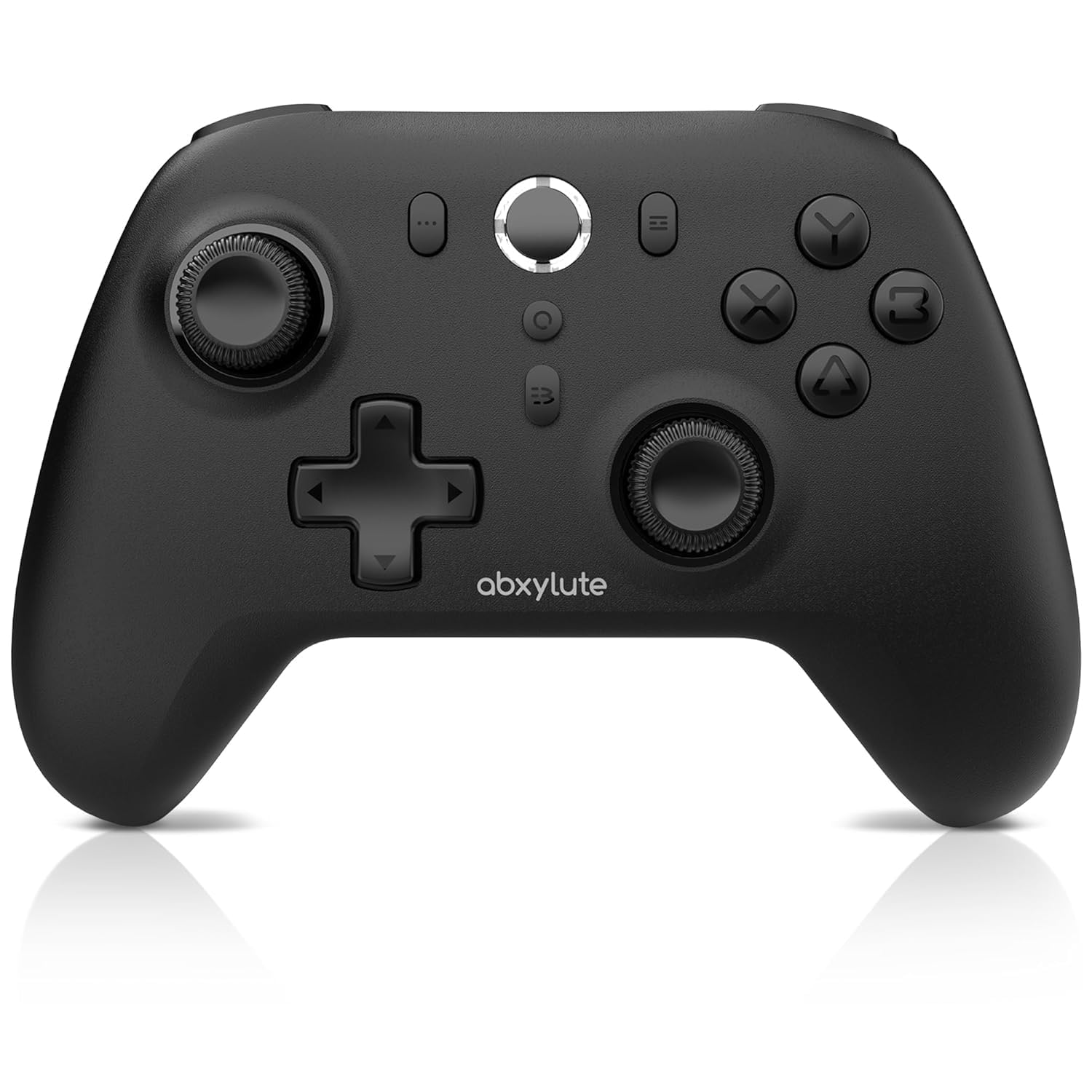
abxylute C6 Wireless PC Controller, Bluetooth Game Controller – Hall Triggers & Joysticks for Windows PC, Nintendo Switch Pro/OLED/Lite, Steam Deck, Android TV/Mobile, iPhone & Tesla Vibration Turbo
Original price was: $39.99.$31.99Current price is: $31.99.


Price: $39.99 - $31.99
(as of Jan 13, 2025 02:05:59 UTC – Details)
Product Description


1 Dual Hall Effect
2 Dual Turbo Modes
3 4-Level Vibration
4 Long Battery Life
 PC/MAC OS
1.Dongle Mode: Plug the dongle, press Home button.
2.Xinput Mode: Hold down X button + Home button.
 Android 8.0 /IOS 13
Android 8.0 Above -HID mode: Y button + Home button
IOS 13 Above -Xinput mode: X button+ Home button
 Connect Steam Deck
Dongle mode: Plug dongle into the device. Press and hold the Home button untill indicators all flash
 Nintendo Switch
NS mode: Press and hold the Home button till all indicators flash in sequence.
 Android Phone/TV
HID mode: Hold down the Y button and long press Home button until two indicators light up.
Wide Compatibility for Abxylute Controller
1 Connect to PC/MAC 2 Connect to Phone 3 Connect Steam Deck 4 Connect to Switch 5 Android Device/TV


How to connect to cod or any other games ?
Please select Xinput Mode.(See details in user manual.) Then select “Xbox Wireless Controller” to complete the pairing.
How to connect to Tesla ?
Please select HID Mode/Android Mode.(See details in user manual.) Turn on the Bluetooth search function on the device that needs to be paired and select “Gamepad” from the list of available devices to complete the pairing
How to get it to pair with iOS (IOS 13 and Above)?
Please select Xinput Mode.(See details in user manual.) Then select “Xbox Wireless Controller” to complete the pairing.
How to get to pair with android device , like phone ,tablet or Android TV (Android 8.0 and Above)
Android TV use a wired connection if Bluetooth is not available.
Phone and tablet: Select HID Mode/Android Mode. Turn on the Bluetooth search function on the device that needs to be paired.(More in manual and videos)
What games modes abxylute C6 supports and its corresponding modes ? How to switch it ?
1. Windows PC / Mac OS → Dongle Mode / Xinput Mode ; 2. Nintendo Switch → NS Mode; 3.Android Device → HID Mode; 4. iOS Device → Xinput Mode ; 5.Steamdeck → Dongle Mode;
In user manual abxylute provide pictures and video.
Wide Compatibility — The abxylute wireless gampad controller works seamlessly with PC /Laptop (Windows 7 8 10 11), Android (cellphone, tablet, Smart TV, Samsung Smart TV and TV boxes), for Apple/IOS (iPhone, iPad, Mac, and Apple TV, Apple Arcade MFi Game), Nintendo Switch (Switch, Switch Lite, Switch OLED), Steam Deck, Tesla, Amazon Luna and Cloud Games. This versatile wireless game controller offers reliable performance across multiple devices with USB Bluetooth Dongle for PC.
Dual Hall Effect Joysticks and Triggers — Experience unparalleled precision and durability with our Hall Effect Controller joysticks and triggers. Enjoy no drifting, no dead zones, and precise control with joysticks that offer an extended lifespan. The triggers provide glitch-free, responsive performance, reducing wear and tear, making this gaming controller ideal for competitive gaming
Ultra-Sensitive Response — The Rechargeable Wireless Gaming Controller achieves 200 Hz in wired mode and 125 Hz in Bluetooth/dongle modes, ensuring precise and prompt responses for seamless gaming, minimizing input lag for a competitive edge
Customizable 4-Level Vibration — From intense rumble at 100% to a gentle buzz at 30%, the abxylute gaming controller allows you to find the perfect level of immersion for every gaming session
Dual Turbo Modes — Turbo and Auto Turbo: Customize the turbo feature to any button, allowing you to unleash rapid-fire attacks with just a single press. Free your fingers and dominate your opponents effortlessly
Enjoy Long-lasting Gameplay — The rechargeable wireless PC controller features a powerful 600mAh rechargeable battery, delivering up to 18 hours of continuous gameplay on a single charge. This ensures that you can enjoy uninterrupted gaming sessions with your controller for PC
Lightweight Design — The abxylute C6 controller weighs only 180 grams, significantly lighter than most controllers over 220 grams. This reduces hand fatigue and enhances comfort during long gaming sessions. Enjoy a light and comfortable gaming experience anytime, anywhere with this portable PC controller
Ergonomic Design PC Game Controller — This hall effect controller fits the hands of most gamers perfectly, providing an extremely comfortable grip. It ensures that you can play games for hours and still remain comfortable with your pc controller
Important Customer Notice — If you experience any issues with your controller for PC, please contact us first before initiating a return. We are here to help resolve any problems and ensure your satisfaction with our wireless controller
Customers say
Customers appreciate the lightweight and comfortable video game controller. They find it provides a premium feel with its classic Xbox style grip. The overall quality is good, with reliable vibration effects that are not too strong. Many customers consider it an excellent budget controller. The build quality feels solid and well-constructed, providing a reliable and immersive experience for casual games and intense moments. Customers also appreciate the compatibility, connectivity, and texture of the controller.
AI-generated from the text of customer reviews
4 reviews for abxylute C6 Wireless PC Controller, Bluetooth Game Controller – Hall Triggers & Joysticks for Windows PC, Nintendo Switch Pro/OLED/Lite, Steam Deck, Android TV/Mobile, iPhone & Tesla Vibration Turbo
Add a review
Related Products


Original price was: $39.99.$31.99Current price is: $31.99.
Andrew Neal –
It works on all my devices
I have been on the search for a controller that works across all my devices, and the Abxylute C6 has delivered in every way. Whether Iâm gaming on my PC, using my Vizio TV for streaming games, or even connecting to my phone for a quick session, this controller has become my go-to.What I Love About It:- Ridiculously Fast Connections:One of the standout features of the C6 is how quickly it connects via Bluetooth. I didnât have to mess with any complicated pairing processesâit connected to my PC and Vizio TV almost instantly. Switching between devices is seamless, and thereâs no lag to speak of.- Super Comfortable to Use:The ergonomic design feels great in my hands. Itâs lightweight yet sturdy, and I can game for hours without feeling any discomfort. The textured grips make a noticeable difference when youâre deep into a long gaming session.- Navigation:While itâs amazing for gaming, itâs also super handy for navigating apps on my Vizio TV. I can easily browse, select, and control everything without needing the TV remote.- Customizable Vibration Feedback:The vibration settings are a nice touch. I love being able to fine-tune the intensity depending on the game. Itâs subtle for casual games and strong enough to add immersion during intense moments in action titles.Final Thoughts:The Abxylute C6 has quickly become part of my gaming setup. The ease of connecting to my devices, from PC to TV, without any fuss is worth it alone. Add in the precision joysticks, customizable features, and overall comfort, and itâs clear this controller is a winner.If youâre looking for a controller that works perfectly with everything and makes gaming (or even just TV navigation) a breeze, this is the one. Highly recommended!
Kim Ngo –
Cheap, lightweight, and more versatile than OEM’s offerings
TL;DR – Abxylute C6 for $32 is a no brainer purchase if you’re looking for a flexible controller to use on multiple systems.These are the main features of the controllers and my thoughts:Hall Effect Joysticks & Triggers – Buttons click audibly when pressed – Subtle texturing on the plastic front buttons as well as grip areas going into the palmVibration – Good enough and not overwhelmingly strongTurbo & Auto Turbo – Nice to have feature, especially for 2D scroller games200Hz polling rate – Didn’t try this out since I was happy with the wireless 125 Hz wireless mode10m wireless range – Don’t have a TV at home. But even if I did, 33 ft away from the viewing screen is pretty fricken far. 10 ft is all I need.600mAh battery – Didn’t do endurance testing. Playing sessions were about 2h each and it’s easy enough to stick in the USB cord and charge after a few playing sessions.Connectivity Testing:Bluetooth I tested with the following and they worked perfectly: – Android Phone – Android Tablets – Steam Deck LCD & OLED versionsUSB dongle connected pretty easily using Windows’ Bluetooth connections – LaptopThoughts on Weight:Very lightweight — the lightest controller I’ve used but doesn’t feel cheap. Comes in at 186g on my kitchen scale. This lightness is useful for longer gaming sessions. Who needs to hold a heavy controller causing fatigue while gaming for long durations? Also tried twisting the controller but could not induce any bit of plastic flexing so I imagine it’s a pretty durable controller (didn’t try any drop tests and neither should you).Comes with – Controller with foam pads protecting analog sticks – USB Dongle – USB-C cord for charging and higher polling rate (vs wireless) – User manual (VERY Important since has instructions on pairing with various devices/modes.) Recommend taking pics of the manual or setting it aside somewhere – Android Bluetooth pairing: Y + HOME for a few seconds until rapid blinking (pairing mode) and when paired, will see bottom left & bottom right lights stay on – USB dongle: Hold home buttons for a few seconds. Top right and bottom left lights will stay on. – Nintendo Switch: I didn’t have one on hand, but pairing it is similar to with USB dongle. Just hold home button for a few seconds and when it’s in pairing mode, finish connections on the switch (Open controllers option, selecting change scripts/order). – Confirmed by other users that this controller will not work with the XBox regardless of wired or wireless connections to the XBox
Harbans S. –
Best controller for the price.
This controller is very well designed and made. Comfortable. Textured grip, triggers, bumpers, and buttons. Lightweight. Great for FPS shooters.
RetroSpecd –
This controller offers a lotâ¦most good
Pros: At this price point itâs amazing that it comes with a lot of first party features and works across the board on all the devices I tried it on. Iâve used it with my Switch, a handful of handheld consoles both Android and Linux, my Xbox, computer and even my Steam Deck. I have been looking for a good lightweight quality controller I can use at home as well as when I travel that i donât need to worry if something were to happen to it.The hall sticks work well though all hall sticks arenât created equally these are better than some Iâve used. There is a solid rumble feature though initially it can be jarring with how lightweight the controller is but it works well. I was surprised to find gyro working on switch which is something I donât normally use but my kids do so they have been taking advantage of it. Also with kids itâs durable enough for the whole family to use which is fantastic.Cons: There are only a couple first being how light it is. I love that I donât notice it in my backpack when Iâm on the road but after using heavy controllers for my whole life it gives it an unfortunate cheap feel. I donât think itâs cheaply made thatâs just how it feels likely from higher quality lighter materials than Iâm used to. The other thing is hand position. I donât have the biggest hands but the grips are narrower than anything Iâve used before. After some use I donât notice it until I go back to it after using another controller which takes a bit to not notice it again.Recommend: I would recommend this to anyone looking for an affordable light weight controller. Iâll likely never use the turbo or gyro features myself but they are there for my kids if they want to use them. This is a quality controller. At this price point there is a sea of junk controllers (I tried a few before finding this one). If you arenât looking to spend $100+ you canât go wrong with the abxyLUTE C6. Now I have to order another one because my kids have taken over mine.