

2054K-WF Mini WiFi Wireless Shipping Label Printer for iPhone Windows Mac Chromebook Android Support Amazon Ebay Paypal Shopify Shipstation UPS USPS FedEx Fanfold Direct Label
$249.00




Price: $129.99 - $249.00
(as of Jan 14, 2025 23:22:18 UTC – Details)
From the brand

Print, Peel, Package, Ship!

Shipping Label Printers!
Arkscan offers various thermal printers to meet the needs of your warehouse, office, or home! USB, WiFi, and Bluetooth compatible model

Arkscan provides high-quality and affordable products for your retail and office needs. You can find shipping thermal printer, product label printer, shipping labels, and barcode computing solutions at Arkscan. We also ensure you have lasting support and consultation for our products. Arkscan is your choice for excellence and value.
See Our Labels and Accessories
Print shipping labels for Amz Seller Merchant Fulfillment, FBA, FNSKU, EasyPost, EasyShip, eBay, Endicia Dazzle, Etsy, Fedex Ship Manager, Fedex website, Inventory Lab, PayPal, Poshmark, ShippingEasy, Shippo, ShipStation, ShipWire, ShipWorks, ShopGator, Shopify, Stamps Desktop, Stamps website, StockX, UPS WorldShip Desktop, UPS website, USPS website, XPSship, Endicia Dazzle, Pirateship and more.
A multi-functional printer to print shipping label, product label, barcode label, labels for other purpose. Able to print minimum of 0.75″ & maximum of 4.25″ in width, minimum of 0.4″ & maximum of 90″ in length. Support roll paper loaded inside the printer & fanfold paper loaded from back of the printer. Printing speed is 5 inches per second.
Come a free software of BarTender UltraLite Label Design Software Tool (Windows Only) to print product labels, warehouse label that contains the most frequently used label-design print features, including full design capabilities for text, graphics barcodes, most serializing capabilities.
Arkscan offers 5-star U.S. based real time tech support via Phone, Live Chat and Remote Access with extended office hours from east to west coast. Arkscan understands the USA customers’ needs, speak your language, and assist you with technical issue of your printing software in a timely manner. If running into any difficulty to setup or operate the printer, Arkscan’s tech support team will be easy to reach and back you up to continue your business as usual.
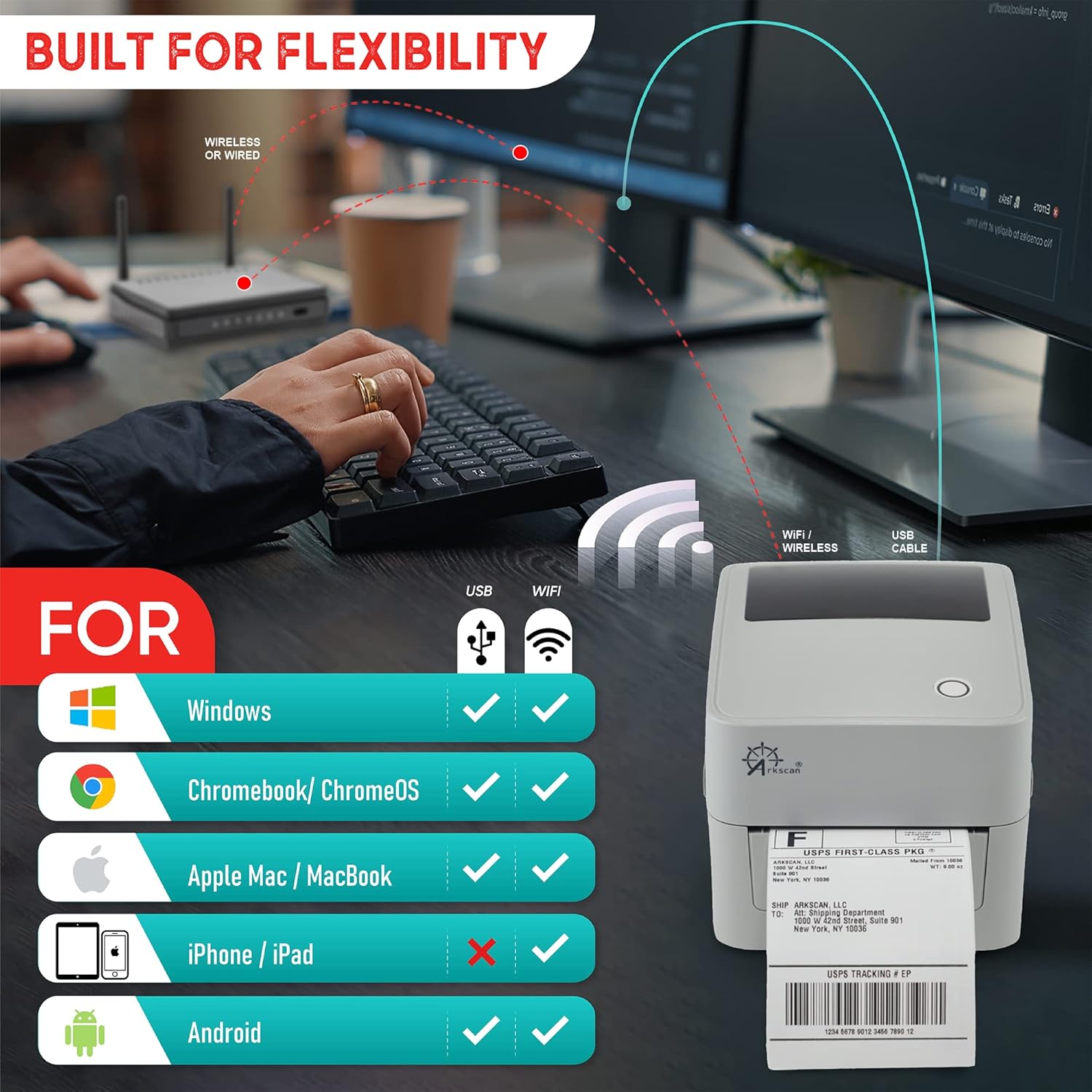
High speed shipping label printer for Windows, Apple Mac Computer / MacOS, Chromebook / ChromeOS & Android via USB connection, also supports Android and iOS/iPhone/iPad WiFi wireless network connection printing. Direct thermal technology will never require to refill ink toner. It supports Arkscan’s labels, Zebra compatible and Arkscan compatible labels. All shipping labels from UP and Fedex are supported. Most common shipping labels in size 4×6 inches, 4×8.25 inches and 4×6.75 inches are supported.
Customers say
Customers are satisfied with the printer’s performance, print quality, and wireless connectivity. They find it works well, prints clear labels, and has fast speed. While some customers appreciate the wireless connectivity and tech support, others have mixed opinions on setup and value for money.
AI-generated from the text of customer reviews
8 reviews for 2054K-WF Mini WiFi Wireless Shipping Label Printer for iPhone Windows Mac Chromebook Android Support Amazon Ebay Paypal Shopify Shipstation UPS USPS FedEx Fanfold Direct Label
Add a review
Related Products



$249.00
Mikey Likes –
Perfect Replacement for your Dymo labelwriter 450
Needed to replace a worn-out Labelwriter 450. It has not been an easy search. Dymo ruined the new labelwriter 550 by forcing you to only use their over-priced labels. Looked at the Brother QL printer but it’s labels are encased in plastic cages to limit third party competition, keep label prices high and selection low. In the end a Zebra-compatible printer seemed to be the best choice. Industry standard printer that works with nearly any thermal label regardless of source.Arkscan to the rescue! This is a superior printer, with more features and capabilities then Dymo labelwriters or Brother QL printers. Now I can print 4″ wide labels with ease along with the smaller sizes I did with the 450. Print quality is much better and the wifi connection is very useful. On top of all this I can use any Zebra-compatible label from any source.The Arkscan also includes a free version of Bartender lite label design software. Design software is usually not included with Zebra printers and this sets Arkscan apart from others.The Dymo and Brother printers look like a better deal then this Arkscan but when you include the cost of labels to the mix they are far more expensive. The cost-savings and added capabilities of the Arkscan makes it a superior label printing solution.
DTA116 –
Fine Printer, Works better than expected.
I don’t know why people have trouble setting up this printer. The instructions are clear and concise. The Videos answer all questions and provide clear guidance. Looks like this printer will work for the long haul and seems to be bullet proof.
glasgk –
Great Product – Even Better Support
In a world in which getting assistance is nearly impossible, I was blown away by Arkscan’s product AND support. The company has done an excellent job of providing set-up videos, but I still was having trouble setting up the WiFi feature (an error on my end). I call support but it was before their service hours. I set the printer aside, but then an hour later, I received a call from someone at Arkscan asking if I needed assistance. Note, I did not leave a message; rather, they returned my call based on their logs showing my initial call to them. The service person patiently walked me through the process and stayed on the line until we had it working 100%. They may not be the least expensive option, but the service was well-worth it. Note: My mistake was that I used the default IP address that is set in the printer, and I did not update it to the correct IP address on my WiFi network.
Aaron D. –
Remember to set your preferences to match you labels…
Enjoying every aspect of the printer. Quick, efficient and easy to use. Had to set the size of the labels in preferences and it worked perfectly.
Zachary L. –
Great printer and Fantastic Customer Support!
I have bought 2 of these printers now. 1 for printing shipping labels on UPS.com and 1 for printing asset tag labels. That way I don’t have to constantly swap out the label rolls. The wireless function is really helpful. I have so much going on and it helps keep thing organized. When you get the printer, go to the Arkscan website and there are step-by-step guides on how to setup and configure the devices to print what you need. I am technically savy, but their guides are extremely well made and should be easy to follow.I did recently run into an issue with the printer and UPS.com. UPS randomly stopped finding the printer when I used the ‘print to thermal printer’ option. I troubleshooted a lot and finally waved the white flag and used the live chat option on the Arkscan website. Mark ended up helping me on this issue. They were very prompt in the chat and when we exhausted the initial steps, I was able to let Mark remote in and take a deeper dive. My issue ended up being due to a Java error. Mark figured it out and after getting everything straightened out, I was back up and running. It was refreshing to have a tech support CHAT go as smooth and great as that did. 10/10 would recommend these printers. Great product and great support!
Dani –
Save your money. Donât buy
Super poor set up quality. Especially for an expensive product. So many other thermal printers work better & are 1000x easier to connect. Spent hours setting it up, it got me no where. Talked to a customer service rep for an hour and was sadly no help. Save your troubles. Returning.
Corban C. –
Solid Thermal Label Printer with fast and fantastic support if needed
Wifi setup was daunting for me but chat support was quickly reachable and remoted onto my PC to help fast. It works and is amazing. Once setup on the network, connecting other PC’s or MAC’s to it was easy. Great price too.
Eileen Howard –
Looks good, great technical support
Although I had some issues with the setup, their tech support was super responsive, and they installed it all remotely for me. I tried another printer that was garbage. This one is more expensive but is now connected to our network and working great.