

55 Inch Smart Board 4K UHD Interactive Whiteboard, Open App Ecosystem, Touchscreen Digital Whiteboard for Classroom Office Home
$1,289.00


Price: $1,289.00
(as of Jan 08, 2025 10:32:18 UTC – Details)
Product Description
Smart Board for Classroom and Office
Collaborate with 20-point Writing
Enjoy 4K Touch with No Lag
Up to 20 users can write at once
Vibrant anti-glare IPS 4K touchscreen
Ensure seamless teamwork and interaction

Flexible Apps for Every Need
Connect with Remote Conferencing
Access a wide range of apps
Enjoy high-quality video calls
Making collaboration easy from anywhere
The video showcases the product in use.The video guides you through product setup.The video compares multiple products.The video shows the product being unpacked.
Screencast, Annotate, and Save
Work Smarter with Split-Screen
Easily mirror devices
Annotate presentations
Use split-screen features
While saving your work in the cloud for easy access.
The video showcases the product in use.The video guides you through product setup.The video compares multiple products.The video shows the product being unpacked.
Easy to Use for All
Engage with Interactive Tools
The intuitive interface allows users of all ages to navigate easily.
Utilize interactive tools like:
Virtual Ruler: For precise measurements Geometric Shapes: To visualize concepts
Enhance understanding and collaboration effortlessly.

Connect Seamlessly Anywhere
Collaborate with Cloud Access
Supports connectivity with tablets, smartphones, and laptops.
Access cloud services for easy file sharing and collaboration.
The video showcases the product in use.The video guides you through product setup.The video compares multiple products.The video shows the product being unpacked.
Built to Last and Perform
Reliable and Low Maintenance
Crafted with a durable aluminum alloy frame and an alloy back cover for longevity.
Features a 5mm thick anti-glare glass touchscreen, ensuring clear visibility in various lighting.
Efficient performance reduces downtime, making it ideal for busy environments.
The video showcases the product in use.The video guides you through product setup.The video compares multiple products.The video shows the product being unpacked.
Smart Board for Home, Training, and More
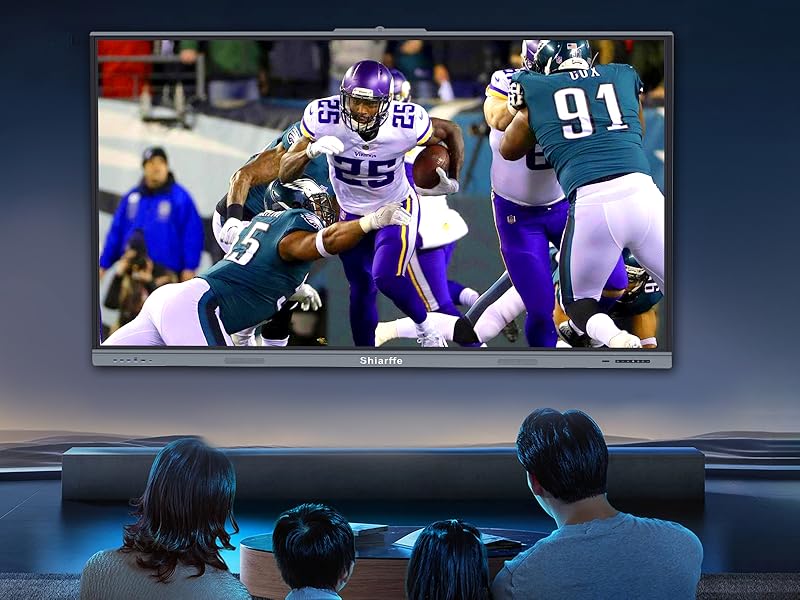
Home Entertainment
Transform Your Living Space
Enjoy movies, games, and presentations in stunning 4K quality.
Interactive features make family entertainment more engaging.
Camera Not Included in 55 inch smart board
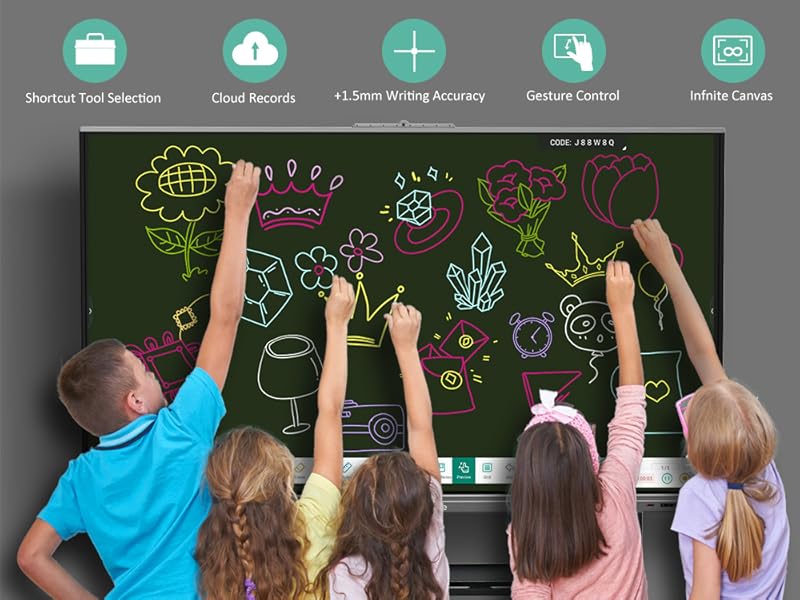
Educational Support
Enhance Learning Experiences
Ideal for classrooms and home schooling, promoting interactive lessons.
Supports tools like virtual rulers and geometric shapes for visual learning.
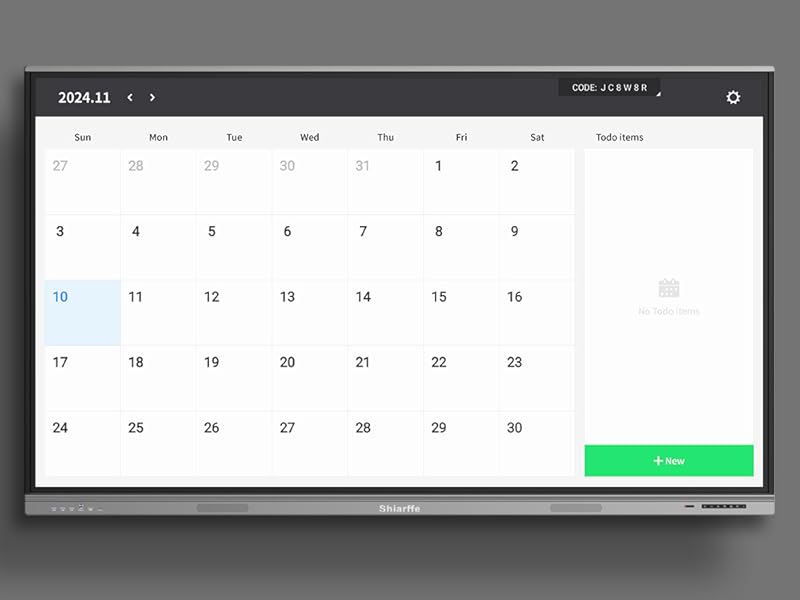
Schedule Management
Stay Organized and Efficient
Smart board features an electronic calendar for easy scheduling and reminders
Download additional scheduling apps from the Google Store to customize your management needs.
Visualize tasks and appointments, making it simple to keep track of your day.

Comprehensive Training Support
Enhance Your Skills Across Disciplines
Use the smart board to analyze techniques in sports, yoga, and Tennis.
Visual aids help illustrate movements and strategies for effective training.
Record sessions for real-time feedback and improvement.

Consulting & Business Meetings
Streamline Your Presentations
Conduct interactive meetings with real-time feedback.
Visualize data and strategies effectively for client presentations.
Camera Not Included

Architecture & Design
Visualize Your Projects
Showcase designs and blueprints with precision and clarity.
Use the board to collaborate on ideas with clients and teams.
Detailed Guide for Multi-functional Whiteboard Use 1
A Complete Solution for Ideas and Collaboration
Whiteboard, File Storage, Screen Sharing & Browser
Designed to support seamless collaboration, this Smart Board combines a high-quality digital whiteboard with essential tools. Access Finder for storing files, Screen Share to project content, and a built-in Browser for real-time information gathering. With easy navigation, it’s your all-in-one hub for productive teamwork, brainstorming, and presentations.

Select, Edit, and Personalize with Ease
Intuitive Selection and Customization Options
The Select tool allows us to manage images, text, and shapes with precision. Choose, move, crop, flip, or delete elements, and adjust text fonts and colors. Integrated search functionality lets our find information fast, while flip and clone features make editing simple. Whether organizing visuals or formatting text, the customization tools put us in control.
The video showcases the product in use.The video guides you through product setup.The video compares multiple products.The video shows the product being unpacked.
Create and Refine with Drawing and Erasing Tools
Pen, Eraser, and Clear Options
The Pen tool offers diverse styles like pencils and magic pens, with adjustable colors and line thickness. Use the Eraser tool to clear unwanted marks precisely, or simply swipe with your hand for quick removal. Clear all content in one tap for a fresh start. This flexibility makes it easy to visualize and iterate on your ideas in real time.

Accurate Shapes, Rulers, and Grids for Creations
Enhance with Lines, Angles, and Diagrams
Insert precise shapes or use the virtual ruler and protractor for accuracy. Draw lines, angles, and structures with ease, ensuring a polished look for every project. The Grid tool adds structured alignment, ideal for diagrams and charts, while undo and redo functions keep your design process smooth and efficient.
Manage Tables, Charts, and Mind Maps
Efficient Data Structuring and Visual Brainstorming
Add tables to organize information, edit rows and columns, and customize text. Insert mind maps to structure brainstorming sessions visually, expanding and reducing sections as needed. Sticky Notes are perfect for jotting down reminders or key points, keeping essential ideas visible and organized for enhanced productivity.

Seamless Sharing and Powerful Menu Options
Share, Save, and Customize Your Workspace
Share content across devices with a simple QR code by browser for easy collaboration. The menu offers options for saving to Finder or cloud storage, importing files from USB flash drive, and customizing toolbars for your preferred setup. Adjust settings, choose templates, and even enable multi-finger writing. It’s a robust toolkit for managing your workspace effectively and staying organized.

Detailed Guide for Multi-functional Whiteboard Use 2
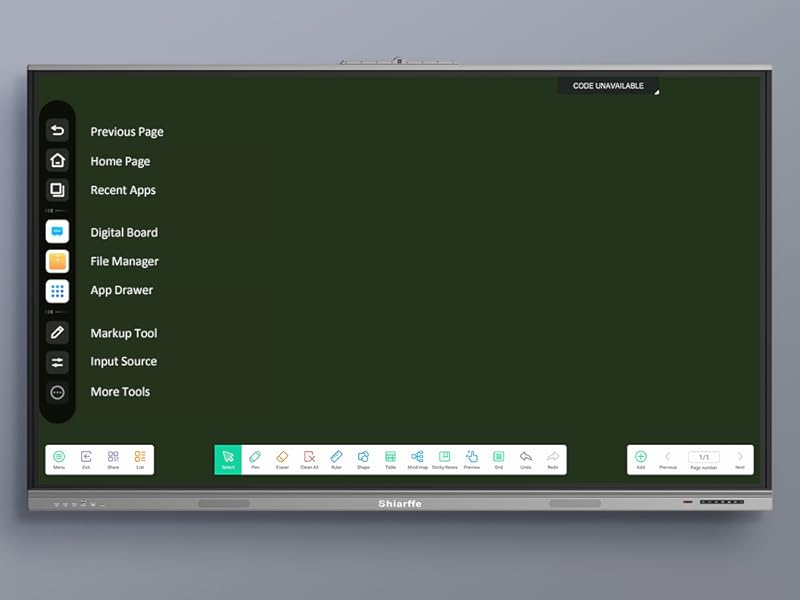
Easy Access Toolbar
Effortless Navigation Right from the Edge
Access all your essential tools with a simple tap on the left or right edge of the Smart Board. Whether it’s going back, returning home, or browsing previous screens, everything is within reach for quick, intuitive use.

Smart Functionality at Your Fingertips
Your Most-Used Apps in One Place
Quickly switch between applications like the Whiteboard, Browser, Finder, or App Library. All downloaded apps from Google Play are organized here for your convenience—perfect for work, school, or any on-demand usage.

Simplify with Finder & File Access
All Your Files & Content in One Space
With Finder, you can instantly access saved files, images, and videos. And if you need cloud files, our Cloud Drive tool links to Google Drive or OneDrive, making it easy to bring your content to life on the big screen.

Power-Up with Custom Settings
Optimize Your Experience with Customized Controls
Configure sound, microphone settings, and security preferences directly from the toolbar. Set up Screen Lock, customize input names, or adjust power-saving features to fit your needs. Personalize your experience and protect your data with a few simple taps.

Boost Efficiency with Multitasking
Maximize Productivity with Split Screen
Work on two tasks at once with the split-screen feature. View your Calendar while taking notes on the Whiteboard, or use the Browser and Camera side-by-side. It’s multitasking, made easy—ideal for staying organized and efficient.

Interactive Tools for Learning & Collaboration
Enhance Engagement with Real-Time Tools
Engage participants with interactive tools like the Timer, Pollkit, Freeze options etc. Easily record lessons, share screens, or annotate presentations in real-time. Designed for classrooms and meetings, these tools simplify interaction and boost focus.
Aluminum Frame, Camera, IPS 4K Touchscreen, Mics, Speaker, External Interfaces
The video showcases the product in use.The video guides you through product setup.The video compares multiple products.The video shows the product being unpacked.
The smart board support camera (not included) for HD video calls,
2×16 watt speakers for quality sound,and an IPS 4K touchscreen for vibrant colors,
Aluminum Frame ensure durability and a modern look. An 8-array microphone
ensures clear audio, while multiple external interfaces enable easy connectivity



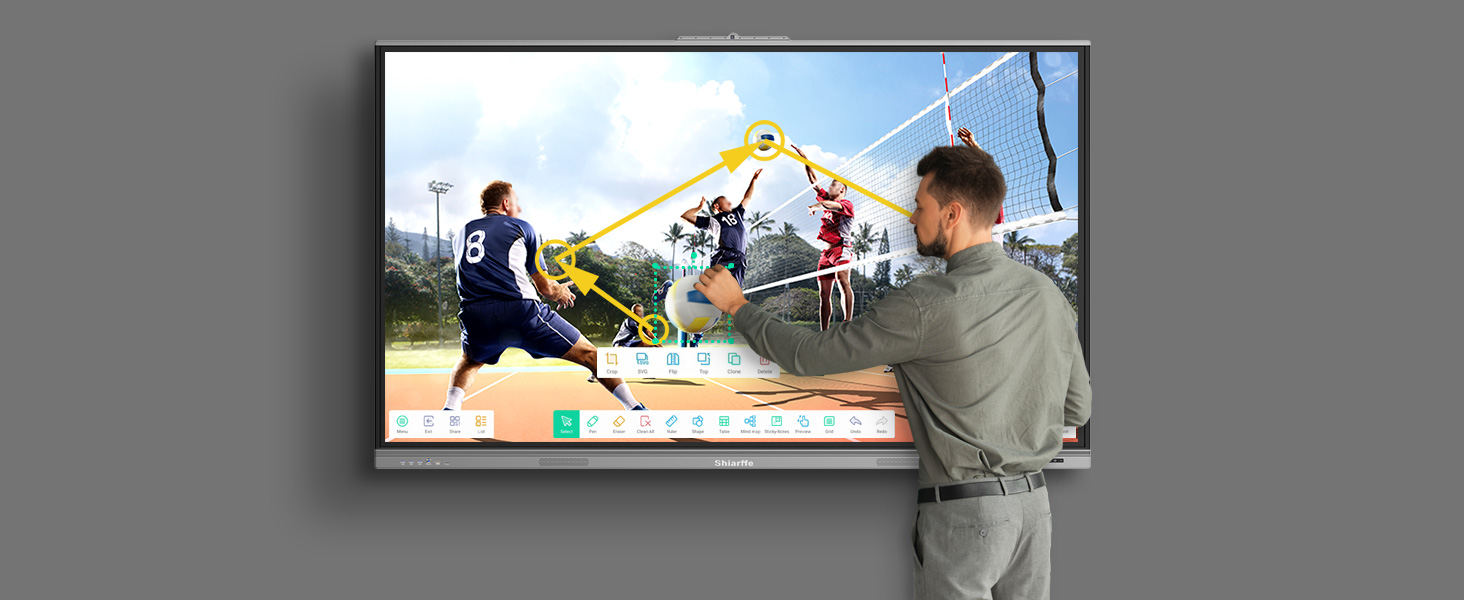
Shiarffe Smart Board Use Cases
1 Classroom 2 Office Meeting 3 Industrial Design 4 Commercial Design 5 Gym Training
Seamless Device Compatibility: Easily connect with Mac, Windows, iOS, and Android 11.0 on our smart board. Supports screen mirroring and annotation on any page for collaborative meetings and classrooms, ensuring smooth, interactive sessions
Secure Document Sharing: Share files wirelessly via QR code for quick access on any device. Screen lock and USB password protection keep our data secure, meeting key privacy needs for schools and businesses, and outstanding for secure collaboration
Robust Open App Ecosystem: Customize our smartboard interactive whiteboard with educational and productivity apps. Our open app ecosystem lets us download tools to enhance lessons or meetings, tailored to our specific needs in any time
Support Remote Conferencing: This 55-inch Smart Board with a 4K display delivers sharp visuals for remote conferencing. Connect easily with video conferencing apps for seamless collaboration, even without a built-in camera
High Performance & Storage: Powered by a Cortex-A55 quad-core CPU, 4GB RAM, and 32GB ROM, ensuring fast response for multitasking and large files. this smartboard is excellent for seamless operation in any school or business setting
Presentation and Annotation: Easily import and annotate PDF files for presentations and collaboration. The intuitive interface ensures smooth navigation, while setup is quick and simple. Switch between apps effortlessly for seamless multitasking
Compatible with Multiple Devices: Compatible with a wide range of devices including laptops (Windows, macOS), Chromebooks, desktops, and monitors. Supports multiple connection options such as HDMI, USB-C, and wireless screen sharing for seamless integration with your devices
8 reviews for 55 Inch Smart Board 4K UHD Interactive Whiteboard, Open App Ecosystem, Touchscreen Digital Whiteboard for Classroom Office Home
Add a review
Related Products



$1,289.00
Wade WELLS –
Smooth Operation, Easy to Get Started!
This is my first time using a smart board, and it has been an amazing experience! The interface is very intuitive, and the operation is incredibly smooth with no lag. Iâve never used anything like this before, but after just a few minutes, I was able to grasp the basic functions easily. Itâs very user-friendly. It works great for both home and office environments. Highly recommended!
Melanie Shumaker –
A Must-Have for Teachers â Keeps Students Engaged!
I canât believe how much of a difference this Smart Board has made in my classroom. My students love interacting with it during lessons, whether it’s for math, reading, or even art. The screen is bright and clear, and the touch functionality is intuitive. It has made learning more dynamic and helped me engage with my students in new and exciting ways. Iâm really happy with my purchase!
Elizabeth J. Kercher –
Super Easy to Use for Beginners!
As a first-time user of a smart board, I was initially a bit intimidated, but the interface is so intuitive and easy to navigate. Within just a few minutes, I was able to start using all the features without any problems. The setup was straightforward, and everything is clearly labeled, making it very beginner-friendly. Whether youâre using it for meetings, presentations, or just note-taking, itâs incredibly simple to get the hang of. Iâm really impressed!
Bridget Christy –
Streamlined Presentations
Presentation capabilities on this smart board are top-notch. I can seamlessly switch between slides, annotate on the fly, and save my notes for later. It’s streamlined my workflow and made presenting much easier
Jody –
Perfect Solution for Hybrid Work – Highly Recommend!
Iâve been using this Smart Board for a few weeks now, and it has completely transformed my hybrid remote work setup! The 4K touchscreen is incredibly responsive and the resolution is crystal clear, making video calls, presentations, and screen sharing a breeze. The ability to annotate during meetings is a game-changerâwhether Iâm brainstorming ideas or reviewing documents, it feels so intuitive.
The multi-user collaboration feature is also fantastic. My colleagues can easily share their screens, and we can all write on the board simultaneously, which enhances teamwork and productivity during virtual meetings. Plus, the integration with Google apps has been seamless, allowing me to manage my calendar, take notes, and even organize projects directly on the board.
I was also impressed by the build quality. The frame feels solid and durable, and the anti-glare tempered glass makes it easy to use even in bright rooms. The setup was surprisingly easy, and the screen mirroring functionality with my laptop and mobile devices is spot on.
Overall, this Smart Board has made my work-from-home experience so much more efficient and enjoyable. Itâs versatile, functional, and really enhances communication during remote meetings. I would highly recommend it to anyone who works remotely or in a hybrid environment. Itâs definitely worth the investment!
Ward Donne –
No More Reflections
The anti-glare feature is a lifesaver in our brightly lit office. We no longer have to deal with annoying reflections, which makes the screen much easier to read during the day. It maintains its clarity regardless of the lighting conditions
Steven –
Intuitive and Easy to Get Started With!
I was a bit nervous about using a smart board for the first time, but the interface is so intuitive and easy to use. There was almost no learning curve at all. The touch controls are smooth, and everything is clearly labeled, so I knew exactly where to go to access the features I needed. Whether itâs drawing, annotating, or managing documents, I felt comfortable using the board right away. Iâm really impressed by how accessible it is for new users.
Kindle Customer –
Perfect for New Users â Simple and Straightforward!
Iâve never used a smart board before, but this one was a breeze to get started with! The interface is extremely user-friendly, and I was able to start writing and annotating without any confusion. The menus are clear and easy to follow, and I didnât need any technical knowledge to use it. Itâs very intuitive, and I love how quickly I was able to begin using it to enhance my work. Highly recommend for first-time users!