
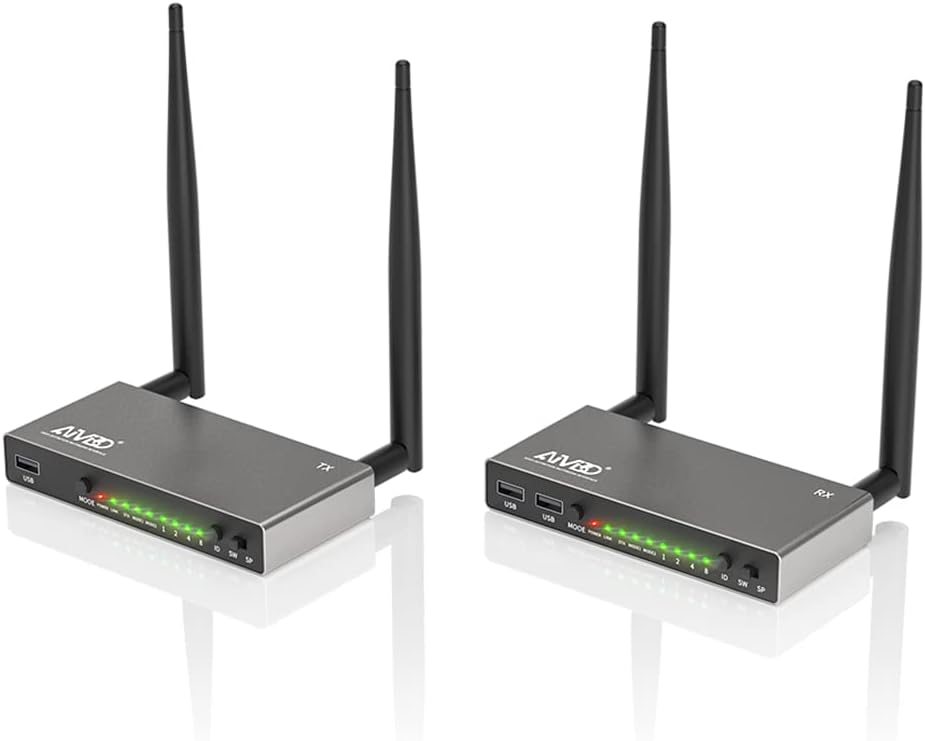
AIMIBO HDMI Wireless Transmitter & Receiver 1080P, Multiple TXs & RXs, 5.8G HDMI Extender with KVM, IR Remote, Loop-Out, 656FT, Stream Video Audio for Laptop, Fire TV Stick, Satellite to TV, Projector
$169.99


Price: $169.99
(as of Jan 14, 2025 11:52:06 UTC – Details)
Product Description


 Note:
Note:
1. Each TX and RX are paired before manufacture, no need to re-pair before use.
2. Add a extra RX to the HDMI kit, you need to pair it with the TX. Connect both of them with a HDMI cable, 5 seconds later, they will be paired.
If cross solid wall, the transmission distance will be shortened. Support all video type, even HDCP apps
Streaming Everything to a Bigger Display
Functions:
Plug & Play, no Bluetooth, apps, Wi-Fi, drivers required656FT/200M Long Range TransmissionHDMI Loop Output for TX Dual ScreensKVM with Keyboard & Mouse to Remote Operate PCIR Remote Control Function1 TX can be paired up to 8 RXs8 TXs can be paired with 1 RX1080P@60HZ Nature Resolution5.8G Ensures Smooth & Stable TransmissionMirror & Extend Mode
1 TX can be paired with 8 RXs, supports multiple screens simultaneously. 8 TXs can be paired with 1 RX, press the TX’s channel ID to change screen content. With the audio port on receiver, allow you to connect with external speakers

Support 1 to Multiple TXs/ 1 to Multiple RXs
AIMIBO new vesion HDMI wireless kit not only supports 1 to 1 mode, it also suppots splitter mode for multiple TVs, and also support switch mode for multiple laptops.

1080P & Support HDCP Apps
This wireless HDMI video transmitter and receiver kit supports nature and high-definition videos up 1080p @60Hz. Compatible with all the video apps you know.

KVM Function with Keyboard & Mouse
This wireless HDMI extender with the newly improved KVM function allows you to connect a keyboard and mouse to the devices on the RX end and remotely control the devices on the TX end from the RX end, even in different rooms or floors.

Plug & Play AIMIBO HDMI Extender Kit
Switch TX & RX to SP mode (SW mode for multiple TXs)Plug HDMI cable for TX (HDMI In Port) and HDMI output device (like laptop), and power it.Plug HDMI cable for RX (HDMI Out Port) and HDMI input device (like TV), and power it. Wait 3-5 seconds for auto sync
IR Remote FunctionConnect IR cables to a 3.5mm port, IR IN cable for RX, IR Out cable for TX. Allow you to control HDMI signal from upstairs or downstairs up to 656 feet. Note: When using the remote control, the infrared receiver should be pointed directly at the receiver and not blocked by objects.

How to Use KVM Function?Plug a USB to TX and laptop (or other HDMI output devices), connect keyboard/mouse on RX’s USB ports, then the RX side can remote control the TX’s laptopHow to Add More Receivers?
Switch TX & RX to SP mode and power them.Connect the HDMI cable’s one end to HDMI OUT of RX, the other end to HDMI IN of TX to pair them. When the STA light of TX and RX is solid light on, the pairing is complete.Then remove the HDMI Cable between them, restore the previous connection..
Note: After pairing, they will be auto paired next time. To delete the pairing, please press and hold the RX’s REST button for 5 seconds, then switch off and restart it.

HDMI Loop-out Function to Add One More Monitor

【Splitter/Switch Modes Design, Fits for Multiple Purpose】The AIMIBO Wireless HDMI extender offers versatile functionality with its new design. It supports both one-to-one mode and 1 TX to 8 RXs (Max) in SP mode, allowing you to display multiple screens and connect multiple TVs simultaneously. In SW mode, it supports 1 RX to 8 TXs (max), perfect for large meeting rooms where multiple laptops need to be connected
【Impressive 200m (656FT) Long Range Transmission】With the AIMIBO wireless HDMI extender, you can wirelessly transmit video and audio signals up to 656 feet (200m) in line-of-sight environments. It can even go through walls and floors, providing flexibility in setup. This extender is compatible with all HDMI-equipped devices, including TVs, monitors, projectors, blu-ray players, set-top boxes, cable/satellite boxes, laptops, PCs, DVDs, cameras, PS4, and more
【Convenient KVM Function & IR Remote Control】The wireless HDMI receiver comes with KVM functionality. Simply plug a keyboard and mouse into the 2 USB ports to control your source device remotely. The IR remote control feature lets you change channels, pause your movie, control your Blu-ray player, or adjust your set-top box settings without leaving your seat—even if the devices are located in another room. Enjoy uninterrupted access to your favorite apps like Neflix, Hulu, and YouTube, all from the comfort of your seat
【Full HD 1080p & 5.8G Stable Transmission】Equipped with a 5.8G chip and 4 strong antennas, AIMIBO wireless HDMI transmitter and receiver ensure stable signal transmission, free from interference by other wireless devices like WiFi or Bluetooth. With only 0.1s latency, it supports resolutions of 480P, 576P, 720P, and 1080P@60Hz. Enjoy crystal-clear, uncompressed HD video and digital audio effortlessly
【Local Loop-out & Premium Material】The transmitter of the wireless HDMI extender features HDMI input and output ports. It supports an HDMI local loop-out, making it easier to monitor the video source. This wireless HDMI extender is made of durable and sleek aluminum alloy material, providing a sturdy build. Its premium appearance makes it a perfect gift for your family members and friends
Customers say
Customers find the AV receiver easy to set up and connect. They say it works well, has a good signal range, and is well-built. The audio quality is good, and volume control is available at the monitor. Customers are also satisfied with the picture quality.
AI-generated from the text of customer reviews
9 reviews for AIMIBO HDMI Wireless Transmitter & Receiver 1080P, Multiple TXs & RXs, 5.8G HDMI Extender with KVM, IR Remote, Loop-Out, 656FT, Stream Video Audio for Laptop, Fire TV Stick, Satellite to TV, Projector
Add a review
Related Products


$169.99
David – MakeMoreNeckbandHeadphones –
A little elbow grease is required, but this is the only product I know that does it all in one!
Let me start by describing my situation.I have 2 computers – a work computer and a personal computer, that I use. For both devices, I am doing work that makes the fan run at max speed, and is extremely noisy. Because of this, working in the evening is simply not an option, because both computers just end up waking everyone up.With this product, that is no longer a problem. I can interact with both of my computers in the basement while I am on the 2nd floor of the house. As a fair warning though, since the signal is being obstructed, 2 floors is about the limit of what this device is capable of transmitting through with a good signal. Of course, with no obstructions, the distance is much further.The thing I love the most about this product is that it allows me to not only stream the computer screen, but I can plug in my keyboard and mouse and send inputs back down to the computer!Let me explain the set up.This product has a Receiver (RX) and a Transmitter (TX). You plug in the TX to an outlet, then connect the HDMI from the TX to your computer. ALSO, you connect a USB cord from your computer to the TX. Then, you plug in the RX to an outlet, then connect the HDMI from the RX to your monitor. ALSO, you connect your keyboard and mouse to the RX. ALSO, you can connect headphones to the RX and hear the audio from your computer too! ALSO, you can connect an Infrared transmitter and receiver to your TX and RX respectively, and you can use your remote control from your RX side to control the TX side! This is critical for me, because I actually have 3 remotes on the RX side that I use to control multiple devices on the TX side.But once you do all that, you can control the computer attached to the TX from your RX side! And as long as the signal can reach, it does not matter where you are!Also, please note – the Infrared receiver on the RX side is good, but some remotes may need to be aimed carefully. Like I said above, I have 3 remotes. 2 of the remotes can easily send the signal to the infrared receiver from far across the room with one push of the button. But 1 of my remotes, I have to get about 2 feet away from the receiver, or I have to push the button multiple times at different angles and positions. I must do one or the other in order for this remote to work. However, I blame the remote, and not the Infrared receiver. After all, my other 2 remotes work just fine with it.Also, for the infrared transmitter, it is good, but to be safe, it is best to put it right next to whatever it is that you need to send a signal to. That way, you can avoid having to press multiple times on your remote if it is a weak remote like the 3rd remote I mentioned above. Before I put the transmitter next to the device, I had to do a lot of presses. Now, it is only 1 or 2 times.Also, please note – for the keyboard, mouse, and headphones, there are a few caveats.First off, all 3 components seem to take a few minutes before the TX has registered that they are connected. This was weird – basically, you have to plug them in to the RX side, and then wait for the TX to register them. That’s not a problem, because once the TX registers them, then no need to register again. The next time you unplug, and then plug them in, they should work immediately. It’s just an initial set up phase I guess.Also, the keyboard and mouse don’t quite work the same as they do when plugged into the computer directly. For example, I have an external trackpad as my mouse. Normally, I would 2 finger swipe up to scroll down. However, when I plug in the same device to the RX, the same motion would scroll up instead. And for my keyboard, it seems like there are more ghost keys than usual. For example, when plugged in directly, I can press Left Shift and Numpad 0 simultaneously. But when I plug into the RX, it only registers one or the other. This is not a deal breaker for me, but if you want your keyboard to work exactly the same, it might be for you. Also, I swapped out my external trackpad with a normal computer mouse, and things work properly. Perhaps it is something weird with the external trackpad, but I doubt it since the keyboard was also having troubles too.But I want to clarify, I am only listing these things to save you time and effort. These are minor nitpicks at best. The fact is, if you want a device that can stream your computer screen, send keyboard and mouse inputs down to the computer, and repeat your remote IR signals down too, there’s really no other option in November 2023. Please note, this company is called AIMIBO, but they are also known as TIMBOOTECH. So, you may see this exact same product under the TIMBOOTECH name. They are one and the same product, and you can even use them together! I am actually doing that right now!Now, there was one technical difficulty. Like I said above, you can connect the keyboard and mouse to the RX side to control the TX side. However, my RX unit had 2 bad USB ports. 1 was completely unusable, while the other 1 was very inconsistent. It was shaky, and couldn’t hold a connection unless I tied it down with some twine. So, I emailed tech support (support@aimibo.tv), and they responded very quickly! I explained the situation, and after some more info was exchanged, they sent me a replacement, free of charge! The replacement was the TIMBOOTECH one that I mentioned earlier on, so perhaps that is the newer version of this product? They both look exactly the same though. They even both say AIMIBO as their logo. Perhaps TIMBOOTECH is the newest batch.But anyways, like I said, as of November 2023, there is no other product on Amazon that could provide all of this functionality at this price point. Believe me, I searched VERY HARD. I landed on AIMIBO, and I have been very pleased! Customer support was excellent, the product is high quality, and aside from some nitpicks, this has been serving beautifully!One final thing before I go — AIMIBO advertises that you can connect multiple RX’s to one TX, and vice versa, and this is true. After all, if you have a computer in the basement, another computer in the first floor, and you and your monitor are on the second floor, then you do need 2 TX’s and 1 RX.However, if the 2 devices that you need to connect are RIGHT NEXT TO EACH OTHER, then you do NOT need to order 2 TX’s. Get 1 TX and 1 RX, then get an HDMI Splitter/Switch (THAT CAN BE CONTROLLED WITH A INFRARED REMOTE), then use the Infrared transmitter and receiver that I talked about above to be able to switch between the 2! You will also need a USB Splitter/Switch (THAT CAN BE CONTROLLED WITH A INFRARED REMOTE). I am doing this now, and am able to connect both laptops to the 1 TX! I love this because it allows me to be smart and not waste money. I went ahead and bought another TX because I actually have another device that cannot be in the same room. But the point is, because I used the HDMI Splitter, I only needed to buy 1 RX and 2 TX’s, not 3 TX’s! This truly is an excellent product. Also, the headphones automatically connect to the correct device. However, do not use the provided AUX cord if you intend to switch between inputs like I am doing. Otherwise, your audio will be forced to the cord as opposed to the device currently connected to the TX. Simply plug in your headphones into the RX, don’t use the AUX cord on the TX side, and then the audio will switch between computers as you switch between computers via the HDMI Splitter/Switch.I really love this product so much. I am only going to buy products like this from AIMIBO and TIMBOOTECH. I asked all my friends how I could solve a problem like mine, and the best anyone could come up with was to find a really good bluetooth connection for the keyboard and mouse, then use an HDMI Wireless kit to share the screen. But this product is ALL IN ONE. I intend to sing their praises for a long time. I asked multiple experts how to solve this problem, and none had an answer as good as AIMIBO/TIMBOOTECH.
DonSchap –
Simple install, right in the box
This KVM HDMI-video solution was exactly what I was looking for, about 9-months ago, when I wound up with just a HDMI-video extender, not the KVM-portion. This unit came with all the necessary cables, as well. Most excellent. The audio-part is a bit strange, as I have the audio-out plug linked and transmitting to the RX-unit, through the speaker selection, but the local HDMI-sound plays through my local-monitor (at TX), also. That could be a little unnerving to an unsuspecting-passerby. It can be volume-controlled, I suppose, at the monitor.
The Marquis of Melbourne –
Great product.
My security camera NVR is at the front of my house but I wanted to have the monitor at the back of my house. This solved that problem. I could have run a 100′ HDMI cable, if they make such a thing, but I would not have been able to use a mouse to control it from that far away. This system allowed for that…perfectly.
AMG –
Easy set up
I setup this for 2 tx point 1 rx. Unfortunately you have to but 2 sets since they donât offer any packs in this set up, but other than that all you have to do is follow the instructions.
Portland, OR –
Great Customer Support
This product works as intended. I use it to transmit to a TV 50 feet away through 3 walls. After 7 months the transmitter stopped working. I contacted AIMIBO support. They were very prompt to reply. We exchanged some troubleshooting information. It was determined the transmitter was at fault and they sent me a replacement unit. I am very pleased with the customer support I received.
JimFog –
Quality HDMI Transmission Units!
These units are well-built and compact in size. Picture quality is great and it has a good RF Range. Extra features are USB in and out, audio, and IR transmit capability. Setup is straight forward, but be sure to follow the instructions on how to pair the Tx and Rx units before putting them into service.I have purchased two sets, one in Aug 23 and one Dec 24. The Rx unit purchased in Aug 23 failed the end of Nov 24. Customer Service was great and quickly sent a new replacement unit. One thing I would light to see is a longer power cable. I put one of the TX units on top of my entertainment cabinet for better RF transmission, but had to add an extension cord in order for the cable to reach.If you’re looking to transmit a high quality RF HDMI signal, I recommend these units.
Sidekick –
This one worked when a different brand did not and at a greater distance.
I updated my security camera system which left me with an unused old system. There are a lot of Canada Geese nearby on a pond shared with 8 neighbors. I had an idea to mount the old security system and cameras in a tree by the pond and then send the video back to my house about 75 feet away. I needed to be able to use a mouse to control the unit in the tree. I mounted the transmitter and all of the security system in a water proof case on the tree (with power too). I added the receiver next to the old security monitor and a mouse in my house. I can now watch the geese with very clear images wirelessly by using this product. Movement of the mouse in the house is reflected in the remote security system. It was easy to follow how to link the two units. Support is superb! I had a tough support question and a very favorable response came sooner than I expected. I would buy this product or other products from this vendor again. I am very pleased.
James –
Inconsistent in linking and finding a connection
I didnât find that these units were consistent when it came to getting them to sync and link up. or when they were reactivated the next day, they would not sync up. Not sure what the problem was. However, it wasnât just us manufacture, we had a similar near facture bunch of the same components that would not sync up at all. It looks like itâs a good idea, that is, assuming that they will work will work on a consistent basis. Itâs packaged very nicely. It looks well-made. Perhaps you could have better luck than we did.
Eubry –
Falto un adaptador de clavija del tomacorriente de 12v, y no puedo probar el producto sin el adaptador faltante, solo puedo encender uno pero de nada me sirve sin el segundo, se ve de buena calidad, pero no puedo hacerlos funcionar. Aparte faltan las antenas IR y el cabke auxiliar que se menciona en el manual, pateviera ser abierto anteriormente.