

BOKESUYA Switch Controller Compatible with Switch/PC, Wireless Pro Controller with Adjustable RGB Lighting/Vibration/One Key Pairing & Wake Up,Wireless Switch Pro Controller for Switch and Windows PC
Original price was: $31.99.$23.99Current price is: $23.99.


Price: $31.99 - $23.99
(as of Jan 13, 2025 22:29:00 UTC – Details)
Product Description


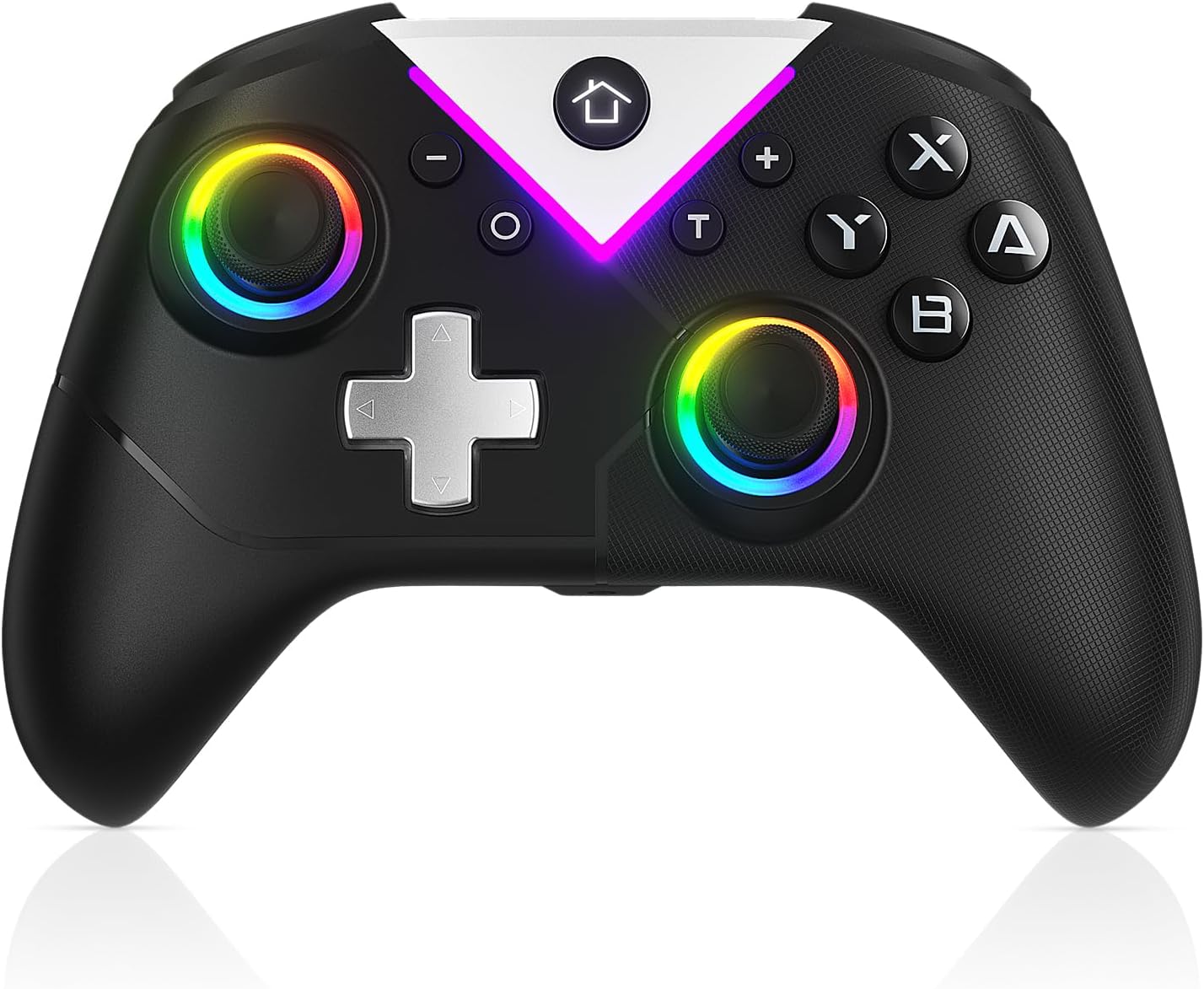
🎮【𝗠𝗮𝗴𝗶𝗰 𝗟𝗶𝗴𝗵𝘁𝘀 𝗶𝗻 𝟳 𝗖𝗼𝗼𝗹 𝗥𝗚𝗕 𝗠𝗼𝗱𝗲𝘀 𝗮𝗻𝗱 𝗖𝗼𝗺𝗳𝗼𝗿𝘁𝗮𝗯𝗹𝗲 𝗚𝗿𝗶𝗽】BOKESUYA Professional controller, you can adjust the lighting mode through the controller key combination (T key + left and right arrow keys): RGB gradient light, single color light, two-color light, two-color gradient light, single color breathing light, RGB marquee, three-color marquee, LED off. When playing games, the meteor lights up in a dark room, which looks cool.
🎮【𝗦𝘂𝗽𝗲𝗿 𝗕𝗮𝘁𝘁𝗲𝗿𝘆 𝗟𝗶𝗳𝗲 𝗮𝗻𝗱 𝗔𝘂𝘁𝗼𝗺𝗮𝘁𝗶𝗰 𝗛𝗶𝗯𝗲𝗿𝗻𝗮𝘁𝗲𝘀】Full charge running time: 6~10 hours, charging time: 2~3 hours, controller compatible with Switch/Switch Pro/Lite/OLED/iOS/Android/PC Windows 7/8/10/11. Quick pairing of the controller switch: Press and hold the HOME button of the controller for 3 seconds in the host pairing mode interface. It will automatically enter sleep mode if not used for a long time. Just touch the HOME button to wake up.
🎮【𝗦𝗲𝗻𝘀𝗶𝘁𝗶𝘃𝗲 𝗝𝗼𝘆𝘀𝘁𝗶𝗰𝗸𝘀 𝗮𝗻𝗱 𝗔𝗱𝗷𝘂𝘀𝘁𝗺𝗲𝗻𝘁 𝗩𝗶𝗯𝗿𝗮𝘁𝗶𝗼𝗻】The controller of the Switch Pro operation button will be released immediately and is responsive, the joystick is smooth to use, and there is no dead angle. Wireless controller suitable for casual Switch platform games, FPS shooting games and exciting adventure games. 4 levels of vibration: strong, medium, weak, none; adjustment method: T key + D-pad up and down key adjustment.
🎮【𝗟𝗘𝗗 𝗜𝗻𝗱𝗶𝗰𝗮𝘁𝗶𝗼𝗻 𝗜𝗻𝘀𝘁𝗿𝘂𝗰𝘁𝗶𝗼𝗻𝘀】1) Four LEDs flash rapidly in a cycle: This controller is searching for wireless device pairing; This controller is connecting back to the host through wireless pairing; 2) LED flashes rapidly: The battery voltage of this controller is lower than 3.6V; if it is lower than 3.4V, the controller will automatically shut down and cannot be turned on; 3) LED is always on: The controller is connected to the host normally through wireless;
🎮【𝐏𝐚𝐜𝐤𝐚𝐠𝐞 𝐂𝐨𝐧𝐭𝐞𝐧𝐭𝐬】PC & Switch controller x1, Manual x1; Beautifully packaged, it is a very good accessory for gamers
4 reviews for BOKESUYA Switch Controller Compatible with Switch/PC, Wireless Pro Controller with Adjustable RGB Lighting/Vibration/One Key Pairing & Wake Up,Wireless Switch Pro Controller for Switch and Windows PC
Add a review
Related Products



Original price was: $31.99.$23.99Current price is: $23.99.
UJ Xiong –
Sadly disappointed
I had high hopes going into this. But there are just certain games that this controller just doesn’t work with. I tried the controller on smash bros but the left joystick is just too delayed. I try springing in the game but the left stick just wouldn’t let me. And the d pad is so light to the click that it’s not satisfying. I even bought two of the same controller but both still works the exactly the same. I love the rgbs and the feel of the controller but sadly it’s just not it. Hopefully the devs find a way to fix this issue with the controllers. And no clicky dpads plz.
J. Suarez –
Wants to Be Flashy
I specifically requested this controller for my Nintendo Switch because one of the joy cons has failed, and sadly, its not the first time one has failed. The original OEM ones are pricey so I figured to try a different after market controller. As you can see from the pictures, the Bokesuva controller likes to be flashy, displaying its lights in lightning speed. And boy does it rumbles. You will hear and feel the controller vibrating when triggered. But best of all, the controller works well with my switch. Setting it up and connecting to my Switch was very easy and quick, just a press of a button and you have a connection., Yes, its not the same as having your controllers connected to the side of your Switch, but using a controller is more familiar and consistent with my other console devices. And once I do decide to spend extra to replace the joy cons, its good to know I can then use this controller for my PC gaming.
Customer Review –
Wanted controller for my Tesla
I ordered this for probably non-standard usage, but I’m pleased to say that it works great for me. I have a 2021 Model 3 and wanted to add a controller to play the built-in games while charging. This BOKESUYA Switch Controller was easy to setup and worked out of the box.After pairing it with Bluetooth, the arcade immediately recognized and was able to use the controller. All the buttons worked as far as I can tell and I didn’t need any special configuration or changes to make it function. Usage was very responsive (no delays) and I thought the colors on the controller looked nice.I’m also happy to report that it has a USB-C charging port so it will work with cables and chargers you likely already have too many of. It does come with a USB A-to-C cable as well if you need it.At the asking price of $24, I found this to fit the bill and be exactly what I needed. Five stars.
Jacob M McNeill –
A terrible controller that makes some odd and outright bad design choices, and has a garbage D-Pad
Every product, no matter how great, has its flaws. Even the best videogame controllers I have reviewed have had at least something minor about them that was lacking, or could have been better. However, it’s not often I encounter a controller with one flaw so terrible, so glaring, that it ruins the whole controller.Enter the Bokesuya Switch Controller. This is a low-range controller that’s modest in its feature set, but does at least have attractive lighting that may make up for some lack of substance with style. And for the most part, this controller works well enough, though it has a few odd quirks and annoyances that are fairly unique among controllers I’ve reviewed, as well as one fatal flaw.Bokesuya’s controller is roughly the same size and shape as Nintendo’s Pro Controller, though it opts for a symmetrical analog stick layout as opposed to Nintendo’s asymmetrical layout. This may throw off players used to Nintendo or Xbox controller layouts, but those who prefer PlayStation-style symmetrical stick layouts may find this more inviting. As always, neither is necessarily better or worse, this is more of a preference thing. Speaking of preferences, these analog sticks are concave at the top, which I prefer, and both feel nice and respond well when used.The standard face buttons are a mix of clicky and squishy that leans in the direction of clicky, but they seem to work well enough, as do the L and R buttons. ZL and ZR feel like analog triggers, but unfortunately they’re not – testing them out on PC (this controller supports PC and Android as well as Nintendo Switch) reveals them to be fully-analog, making this the worst of both worlds as they lack the precision of fully-digital triggers and also lack the degrees of control that analog triggers allow for.The secondary face buttons have been juggled around a bit. You more or less have the plus and minus buttons in the same place, but the home button has now become a triangular “K” button in the center-top, and the screenshot button has become the “FN” button in the dead-center. This more or less works, though it takes a bit to get used to.However, here’s where we have to deal with the first of this controller’s odd design choices – players can control the strength of the controller’s vibration and the style of the controller’s lighting by using the FN button combined with the D-Pad. However, if you’re connected to a Nintendo Switch while doing this, the screenshot function will still work, which means that while you’re fiddling with the settings, you’ll inadvertently be taking multiple screenshots or video.The sync button is now on the center-back of the controller for some reason, which is fine I guess but seems like an inexplicable choice. There is no turbo or macro functionality here, but this controller can wake the Nintendo Switch from sleep, has the aforementioned adjustable rumble, and has good gyroscopic motion control. This means, the only standard feature of a Pro-style controller missing here is Amiibo scanning.There is one more odd quirk here I need to mention before getting to the major flaw. When this controller is plugged into a Nintendo Switch dock to charge and/or sync, it will randomly wake the Nintendo Switch from sleep mode. This happens frequently, and since my TV is set to wake when it detects that the Nintendo Switch is on, this controller basically turned on my entire entertainment system on its own without my input. Odd and frustrating, and after this I felt I had to unplug the thing and charge it separately from the Nintendo Switch.However, if you were paying attention, you might have seen one thing I skipped over, the major flaw that absolutely kills this controller: the D-Pad. At first, this controller’s D-Pad seems fine, although not great. It’s extra-clicky, which I don’t mind terribly, but it does mean that playing games that use it is a loud experience. However, soon enough I found that the D-Pad wasn’t detecting my inputs correctly – trying to press down, for example, would only ever make the D-Pad input go left or right.Even an inexpensive controller shouldn’t have such a basic feature that’s this broken and unusable, and this combined with all of the other flaws of the Bokesuya Switch Controller, combined with the lack of features just brings me to the conclusion that this is an absolutely terrible controller that no one should buy. You can do much better in this price range, or in any price range, for that matter.