

Brook Xone SE Adapter – Type C Version, for XB Elite Series 2 and XB X/S Controllers on XB X/S, Switch, PS4 Gaming Consoles and PC(XID), Supports Motion Control, Turbo, Remap, Audio Function
Original price was: $49.99.$44.00Current price is: $44.00.



Price: $49.99 - $44.00
(as of Jan 15, 2025 08:12:31 UTC – Details)
Product Description

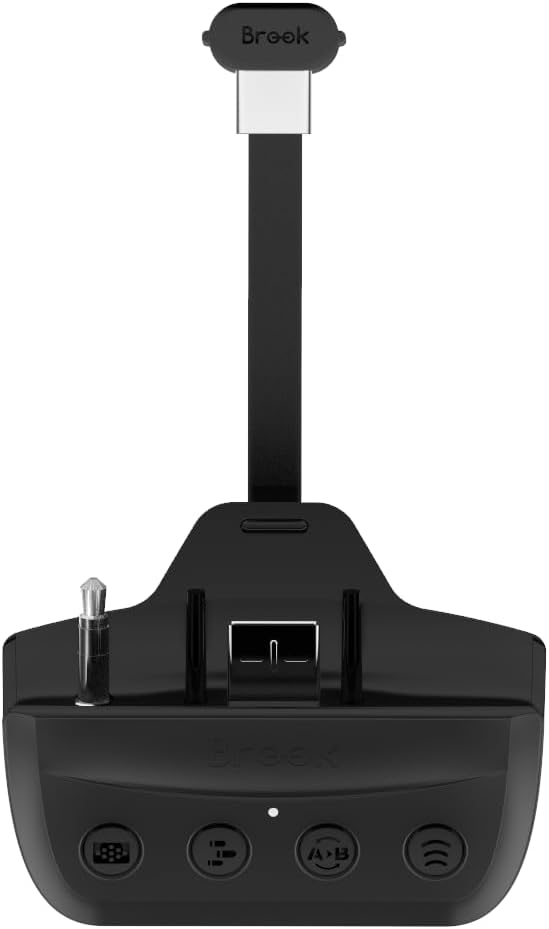
With the X One SE (Type-C version) , the XB One Elite Series 2 and XB Series X/S controllers can be connected and play on XB Series X/S, PS5, Switch, PlayStation 4, PC(XID,Steam) and XB One consoles, motion control and 3.5mm microphone headset are entirely supported.
Support Motion Control for PS4/ SwitchAudio Function for XB Series X/S/ XB One /PS4Emulate PS4 Touchpad Via Function Key for PS4Compatible PS4 games are playable on PS5 console, PS5 games are NOT supported
The X One SE has strict requirements for appearance, material, pattern and color; “Seems to be integrated with the controller” is the design criterion for it.
Product Description


Easy to assemble Durable in use
Slide the X One SE adapter directly into your XB One controller.

Easy to assemble Durable in use
Insert the right angle end of the X One SE cable into the top connector of the controller.

Easy to assemble Durable in use
Insert the flat end of the X One SE cable into the back connector of the X One SE.
Step 1
Step 2
Step 3

TURBO & BUTTON HOLD
Combine Turbo function with the Button hold functions to achieve AFK automated actions.
Eliminating all redundant and boring operations, which also extends the life of the buttons on the controller.

TOUCHPAD SIMULATION
2 modes to simulate PS4 touchpad commands.
Easy mode for normal using, and Full mode for complete control.
Add to Cart
Add to Cart
Add to Cart
Add to Cart
Customer Reviews
3.4 out of 5 stars
305
3.8 out of 5 stars
28
4.0 out of 5 stars
60
3.8 out of 5 stars
41
3.6 out of 5 stars
37
Price
$44.00$44.00 $11.99$11.99
— $19.99$19.99 $14.99$14.99
Support Console
XSX|S / PS5 / PS4 / Switch XSX|S / PS5 / PS4 / Switch XSX|S / PS5 / PS4 / Switch XSX|S / PS5 / PS4 / Switch XSX|S / PS5 / PS4 / Switch
Support Controller
XSX|S and Elite Series 2 Controller XB One and Elite series 1 Controller XB One and Elite series 1 Controller XB One and Elite series 1 Controller XB One and Elite series 1 Controller
Support play PS4 Games on PS5
✓
✓
✓
✓
✓
With the X One SE (Type-C version), the Xb One Elite Series 2 and Xb Series X/S controllers can be connected and play on Xb Series X/S, Switch, PS4, PC(XID, Steam), and Xb One consoles.
Functions upgrade and easy to use ! Just switch the button to change the console mode for PS4 and Switch. Just press the turbo and remap button to set up functions easily!
Compatible PS4 games are playable on PS5 console. PS5 games are NOT supported
Support Turbo ,remap and button hold function for PS4, Switch and PC. Emulate PS4 touch Pad via Function Key. Turbo speed is adjustable.
Support motion control for PS4 and Switch. 3.5mm microphone headset for PS4 and Xb One. Please visit Brook’s website to check whether there is a firmware update before using
Customers say
Customers appreciate the build quality of the product. However, some have reported issues with connection and disconnecting from devices. They also dislike the ease of use and garbage content. Opinions differ on functionality, input lag, and adapter functionality.
AI-generated from the text of customer reviews
9 reviews for Brook Xone SE Adapter – Type C Version, for XB Elite Series 2 and XB X/S Controllers on XB X/S, Switch, PS4 Gaming Consoles and PC(XID), Supports Motion Control, Turbo, Remap, Audio Function
Add a review
Related Products


Original price was: $49.99.$44.00Current price is: $44.00.
Roberto H. –
Works very well for Switch
I wanted this adapter for my Elite 2 so I can use it on Nintendo Switch. For that application, it works basically perfectly. Connecting the adapter and syncing the controller with the Switch is flawless (for those of you wondering, no you cannot wake the Switch from sleep with this adapter).The adapter feels solidly constructed. It weighs very little, but it doesn’t feel like it’ll fall apart very easily. When connected to the controller, it feels like it adds almost no weight, and it doesn’t interfere with any of the Elite 2 functions.The main reason why I wanted to try this out was for motion controls. The absence of a gyro is one of the bigger pitfalls of the Xbox controllers, but this adapter is a great work around; the Elite 2 + adapter works excellent for motion heavy games like Splatoon 2 (Just make sure to disable the vibration either in the Elite 2 configuration or in the Switch settings as it makes the gyro behave strangely). The motion sensitivity feels a bit slower than the Switch Pro Controller, but it doesn’t feel any less precise.The other features of the adapter work pretty well as well. Turbo is a bit slow for my liking, but it comes in handy for some things. The Hold feature is a bit less useful, but I’m positive their are scenarios where you will be glad to have it. I don’t own a PlayStation so I can’t test any of the features specific to that platform.I’m glad this niche product exists. If you are like me and you want an Xbox controller with gyro for motion-heavy games, get this adapter. If you are just looking for a way to use your Xbox controller on Switch or PS, get a cheaper adapter. But if for whatever reason you do decide to get this, you shouldn’t be disappointed.
Amazon Customer –
Never got it to work
I had high hopes for this to use my Elite 2 controller with the Nintendo Switch. Alas I could never get the pairing to work properly. The controller appeared in the pairing screen but none of the buttons worked to confirm the pairing process. Also, the firmware update process never completed. Perhaps the fw was already updated but there was no message to tell me that and no way to view the current fw version. The whole experience with this manufacturer was just strange. I am returning for a refund.
Jay Yang –
Works as advertised, if you don’t mind the battery life.
As someone that has ergonomic problems with both Dualsense and Switch pro controllers and after trying out half a dozen well known 3rd party controllers for the switch this was the answer to my comfort.Setup is very simple but the huge oversight: device did NOT come with a manual. A device of this price has no excuse not including at least a printed startup guide.Out of the box you’ll definitely want to plug it into your PC and update firmware to ensure compatibility, the packaging has a QR that takes you to the firmware download a long with a guide that is very clear and simple to follow. Once the firmware update is completed it works flawlessly with my Xbox Elite series 2 on the switch. I was unable to wirelessly pair with the switch but as soon as I plug it in the USB it paired immediately and never had another connection issue.To use it after it’s paired just turn on the controller and it will turn on the addon device as well and pair itself to the console. I have not experienced any connection issues since the initial pairing. Latency is not noticibly worse than the Switch Pro controller: I was able to achieve similar scores on Groove Coaster on the switch on wireless.Gyro works flawlessly, in fact this was purchased to be used specifically for Splatoon 3 and now I have rear buttons that I did not on the Switch pro controller. It also adds fairly minimal weight to the controller.The cons:Previously mentioned, no included manual, needs to be downloaded online.Low battery life: with the attachment it runs around 4 or so hours. It uses quite a bit of power off the controller. Do NOT attempt to use this on the normal Xbox core controller running off of AA batteries, it will not supply enough voltage. Only use it with the rechargeable packs.Micro-USB: come on it’s 2023, the device clearly works with AND requires a USB C connection to the controller itself, yet the actual device is micro USB.Device does need to be plugged in on both bottom expansion slot on the controller as well as the USB-C plug on the controller with a ribbon cable running behind it so if you are using the magnetic charging stand you do have to remove the cable, or to charge the controller directly.Macro programming on the fly does not save on device; if you turn it off it gets erased. If you set the triggers on the elite via the app it works normally.This is the device to get if you absolutely love the Xbox elite 2 and wish you can use it for Switch or PS, or add gyro to the controller for PC. It’s harder to recommend a device that costs as much as most controllers however if you just want just gyro on PC or rear buttons on switch. There are plenty of 3rd party controllers for cheap that can provide that.
Hora i. –
The functions don’t work on pc/xbox
I am quite sad to have to return this, very sad infact, which is why I am giving it 5 stars, it worked really well on switch but the manual even states it does nothing for xbox’s, and only works on pc if you don’t use the dongle and accept Bluetooth delay via connecting it as a PlayStation controller. Really wish they would add functionality but maybe that entails writing their own driver codes :/. Either way the product is very well made and works on the other consoles. Sadly I wanted it for my xbox mainly.
Ocegueda –
Se siente un pequeñisimo delay o algo se siente diferente al jugar smash por ejemplo, pero en mi experiencia con el mando elite 2 hasta podria ser culpa del control, pero fuera de smash, funciona perfectamente en switch y ps4, incluso lo conecte a un ps5 como si fuera un dualshock 4, me encanta el giroscopio y acelerómetro
Daniel Carson –
I use this adapter every day with all my consoles and pc. It adds gyro to the Xbox controller elegantly and allows me to seamlessly use it on PC, Switch, Ps4 and PS3
Musca Costin Mihai –
I’ve had poor experiences with 3rd party controllers or adapters with Gyro in the past (only recently discovered PROPER gyro aiming on controllers) because of latency and very poor tracking (like trying to use a cheapo office mouse for gaming) Now I don’t know for a fact that it was not my units having issues or being faulty (although I’ve sent back and swapped two of them of one particular model) but what I can say is that this adapter here.. ACTUALLY WORKS! And it works wonderfully. It has little to no latency (I cannot detect any.. and I am quite picky to “little details” like this) and on my sample I could not yet find any issues. I have upgraded the firmware to the current latest (although it might’ve already been on it to begin with – I believe the production date on mine is very recent, Jul-2023) and still no issues to speak of. The only one disappointment I have with this adapter is that it would not detect the new “Share” button on the Series S/X Controllers.. 😐 I’m planning on using this with the Elite S2 Controller anyways, as that one also has the back paddles, but I’ll have to wait until I’ll get a new battery to fix mine.. Micro$oft will finally have a good competitor to the DualSense Edge among my controllers. For the time being the DSE rules supreme above all controllers on the market, first and 3rd party alike. At least I don’t know of any better alternative. Take away this adapter on the Elite Controllers.
Gabbo –
Gute Idee, gute Funktionen, aber für mich zu laggy und damit unbrauchbar
ãã¡ãã« –
ã¹ãã©ãã¥ã¼ã³ã«ã使ããã®ã§è³¼å ¥ãã¾ãããä»ã®æ¹ãæ¸ããã¦ãã¾ããæ¬è£½åã縦ã«åãããæã«ç §æºãæãã«ç§»åãã¾ããææãç §æºãçä¸ã«ç§»åãããã¨ãããã¾ããã¸ã£ã¤ã以å¤ã®åä½ã¯æºè¶³ãã¦ãã¾ãã— è¿½è¨ —ä¸è¨ã®å 容㧠brook ã«åãåããã¾ããã以ä¸ã®æé ã§ã¢ã¼ã·ã§ã³ã³ã³ããã¼ã«ã®ãã£ãªãã¬ã¼ã·ã§ã³ãåºæ¥ãããã§ããããã§è§£æ¶ãã¾ããã1. PS4 ã¢ã¼ãã«åãæ¿ã2. X One SE Adapter ã (PS4/NS/PC) ã®ããããã«æç·æ¥ç¶3. ããã¼ã«ã/ç¡ç·ãã¢ãªã³ã°ãã¿ã³ã㨠D-Pad (Down) ãåæã«é·æ¼ã (5 ç§)4. 赤㮠LED ãç¹ç¯ãããæ¾ããéã® LED ãç¹ç¯ããããã£ãªãã¬ã¼ã·ã§ã³æåã©ããã¦ãã¸ã£ã¤ãã®æ§è½ã¯ç´æ£ã®ã³ã³ããã¼ã©ã¼ã«å£ãã¾ããéã«ãã¬ã¤ããããã®ãµãã³ã³ããã¼ã©ã¼ã¨ãã¦æ´»èºãã¦ãã¾ãã