

EPOMAKER Tide75 Upgraded QMK/VIA Wireless Gaming Keyboard, 75% Aluminum Mechanical Keyboard, Hot-Swap Creamy Keyboard with FR4 Plate, Bluetooth/2.4Ghz/USB-C, RGB Backlit, NKRO (Black)
$139.99


Price: $139.99
(as of Jan 17, 2025 16:01:45 UTC – Details)
Product Description
EPOMAKER TIDE 75 Aluminum Tri-Mode QMK Mechanical Keyboard
The video showcases the product in use.The video guides you through product setup.The video compares multiple products.The video shows the product being unpacked.


Tri-Mode Wireless Keyboard with VIA/QMK Support
1 VIA & QMK Code 2 Bluetooth/2.4G/USB 3 Mac/PC/Tablet/Xbox 4 N-Key Rollover
6063 CNC Aluminum Gasket Mechanical Keyboard Cushioned with Foams
The video showcases the product in use.The video guides you through product setup.The video compares multiple products.The video shows the product being unpacked.
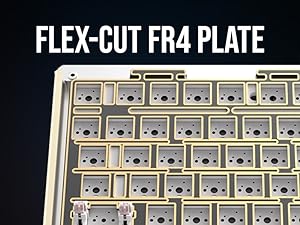 Flex-Cut FR4 Plate
Slot cut around each key, for extra flexibility. FR4 for firmer support than PC.
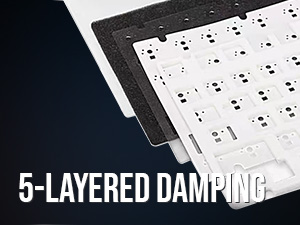 Sound-Dampening
Enjoy crispy and thocky typing with 5 layers of foams made of Poron, IXPE, and PET.
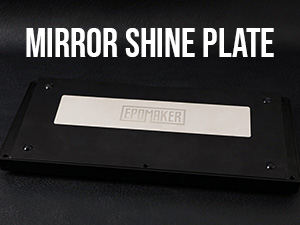 Glossy Metal Plate
The mirror shines with metallic gloss, the LOGO Plate serves as a balanced weight and gleam decoration.
 Multifunctional Knob
Metal Knob for volume control or anything you want, with support for VIA and QMK code.


 Weight: 1.8kg
1 Lubed Creamy Switch
2 Hot Swappable
3 PBT Keycap
4 Size & Weight
What is QMK? What is VIA?
VIA is an open-source software for programming keys, and QMK is both a firmware and a document of codes. With QMK code, you can make keys do different things when it is tapped or held down.
Where is the JSON file for Tide65/75? How to conenct to VIA software?
Tide75 can be connected to VIA in wired mode or 2.4Ghz mode. JSON file, available on EPOMAKER web, is the same for both mode. Instructions on connecting can be found on Manual.
What is the MCU of the Epomaker Tide75 QMK? How to Reset Tide75? How to enter DFU mode?
The QMK file for Tide75 can be found on the EPOMAKER web or GitHub. To flash it, 1) get the keyboard into DFU mode (holding ESC and re-plug, or FN+R_Shift+PGUP), 2) MCU set to ATmega32U4, 3) Exit DFU when flashing is completed.
Why is the FN key always red? Why won’t the Q/W/E/P/T/WIN/CapsLock key’s light change color?
These keys are indicator lights. FN keys flashes in red meaning low battery, and stays red if keyboard is charging. Q/W/E/P/T represent Bluetooth, wireless and wired mode. WIN and CapsLock stays white if it’s locked.
How is TIDE75 upgraded from Tide75? What is the differences between lemon switch and zebra switch?
The keycaps and switches on TIDE75 are upgraded for a much more enjoyable type sound and style. The Zebra switch with 40/45gf acutation force is heavier than lemon switch, so its sound will be lower-pitched and more thocky.
Aluminum Mechanical Keyboard from EPOMAKER
Add to Cart
Add to Cart
Add to Cart
Add to Cart
Add to Cart
Add to Cart
Customer Reviews
4.5 out of 5 stars
15
3.7 out of 5 stars
29
4.5 out of 5 stars
65
4.6 out of 5 stars
138
4.4 out of 5 stars
459
4.7 out of 5 stars
156
4.3 out of 5 stars
36
Price
$139.99$139.99
$119.99$119.99
$99.99$99.99
$99.99$99.99
$105.99$105.99
—
$149.99$149.99
Layout & Case Material
82+1, 75% Aluminum
66+1, 65% Aluminum
80+1, 75% Aluminum
82+1, 75% Aluminum
88, 87% TKL Aluminum
80+1, 75% Aluminum
87+1, 87% TKL Aluminum
Shine-Through Keys
Side-Print Shine-Through
Side-Print Shine-Through
X
X
X
X
X
Available Colors
Black,Purple,Blue,Pink
Black,Purple,Blue
White, Purple, Green, Grey
Retro Grey, Black, Blue Ombre
Black,White,Blue,Purple,Pink
Retro
Retro
PBT Keycaps
OEM Profile
OEM Profile
Cherry, MDA, SOA
Cherry, MDA
MDA profile
Cherry Profile
Cherry Profile
Available Switch
Linear
Linear
Linear, Tactile, Clicky
Linear
Linear
Linear
Linear
Hot Swap
✔
✔
✔
✔
✔
✔
✔
Connectivity
Bluetooth/2.4Ghz/USB-C
Bluetooth/2.4Ghz/USB-C
USB-C
Bluetooth/2.4Ghz/USB-C
Bluetooth/2.4Ghz/USB-C
Bluetooth/2.4Ghz/USB-C
Bluetooth/2.4Ghz/USB-C
Battery
4000mah
4000mah
X
4000mah
4000mah
3000mAh
3000mAh
Backlight
Per-Key RGB, South-Facing
Per-Key RGB, South-Facing
Per-Key RGB, South-Facing
Per-Key RGB, South-Facing
Per-Key RGB, South-Facing
Per-Key RGB, South-Facing
Per-Key RGB, South-Facing
Knob Function
Programmable Knob
Programmable Knob
Volume/Brightness
Volume/Brightness
X
Programmable Knob
Programmable Knob
Programmable
VIA Software, QMK Code
VIA Software, QMK Code
HI75 Software
Galaxy70 Software
Galaxy80 Software
VIA Software
VIA Software
Polling Rate
1000hz (2.4G/USB); 125hz(BT)
1000hz (2.4G/USB); 125hz(BT)
1000hz (USB)
1000hz (2.4G/USB); 125hz(BT)
1000hz (2.4G/USB); 125hz(BT)
1000hz (2.4G/USB); 125hz(BT)
1000hz (2.4G/USB); 125hz(BT)
【EPOMAKER Tide Series】At EPOMAKER, we take community feedback very seriously. Responding to the increasing demand for affordable aluminum keyboards, we are excited to introduce the EPOMAKER Tide series. The Tide 75 feature full aluminum construction for enhanced durability and style. The EPOMAKER Tide series are now available in both 75% and 65% layouts cater to various needs, offering options for different user preferences.
【QMK Programmable Hotswappable PCB】Both the Tide 65 and Tide 75 are QMK compatible, allowing for comprehensive programmability and customization of key mappings and macros to suit any workflow or gaming setup. With a hot-swappable PCBs, users can easily swap to desired switches without any soldering required, maximizing personalization and convenience.
【6063 Aluminum Case with Mirror PVD Back Piece】The Tide 75 aluminum keyboard is housed in a 6063 aluminum case, available with electrophoretic (Blue) or anodized (Black/Purple) finishes. These finishes provide resistance to daily wear and tear and improve durability for long-term use. A Mirror PVD back piece featuring the EPOMAKER logo enhances aesthetics in a subtle yet meaningful way. Although it’s positioned on the back of the keyboard and not visible while typing, we believe every detail matters
【Tri-Mode Connectivity with a 4000mAh Battery】The EPOMAKER Tide 65 and 75 feature versatile tri-mode connectivity, supporting Bluetooth, 2.4GHz wireless for portability and USB Type-C for reliable wired operation. Equipped with a powerful 4000mAh battery, delivering extended usage time, minimizing the need for frequent recharging and ensuring productivity remains uninterrupted.
【FR4 Plate and Comprehensive Foam Kit】The use of an FR4 plate—a high-density fiber material that strikes a balance between the rigidity of an aluminum plate and the flexibility of a PC plate—ensures a solid yet less harsh typing experience. This material choice provides a balanced typing experience. To further refine the acoustic performance, we incorporate five layers of sound-dampening materials: Poron pcb-plate foam, IXPE switch foam, PET noise cancellation pad, Poron case foam, and PET insulation pad. These layers work together to enhance the sound, reduce vibration and rattle, and eliminate metal pinging.
7 reviews for EPOMAKER Tide75 Upgraded QMK/VIA Wireless Gaming Keyboard, 75% Aluminum Mechanical Keyboard, Hot-Swap Creamy Keyboard with FR4 Plate, Bluetooth/2.4Ghz/USB-C, RGB Backlit, NKRO (Black)
Add a review
Related Products



$139.99
Customer –
One of the best pre-builts I’ve tried.
This keyboard is awesome and feels really high quality. The typing experience is great, and I really like the customization options. The sound is great! Highly recommended I’ve tried a ton of keyboards and this is one of the best ones.
TechLover –
SOUNDS SOOO GOOOD!
Absolutely wonderful board from epomaker. Comes with Linear switches and with the fr4 plate and stock caps the board really does sound creamy out of the box! The stabs are also well lubed and don’t rattle at all. Build quality is nice and solid, too, the aluminum body is hefty and adds to it’s sound. Boards are getting so good out of the box this thing is amazing! I love taking sub $100 boards and modding them to sound great but this one being just a little over $100 doesn’t require any mods at all. I’ll likely leave it stock or possibly swap out the switches for tactiles and see how it sounds/feels after that too. Again, I cant get over how good this sounds out of the box, very creamy, no mods needed. If you’re looking for a board and dont want to mod it, this is definitely a strong option. 10/10 rating!
Armv –
La estetica es grandiosa en persona, se siente pensada y de buena la calidad, pero la diferencia es abismal en sonido y en tacto, solo puedo decir que se siente caro y de calidad como pasar de usar unos tenis de 3 hermanos a pasar usar Gucci, 0 arrepentimientos en el teclado, lo peor que podria tener serian las keycaps y que lo hacen sonar un poco clacky pero en si el sonido es parecido a unas piezas de marmol claro el prelub de los switches no es uniforme entonces tiene zonas mas clacky o mas thock pero no es nada que haga que parezca 2 switches diferentes, para nada se siente hueco todo lo contrario cada click se siente como presionaras algo solido en el fondo del click y solido no flexible como otros pbcs
Ibuystuff –
I am thoroughly impressed with this keyboard. I have been a keyboard enthusiast for a few years now, building boards that cost up to $1000. I have to say that in the last two years, pre-built keyboards have really improved. The 2.4GHz connection has no noticeable latency, the connection quality is good. The stabs shockingly were very balanced and did not rattle – that’s something that many custom builds even lack. The case is definitely thinner and hallower than most high end keyboards, but for the price, I am not complaining. If you have ever had a Tiger80 Aluminum, this keyboard is pretty much the same build quality, but with less case rattling than the Tiger 80.Honestly, this board is about 90% of any custom keyboard I’ve ever typed on. It would be about 95% as good, IF they provided better keycaps. As it stands, I would suggest getting a decent set of dye sub keycaps because this keyboard just sounds too high pitched and tinny. But I slapped on some thicker high profile keycaps and the sound is much improved.
Raven Kilit –
Ho acquistato la tastiera meccanica EPOMAKER Tide75 e sono rimasto molto colpito dalla qualità del prodotto. Una delle prime cose che ho notato è il peso: la tastiera è davvero pesante e solida, il che la rende molto stabile sulla scrivania. Questo conferisce una sensazione di robustezza e qualità premium, come se fosse un prodotto costruito per durare nel tempo.La tastiera è realizzata interamente in alluminio e offre un design elegante e moderno. La piastra in FR4 e metallo contribuisce ulteriormente alla sensazione di solidità e rende la digitazione molto piacevole. Gli switch sono sostituibili, il che significa che è possibile personalizzare l’esperienza di digitazione, senza dover saldare nulla. Questo è un grande vantaggio per chi ama sperimentare con diversi switch.La connettività è molto versatile, dato che la tastiera può essere connessa tramite cavo, Bluetooth e tramite il dongle integrato. La connessione Bluetooth funziona molto bene e permette di collegare la tastiera a più dispositivi contemporaneamente, passando facilmente dall’uno all’altro. Ho trovato questa funzione molto utile, soprattutto quando lavoro su più dispositivi, come PC e tablet. L’illuminazione RGB è ben realizzata, con molte opzioni di personalizzazione per creare l’atmosfera perfetta, sia durante il lavoro che nel gaming.Nel complesso, considero la EPOMAKER Tide75 una tastiera eccezionale. La qualità dei materiali, il design robusto e l’esperienza di digitazione la rendono un ottimo investimento per chi cerca una tastiera meccanica di alta qualità . Se cercate un prodotto solido, elegante e versatile, questa tastiera non vi deluderà .
chambon –
attention, ce clavier est querty alors qu’en France, on utilise des azerty. c’est à prendre en compte avant d’acheter.sinon, il est de belle qualité avec son matériaux en aluminium, cela me change des modèles en plastique.il est plus lourd et ne bougera pas une fois en place.il a bien été reconnu sous windows 11la frappe est souple et relativement silencieuse.il a des touches programmables.une bonne qualité.
P. und G. Arentzen –
Hinweis: Diese Tastatur kommt im amerikanischen QWERTY-Layout! Wer damit nicht arbeiten kann, sollte sich eine andere Tastatur suchen!Ich schrieb es ja schon häufiger – als Autor bin ich stets auf der Suche nach einer guten Tastatur. Daher griff ich bei dieser zu..Es ist meine erste Epomaker – auch wenn ich den Anbieter zuvor nicht kannte, konnte mich die erste Tastatur doch überzeugen und so griff bei dieser geschrumpften Variante ebenfalls zu. Die Tastatur verfügt neben dem Buchstabenblock noch über die F-Tasten, einige Zusatztasten wie Home, End etc. und einen kleinen Knopf in der rechten oberen Ecke, über den man zum Beispiel die Lautstärke regeln kann.Wie man es bei einer guten, mechanischen Tastatur erwarten darf, ist diese beleuchtet. Zudem ist die Beschriftung nicht oben auf, sondern auf der Frontseite der Tasten – siehe Bild. Das ist praktisch, denn so kann man, wenn man das möchte, deutsche Layout-Aufkleber auf den Tasten befestigen.Verbunden wird die Tastatur mittels Bluetooth, Dongle oder Kabel – das funktioniert gut. Ebenso kann man sie unter Windows, Mac oder Linux nutzen.Die Kompatibilität zu Linux ist sogar sehr hoch, denn nicht nur wird sie sofort erkannt – etwa unter dem auf Ubuntu basierenden Pop-OS. Nein, die Tastatur kann mittels des Universaltools VIA konfiguriert werden. Und VIA, ein Tool für ganz verschiedene Hersteller und Tastaturen, gibt es auch für Linux. Ich habe also einfach das Deb-Paket installiert, die zur Tastatur gehörende json-Datei von der Webseite des Herstellers geladen und schon konnte ich sie konfigurieren – genau, wie es unter Windows der Fall ist! Und ja, auch für Mac gibt es VIA. Das ist natürlich eine sehr schöne Sache, denn Gaming wird dank Steam auch unter Linux immer beliebter, und mit VIA fällt diese Schranke.Der Tastenanschlag ist sehr gut, die Tasten liegen angenehm weit auseinander; es braucht nur eine kurze Umgewöhnung von vier, fünf Stunden. Zudem kann man dank Cherry-Schaltern auch andere Tastenkappen verwenden; ich habe das probiert und es klappte gut! AuÃerdem ist die Platine Hot-Swap-Fähig und auch das klappt.Da die Tastatur gedämpft ist, entstehen keine zu lauten Geräusche. Der Aluminiumkörper ist schwer und stabil, was ein Verrutschen verhindert.Alles in allem überzeugt mich diese Tastatur – mehr noch als jene, die ich zuvor getestet habe. Sie ist qualitativ hochwertig, kann unter drei Systemen konfiguriert werden und sieht cool aus – wobei das natürlich Geschmackssache ist! Das Preis-Leistungs-Verhältnis stimmt – 5 von 5 Sterne.