
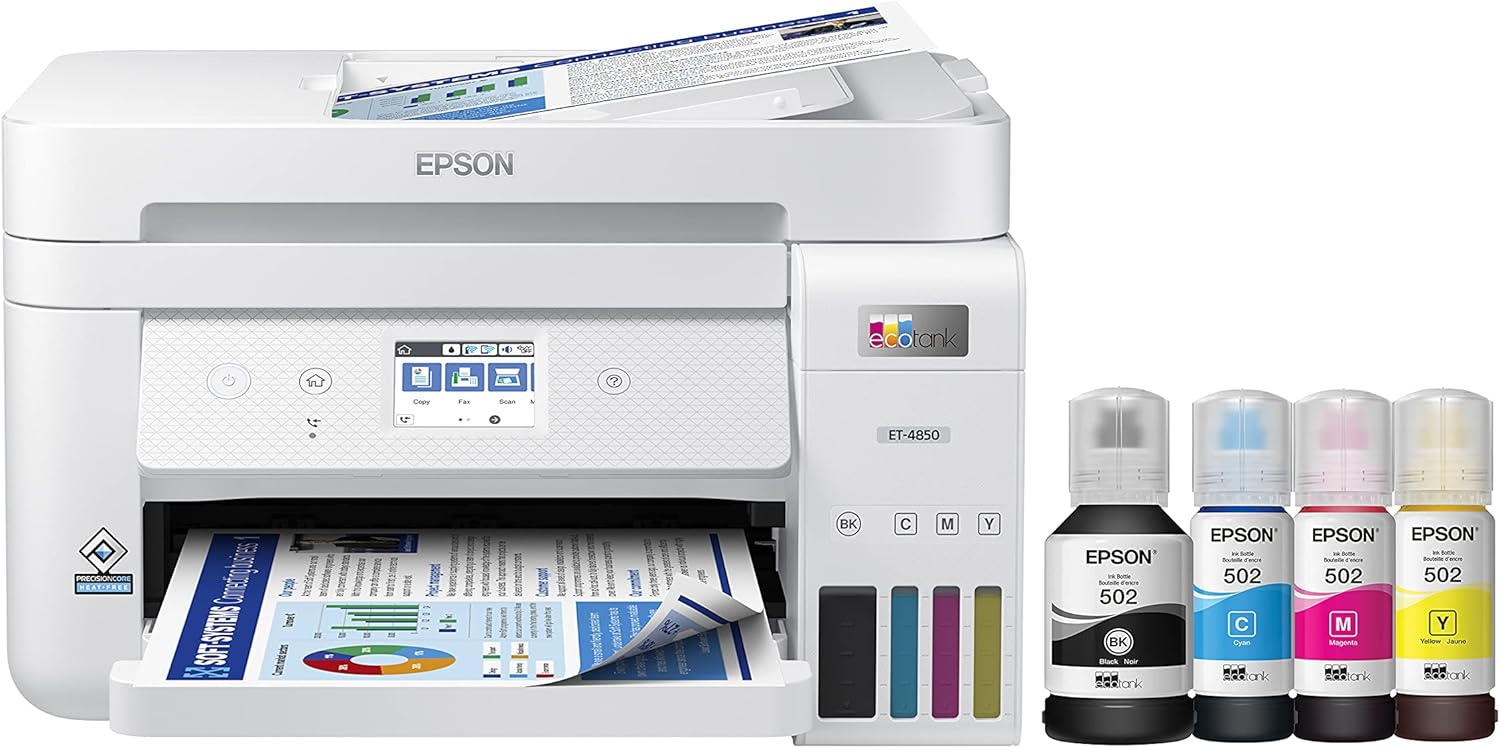
Epson EcoTank ET-4850 Wireless All-in-One Cartridge-Free Supertank Printer with Scanner, Copier, Fax, ADF and Ethernet – The Perfect Printer Office – White, Medium
$349.99


Price: $199.99 - $349.99
(as of Jan 12, 2025 09:58:09 UTC – Details)
Your business needs a printer that’s fast, affordable, easy to use, and has premium productivity features. That’s why we developed the EcoTank ET-4850 – an innovative cartridge-free solution that uses high-capacity, easily refillable ink tanks. So you’ll worry less about running out of ink, and save a lot on replacement ink (1). The ET-4850 offers fax, productive paper handling, a high-resolution flatbed scanner, and convenient 2.4″ color touchscreen – making it the perfect printer for your office. Epson strongly recommends the use of genuine ink to ensure optimal print quality and performance. Use of non-genuine ink could cause damage not covered under the printer’s ltd. wnty. | 1. Actual savings and costs will vary considerably based on print tasks, print volumes and usage conditions. Savings and cost per ISO page are based on the cost of replacement ink bottles and the cost of enough standard cartridges to achieve the total page yields of the bottles using the MSRP (USD) and yields for Epson standard-capacity ink cartridges for similarly featured Epson consumer inkjet printers as of March 2024. | 2. Individual cartridges estimate based on print yields of an included or replacement set of black and color ink bottles as compared to Epson standard-capacity ink cartridges for similarly featured printers as of March 2024. | 3. Part of the ink from the included bottles is used for initial setup; yields are lower than those of replacement ink bottles. Replacement and included ink bottle yields based on the ISO/IEC 24712 pattern with Epson’s methodology. Actual ink yields will vary considerably for reasons including images printed, print settings, temperature and humidity. Yields may be lower when printing infrequently or predominantly with one ink color. All ink colors are used for printing and printer maintenance, and all colors must be available for printing. For more information, visit www.epson.com/inkinfo | 4. Based on average monthly document print volumes of about 200 pages. | 5. See www.epson.com/voice for device compatibility. Epson Connect account and voice-activated account registration required. | 6. Most features require an Internet connection to the printer, as well as an Internet- and/or email-enabled device. For a list of Epson Connect enabled printers and compatible devices and apps, visit www.epson.com/connect | 7. Requires Epson Smart Panel app download. Data usage fees may apply.
Innovative Cartridge-Free Printing ― No more tiny, expensive ink cartridges; each ink bottle set is equivalent to about 80 individual cartridges (2)
Dramatic Savings on Replacement Ink ― Save up to 90% with replacement ink bottles vs. ink cartridges (1) – that’s enough to print up to 7,500 pages black/6,000 color (3)
Stress-Free Printing — Up to 2 years of ink in the box (4) – and with every replacement ink set – for fewer out of ink frustrations
High-Capacity Ink Tanks – Epson’s exclusive EcoFit ink bottles make filling easy and worry-free
Zero Cartridge Waste ― By using an EcoTank printer, you can help reduce the amount of cartridge waste ending up in landfills
Impressive Print Quality ― Unique PrecisionCore Heat-Free technology and pigment black ink produce extremely sharp text – plus impressive color photos and graphics – on virtually any paper type
Robust Paper Handling ― Auto Document Feeder, paper-saving auto 2-sided printing and a 250-sheet paper tray for high productivity
Built-In Scanner & Copier ― High-resolution flatbed scanner and a 2.4″ color touchscreen for easy document copying and navigation
Modern Connectivity ― Features Ethernet and wireless, plus hands-free voice-activated printing (5). Easily print and scan from your smart device (6) with the intuitive Epson Smart Panel app (7), Mopria Print Service and Mopria Scan
Use Genuine Epson Ink ― For optimal print quality and performance. Non-genuine ink could cause damage not covered by the printer’s ltd. wnty.
Customers say
Customers find the printer easy to set up and use. They say it works well with no issues. The ink capacity is appreciated, with refillable tanks and a good ink supply. However, some customers dislike the print speed. There are mixed opinions on print quality, value for money, and wireless connectivity.
AI-generated from the text of customer reviews
9 reviews for Epson EcoTank ET-4850 Wireless All-in-One Cartridge-Free Supertank Printer with Scanner, Copier, Fax, ADF and Ethernet – The Perfect Printer Office – White, Medium
Add a review
Related Products


![Canon PIXMA TS6420a All-in-One Wireless Inkjet Printer [Print,Copy,Scan], Black, Works with Alexa](https://m.media-amazon.com/images/I/61x6KTFR8yL._AC_SL1500_.jpg)


$349.99
Leon Gary Jr. –
Review of Epson ET4850, install, WiFi, succeeded first try. Aligning print heads was a challenge
This November 2023 purchase of an Eco Tank 4850 was our second EcoTank having purchased the first shortly after these printers hit the market. I was replacing a finicky Canon printer that had a lot of difficulty in staying connected to WiFi. The overall installation process was both quick with only a couple of hiccups in getting the printer to connect to my HP Envy laptop. Initially the laptop found and installed the Eco Tank fax printer that I promptly deleted. Once I did that the paper printer was located on our network and installed. Making the necessary WiFi connection needed to facilitate AirPrint from iPads and iPhones also succeeded but with a bit more effort due to the difficulty in choosing the best configuration of images on the test print because they were all pretty close to âgoodâ at the start. I have printed documents and photographs on regular and premium paper along with card stock and photo paper with satisfactory results. While this particular model appeared to hit the sweet spot between function (touchscreen controls, auto 2-sided printing, sheet capacity) and price and there are versions that cost and do less as well as versions that cost and do more, I am quite happy -so far. My only disappointment is that printer throughput seems slower than the speed of the Canon printer that it replaced. It is also noteworthy that the biggest drawback to the first Eco Tank we bought relates to our being away from our home during the summer months when that printer is unused. The âGenuineâ Epson ink in that printer dries up requiring quite a bit, time and wasted test paper to get the original Eco Tank to again print properly. At this early point, I am hoping by now Epson has fixed that problem by modifying the ink, automatically printing test pages before ink has dried or something else. Lastly, compared to my old Canon printer, the per-page cost for a color print is minimal. Should you decide to give a tank printer a try be sure that what you order has all of the functions and features that you need. Less expensive models have fewer functions.I have now used this printer for quite a while since I first put it in service. I have a similarly aged HP printer in an office in a mountain cabin and recently had to pay about $100 to replace some short-lived printer cartridges after a nefarious HP firmware update killed off the ability to use better and less expensive third party ink cartridges – so, I took advantage of the recent Amazon days and bought another Epson ET 4850. I love that printer and its almost endless inexpensive ink bottles.
Alan Gold –
Perfect prints
I love the Eco-tank inks! Buying genuine Epson ink is about 1/2 what the individual cartridges cost, and the ink seems to last forever. Not quite as fast printing as my WorkForce all in one was, especially when printing 2 sides, but still a great printer, copier, scanner and fax! Use good quality photo paper and Epson inks and photos look like photos should.
R. A. Martinek –
So far, vastly superior to the Canon Pixma it replaced.
Set up: The biggest problem I had was expecting it to be much harder than it wasâ”This seems to simple and easy. What is the documentation not telling me?” The documentation was also written by someone who knows English. It’s only shortcoming is that it’s a PDF file. However, it’s well enough put together that cross-referencing is easy.Unit has a nice, small footprint considering everything it does. ONE (YAY!) paper tray with plenty of capacity. The touch screen can swing out and up if the printer is below eye level, but it also works perfectly if left flush with the front of the printer. For us, this is great, as the printer sits on a rack at about eye level. The touch screen is small, but easy to read and very well designed.Ink filling is very different if you are accustomed to ink cartridge printersâand frankly, easier with less mess! The only problem we foresee is buying more Epson branded ink. The Epson web site may just not like our browser. We have plenty of time to resolve the issueâthe ink reservoirs are ENORMOUS compared to cartridges. It will be quite a while before we need more.We haven’t tried printing on high quality paper or glossy photo paper, but the print quality is still quite good, more than adequate for our needs. Extrapolating to better paper from the print quality so far, it might well be adequate for most DTP. Online reviews we’ve seen indicate that photo print quality is quite good.The only thing we don’t like about it is that it won’t automatically turn on when a network computer sends it a document.
JPB –
Epson software and customer service is terrible. Amazon service is excellent
Epson ET-4850B (renewed). The first one I bought, I could not get it installed on my PC and returned it. After research, I decided to purchase another one (same model – renewed). It installed (not necessarily smoothly), but it worked fine. However, I was unable to use Epson Connect, even though printer was registered with no issues, Epson Connect stated “password or email is wrong.” I tried clicking on “forgot password” (since I knew the email was correct) and then it stated “email is wrong.” So I could sign in to Epson successfully, but not Epson Connect. No big deal for that issue – just time wasted. Printer printed fine. Today, after I restarted my laptop, the printer timed out and stated “could not process print job.” Couldn’t make it work.The printer itself worked fine on the initial setup – it prints well. But the software interaction is terrible. The Epson web site is no help either, with the standard statement “Is the printer turned on?” I really wanted to like this printer, but the Epson experience was so terrible that I will never purchase another Espon product. The only reason this has one star is that you cannot use zero stars for a rating!The plus side: Amazon customer service and their return policy is excellent.
Dipen –
Great printer. You get to print for really cheap. Initially it is a bit expensive compared to a normal printer but the savings add up over time. The app is easy to use. I tried printing a few photos and was pretty surprised with how decent they came out. It’s not professional quality but it’s not bad either.
Robert Poppenheim –
The Epson ET-4850 Eco Tank printer, is the best printer that I have ever owned. I’ve had other color printers and also laser printers, but this Epson tops them all. Excellent print quality no matter what you print – I am very satisfied with my purchase. Amazon Prime rocks, with next day delivery!
Ed Yee –
Replaced a old Epson printer upgraded to this modelWorks and runs great, so much faster than my old unit.Very happy
Jim S –
Iâve had a colour laser printer for years, however the unit I had was nearing the end of its life ( drum cycles, etc), and the cost of OEM colour and black laser cartridges were astronomical ( cheaper generic cartridges have always produced substandard output for me). I decided on this Epson due to the very low cost for ink, the ease of refill, and auto features. Iâve had it now over a month and am very impressed. Iâve printed hundreds of pages, ink levels have hardly dropped, and the unit just works well. When using photo paper, it produces really accurate and sharp images superior to a laser printer. When printing documents, the output is sharp as well, however for sheer black contrast, the laser printer I had had a slight edge on pure black contrast. Speed of printing on this Epson is acceptable, fairly fast, and adequate for my home office, but a bit slower than a laser. My model has a touch display, but the display is fairly small in about a 2â window, so it can be hard to see options. Epson should consider making the display larger and having it swivel up, because a small window fixed on the flat front of the printer means you have to place the printer at near eye height, or bend down every time you use it. So far, Iâm pretty happy.
Small Business paper goods –
Item came on time, secured and well packaged. This was my first epson printer and itâs easy to set up, thereâs a little of getting used to this printer but as soon as Iâve been using it 1-2 times everything getâs easy.