

FIFINE Gaming Audio Mixer, Streaming RGB PC Mixer with XLR Microphone Interface, Individual Control, Volume Fader, Mute Button, 48V Phantom Power, for Podcast/Recording/Vocal/Game Voice-AmpliGame SC3
$49.99


Price: $49.99
(as of Jan 08, 2025 10:27:59 UTC – Details)
Product Description

Provides multi-purpose functions for game voice, streaming, entertainment.

Presents individual volume control for audio level.

Offers a more easier way for audio control.

Gives a quick mute/unmute to ease embarrassment.
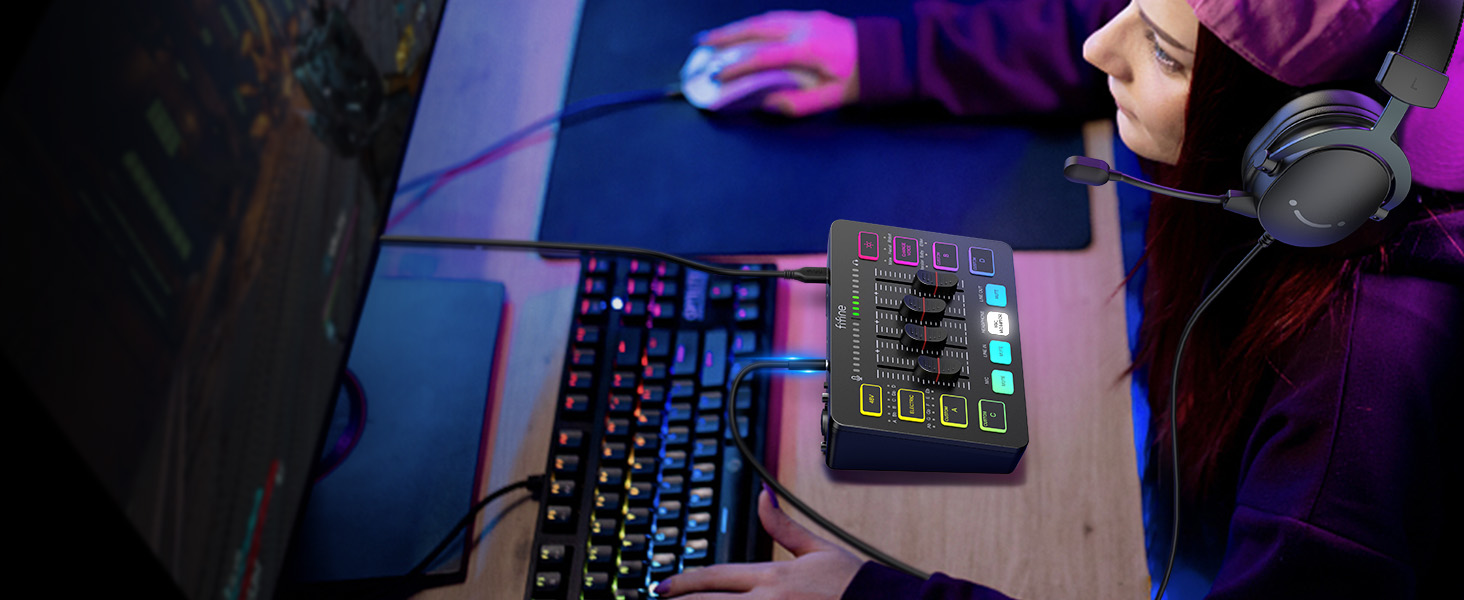
Allows headphones feedback can be heard at any time.
1 Multifunctional Mixer 2 Volume Slider Fader 3 Individual Control Design 4 Mute Button 5 Real-time Monitoring

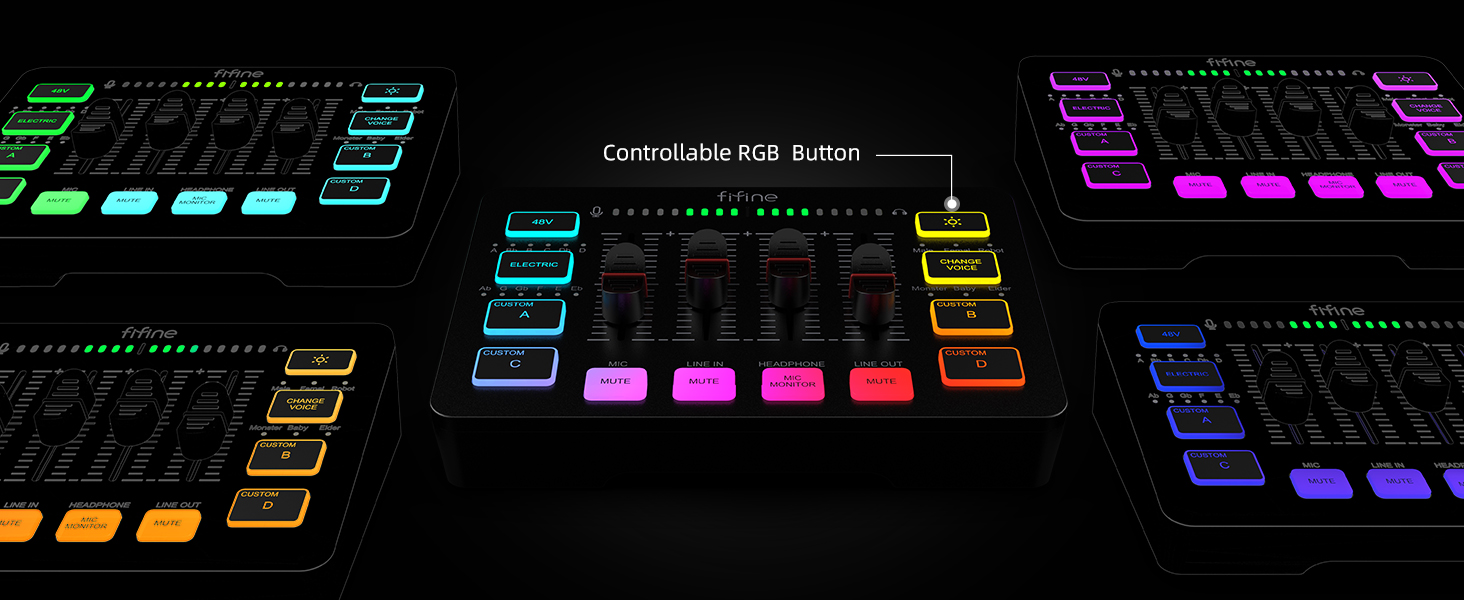
Multiple colors can be chosen for adding up atmosphere.

Set customized sound effect as atmosphere supplement needed.

6 kinds of voice mode meet more interaction requirements.

Convert and gain more sound tones.

Eliminates additional 48V phantom power requirements when using condenser mic.
1 Five Kinds Optional RGB 2 Customized Button 3 Voice Change 4 Auto Tune 5 48V Phantom Power

For Game Victory
Perform more dynamic elements to your gaming sessions.

For Live Broadcast
Deliver more realistic sound to your audience.

For Gaming Voice
Add more entertainment to your gaming squad up.

For Video Creation
Multiple functions provide more versatility in video editing.
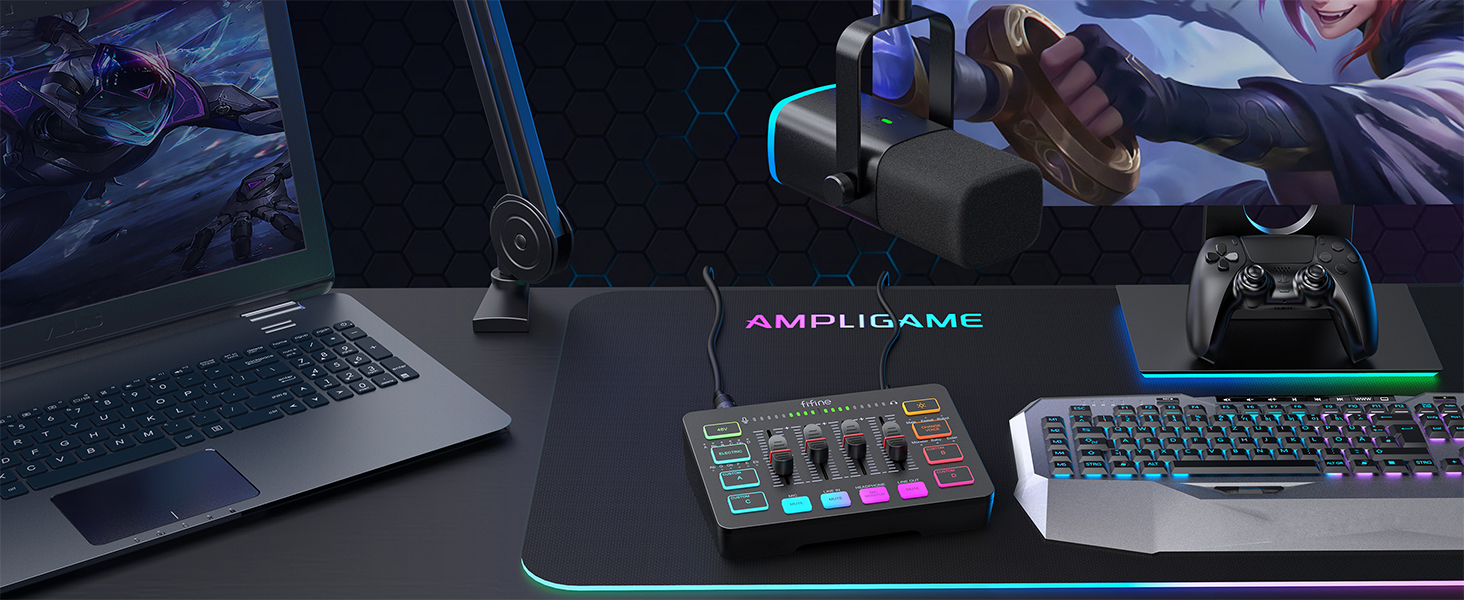
For Gaming Aura
Optional RGB create unique live streaming or gaming zone.
Audio Recording Setup
Add to Cart
Add to Cart
Add to Cart
Add to Cart
Add to Cart
Add to Cart
Add to Cart
Customer Reviews
4.3 out of 5 stars
2,282
4.6 out of 5 stars
150
4.3 out of 5 stars
2,282
4.1 out of 5 stars
173
4.1 out of 5 stars
40
4.5 out of 5 stars
1,775
4.3 out of 5 stars
1,362
Price
$49.99$49.99
$89.99$89.99
$51.99$51.99
$54.99$54.99
$79.99$79.99
$23.99$23.99
$23.99$23.99
Product Item
Audio Mixer
Audio Mixer+XLR/USB Mic
Audio Mixer
Audio Interface
Audio Interfac+XLR Dynamic Mic
Headphones Amplifier
Line Mixer
Features
Individual Channels Control
Individual Channels Control
Individual Channels Control
Mic Input, Instrument Input
Mic Input, Instrument Input
Stereo Audio Quality
Stereo/Mono Operation
Specials
Volume Fader, Controllable RGB
Volume Fader, Controllable RGB
Volume Fader, Controllable RGB
Audio Gain Indicator
Audio Gain Indicator
Compact Portable, Low Noise
Compact Format, Low Noise
Function of Mixer
48V Phantom Power/Mute/Monitor
48V Phantom Power/Mute/Monitor
48V Phantom Power/Mute/Monitor
48V Phantom Power/Monitor
48V Phantom Power/Monitor
Individual Level Vol. Control
Individual Level Vol. Control
More Function of Mixer
Customized Sound, Voice Change
Customized Sound, Voice Change
Customized Sound, Voice Change
Gain Knob/Vol. Knob
Gain Knob/Vol. Knob
LED Indicator
LED Indicator
Uses
Game Voice, Live Streaming
Game Voice, Live Streaming
Game Voice, Live Streaming
Instrument Recording, Podcast
Instrument Recording, Podcast
Monitoring Tracking, Live Use
Audio Sources Blending
Widely Uses
Audio Recording, Entertainment
Audio Recording, Entertainment
Audio Recording, Entertainment
Music Creation, Play and Sing
Music Creation, Play and Sing
TV Listen, Studio/Stage
Instrument/Audio Mixing
Compatibility of Mixer
Computer,XLR/1/4’’ Mic,Phone
Computer,XLR/1/4’’ Mic,Phone
Computer,XLR/1/4’’ Mic,Phone
XLR/1/4’’ Mic/Guitar/Bass
XLR/1/4’’ Mic/Guitar/Bass
Speaker, Headphones
Microphone, Guitar
Widely Compatibility of Mixer
Headset,Speaker,Headphone
Headset,Speaker,Headphone
Headset,Speaker,Headphone
Computer,Speaker,Headphones
Computer,Speaker,Headphones
Television
Bass, Keyboard
Can I adjust the mic gain by using this audio mixer?
Sure! The audio mixer comes with mic volume fader. You can push the fader gradually from the zero until desired loudness depending on your mic gain.
When do I need to turn on the 48V phantom power?
The mixer offers 48V phantom power for XLR condenser mic. Check the mic’s specs. Press “48V” button to turn on (in white light) if needed. Turn it off if not needed to avoid damage or noise. Phantom power does not enhance mic volume.
Can I use the audio mixer with a condenser mic or dynamic mic?
Yes, this audio interface has XLR input for condenser mic or dynamic mic. Just remember to switch to “Dynamic” or “Condenser” according to the element of your mic by using the switch beside the XLR input to minimize noise.
What headphones can I use with this audio mixer?
It is suggested to use 3.5mm wired headphones (TRS or TRRS) whose impedance is 32 or 64 ohms. Like Fifine H8 (ASIN: B0B6BPVS3Z). Please note that the MIC MONITOR button is turned on and HEADPHONE channel volume not to zero during monitoring.
Can I listen to my voice while recording on a Windows computer?
Yes. Just make sure that the mixer is set as the output and input device of the computer, then check the box “Listen to this device” from the sound setting, and turn on the MIC MONITOR button on the mixer. (MIC MONITOR button in white means on)
[XLR Mic Input] One XLR microphone input interface is set on the gaming audio mixer, which is great to up your audio quality with your XLR setup. The XLR mixer is a stepping stone to upgrade your live streaming. Audio mixer offered built-in 48V phantom power which opens up more choices for mics. Directly use it with your condenser microphone but do not solve added peripherals. (NOT available for USB mic)
[Individual Channel Control] Gaming audio mixer for one mic recording with smooth volume slider fader take your streaming recording to a whole new level with full pleasure. Four independent channels set on the DJ mixer give audio volume of the MICROPHONE, LINE IN, HEADPHONE, and LINE OUT channels individual control. Configurable on the PC audio mixer instead of just operating on your game or streaming software.
[Mute and Monitor] The front mute and monitor buttons but not at the back, make it easier to get the audio interface use. Ability to mute audio, the audio mixer for streaming prevents background noise from damaging your live broadcast. Real-time feedback between speaking and hearing will not distract your attention, which encourage you to speak more confidently. The sturdy-built control button allow you to operate freely and easily during live streaming.
[Sound Effects] The computer sound mixer supports four pre-recorded customized button that can be recorded and activated at the press of button to post production. 6 kinds of voice changing modes change your output style. 12 auto tune changes the tone of your voice. The podcast mixer being able to add different and fun effects is a huge bonus for your streaming or game voice.
[Controllable Vibrant RGB] RGB button on the audio mixer DJ meets different live streaming themes. Lights on the video mixer is vibrant but not harsh on your eyes. Flowing or frozen RGB color rotation in a decent pace presents a greatly strong impression as a “light show” to your audience. Even a streaming equipment accessory will not be dull looking when video production.
[Easy Use for More Scenes] The streamer setup mixer features easy and intuitive audio port to support two PC settings or audio mixing, able to physically balance music, game or audio settings. Plug ‘n play solution works well with Mac OS/Windows. The computer DJ mixer for beginners brings breadth to live streaming on OBS, online chat on Twitch, Youtube/Tiktok video creation. The audio mixer is set with two input and two output interface (Mic and Line in, Headphones and Line out) and a headset interface.
Tips: 1.) USB-C to USB-A/C cable used to connect mixer and computer via Type-C interface on the mixer. 3.5mm to 3.5mm audio cable used to connect mixer and 3.5mm audio device (like phone or tablet) via LINE IN on the mixer 2.) XLR cable NOT included. 3.) Input Interface: Mic, LINE IN and Headset. 4.) Output Interface: Headphones, LINE OUT and Headset.
Customers say
Customers find the audio mixing console offers good value for the price. It works well and is easy to use for beginners. They appreciate its build quality and attractive looks. However, some customers have issues with functionality and differing opinions on sound quality and voice change capabilities.
AI-generated from the text of customer reviews
10 reviews for FIFINE Gaming Audio Mixer, Streaming RGB PC Mixer with XLR Microphone Interface, Individual Control, Volume Fader, Mute Button, 48V Phantom Power, for Podcast/Recording/Vocal/Game Voice-AmpliGame SC3
Add a review
Related Products


$49.99
Griz –
I love this little mixer, it’s one of the go-to tools in my studio.
This mixer is perfect for putting on your desk and controlling speakers and headphones mixing multiple inputs. It’s got a lot of tricks up its sleeve. First, it’s a great audio interface. You can plug the usb into a computer and play sound out through this mixer into speakers or headphones. Second, it’s got a mic preamp on it that supplies phantom power. That means if you’re doing podcasts or the like, you can literally use any mic you want. Now granted, the mic preamp on this inexpensive unit is not going to be the best in the world, but if you want to move into the realm of pro audio, just put another zero on the end of everything you buy. The mic pre is fine for the money. I don’t use the lights or the voice changers, or the other bells and whistles, but they’re definitely fun and could be used artistically.
The one caveat for this isn’t really an issue with the product but more the use you put it to; it is also the reason I gave this unit three stars for beginners. This is strictly for audio inputs, so you can attach a headset with mic, but it has to be the old style with a four conductor 1/8″ phone plug. Far as I can tell, there’s no way to use a USB or bluetooth device. However, you shouldn’t need to. Those can be plugged into you PC or tablet directly, but then it becomes an issue of learning how to route the sound in Windows or Android to achieve your sound goals, and it depends heavily on what platform you’re using for streaming or recording as to whether you can get the config you need in this way. I use OBS, which provides ultimate flexibility for audio and video, but there are simpler systems out there.
Then there’s the XLR jack. That’s the round three conductor jack on the back. You can also plug a 1/4″ TRS phone plug into it. There are, broadly, two kinds of mics, condenser and dynamic. They act differently and have different needs. This jack takes something with a very low signal and puts it through the mic preamp to produce a line level signal (which is the level a “line in” jack expects.) The mics and the cables are generally sold separately and there are further complications as well. But…if you are the podcaster that needs that visual setup on your video with the Shure SM7b on an arm in front of you, this is the cheapest way to get there that produces an adequate result. If you are that person though, for a few dollars more, please consider giving some love to the venerable EV RE-20 mic that was the standard for voice work decades before Shure took an SM57 capsule and threw it into an unnecessarily large housing to compete with the visual ubiquity of the RE-20.
Phil Salvo –
Elevate Your Gaming Experience with the FIFINE Gaming Audio Mixer
As an avid gamer, I recently added the FIFINE Gaming Audio Mixer to my setup, and it has truly transformed my gaming experience. This feature-packed mixer offers a host of benefits that enhance audio quality, provide individual control, and add a touch of vibrant RGB lighting for an immersive gaming session.
One of the standout features of the FIFINE Gaming Audio Mixer is its XLR microphone interface. This interface allows me to connect my professional-grade microphone effortlessly, ensuring crystal-clear audio for in-game chats and streaming. The XLR input preserves the integrity of my microphone’s sound, resulting in studio-like quality and eliminating any background noise or distortion.
Individual control is another fantastic aspect of this mixer. The FIFINE Gaming Audio Mixer provides separate volume knobs for microphone and game audio, allowing me to fine-tune the levels based on my preferences. This level of customization ensures that my voice is heard clearly without compromising the in-game audio experience.
The RGB lighting feature adds a visually appealing touch to my gaming setup. The vibrant RGB lights on the FIFINE Gaming Audio Mixer create an ambient atmosphere that syncs with the game’s intensity. The ability to control the lighting effects and colors further adds a personal touch, creating a captivating environment that enhances the gaming immersion.
Furthermore, the build quality of the FIFINE Gaming Audio Mixer is robust and durable. The mixer feels solid and well-built, making it a reliable addition to any gaming setup. The buttons and knobs have a satisfying click, and the overall design is sleek and modern, adding a professional look to my gaming space.
Setting up the FIFINE Gaming Audio Mixer was a breeze. The included documentation and intuitive interface made it easy to connect the mixer to my PC and adjust the settings accordingly. The mixer is also compatible with various gaming platforms, ensuring seamless integration with consoles and PCs.
In terms of performance, the FIFINE Gaming Audio Mixer delivers exceptional audio quality and control. I noticed a significant improvement in the clarity of my microphone audio, resulting in more engaging streams and efficient in-game communication. The individual control knobs allow me to balance the audio levels in real-time, preventing any sudden volume spikes or drops.
Overall, I highly recommend the FIFINE Gaming Audio Mixer to gamers and streamers looking for an all-in-one solution to enhance their audio experience. With its XLR microphone interface, individual control, and captivating RGB lighting, this mixer takes gaming audio to new heights. Prepare to be immersed in high-quality sound and create an ambiance that elevates your gaming sessions to the next level.
JennyCï½ –
Great!
The Fifine SC3 audio mixer is a fantastic budget-friendly option for content creators and streamers. Its compact, sturdy design layout makes it easy to use. The sound quality is solid, with decent controls and versatile input options, including USB and Bluetooth. While the preamps can introduce slight noise at higher gains, itâs a minor drawback for the price. Overall, itâs a great value for enhancing audio on a budget.
Oliver –
Amazing value – decent quality
If you are looking for a highend audio interface, this is not it. If you are looking for an inexpensive interface, this has an amazing feature set. The custom sounds are nice. having dedicated mic in, line/aux in, audio out, and headphone ports.. each with its own mute and fader (volume control) makes this a great any to any mixer. Even if you don’t use all the features, it’s quite handy. I can tell when on my headphones that the audio quality is not the best, but it’s adequate for gaming and even live production use. Can’t beat the value.
jason –
Works great for the most part
It works great for my AT2020. I would not buy this for the programable buttons however. While they do work it’s to easy to accidentally wipe the button. And the voice changer modes are funny once or twice but get old fast. As for the mixer the sliders are fine and mixing 2 sources is adequate. Overall there are probably better choices but for the money this is great.
Ezequiel Ramos Lopez –
Ãtil para controlar distintas entradas de audio y controlar el sonido de distintos dispositivos y agregar efectos tanto incluidos como personalizados
Wellington Simão –
Produto impecável! A mesa mixer Fine AC3 original oferece uma qualidade de áudio excepcional, com controles precisos e uma construção sólida. O design é moderno e funcional, facilitando o uso em gravações e performances ao vivo. Estou extremamente satisfeito com a compra e recomendo a quem busca um equipamento de alta qualidade.
Safi –
I highly recommend this mixer.
ibrahim semih yavuz –
Bence bu fiyata ihtiyacınız varsa düÅünmeden alın derim iÅini fazlasıyla yapıyor.
راÙا٠سÙÙ٠ا٠–
اÙÙ Ùسر ٠٠تاز Ùأداء جÙد ÙاÙ٠صÙت اÙبÙت ٠ا ÙضبطÙا ابد