

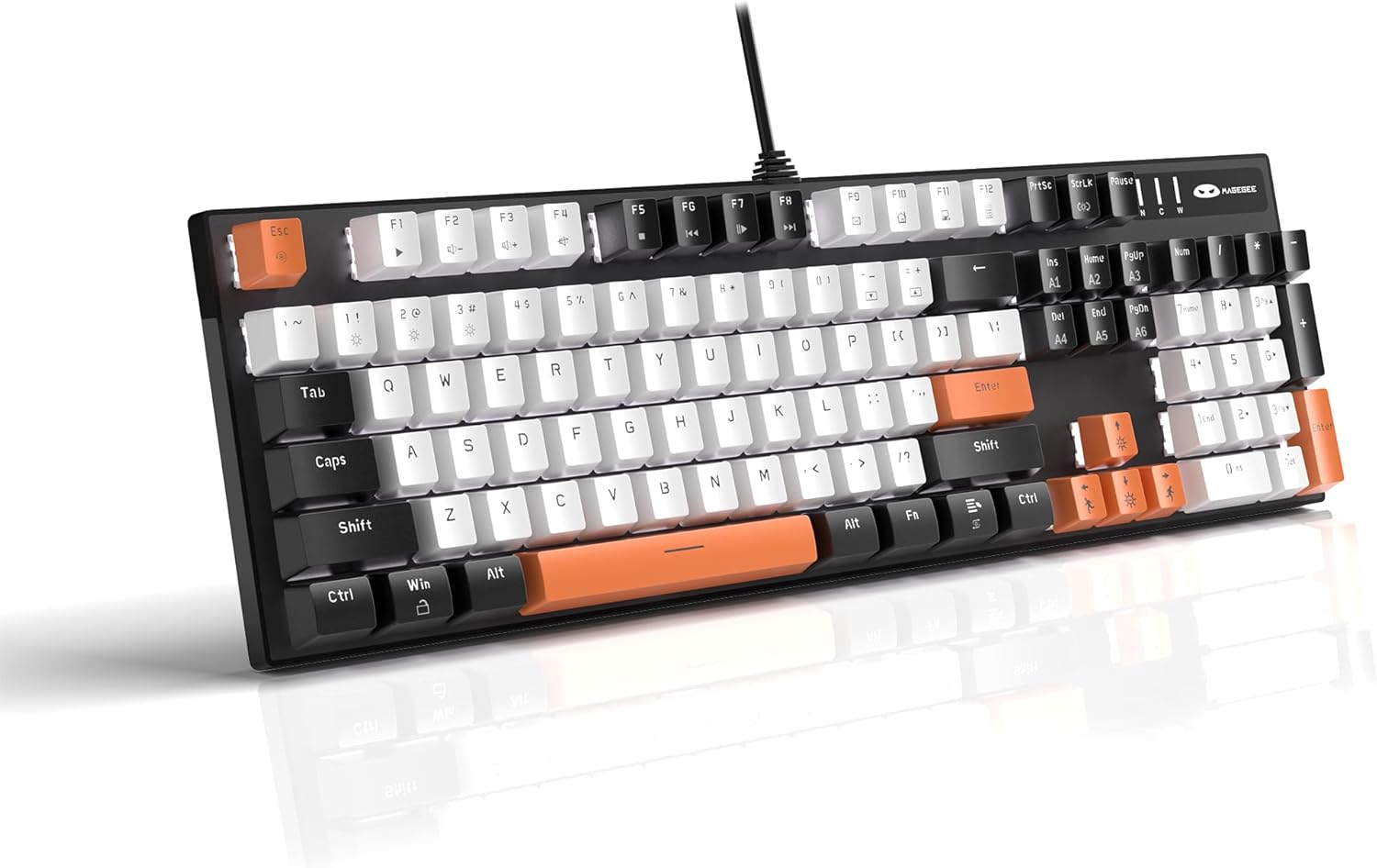
MageGee Mechanical Gaming Keyboard, 104 Keys White Backlit Keyboard with Yellow Switches, USB Wired Mechanical Computer Keyboard for Laptop, Desktop, PC Gamers (Black & White)
Original price was: $51.99.$39.99Current price is: $39.99.


Price: $51.99 - $39.99
(as of Jan 13, 2025 20:06:08 UTC – Details)
Product Description


 Linear Yellow Switches
The yellow switches are easier to trigger and have less clicking sound than blue switches, suitable for mechanical keyboard enthusiasts to get started.
 Double-Shot Keycaps
They have good wear resistance, and do not fade.
 Comfortable Typing Feel
Two-step keyboard legs allow you to choose different tilt angles.

WHITE BACKLIT GAMING KEYBOARD: MageGee gaming keyboard is designed with single white lighting effect, 20 different backlit modes, 5 backlight brightness levels and 5 backlit speed, creating a cool and colorful game atmosphere to enhance the excitement of the game. The backlight can be easily turned off. NOTE: THE WHITE & PINK / WHITE & BLUE KEYBOARDS COME WITH AN EXTRA SET OF KEYCAPS IN THE NEGATIVE COLOR SCHEME. OTHER COLOR KEYBOARDS COME WITH 16 KEYCAPS.
MECHANICAL YELLOW SWITCHES: Excellent performance with an expected lifespan of 50 million times. Linear yellow switches are sensitive to trigger, less audible and require less force to press, making it smoother to use. Floating keys design, easy to clean the dust.
DESIGNED FOR COMFORT: The mechanical keyboard adopts premium metal panel construction to make it stable. Ergonomic key layout fits your fingers perfectly and reduces typing fatigue. Two-step keyboard feet allow you to set your keyboard up at 3 different tilt angles. No driver needed, just plug and play.
ANTI GHOSTING KEYBOARD: All keys have individual switches with full n-key rollover, which provides faster response and better keystroke feeling. 104 mechanical keys are conflict free, allowing you to press or hold multiple keys simultaneously. 12 multimedia combination keys on the top of the keyboard (FN+ F1~F12) offer quick operations, great for gaming and office.
WIDE COMPATIBILITY: The USB wired gaming keyboard works well with computer, PC, laptop, compatible with Windows 2000/Vista/Win7/Win8/Win10/MAC/Linux.
Customers say
Customers appreciate the keyboard’s appearance and color scheme. They like the backlit red keys and lighting options. However, some have differing opinions on the keyboard functionality, build quality, value for money, and sound quality.
AI-generated from the text of customer reviews
9 reviews for MageGee Mechanical Gaming Keyboard, 104 Keys White Backlit Keyboard with Yellow Switches, USB Wired Mechanical Computer Keyboard for Laptop, Desktop, PC Gamers (Black & White)
Add a review
Related Products


Original price was: $51.99.$39.99Current price is: $39.99.
Chuck Phillips –
Great quality
The pink keys are darker than I expected but that goes for every product online. The typing loudness is higher than expected also. It’s high pitched clicking rather then low but the keys are higher up and feel nice with typing. I also remember people before mentioning keys not working when you type them, I checked every key individually and wrote some, they all work great. ALSO it comes with a key remover to make customizing you color pattern effortless. And when you type the light pattern ripples with each key. The light is kinda bright also but it looks nice and it’s VERY heavy feeling. Not in a bad way but in a way where it feels like very good quality! The base is made of some type of mental and it feels sturdy. I love this keyboard alot! The only thing is there is a tiny dot where they missed the paint or something but it’s not noticeable and smaller then a spec which I’ll include a pic of. Really think this is a steal for the price!
Josiah wofford –
Absolutely amazing
This keyboard is an absolute dream for typing enthusiasts. The moment I unboxed it, I was captivated by its sleek design and the promise of a tactile typing experience. And it delivers.The keys offer a satisfyingly crisp and responsive feel, with a deep, resonant sound thatâs pure auditory bliss. The weight of the keyboard feels substantial without being overly heavy, providing excellent stability during intense typing sessions.One thing that truly sets this keyboard apart is its customizable lighting. The effects are mesmerizing.While the keyboard is exceptional out of the box, I did take it a step further by lubing the stabilizers. This process might seem daunting for beginners, but itâs worth the effort. A little bit of lubricant on those larger keys dramatically reduces rattle and creates a smoother typing experience.Overall, this mechanical keyboard is a masterpiece of engineering and design. It’s more than just a typing tool; it’s an instrument that elevates your computing experience.**Tip:** For those willing to invest a little extra time, lubing the stabilizers will transform your keyboard from excellent to extraordinary.
Bryn –
KAWAII good first keyboard!
I’ve had this keyboard since Dec 22nd 2021.⢠To sum it up I just wanted a kawaii pink and white keyboard and I loved that it had interchangeable keycaps (which I love by the way what a deal)!⢠However I noticed the interchangeable keycaps aren’t the same. Idk it’s probably in the description and I’m probably blind and didn’t read it but they’re not uniform. Idk how to describe it but yeah. Other than that I love it has diff keycaps.⢠MY ONLY ISSUE with this keyboard is that when I’m playing League of Legends (AND ONLY THIS GAME out of all the games I play) the keyboard stops working during the game. This is hard to describe as it does not shut off but I have to CTRL+ESC my game to the home screen and then reclick my game and it’s working fine again but in a game like that it’s so crucial to never have to do that it’s always when I’m engaging it’s annoying. But other than that the only other time it “stops working” is when I shut off my pc and start it up. I have to unplug it and replug it and sometimes I have to do that multiple times before it works.⢠Besides my one problem of how it stops working on only one game and sometimes when I restart my pc I have to unplug and replug it… ITS A GREAT STARTER KEEBI love the rgb and options for it and it’s very click which I used to love before I just built my own linear switch keeb. ð¥°
BigFan –
Definite Reccomend!
I grew up with the classic IBM and later on, Chicony keyboards. However, as time went on, I migrated to the common membrane keyboard of today. I was looking for something new, just because I’d worn down the letters on my Logitech K120. I decided I wanted something with a backlight, because I tend to write and game in the nighttime. Most inexpensive lit keyboards today have a multi-color rainbow light set, that just doesn’t appeal to me. I found this, read the reviews, and figured I would give it a chance.100% best decision I’ve made in a while. Not only is it aesthetically pleasing, the tactile and auditory feedback have got me excited about typing again. What’s more, because I can FEEL the keypresses, I believe I have improved my typing. Over the last few years, I have had the experience of transposing letters while typing, because my right hand is naturally stronger than my left, and my left handed keystrokes lagged. This is greatly improved because I can feel the key depress on the left before I hit the key under my right hand. I can’t believe this actually helped!Overall, I’m very impressed with the build quality, it is probably five or six times as heavy as my old keyboard, it doesn’t slide around the table, and it just feels solid. The riser feet in the back even feel strong and I’m not afraid to open and close them as much as I like. These are usually cheap press-fit plastic and I have broken the feet off many keyboards in my day. The cable is actually in a cloth braid, very shi shi.The light pattern feature is nice, but I really only want the basic backlight, and dimming, which this does no problem. I wish the logo did not continually blink. It’s annoying, and I may tape over it because it doesn’t seem to have a toggle.I purchased this at $36 and I think it is a very very good deal at that price. I feel like my computer is a computer again. Very few upgrades will improve your system as much and as cheaply as this keyboard.
Tyler –
Clicky-Clacky keyboards make me happy. This keyboard makes me happy. I purchased the Red Switch variant. The keyboard comes with extra keys in complimenting colours. While you don’t get a full set of keys, common keys like WASD, Space, Esc, Shift, and Enter were all included. Swapping keys was easy with the included tool.This keyboard is an excellent value for the price. It feels good in hand, and the construction feels more solid than I was expecting. The different light presets are fun, with my favourite being the pebble-in-a-pond ripple effect.While I am a relatively strong typer, I find I make a few more mistakes than normal, which may be due to the height or travel distance of the keys. My large hands will sometimes grab a nearby key on the downstroke and add a letter.Overall this is a good quality keyboard at a good price and is worth consideration.
Roberto R –
Al abrir el empaque tenÃa varias teclas fuera de lugar y la mayorÃa estaban mal colocadas. Al conectarlo, 3 teclas no sirvieron. Lo tuve que devolver
Akshayamstories –
Bought this after comparing with several similar brands. Happy with my purchase so far. The sound feedback is quite satisfactory.They give you alternate keys (for few of them) in red so you can swap if you want.Read the instructions booklet for color pattern changing tips.Cons:Just 2 for now..1. Would have liked an option to turn off lights completely as sometimes you need to soothe your eyes2. It doesn’t remember the color setting. Every time I boot up my PC, the keyboard reverts to the original pattern.
Nagendra Chaturvedi –
I just love everything about this keyboard. Its fast and accurate and really cool. I have to now use it for long enough to see the reliability of the keyboard. I just hope this keyboard lasts long enough. I have nothing to complain about.Typing on this keyboard is pure bliss. I just regret for not getting this earlier. Better late than never. Just wondering how to turn off the animation of the keyboard. I guess, it gets annoying after a while especially when you are getting something done seriously.
Soham.G –
amazing jus buyyyyð©µð¤