

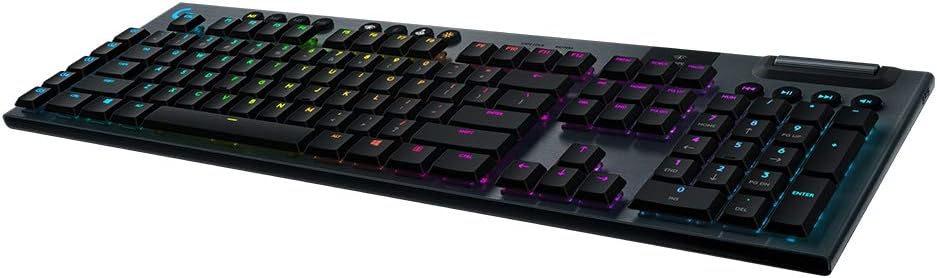
NPET K10 Wired Gaming Keyboard, LED Backlit, Spill-Resistant Design, Multimedia Keys, Quiet Silent USB Membrane Keyboard for Desktop, Computer, PC (Black)
$24.99


Price: $24.99
(as of Jan 11, 2025 06:56:18 UTC – Details)
Product Description


Add to Cart
Add to Cart
Add to Cart
Add to Cart
Customer Reviews
4.6 out of 5 stars
1,527
4.6 out of 5 stars
1,527
4.7 out of 5 stars
99
4.4 out of 5 stars
22,530
4.4 out of 5 stars
22,530
4.4 out of 5 stars
22,530
Price
$26.99$26.99 $16.99$16.99
— $27.99$27.99 $44.99$44.99
—
Wired/Wireless
Wired Wired No Wired Wireless(2.4G) Wireless(2.4G)
Key Type
Membrane Membrane Micro-textured Cloth Membrane Membrane Membrane
Lighting
RGB No Backlit No Backlit RGB RGB RGB
Size
Full Size (104 Keys) Full Size (104 Keys) 35×17×1.18 inches Full Size (104 Keys) Full Size (104 Keys) Full Size (114 Keys)
Anti-ghosting Keys
26 Keys No No 26 Keys 26 Keys 26 Keys
Media controls
✓
✓
✓
✓
✓
✓
IP32 Spill Resistance: With durable construction that repels liquids and dirt for easy cleanup. Capable of withstanding accidental spills. Adjustable feet let you set your keyboard to the ideal position, so it’s comfortable to use even during the longest gaming sessions.
Durable Full-Sized Gaming Keyboard: Made with highly-resistant ABS plastic and metal base for longevity, and durability. With a mechanical brown switch gaming feeling that delivers precise tactile feedback and responsiveness.
10-Zone RGB Lighting: With 16.8 million colors and a suite of effects to choose from, press FN+M1~M5 to personalize the keyboard and get access to dynamic lighting effects.
Dedicated Media Control & Anti Ghosting: It has 26 conflict-free that keep you in control when you press multiple gaming keys simultaneously. 13 dedicated media keys can control your background track without switching out of your game.
Wear Resistant Doubleshot ABS Keycaps: The UV coating ensures more fade-resistant legends and greater protection against wear and tear from frequent use. The ergonomic stair-up keycap design brings maximum comfort keeping your hand in a natural state to minimize hand fatigue.
Customers say
Customers appreciate the keyboard’s functionality, color options, and value for money. They find it works well, has an impressive array of colors, and offers a lot of features for its price. Many are satisfied with the feel of the keyboard. However, some have differing opinions on key functionality, brightness, build quality, and noise level.
AI-generated from the text of customer reviews
7 reviews for NPET K10 Wired Gaming Keyboard, LED Backlit, Spill-Resistant Design, Multimedia Keys, Quiet Silent USB Membrane Keyboard for Desktop, Computer, PC (Black)
Add a review
Related Products




$24.99
Scrambyvision –
Spill Resistant!
I’ve wasted so much money on expensive keyboards just to accidentally spill a drink on them and ruin them. As a gamer/streamer, I sometimes get caught up in the moment and lose track of my drink and/or hands and the next thing you know, your keyboard is soaked. With this keyboard, it’s not an issue. I have actually spilled multiple sticky sugary drinks on it and it keeps pluggin’ away. I have not gone so far as to intentionally spill large amounts of liquid or submerge it to test it. My experience is based on actually accidentally knocking over a drink and spilling a small-ish amount of liquid.The feel of the keyboard is good. It’s much quieter then a mechanical keyboard, but louder then a membrane one. The keys have a nice click with decent finger feedback. I’m a gamer, but not a professional by any means, so I don’t need a super expensive keyboard with Cherry Switches, etc. This style works great for me.The only downside is that in the time I have had this keyboard, the paint on the S, A and D keys have worn off and the Left Shift, Space Bar, C and W keys are wearing off too. But the function is still 100%!The RGB is limited to Four modes, 3 different sets of static rainbow colors and off.Overall, a solid keyboard at a great price. I liked it so much I bought a second one for my second computer. Highly recommend!
Amy Thach –
Gaming Keyboard
what I like about this product is that one of the most significant advantages of the NPET K10 is its affordability. It offers a lot of features for its price, making it a popular choice among budget-conscious gamers. The keyboard features rainbow LED backlighting, which enhances its visual appeal. I appreciate the vibrant colors, which can be customized or set to different modes such as breathing or static. Despite its low price, the keyboard is noted for its durability. Itâs made with a spill-resistant design, which helps protect it from accidental liquid spills, a common issue during long gaming sessions. The keys are generally quiet and responsive, making it suitable for both gaming and typing. The membrane keys provide a decent tactile feel, which I find comfortable for extended use. Also, The NPET K10 features 26 anti-ghosting keys, allowing multiple keys to be pressed simultaneously without conflict. This is especially beneficial in gaming scenarios where quick, multi-key inputs are necessary. Lastly It includes dedicated multimedia keys that allow me to control music, volume, and other media functions directly from the keyboard. This adds convenience for both gaming and everyday use.
my_two_centz –
For a budget price a good keyboard that both a general purpose or office and gamers should like.
NPET K10 Backlit Gaming Keyboard, Black, Purchased 10/22, Reviewed 10/22/2022I purchased the K10 budget membrane faux mechanical keyboard. I was searching for a backup budget keyboard because my main PC keyboard gave up the ghost after 7 years. I needed a backup so I could continue working from home, while I waited for the new replacement keyboard to arrive next week.1st impression: when I grabbed the Amazon package at my front door, I thought, “Wow, this is a heavy keyboard.” Opening the package, I was impressed with its mechanical keyboard look, and it looked like a quality keyboard but at a budget price of $20. Of course, as soon as I set the K10 on the desk, I started testing the keypress feedback, noise, and how typing felt. Key travel felt a tiny bit stiff but still good for this price point. Any keying noise was surprisingly low.Plugging in the K10’s braided USB cable, the first con is revealed: the cable is too short at 67″ long, another 6 to 12 inches would be better. The board’s RGB lights lit up, and my Windows 10 Pro PC had no issues with the new K10. The next thing I noticed, which is not necessarily a negative, is that the keys are smaller than typical full-sized keyboard keys. [Update “edit” 4/12/23: I later compared my full size keyboard and the new replacement keyboard I had ordered, and the keypad surface area is the same. (What was different was the K10’s top surface has a slightly deeper concave indentation, so the feel is slightly different.)] I am a touch typist capable of 60+wpm so the size of the keypad felt a little off; however, with use, it would feel fine. With nearly 40 years of using and owning many computers and their keyboards, touch typing resulted in some initial missed direct keypad hits, but adjusting was easy. One additional observation: right after startup, a distinct odor was coming from the board, sort of an electrical and plastic overheating smell (note, I had the RGB lights off). After about 20 minutes, it faded, and I haven’t noticed it since. [edit 4/12/23 I have been using nearly 5 months most days on my Hosting Music pc and no issues at all.]What does a touch typist think of the key typing on the K10?⢠Sore fingers. My fingers were tired after 1 hour, and after 2 hours, they were sore. The problem is how I type, pushing down slightly harder than the average typist, who maybe learned to type on a mushy membrane keyboard. I learned on IBM Selectrics, which required a slightly heavier key press. The keystroke travel is higher or longer on the floating keys of the K10 than on most keyboards at 3.6mm, so I have to push further down for it to bottom out the key travel, and if I am typing hard and fast, my fingers are sore. I tested where the action point in the key travel seemed to be; it’s either halfway or slightly higher. So if I type with a lighter keystroke and try to avoid the key bottoming out, there should be less soreness. A lighter touch is possible, and the keys feel good as you type along and shouldn’t cause sore fingers. I would like the stroke to be a little softer or less stiff. [edit 4/12/23  After some practice, I haven’t had any soreness issues.]⢠“Noise,” a comment about YouTube reviewers Any YT review doing their keyboard review on a wooden desk or a hard desk surface with no large mouse pad that cushions and accommodates both the keyboard and mouse is only testing the keyboard’s resonance with the hard desk, and that is likely 2x or 3x louder than typing with a keyboard on a desk size keyboard – mouse pad. Typing noise on the K10 sitting on a 32″ x 12″ x 2-3mm thick pad was very low.â¢No movement, the K10 on my full-size keyboard/mouse pad does not slide or move at all. The K10’s weight and three rubber grip pads on the front bottom of the chassis, plus the two pull-out feet, securely hold the board with no movement.⢠Key wobble was not noticeable, very slight on the space bar.⢠RGB lights, are not my thing, but if there was an RGB selection that lit only the key letters and numbers, that would be ideal. However, it’s not an option.I have about 27 days to decide if I should keep the K10 or return it to Amazon. I’m pretty sure it’s a keeper.[Update: 4/12/23, I kept the K10 and use it almost daily. For the price and for my type of usage, I would recommend the K10. Would it be a good gaming keyboard? I do play games, I tried it for one game, and it was fine, I have never owned an expensive gaming board or typed on one, so I cannot compare. ]
Splash –
Solid budget level setup
Was looking for a cheap and easy setup for a secondary PC that children would be using for general web browsing, homework, and occasional gaming. This combo fit the bill and then some. The feel of the keyboard is smooth and responsive with functional feedback and resistance in the keys. The only downside is the audible noise you get from keystrokes.The Mouse is pleasantly smooth with good button engagement and response. The DPI switch is a very nice addition and performs flawlessly when needed.The winning tick for this combo is the RGB quality at this price point. The keyboard provides an impressive array of colors that are not overly bright or distracting, but not so muted that they regress out of sight. The Mouse has a nice fading array of simplistic lines that adds to the ambiance of the lighting package.Overall, I think it’s a great package for light general use. The RGB features really add to the value and provide an impressive overall package for the price.
AndresG –
This keyboard worked great for three days then started to log and lose power really fast. Wouldnât charge properly after that. It was never dropped or damaged in any way
Jod Cadieux –
exactly as advertised
Damodar –
I bought this keybaord in JUne 2022. I bought this keeping in mind that it is rechargeable. This keyboard worked quote well untill December 2022 and aftre which does not charge and stopped working. I sent message to the seller but no response. I serously feel it’s was a sheer waste of money.