

Plugable 7-in-1 USB C Hub Multiport Adapter with Ethernet Driverless Compatibility with Mac, Windows, iPhone 15, Chromebook, USB4, Thunderbolt, 100W Charging, Ethernet, 4K60Hz HDMI, 2X USB, SD/microSD
Original price was: $59.99.$39.95Current price is: $39.95.



Price: $59.99 - $39.95
(as of Jan 12, 2025 09:25:00 UTC – Details)
Product Description

The Reliable Hub That Lets You Do More With Less
Through a single connection, make space for your preferred peripherals. The Plugable 7-in-1 USB-C Hub (USBC-7IN1E) lets you connect an extra 4K HDMI monitor, two USB devices like a mouse and keyboard, wired Gigabit Ethernet, SD or microSD cards, and 87W charging.
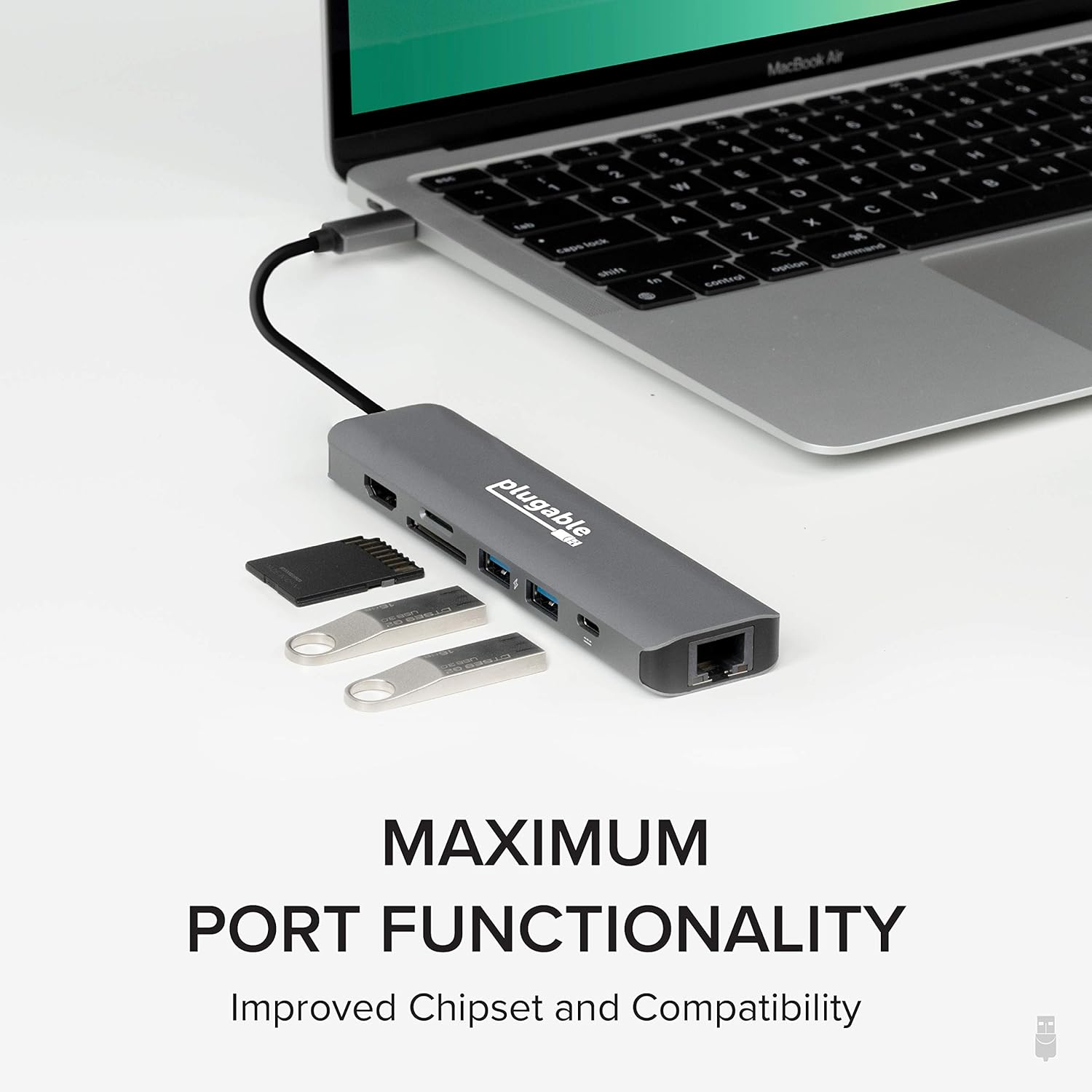
This compact and ruggedly constructed USB-C hub is engineered to fix the issues most commonly associated with USB hubs. With the latest, updated chipsets, you can expect a more reliable DisplayPort over USB-C signal, which means no more flickering screens. It also means intelligent power handling, which prevents overdrawing power. But most importantly, this hub supports consistency in port functionality so you can use all of the ports at the same time.

Charge Up
Don’t waste a USB-C port on a charger. The USBC-7IN1E has pass-through charging so you can use all of your peripherals and charge your laptop at the same time, all through one USB-C port.
Supports USB-C Power Delivery (PD) input up to 100W and can charge supported systems up to 87W.
Note: USB-C power adapter not included.

High Definition Display
You’ve got too much to do to be cooped up in a little laptop screen. Stretch out with an HDMI-equipped monitor, T.V., or projector and achieve resolutions up to 3840×2160 @ 30Hz (4K 30Hz).
For laptops that support DisplayPort 1.4, this hub supports HDMI displays at up to 4K 60Hz.
Note: Not all laptops support DisplayPort 1.4. See “Compatible Systems” below for a list of known DP 1.4 hosts. Please consult your laptop manufacturer to help determine if your system is DP 1.4 capable.
This hub will not work with DisplayPort monitors.

Let’s Connect
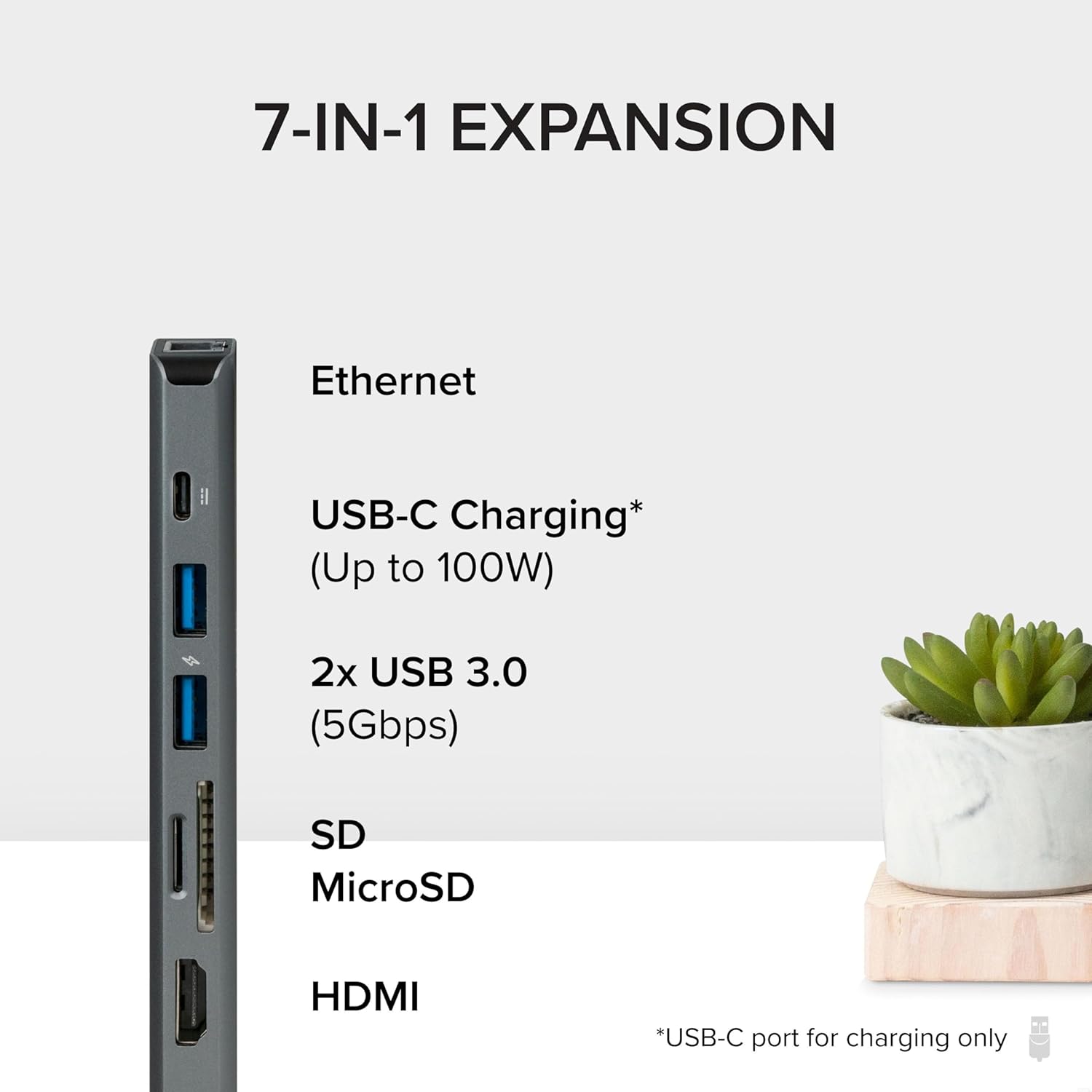
Two USB 3.0 (5Gbps data transfer speeds) ports let you connect anything from keyboards to storage devices.
SD and microSD card slots so you can quickly transfer the images and videos on your camera without actually connecting your camera.
Gigabit Ethernet port so you can connect to the world even if you can’t connect to the WiFi.

Compatibility
Compatible Systems Plug and Play installation on any Chromebook/Windows/Mac/iPhone 15/Linux hosts which support DisplayPort Alternate Mode (Alt Mode) video output functionality. Adapter has been fully tested for functionality on the 2018+ iPad Pro (mirroring only)/MacBook Air/iMac and iMac Pro/MacBook and MacBook Pro/Google Pixelbook/Dell XPS 13 & XPS 15/Lenovo Thinkpad/HP Spectre x360/Samsung DeX capable devices/Surface Laptop 3 and Surface Go/and many other systems which support USB-C DP Alt Mode. Known laptop computers which support DisplayPort 1.4 include the Surface Pro 7/Surface Laptop 3/Surface Pro X. Audio is supported on HDMI-capable TVs, projectors, and monitors with built-in speakers. Incompatible Systems Most current phones and tablets with USB-C ports do not support Alt Mode video output. ASMedia USB 3.1 controllers do not support Alt Mode video output. Most motherboards with dual USB-C/Thunderbolt 3 ports are limited to a single Alt Mode output; only one Alt Mode adapter supported per system.
Add to Cart
Add to Cart
Add to Cart
Add to Cart
Customer Reviews
4.4 out of 5 stars
448
4.4 out of 5 stars
1,442
4.2 out of 5 stars
528
4.2 out of 5 stars
185
Price
$39.95$39.95 $34.95$34.95 $29.95$29.95 $79.95$79.95
Number of USB 3.0 Ports
2 3 1 3
USB-C Charging*
Up to 87W Up to 87W Up to 60W Up to 92W
Display Output
HDMI HDMI HDMI 2x HDMI
Max Resolution
4K 60Hz* 4K 30Hz 4K 30Hz 4K 60Hz
SD/microSD Card Reader
✓
✓
–
✓
Ethernet Port
✓
– –
✓
*A separate and not included USB-C charger is required for USB-C Pass-Through Charging
*4K 60Hz is only supported on laptops which support DisplayPort 1.4
7-in-1 Expansion: Convert a single USB C or Thunderbolt port into a 7-in-1 USB-C hub featuring 2x USB 3.0 ports, 1x 4K HDMI, 1x Gigabit Ethernet port, 1x SD card reader, 1x microSD card slot, and 1x USB-C Power Delivery charging port
4K HDMI Display: Elevate your visual experience with the 4K USB-C to HDMI adapter supporting resolutions up to 4K 60Hz; the durable metal construction ensures portability
High-Speed Data and Charging: Enjoy fast 5Gbps data transfer with USB 3.0 ports, versatile SD and Micro SD card slots, and 100W USB-C pass-through charging for maximum speed (not all laptops support USB-C PD)
Reliable Performance: Utilize all ports simultaneously or individually with this Type-C Thunderbolt 3 hub offering intelligent power management to prevent power overdraw, screen flicker, or common port issues
Unlock Your Productivity: Seamlessly connect multiple devices and peripherals with this versatile 7-in-1 USB-C hub, ideal for professionals, creatives, and students alike
Customers say
Customers appreciate the multiport hub’s functionality, build quality, and compact size. They find it works well for connecting to TVs, Thunderbolt ports, and bluetooth mice. The small form factor makes it ideal for travel. The port capacity is appreciated, providing pretty much every port needed. Customers also appreciate power consumption, value for money, and portableness. However, some customers have reported issues with HDMI and Ethernet not working properly.
AI-generated from the text of customer reviews
13 reviews for Plugable 7-in-1 USB C Hub Multiport Adapter with Ethernet Driverless Compatibility with Mac, Windows, iPhone 15, Chromebook, USB4, Thunderbolt, 100W Charging, Ethernet, 4K60Hz HDMI, 2X USB, SD/microSD
Add a review
Related Products


Original price was: $59.99.$39.95Current price is: $39.95.
Ted –
It works!
TL;DR: I plugged an Apple USB-C PD power adapter into this multiport adapter, then plugged this multiport adapter into my HP laptop’s USB-C, and everything “just worked”, So, I’m very happy with how well this Plugable 7-in-1 Multiport adapter performs.However, to be as happy as me, I believe that you’ll want to make sure your laptop has Display Port 1.4 support, and if you want to abandon your laptop’s charger, then your laptop needs USB Power Delivery (PD) support and you’ll need a reliable USB-C PD power source.Details:I got this adapter to extend the USB-C port on my HP 15-eg2073cl laptop. Before buying this adapter, I tried to verify that it would work for my laptop and then find an appropriate USB-C PD power source.Regarding the laptop’s compatibility: HP is getting real sloppy on its per-model published specs, especially for club models; as a result full specs are not always entirely clear for any particular laptop from any model line. For example, HP’s spec for my laptop’s model line mentions a couple of 12th-generation Intel CPUs, but my laptop has a different 12th-generation Intel CPU. I took a chance because the model spec mentions USB Power Delivery and Display Port 1.4 support, and I was gratified that my laptop did indeed have those features.Regarding the USB-C PD power source: I had a difficult time trying to find a UL-listed charger from a reputable manufacturer that was specified to comply with USB PD and had a greater than 70W capacity. (I wanted >70W because: my laptop requires up to 45W, the Pluggable multiport adapter seems to require 13W and can also supply up to an additional 12W to its USB ports, and it’s good to leave some headroom so you’re not running the power adapter hot at its full rating.) In the end, I decided to buy an Apple 96W USB-C Power Adapter, because I figured that an Apple product would be reliable, because it’s UL listed, and because it’s specified to use the PD standard. My local Apple Store was out of stock on the 96W, so I went with the new Apple 140W USB-C Power Adapter, which uses the newer PD 3.1 standard. It’s too expensive, but it works great and I can anticipate being able to safely use it for many years.Because the Pluggable is now providing power to the laptop, I unplugged the HP-provided charger from the laptop’s power port.I didn’t have to install any drivers; the original Windows 11 release on my laptop had everything it needed to use all the Pluggable’s features.When looking for an adapter, I noticed that some people mention that multiport adapters like this run hot and indeed so does the FAQ for this adapter. The hottest spot on my Pluggable 7-in-1 runs at 107 degrees F (measured by an IR thermometer). 107 degrees can feel “quite warm” if you grab it tightly and hold it for a while, especially compared to my laptop’s typical 95 degree warmest-spot temperature, but “barely warm” would be a more apt description.I’ve tested that I can drive either a 4K and HD monitor from the adapter’s HDMI port at 60Hz. Currently I’m using a dual-monitor setup: a 4K monitor attached directly to my laptop and an HD monitor attached to the Pluggable. (I could also simultaneously use my laptop’s screen, but I don’t have the desk space, so I turned it off.)I’m also using the two USB ports for an external drive and keyboard, and they both work fine. The SD card ports also work fine.Last, I use the Ethernet port to hardwire my laptop to my network, and because I use a lot of remote desktops, the Ethernet link is always busy.I did have one issue: I used this Pluggable adapter for a week without any problems, but then the Ethernet stopped working. In order to “fix it”, I had to remove the Pluggable adapter from the laptop, then remove/restore the USB-C power from the Pluggable adapter, then restore the Pluggable adapter to the laptop. Another 1.5 weeks has passed and this problem has not recurred. Notably, around the same time, Windows updated the Realtek drivers, so I’m thinking this was a transient issue unlikely to recur.The bottom line: I’ve used various Pluggable USB serial and ethernet dongles for years, and they’ve always worked flawlessly. So far, this multiport adapter seems to be in the same high-quality camp.I’ve added this many months later: First, this adapter does not use a Realtek Ethernet chip, it uses the ASIX AX88179A. Second, my Ethernet has not failed since that one time when the Ethernet stopped working. Put simply, it has been rock solid. I contrast that to several other Realtek-based Ethernet USB adapters I own that routinely stop and need to be unplugged/replugged.
Steve Henderson –
Does everything I wanted it to
This thing is great. I got it to use my Samsung Galaxy S9 on Samsung dex because I bought a 15 dollar one that only worked on dex sometimes, andbwhen it did it lagged horribly and heated up quite a bit and this one works perfectly. No lag no stutters and it doesn’t heat up at all and with the ability to charge my phone while using it is great. I can’t say enough about how pleased I am with this USB c hub for my needs. Just to give you an idea it works for gaming. Unless the game is only optimized for touch screen play then you can use it to make the screen bigger and not strain your eyes. I have it connected to my Asus monitor and it runs smooth and is easy to connect. Thanks plugable great product.
Mountain View Elementary –
price, quality
amazing gadget
K. Pham –
Glitches at 4K 60Hz on ASUS TUF15.
Everything works great except for 4K 60Hz on an ASUS TUF15 gaming laptop. It glitches out sometimes at 60Hz. 4K 30Hz is stable, though.
NotTheDude –
Very light and portable, and durable. Excellent compatibility both Windows and Mac
Pretty much every port you need. Solid performer that packs light, and lasts forever. Works great with my HP laptop, Dell Desktop and MacBook Air m2
Amazonian –
Plugable Quality and Reliability, Perfect for Travel
Long story short, I have several Plugable products that Iâve purchased in the last 2 years and all have performed perfectly. They all work seamlessly with Windows and Apple devices.I got this usb-c hub primarily for travel and itâs been the perfect compact but very capable travel companion! On a recent business trip it was a life saver. I was paged into a conference call while in my hotel room to respond to an emergency and was able to use this hub to connect to the internet via hardwire (I always carry an Ethernet cable) and the roomâs TV to use as a monitor. The call lasted for 4 hours and the hub never lost connection or video.Later during the same trip I connected my M2 MacBook Pro for my personal project development work and gaming, again with no issues. I ended up giving this to my colleague before returning home.In fact I was actually in the process of buying a replacement Plugable hub and decided to write this review. 5 stars all the way!
AB –
Not even 65W pass through for Asus Rog Ally
Bottom line: the Ally warns that the pass through power is insufficient, and playing games drains the battery. I have a 120W charger, a 100W cable (both Anker and Iâve watched videos of it outputting 90W). The Ally doesnât have the warning nor drain the battery when using the 65W Asus charger (because itâs designed with battery bypass).
JTJersey –
Great device for the laptop traveller
Likes: Replaced three other accessories. Packs better in my laptop case and works great. Love it.Cons: None that I’ve found.
Yo Dude –
Used this to replace a adapter from my Old Mac Book Pro (Thunderbolt) with a USB C adapter that gave me USB A B C , Gigabit Ethernet, HDMI . Small footprint , and works as advertised .Actually bought a second since the 1st worked so well and using the second to travel with
Mark Benson –
I got this fir my iPad Pro (12.9â 3rd gen) to replace a previous plugable mode that had no built in Ethernet port. It does exactly what youâd expect and the Ethernet works great with iOS, including pass-thru fast charging (with an appropriate charger and USB-C cable!). Now I have one small, convenient dongle that can cope with all my on-the-go needs.The price is not insubstantial but honestly itâs worth it just to get out of Dongle Hell and just have one plug-in unit that gets everything done.The only downside I noticed with the previous model was a bit of a bottleneck if you copied from a device on the hub to a device on the hub (SD card to external SSD for e.g.) but I so far have not tested the same on this model and that also may be the iPad, not the hub.
C S Rajendran –
A good product which functions as promised. The power delivery function comes in handy to use USB C connection to the laptop to access all the peripherals working as a docking station. Wondering if this could be connected to a USB switch to share this with another computer (KVM switch functionality). Overall product is sturdy and satisfied with its performance.
Malcolm Lithgow –
This hub looks and feels good and, more importantly it actually works.It’s compact and lightweight, yet packs plenty of ports.I’ve tried using Hdmi (HD 60hz), a Usb-A webcam, and 1Gbps Ethernet plus power delivery in a Zoom call and it all works a charm.The only minor negative is that the short cable leaves the hub dangling awkwardly off the side of my Surface Pro 9.
toyo –
ãã®è¾ºãã®è£½åã§ã¯ä¸æãæè¡åãå質ããµãã¼ãééãããã¾ãããDisplay Linkã®é ãããä¸è©±ã«ãªã£ã¦ã¾ãã