

Plustek PS188 High Speed Double-Sided Color Document Scanner, with Automatic Document Feeder (ADF), 30 Pages Per Minute, Support Windows 7/8/10/11
$219.00


Price: $219.00
(as of Jan 10, 2025 00:57:04 UTC – Details)
Product Description


 High-Speed Digitization
Experience rapid scanning, 30 pages or 60 images captured in one minute* for efficient digitization.
 Customizable Buttons
Tailor your scanning tasks with 9 customizable function keys to manage recurring tasks efficiently.
 Batch Scanning
A high-capacity ADF handles up to 50 pages at once, making it perfect for uninterrupted office jobs.
 Space-Saving Design
This compact device with a small footprint fits into any environment, saving valuable workspace.
1 PS188 at a Glance
2 High-Speed Digitization
3 Customizable Buttons
4 Batch Scanning
5 Space-Saving Design


Select Document Scanner you need
Add to Cart
Add to Cart
Add to Cart
Add to Cart
Add to Cart
Add to Cart
Add to Cart
Customer Reviews
4.2 out of 5 stars
43
4.0 out of 5 stars
36
4.6 out of 5 stars
3
—
3.4 out of 5 stars
33
3.8 out of 5 stars
30
4.1 out of 5 stars
610
Price
$219.00$219.00
$339.00$339.00
$369.00$369.00
$699.99$699.99
$239.00$239.00
$499.00$499.00
$199.00$199.00
Scan Speed *200dpi@Color
30 ppm / 60 ipm
40 ppm / 80 ipm
40 ppm / 80 ipm
60 ppm / 120 ipm
30 ppm/ 60 ipm
34 ppm / 68 ipm
8 ppm / 8 ipm
ADF Capacity
50 sheets
100 sheets
50 sheets
100 sheets
50 sheets
100 sheets
50 sheets
Flatbed (8.5 x 11.7 in)
✘
✘
✔
✘
✘
✘
✘
TWAIN Driver
✔
✔
✔
✔
✔
✔
✔
Citrix Ready
—
Yes
—
Yes
—
—
—
Daily Duty Cycle (max)
4,000 sheets
4,000 sheets
3,000 sheets
8,000 sheets
4,000 sheets
4,500 sheets
1,500 sheets
Dimensions
10.36″ x 5.02″ x 5.83″
12.55″ x 9.08″ x 8.99″
16.45″ x 12.83″ x 4″
12.59″ x 11.74″ x 9.32″
10.36″ x 5.02″ x 5.83″
15.95″ x 10.7″ x 11.69″
10.36″ x 5.02″ x 5.83″
Vertical/Horizontal Feeding
Vertical
Vertical
Vertical
Vertical
Vertical
Vertical & Horizontal
Vertical
Product Protection
1-year
1-year
1-year
3-year
1-year
1-year
1-year
Can I install SmartOffice PS188 driver without a CD-ROM?
Yes, you can download the latest driver pack for from the official Plustek website and run the installer. For any technical assistance, visit Plustek website for help
How do I maintain the ADF scanner?
Keep your scanner clean by closing trays when not in use. For dirt on rollers or streaks on scans, simply follow cleaning and calibration instructions.
How to let scanner auto recognize paper barcode become file name?
Click “New” to add scan profile, in filename format select “Barcode” , then software will auto recognize barcode and set to file name.
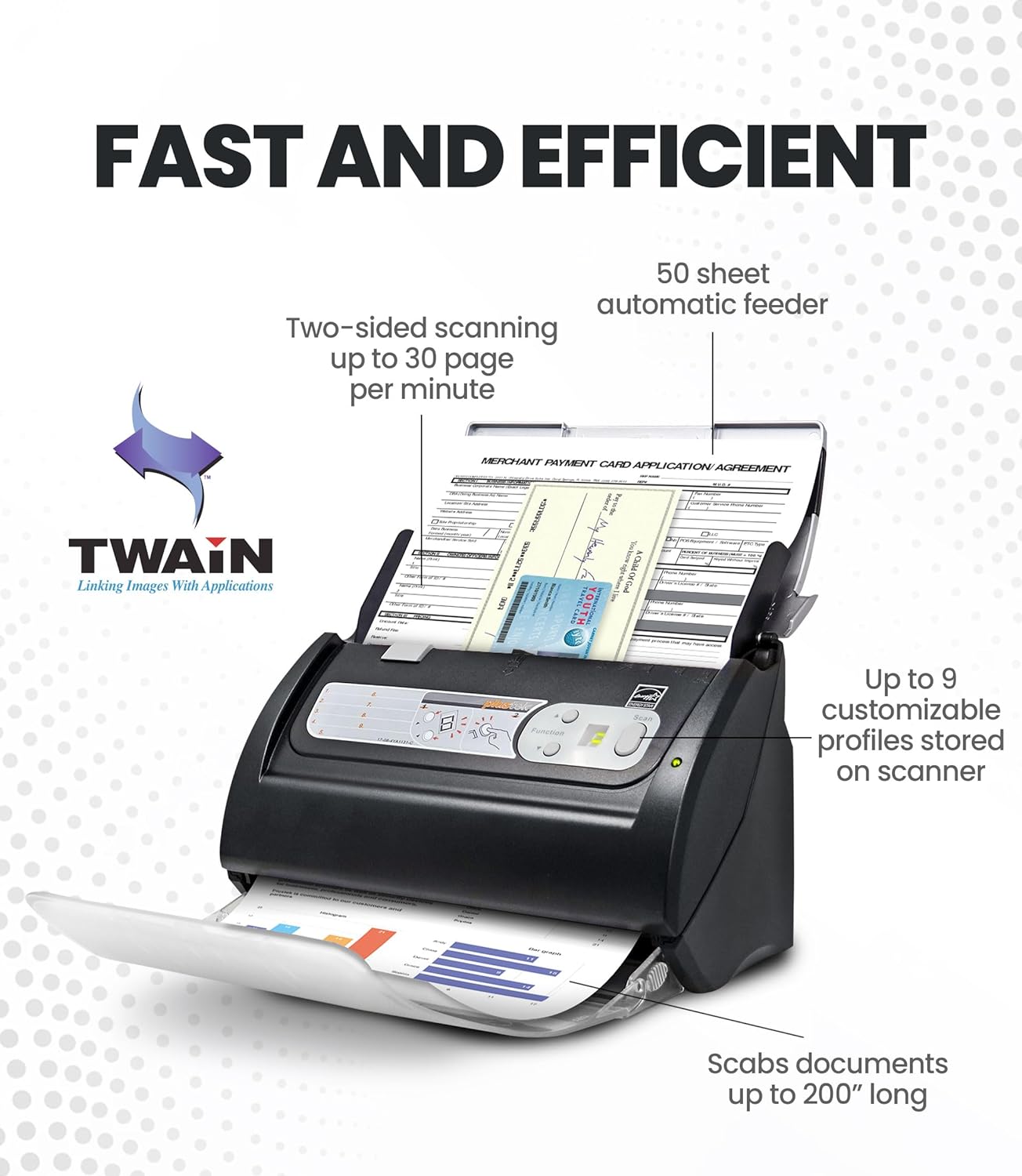
Fast and Efficient – Easily scan both sides of a document at the same time, at up to 30 pages-per-minute, and with a 50 sheet automatic feeder
Embedded File Search Engine – Full Text Search is a comprehensive search system. The system will compare every word of the search request against every word within the document or database. In other words, even a word can help you find the document, SUPER!
Barcode as file name – PS188 is able to recognize the barcode number and save it as your filename, which allows you to manage the file more conveniently and efficiently
Stack Scan – Robust design with a 50-page Auto Document Feeder (ADF) and versatile paper handling from Cards to 200″ long documents.
Multiple Scan Destinations – DocAction II supports up to 255 customizable scan profiles. Each profile represents individual scan settings including file size, scan resolution, format and saving folder. Once the profile is set, you can scan with a push of a button to finish all the work.
8 reviews for Plustek PS188 High Speed Double-Sided Color Document Scanner, with Automatic Document Feeder (ADF), 30 Pages Per Minute, Support Windows 7/8/10/11
Add a review
Related Products


$219.00
DAVID –
Scanner
Goes above an beyond of what I expected
Very light and stylish –
Product to clean the office
I got it for my Veterans Organization work right out of the box
Review –
Scans fast and Small Learning Curve
I really like that the learning curve was not too much. Technology these days can be so complicated to learn and especially with office type products and software there’s so many bells and whistles. The time it took to learn how to use was not very long and I think I learned all the important features with just scanning a few things.The good:1.) I like that it scans fast.2.) I like that the software is not too complicated , although it might appear so at first. Namely the automatic titling , setting up of different profile options and enabling the OCR (so that you can search text within a document you scan) were mastered within an hour of usage or so.The bad1.) Paper jam clearing was so frustrating . Clearing the jam physically is simple (just press the release button and open tray and remove) but getting the software to start back up again at least on my computer, would cause a crash on the program. It also did not seem to save any progress up to that point so if I had a 20 page document but it jammed 18 pages in, it would not retain the first 17 pages. After clearing the jam physically I also would have to on my computer at least (Windows 10) do a CTRL + ALT + DEL , DOCUSCAN II > END TASK , and then click on it to start it back up again2.) The automatic idle time to set to sleep every few minutes can be real frustrating . I could not find a way to disable this or increase the sleep time on the program. It also seems that the physical button press does not automatically start it up to work. You could put some paper physically into the tray to wake it up but still I would have to press the DOCUSCAN 2 program icon to scan thus making the waking up pointless to do anyway other than to go the software route.A problem unique to me was that I had a lot of uneven or thin papers. This could cause frequent jamming. I am still giving it 4 stars because of the simplicity and power of this but I would highly recommend it if you have uniform paper that isn’t too old. I had a mishmash of thin papers that would cause frequent jammings or irregular sized things or a lot of creases that would cause frequent jams. In the office though if you had non-stapled , newer and less dirty papers, this would be really good.
Randy –
Doesn’t work!
Even their tech support couldn’t get my computer to recognize the scanner. I’m running Windows 11 Pro. Scanner got promptly returned. I’d give it minus star review if it was possible. ð
K. K –
The scanner work great.
Ready for use just out of the box. User friendly, no need to set up. It is as good as my Fujitsu ScanSnap S1500 with half the cost.
Joel E Kobayashi –
Works well
Works well
Davidwu –
Fast and easy to use
The Plustek scanner is fast and allows me to rename my documents with the barcode. It is really a time saver!
Andrew –
faster then old model
technical support is very friendly, and this model is faster then old model. hope have wifi function.