

Plustek PS3140U Duplex Document Scanner, Citrix Ready & Twain Support for PC and Mac, Scan and Save Batch Documents
$339.00



Price: $219.00 - $339.00
(as of Jan 19, 2025 00:13:01 UTC – Details)
Product Description

Stay Organized. Convert your paper document in most efficient way

Batch Scan 100 Pages
100-page, both side automatic document feeder for handles even the heavy scanning jobs.

Scan long paper up to 200”
Easily scans documents, contract, receipts,
business and plastic cards, and more – from
business card, even the long paper up to 200”

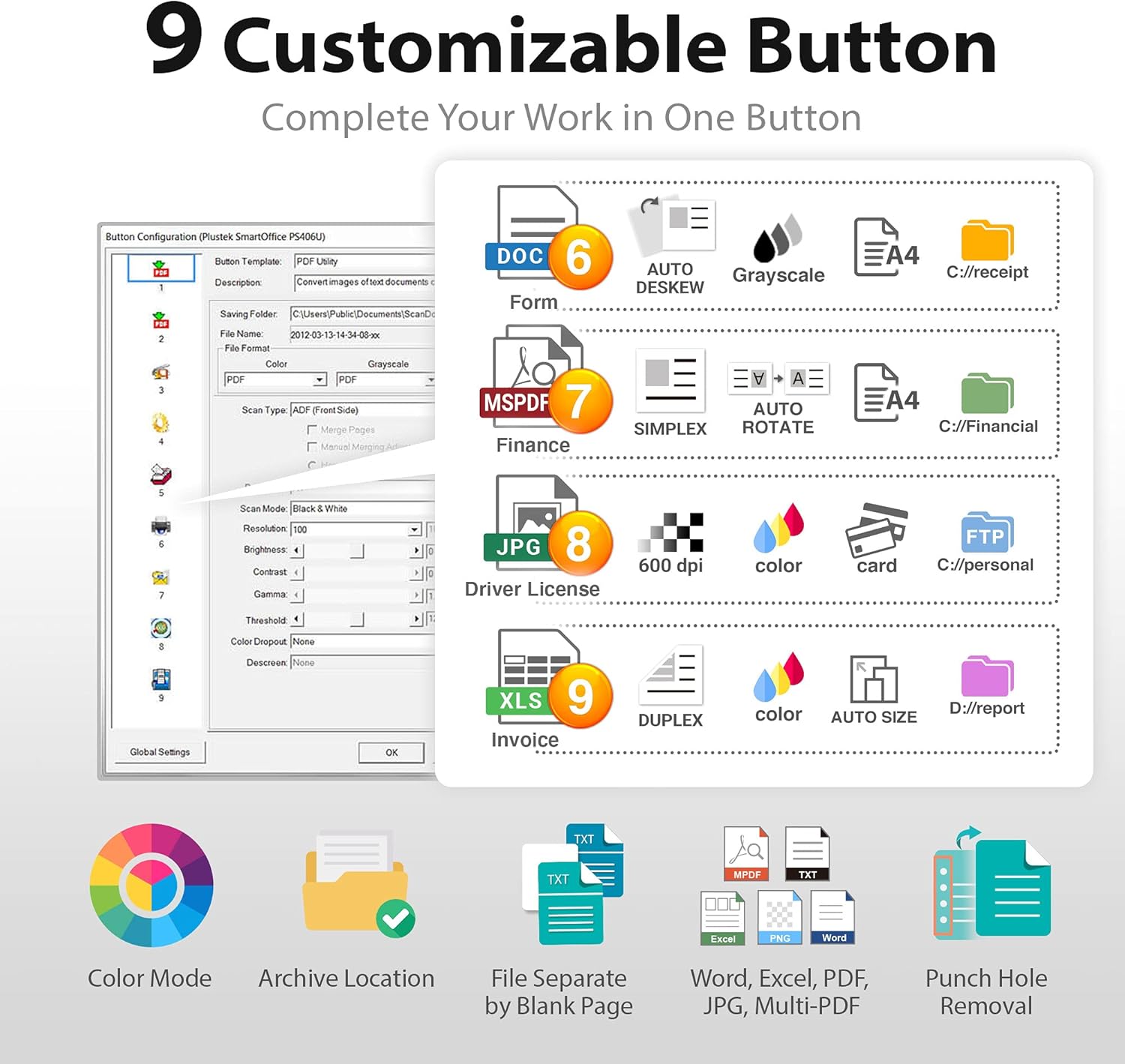
Customizable Scan Button
Tap button and your document will send to your pre-configured folder, including the preset file format and resolution..etc.

The fast, dependable color scanner for efficient document management.
Delivering high-quality scans at up to 40 ppm/80 ipm(1), the PS3140U color scanner offers efficient document management for busy businesses. This powerful, compact performer offers a peak daily duty cycle of up to 4,000 sheets(2) and includes TWAIN drivers for seamless integration with most existing document management systems.
Mac and Windows Support
Supports Mac 10.12 ~ 14.x and Windows XP / Vista / 7 / 8 / 10 / 11 .
If you don’t have optical drive to install, you can directly download driver from Plustek website.
Versatile Paper Handling Ability
is designed to scan business documents from legal size to rigid cards, such as ID cards and drivers licenses, it supports up to 1.2mm thick without additional operator adjustments.
Why Buy? Scan single or doublesided documents up to 40 page per minutes 100-page Auto Document Feeder. Scan document up to 8.5” x 200” long, also for receipts, and plastic I.D. cards TWAIN driver included. Include converting documents to Searchable PDFs/editable files.
Customizable Button Scanning brings you the most efficient way to scan documents

Settings, Save and Scan!
SmartOffice PS3140U provides intuitive scan software, including 9 customizable buttons, you can easily create a shortcut based on your needs, for example, setup a button that for scan your finance report, that will automatically save as multi-page PDF with 300dpi and remove punch hole, also setup the saving destination to your desired folder.

Save invoices as Multi-Page PDF
Automatically read barcode number and set as
your filename, reduce time for manual adjust and archiving. In additional to this, barcode set as filename helps you retrieve files more efficiency.

Edit file with Excel and Word
With the OCR (Optical Character Recognition)
function that recognizes up to 183 languages, the PS3140U helps you transfer your data from paper based to Excel, Word or CVS format.

Customize the file name
Manage your scanned documents with prefix name or date & time. You can configure each button with different prefix name based on the scanned file type, for example, invoice or purchase order, to quickly archive the file.


【Quickly Scan Stacks of paper】: Place up to 100 pages at a time, speedy scanning 40 pages per minute. Included versatility of paper scanning ability, scan extra long pages up to 200″, business/ID card and more.
【One Touch Workflow】: Customizable scan button configuration, one button to digitize your document with all pre-set profiles, including file format, color format, image adjustment and saving destination. Efficiently sharing document to your colleagues.
【Integrated Image Optimization Features】: built-in multiple automatic functions, including blank page removal, dekews, rotate and detect document size, and more. The PS3140U features with intelligent streak reduction technology, helps you ease the streak from scanned images, get clearer and optimized images at the same time.
【Steady and Reliable Paper Feeding】: Equipped with ultrasonic sensor and the dedicated brake roller for stable scanning , this mechanism helps prevent missing pages through intelligent double feed detection and for security against damage files.
【Compatible with Most Software Solutions】: Support Mac and Windows, also, The included TWAIN driver allows you to easily incorporate your data into most document management software. Built-in OCR allows you convert the files into editable, such as searchable PDF, excel or word. Seamless save to your local computer, FTP and even shared folder.
8 reviews for Plustek PS3140U Duplex Document Scanner, Citrix Ready & Twain Support for PC and Mac, Scan and Save Batch Documents
Add a review
Related Products


$339.00
Siyal Celik –
Efficient and Speedy
The Plustek PS3140U Duplex Document Scanner is a real speed demon! It whizzes through batches of documents super fast, saving me loads of time and boosting my productivity big time. Perfect for both PC and Mac users, this scanner also plays nicely with Citrix, making it ideal for virtual desktop environments. Its Twain support is a great feature, giving me the freedom to use different software applications for document management.However, I must point out that it has some connectivity limitations. It lacks certain wireless options, which might be a downside for those who prefer wireless scanning or cloud-based storage. Nevertheless, the USB connection works well and provides a stable performance.All in all, the Plustek PS3140U Duplex Document Scanner is a beast when it comes to speed and efficiency. It’s perfect for handling large document batches, and its Citrix and Twain support make it highly versatile. Just keep in mind the connectivity limitations, but if that’s not a deal-breaker for you, this scanner is a solid choice for any workspace.
Premier –
A good scanner, but with limitations in connectivity.
I received this item free as an Amazon Vine reviewer and this is my honest review. I only request items I will actually use, and use I do, prior to writing a review.Like many small businesses, and I have been in business for over 20 years, we have banker boxes full of paperwork. Mostly receipts, invoices and billing statements that we keep because at some point, maybe, we would need to reference them again. It is a cumbersome process to find something stored away in a box not to mention the space needed to physically store the boxes of papers. So I thought a page scanner would allow us to archive certain documents and better categorize them for future reference.This unit looks and feels well built. It connects via USB cable, which works though does mean you need to have it fairly close to your PC. A wireless connectivity option, like Bluetooth, would be a better design in my opinion. Itâs funny, the description says âWorkgroup-class Professional Duplex Scannerâ. I guess s long as your âworkgroupâ is just one person, or you donât mind carrying this unit around to different PCs, having to then plug the USB into each, you could consider this workgroup usable, but I think that statement is a bit misleading.This unit does scan quickly though I did experience some feed issues with documents with creases, like a tri-folded billing statement. They seemed to want to double feed, but once flattened out better, fed OK. A big plus to me is the fact that this unit is designed to scan a continuous length of paper, up to 200 inches as the description states. Receipts are a large percentage of what we archive, and I like the idea of being able to scan them as thermal paper tends to breakdown and fade over time. So, you can scan over 16-feet of continuous paper and archive those receipts if needed.The software is good, the interface is simple to use and provides a lot of features such as one touch scanning to a certain folder. We setup and âpaid invoiceâ folder, loaded a stack of 70 or so, hit the scan to button and within a few minutes all the invoices were digitized and in that folder. You can set how you want each document saved in that particular folder (what format) as well as resolution and in color or greyscale, which is handy.If you are looking for a straight scanner, that duplex scans in black and white and color, this does work. If you need wireless connectivity, you will be disappointed. Add a Bluetooth or Wi-Fi connection option and I believe this will be a more usable unit for some. I dinged this one star solely for the lack of a wireless connectivity option.As I do at the end of all my reviews, I ask myself if I would actually purchase this item. I might look for a unit that has Wi-Fi (and a network sharing option) or at least Bluetooth connection if I had that need. But, for my particular need, with using this on just one PC, this unit does a good job.
Mike P. –
Good But Limited
This Plustek SmartOffice PS3140U High-Speed Duplex Document Scanner with Auto Document Feeder is good for scanning substantial amounts of documents efficiently.I would say that it would’ve been a huge improvement to scan directly to one of the major cloud drive providers or scan to a network connected device, but this is limited to solely a hardline connection through USB.One of the features I feel is good but feels similarly limited is the custom scan buttons, this would be excellent to have it setup to scan to a remote folder on the network, which is something I currently have setup with OCR software watching the folder for documents to be scanned in to be processed, that isn’t possible here, unless you are directly connected to whatever device you have that folder, which in my case is a homelab server that runs headless and isn’t easily accessible to connect to USB.Will this be replacing my current document scanner? Absolutely not, it is too limited in this day and age to accept the lack of connectivity provided here. Being limited to a physical USB connection is a deal breaker for me and I think I’m not alone in feeling that way.This does work well when you are scanning large amounts of the same exact kind of papers, meaning like being a letter sized paper or a receipt type of paper, and it is able to do one much better than the other. Autofeed will accept 100 pages at a time and will quickly scan those documents but if they aren’t aligned or aren’t the same kind of paper it will require some intervention to get through good quality scans of your documents.Overall, this is a good document scanner that feels highly limited by the lack of connectivity features and the user experience is vastly inferior to a network connected document scanner. 3/5 stars.
Chris –
If you need to scan multiple documents this thing will save you so much time. I’ve had no issues with paper jams and setup was nice and simple. Great build quality and the quality of the scans themselves are also great.
Andrew Brown –
This Document scanner saved me hours of time scanning that I would have spent manually feeding sheets in to a conventional flat bed or sheet fed scanner. The resolution and image quality is excellent and the document feeder works well. The only negative is that I would have expected a WiFi or Network connection so it can be easily shared in an office environment, for my use it’s fine as I have a spare USB connection and the scanner is close to my desk but plugging it in to a network would be more convenient. In a large office I expect it would be set up with a dedicated workstation on a network, which would work perfectly.
Ben –
It’s a good product, but there are some positives and negatives to consider before purchasing.Positives:- Quality of scanning is very good.- Fast scanning- Premium features- Various supporting OS’Negatives:- Expensive compared to other products that do a similar job- No wireless connectivity- Would be good for an office, not really a home office- Quite bigNevertheless, the scanner is good, and does the job very well. It’s just whether you can afford to spend the £300 on something you can get from a much cheaper alternative.
D. S. Hughes –
Judging by the size of this unit I think it’s designed more for the office than for home use. That said, I love it at home. I have a rather expensive printer/scanner at home already but the scanning function is an absolute nightmare, 8/10 times it won’t talk to my computer and no matter how much I plead and fiddle it firmly refuses to scan more than one side of a document. So a three page letter ends up as three separate pdf files!This Plustek scanner knows what it’s doing. It happily scans batches of pages, even if they are double sided and will plonk them all into one file. Sadly, it’s not going to get the level of use that it’s designed for as I’m using it in the home. But, I’m not going to spend half of my time pleading with and swearing at my printer any more – it has scanned it’s last page. This Plustek scanner is great, if you have the room to put it in your house and if you ever scan documents, then this is for you – happy to recommend.
Beardy –
Let me begin with the negatives:1. this scanner is bigger than I expected. Make sure youâve got enough space.2. It only works using the USB provided. There is no wireless connectivity, which is a letdown in this day.Now letâs get onto the positives:It has very good feeding mechanism and can scan pages than are longer than your typical A4. This is especially important for when scanning the olden style marriage certificates which were not typically A4zIt is easy to setup and use and the speed of scanning is good.However, I am unsure of the current price tag and wether the positives justify the high cost for just a scanner.