

Sound Town 16 Channels Wireless Microphone Karaoke Mixer System, Supports HD ARC, Optical (Toslink), Smart TV, Media Box, PC, Bluetooth, Soundbar, Receiver, AUX (SWM15-PROS)
$99.99


Price: $72.99 - $99.99
(as of Jan 14, 2025 13:42:25 UTC – Details)
Product Description

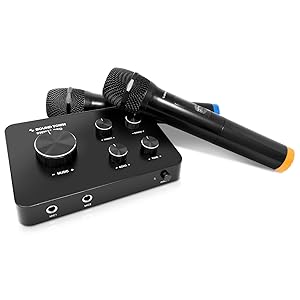
Sound Town SWM15-PROS
16 Channels Wireless Karaoke Mixer System – Upgrade Version
The Sound Town SWM15-PROS is a compact karaoke microphone mixer system. It comes with dual-channel, 8 selectable UHF frequencies per channel (16 channels in total) and is interference-free. The HD, 3.5mm (1/8”) input and output connectors and built-in Bluetooth make it easy to connect with various devices including TV box, smart TV, home theater systems, receivers, speakers, soundbars, amplifiers, notebooks, tablets, and more.
The microphone receiver and sound mixer enables you to mix mic signal with music without using an additional mixer. It comes with two wireless microphones and can support two wired dynamic microphones (not included). The rotatory control knobs can swiftly adjust the volume of your music, microphone, echo and tone to the desired level. It is ideal for karaoke, DJ music and house parties.
Features 16 UHF Selectable Frequencies Supports TV ARC Supports Optical Input Sound Bars Sleek Metal Design Includes 2 Wireless Handheld Microphones Echo & Tone Controls Built-in Bluetooth 100 Feet Operating Range
Versatile Compatibility Options

Smart TV
Smart TV ► SWM15-PROS ► Speakers

Laptop / PC
Laptop/PC ► SWM15-PROS ► TV

Streaming Device
Streaming Device ► SWM15-PROS ► TV

Smart Phone / Tablet
Tablet/Smart Phone ►HDMI Adapter ►SWM15-PROS ► TV

Works with Smart TV
With a built-in HD audio return channel connector on the SWM15-PROS mixer, it allows you to connect to almost any smart TV through an HDMI cable. Simply plug the HDMI cable to the HDMI ARC port on your Smart TV and plug the other end of the HDMI cable to the HD OUT (ARC) port on the SWM15-PROS mixer. The smart TV is required to have an HDMI ARC port and the HDMI cable is not included.
Important! If you intend to use a smart TV as the input source, you will need external speakers (not included) to connect the TV to the SWM15 receiver. Please check the connection diagram for more information.
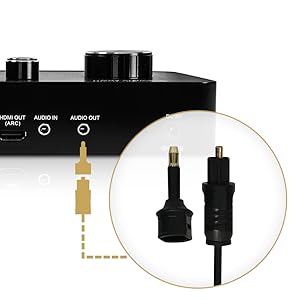
3.5mm Audio / Optical Combo Output
Depending on the input connectors on your soundbar or home receiver, the Audio Out port serves as either an AUX or optical output. The 3.5mm AUX audio cable and mini Toslink to Toslink optical cables are included in the package. The dual-purpose output makes it a breeze to connect the SWM15-PROS system to almost any soundbar or receiver.
How to Connect


Setup Requirement: The wireless microphone system needs to be connected to a powered speaker (with 3.5mm or optical inputs) or an amplifier to work. These devices are sold separately.
VERSATILE COMPATIBILITY: The SWM15-PROS‘ multiple input / output connectors including HD Audio Return Channel, 3.5mm and optical combo output enables it to be compatible with a variety of devices including smart TVs (HDMI ARC needed), home receivers, soundbars and etc.
HD Audio Return Channel FUNCTION: Please check the pictures for CEC/PCM setting guidance. Please help make sure to enable your TV’s CEC and choose PCM as audio format under expert setting on the TV. The HD Audio Return Channel on the SWM15-PROS karaoke mixer allows you to extract the audio from the TV to the mixer. This allows the mixer to blend the music and vocal, and send the mixed signals to a soundbar or amplifier (HDMI cable is not included)
AUX/OPTICAL COMBO: The Audio Out port can be served as either an AUX (3.5mm Jack) or Optical output (with the included AUX to Optical adapter). It supports a variety of sound bars like Bose 300/500/700, Samsung, Vizio, etc.
EASY-TO-SETUP: With up to 16 selectable frequencies and independent volume controls, the karaoke mixer system supports up to 2 wireless mics or 2 wired mics (not included) and its operation range is up to 100 feet line-of-sight
CONNECTION DIAGRAM: 1. To use this product via the TV connection, refer to the “How to Connect” section on the connection diagram for setup and “IMPORTANT” section in the picture to enable your TV’s ARC function and choose external speakers in the TV settings. 2. If you are experiencing little to no volume for the mics, turn the volume much higher on your TV, Sound Bar, and Receiver; then on the SWM15-PRO mixer, turn the “MUSIC” volume knob low to mid level (20%-30%) and adjust “W/MIC” volume knob on the top right to max
Customers say
Customers find the karaoke machine functional and easy to set up. They mention it works well for their purposes, with HDMI connectivity working perfectly. However, some have issues with the mic quality. There are mixed opinions on sound quality, karaoke capability, value for money, and wireless microphone connectivity.
AI-generated from the text of customer reviews
11 reviews for Sound Town 16 Channels Wireless Microphone Karaoke Mixer System, Supports HD ARC, Optical (Toslink), Smart TV, Media Box, PC, Bluetooth, Soundbar, Receiver, AUX (SWM15-PROS)
Add a review
Related Products


$99.99
Techie1234 –
Perfect SONOS system microphone…
SONOS does not make a dedicated microphone that you can use for karaoke or as a PA system (like if you are having an event at your home and want to pipe your voice throughout the house). You can use any microphone in the line-in port on select SONOS speakers but there’s a little delay because of the analog to digital conversion inside the SONOS speaker. This delay can be distracting, especially if you are hearing your own voice with a delay through the speakers. This wireless microphone set has digital optical audio output which eleminates the delay. You have to have a SONOS speaker with optical audio input (like the original sound bar). It works perfectly for my purpose. It even comes with the necessary cables for digital optical audio. This microphone also has HDMI output which is digital as well and although I didn’t test it, I would imagine it works the same way.
Wan Jasmin –
Simple to use karaoke system
I was looking for a karaoke system that can connect to my Sony Bravia and my Bose 700 Soundbar. This is probably the only one that can do the job in Amazon but make sure you get the one with optical out. Overall I donât like it because of the wireless microphone to speaker delay. A plus point is that this unit have two plug socket for microphone cords. I plugged in the microphone cord and there was no delay. I can also confirm there is a huge sound quality difference between the supplied plastic wireless microphone and my shure 58 corded microphone.
KE –
Best home karaoke I’ve own
I am an audio enthusiasts and have semi pro dj set-up for small events, mostly karaoke. I can’t use it at home , it will be over kill. I was looking for a small set-up for home karaoke , something minimalist to match my jamo and klipsch home audio and found this absolutely beautiful small but powerful home karaoke unit. Pros – quality build, mic response, clarity, simplicity, price, multiple options for input and output [hdmi and optical] wow. I got compliments today 1st time using it. Cons – non so far, but I hope this unit lasts longer as I plan to use it weekly. Lastly, im using the TV optical output to this unit then output optical to my Denon receiver, so then I have options to use the different audio settings, not just plain stereo. Amazing sound quality. Buy it, you won’t be disappointed.06/19 update , I tried using it for a small bday event about 100 people and open air venue. The performance was okay but it drops ones in a while when your about 50ft or more away. I still get nice voice quality though.
David T. –
eARC HDMI PORT DOESNâT WORK
Whatâs the point of advertising that your item specifically is used for eARC HDMI connectivity when it doesnât work at all. At first I thought maybe it was my newly bought Sony sound bar but no I tested it for both Bluetooth and eARC HDMI on it and it connects 100% of the time and works perfectly. Then I thought maybe itâs my HDMI cords not working but not that either I tested them out using the sound bar and my MacBook and my HDMI cords work perfectly again. So that only leaves the sound town mixer left in the equation as my smart TV is brand new not even 2 weeks old and itâs eARC port works with every single other electronic device I tried it on. At the end of the day my message is donât buy this mixer as its main advertised functionality doesnât work and buy from another brand or get a more expensive one.
Kristin Vasaitis –
Not sure how great itâs made….
So hereâs the deal, Iâm giving it 3 stars because I got to enjoy using it for about 30 mins before the whole system just stopped working. Iâm waiting on Amazon to send me a replacement to possibly change this review. Initially it was a SUPER easy set up. Followed the plug in instructions to connect through my Apple TV box and it worked well. Sound came through my sound bar and wireless microphones connected flawlessly. I could see the blinking light on the box change color when I would change mic channels and hear my voice instantly. So, I geared up my first song through YouTube Ap on Apple TV and started to sing. I noticed some pretty significant delay in my mic to producing sound. So I played with the tuner and couldnât quite get it to sync right. Thatâs when I decided to change the inputs and go through my smart TV instead. My smart TV does not have an AUX jack and needs an RCA cable to connect to the boxâs AUX output….it said this wire option was included on the instructions, but I never received one in my box. And I canât go optical because my TV only Has one optical outlet and itâs connected to my sound bar. So, I re-routed to my sound bar instead. Ultimately it synced up much better with the TV playing the music and my sound bar producing my Mic sound, but this will bypass the âmusicâ volume control on the box (you just manually control it with remote instead.)So I sang about 2 more songs then, BAM! My mics just stopped working and my sound bar wasnât producing any sound?!?! So I did some trouble shooting, unplugged everything, re-plugged, tried to go back to the Apple TV output to see if maybe it was a glitch and nothing! The box stopped changing colors with the mic channels, the HDMI wouldnât read. Just blank. The box died in less than an hour of using it! I even tried a whole separate TV! Also, side note, the microphones eat up the batteries pretty quick, Iâm already down to 2/3 bars after a short period of use. I really did enjoy my short karaoke session so Iâm hoping this box just had manufacturer defect or something. Iâll update my review if it makes it through my planned karaoke party!! Happy birthday to me…..I guess 🙁
Michael Meacham –
It’s not their fault…
Like many, I noticed a big delay. It’s not the device’s fault – at least it wasn’t for me. The HDMI in/out feature is begging for people to plug this sucker into TV/receivers that have a built-in delay already. You never notice it because the video/audio are synced perfectly when watching TV. But when you are singing, holy moly any delay is crazy annoying and makes karaoke awful. I *had* to plug this unit directly into my soundbar and have the TV handle the video/audio from the Apple TV. It sounds great. I just have to switch audio on TV to internal only, and also switch soundbar input to Aux. Probably could have saved a little money by buying something without the HDMI in/out feature, but whatever.
Ash –
I bought this for my parents as they like to do karaoke. Itâs connects seamlessly with their surround sound bar via HDMI arc so that they can still use Dolby atmos as well. As for the sound quality of the mic, itâs pretty good and you can adjust the volume + echo with the knobs. It comes with 2 wireless microphones and is powered by batteries. There is also room for connecting 2 wired microphones but Iâm not sure if it would allow for up to 4 micâs to use or if it overrides the wireless micâs. Also the mic doesnât go as loud as I want it to but you can adjust the main music sound to let the voice come through. Overall for the price point and quality of sound, itâs pretty easy to setup in no time.
Hunter –
Good quality mic, works as described. However the HDMI in and out were somehow back to front? Had to put my HDMI input into the âHDMI outâ port for it to work. Other than that is all good
ICyclic –
The sound quality is good.It sounds realistic enough but there is still something to make you sound good.We had to play around with our system to get it to work properly.Easy to use. Worth the price I paid for it. The batteries last quite a while.
DaMo –
Bought this as a gift and tested the product to provide a review. The unit is easy to set up, comes with easy-to-read manual complete with diagrams, so that takes away a lot of the guesswork. Works well with Smart TV as well, just remember to unplug the Optical Cord on your speaker system if you have that. Sound quality depends on your speakers too, so take note of that. No discernible interference from the Mic either. I have an older unit from VocoPro and one of the drawbacks of that is it runs on one frequency while this unit has multiple channels so it minimizes, if not eradicates that crazy mic feedback. Overall, a good unit for anyone with a Smart TV. They have a similar device if using a laptop/computer without the HDMI ARC and it is substantially cheaper. Check that one out if you don’t have a Smart TV but still want an awesome system for your home Karaoke!
Mikhail –
Had this unit connected between Google Chromecast ULTRA and EPSON HC 2100 projector as TV. Everything works fine, right until you decide to turn the TV off and then back on again, after that no sound or video appears over HDMI of the TV. Microphones still continue to work over analog out. The only way to fix this is to power cycle the Mixer system. Disappointed.