

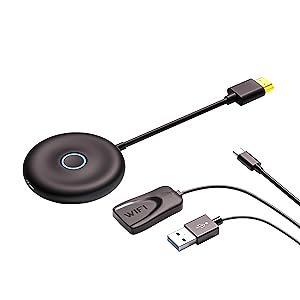
Wireless HDMI Display Adapter, for iOS/MacOS/Android Mirroring/Casting Screen to Monitor/Projector/TV,Used for Meeting/Speech/Home Theater,2.4GHz and 5GHz Dual Band WiFi
$36.79


Price: $36.79
(as of Jan 19, 2025 13:58:56 UTC – Details)
Product Description

Mirror/Casting HD Content and Videos
The HRpat wireless HD display adapter lets you wirelessly mirror all your favorite HD content from your i-Phone/Mac-Book/i-Pad to a larger, high-definition TV screen, without a Wi-Fi network or wireless router. That means you can sit back and share your vacation photos with family and friends on the big screen.View a spreadsheet on a large HDTV. allows you to use your HDTV as a 2nd monitor for your Mac-Book Pro Air devices, perfect for people working from home. and viewing Zoom / Teams meetings on the big screen! Conducive to improving work efficiency,Even tuck in your bag to watch the content you want on the hotel TV while traveling.
Function
1.Support Miracast Airplay DLNA protocol, no need to switch Miracast Airplay DLNA mode.
2. Support 4K and 1080P resolution.
3. Supports most Android, Windowns, Apple’s devices.
Please note:
1.Please plug the USB into an external power adapter with at least 5V/2A.
2.Click the product center button to switch between Android or I-OS mode.
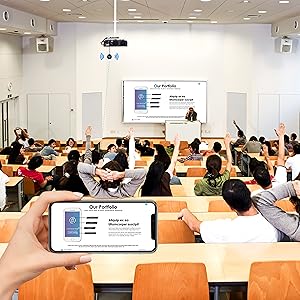

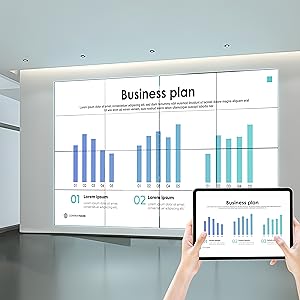
Why choose the HRpart wireless display adapter/receiver?It will allow you to view audio, video, office documents and more from a small to a large screen without the need for long and messy cables. Share your file content, photos, videos on any TV, monitor, projector with HDMI port, perfect for presentations, meetings, exhibitions, etc.
Wireless and Easy Connection:This wireless presentation receiver no app, easy to set up.Bear in mind you will need a 5V/2A power source for the included usb cable. Many modern TVs and Projectors have a USB port near the HDMI input and that will work for this device. If the port is occupied, a battery pack will work.
Office-Friendly: This wireless presentation adapter allows you to view office software content as word, excel,powerpoint from your smartphone and laptop on a large screen.Note:don’t support with some Subscribed paid Apps which have “HDCP” video copyrights protection like Netflix,Amazon prime videos,Hulu,Comcast tv,BT Sport,etc
Note:This is a self-contained device that doesn’t connect to the internet itself. once connected to an HDMI input and power, the dongle displays a screen with operation details to make connecting to it a breeze. only needs to connect to the wireless signal of the adapter.
Safe use:Our company is committed to providing the best products and services. There is a dedicated after-sales service team. If you have any questions, please feel free to contact us.
Customers say
Customers find the standalone streaming media player easy to set up and use. They mention it’s simple to connect with direct instructions popping up on the screen. However, some customers report issues with connectivity – it loses connection from time to time and drops the signal every few minutes. There are mixed reviews regarding functionality.
AI-generated from the text of customer reviews
8 reviews for Wireless HDMI Display Adapter, for iOS/MacOS/Android Mirroring/Casting Screen to Monitor/Projector/TV,Used for Meeting/Speech/Home Theater,2.4GHz and 5GHz Dual Band WiFi
Add a review
Related Products


$36.79
Todd Cameron –
Works perfectly for Power Point presentations. Canât speak to other uses
I bought this strictly for Power Point work presentations, using an iPhone, and it works flawlessly. It took what was previously a lap top, cable, power supply, and clicker, down to this and an iPhone. Set-up literally takes seconds, and as soon as itâs powered itâs ready. No delay. No lap top to boot-up, just plug and go.If your viewing source has no powered USB, youâll just need to add one, but hey, theyâre cheap and plentiful, and I think most of us have extras laying around.Fantastic little device, exceeded my expectations.
Devin –
This just doesnât work all that great
I can get It to mirror and airplay for a few minutes, and then this thing gives up. It stops displaying my devices after a few minutes and I have to manually set It up again only to have the airplay drop again later. This thing is a good idea in principle but not in practice.
Darian poseno –
disappointed
it definitely does what it supposed to do it has great qualities like itâs super convenient and it works great but the only reason why I got it was because my Samsung TV doesnât work with my iPhone so I got this wireless adapter thinking it would be able to allow me to screen mirror and watch Netflix Hulu Disney etc. unfortunately that just wasnât the case because all of the main streaming services have updated their policies and donât allow third-party screen mirroring devices to share their streaming services so keep that in mind. Purchased april 2022
Drusifer –
Works but not w Netflix
It works but wonât cast Netflix due to licensing
opoolejr83 –
What device are you mirroring?
I’m a galaxy user. My s24 works flawlessly. My a9+ tablet. Not the case. Bottom line. For S series galaxy users, this works just fine. Plug the thing into your tv and hit the mirror cast function on your phone. That’s it.
Erich Summers –
Temperamental
This only works sometimesâ¦a lot like autocorrect. Right now it connected but is only showing a green screen. Another time it never showed up to connect. A different time it showed the primary color bars. Then it worked. Then it went back to a black screen. And then it worked.Completely hit or miss. Two stars for working once in a while.
AAB –
functional with some caveats
It works great with iphone in HD seamlessly; However, while pairing with Macbook Pro, it fails to work smoothly, cursor wont move, video renders slowly with asynchronous audio. This device is easy to install and pairing to devices is super simple. The dongle heats up really quickly after few minutes use.
Amanda –
not what you think
I love how easy it is to install, however it does not allow you to view everything off your iPhone like it states. you cannot watch movies, or some of the apps on the phone that we have. this is definitely more of a item to use if you are doing projects like Microsoft or PowerPoint. not as versatile as it states.