

Phomemo M250 Label Maker, 3″ Thermal Barcode and Address Printer – Portable Label Printer for Business, Home & Logos, Sticker Printer Compatible with Phones & PCs, with 100 Labels, 40x30mm
Original price was: $80.99.$64.99Current price is: $64.99.




Price: $80.99 - $64.99
(as of Jan 21, 2025 05:44:08 UTC – Details)
Product Description
Phomemo M250 Label Printer 


Easy to Connection 
Versatile Label Printer for Home & Business 

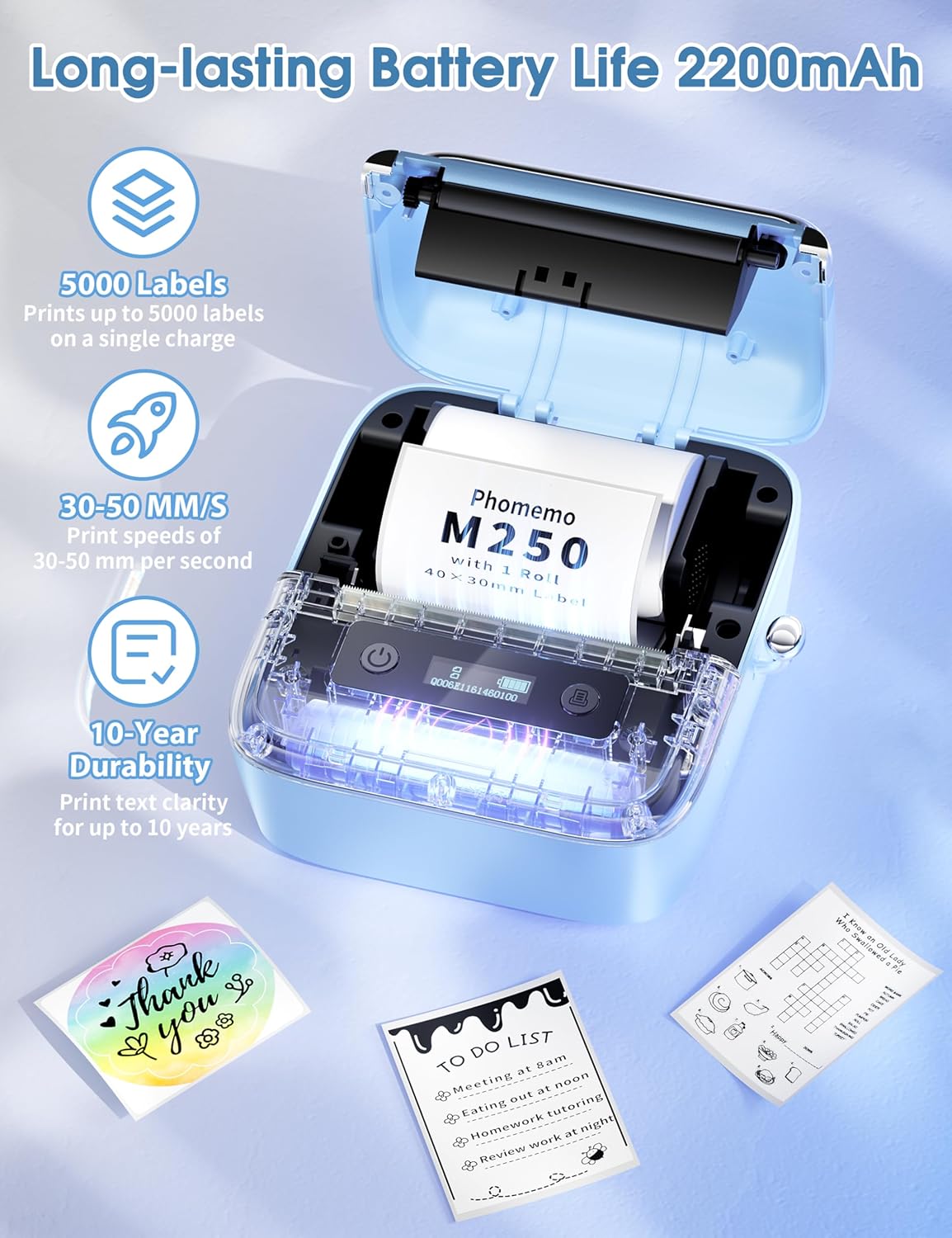
2025 Upgraded Version – Phomemo M250 Label Maker: With an extended battery life of 2200mAh, the Phomemo M250 portable label printer can print up to 5000 labels on a single charge. Enjoy a printing speed of 30-50mm per second. It features an automatic sleep mode that conserves energy by automatically shutting down after 5 minutes of inactivity, preventing unnecessary power waste
Versatile Upgrade: The all-new 3-inch label maker from Phomemo supports a wider printing width of 20-75mm. Perfect for barcodes, QR codes, cables, addresses, names, mailing, jar labels, food labels, office, and home organization. Whether you’re at home or running a small business, this compact sticker printer is the ultimate choice
Free Multifunctional App: The Phomemo M250 label maker printer comes with the powerful “Print Master” app. Create various content like QR codes, text, OCR, images, voice recognition, and batch printing. Choose from over 1500 symbols, 200+ templates, 110+ fonts, and 20+ languages for limitless customization options
Convenient and User-friendly Bluetooth Label Printer: With its integrated paper loading structure, installing labels has never been easier. Weighing only 390g, this portable label printer easily fits in your pocket, bag, or backpack. Experience the convenience of printing labels anytime, anywhere with the M250 thermal barcode label printer
Highly Compatible: Phomemo M250 mini sticker maker is compatible with multiple systems including Android, iOS, iPad & macOS, and Windows 7 or above. Connect your smartphone or iPad via Bluetooth using the “Print Master” app. For computer connection, simply download the driver and “Labelife” app, then connect using USB (refer to the software installation tutorial on the page for detailed instructions)
Customers say
Customers find the printer easy to use and versatile. They appreciate its clear print quality without smudges. The size and concept are appealing, though some mention performance was disappointing.
AI-generated from the text of customer reviews
13 reviews for Phomemo M250 Label Maker, 3″ Thermal Barcode and Address Printer – Portable Label Printer for Business, Home & Logos, Sticker Printer Compatible with Phones & PCs, with 100 Labels, 40x30mm
Add a review
Related Products


Original price was: $80.99.$64.99Current price is: $64.99.
Amazon Customer –
works well
haven’t had any issues, easy paper replacement. App is easy to use and understand, can scan code on replacement label box and all dimensions are set and ready for use.
Elaine –
Small but mighty
This printer is great for so many things easy to use. Prints clear. No smudges. It plugs in to usb to charge. And it’s fast.
Ruthy P. –
Surprisingly cool
This thing is great! I’m using it for my handmade items and it works fantastic. Very versatile. Super fast. Easy to figure out. Scans the code and knows what labels you’re using. I bought a second one for my son for his business too!
Caring Customer –
Ready to be Patience, Search, Read &Practice a lot – Nice printing but hard to gauge size of label.
Got it 12/11/24 fast delivery. now it is a week and still having trouble setting the size for the labels. i have wasted around 36 labels. not sure if I am going to keep it. My last resort is to call the company and maybe they will give the answer. ;( . I will keep you updated.12/18/24 Update: after a few more days of trying, reading, wasting about 57 labels. what finally work was to upload the application in my PC. My phone still have issues setting the labels right. I will continue reading, maybe one day.It will help if the company would have more videos on this M250 model how to set up labels sizes. Otherwise be ready to be patient and do not desiste lol.After all these problems , the results are very good, Love my labels,,,,,, maybe I can get refund for the wasted labels hahaha , just hoping!!!!
Sandy K. –
Easy to Use
I like this product. I haven’t figured out how to use the print app though. It is a little wonky. All in all a good buy. Lightweight. Clear print on white labels.
Angelle Alonzo –
man this is expensive
It’s a good product, and the app is easy to use but finding labels rolls that actually fits in the little machine is kind hard. But when you do find the right size for it it’s like $12.99 per roll. If your willing to spend the money then this will be grate but if your tight on money look for a different model with a lager capacity to hold labels.
Loper –
So simple to use
Â
Gaetano –
Good
Fantastic and easy to use with a well made app
James Ruddy –
Iâm very happy with this product. It is very easy to use and the app has many different options to try out. The customer support was fantastic, great response time for an issue that I had with a different model. I upgraded to this model and also got a different model for my daughter. Very pleased.
Gail Colbourne –
Love this little printer. Exactly what Iâve been looking for. Looks good, works great and highly recommend it. I would suggest get more labels at the same time.
Nicky –
Sollte in jedem Haushalt vorhanden sein !Meine Vorratskammer ist jetzt alles schön beschriftet.Durch die nötige GröÃe können auch mit diesem Drucker sehr schöne Sachen für s Bujo gedruckt werden.Gewürze sind nun auch in schönen Gläsern beschriftet. Daumen hoch ð
EG –
I like the fact that when you put in the labels, you just slide the sides together. No separate pieces, like the M220. Great little label maker and it’s nice looking too.
R. Heydrich –
In meiner Wahrnehmung ist Phomemo durchaus eine ernstzunehmende Konkurrenz für bisherige Platzhirsche in Sachen Etikettendruck und mit einer Vielzahl unterschiedlichster Geräte auf Amazon vertreten.Testen durfte ich den Phomemo M250 Etikettendrucker, welcher tintenfrei im Thermodruck arbeitet, via App angesteuert wird und vielseitige Optionen zum Druck von Papieretiketten bietet.Optisch erinnert das Gerät an eine Miniatur einer Schreibmaschine. In der vorderen Hälfte des Gerätes ist die Technik verbaut und oben auf ein kleines Display, welches einen schnellen Ãberblick zum Verbindungsstatus (Bluetooth), dem Akkustand und via Optionsmenü (Einschalttaste im eingeschalteten Zustand drücken) zu den Einstellungen wie Sprache oder automatischer Abschaltung liefert.Im Hinteren Teil des Gerätes werden die Rollen mit den zum Modell passenden Etikettenrollen eingelegt.Eine Gebrauchsanweisung in deutscher Sprache liegt dem Gerät bei. Vor der ersten Verwendung sollte der Akku geladen werden. Hierzu liefert Phomemo ein USB-C-Ladekabel (ohne Adapter) direkt mit.Das Aufladen dauerte ca. 1-1,5 Stunden. Dank der Abschaltautomatik, welche ich auf 5 Minuten eingestellt habe, versetzt sich das Gerät selbstständig in einen Stand-by-Modus und schont so den Akku gegen unnötige Entladung.Im zweiten Schritt sollte man sich die dazugehörige App “Print Master” aus dem entsprechenden Store herunterladen. Die Installation der App geht sehr schnell und es wird kein Nutzerkonto, eine Anmeldekennung (wie E-Mail) oder Passwörter verlangt, was die Hürde zur Verwendung der App deutlich herabsetzen sollte. Die Sprache in der App war bei mir automatisch auf deutsch eingestellt. Die Navigation ist sehr intuitiv und die Einrichtung wird geführt. Zunächst muss man seinen neuen Etikettendrucker via Bluetooth mit dem Handy verbinden, was auf Anhieb problemlos funktionierte. Danach kann es bereits losgehen. Die App bietet sehr viele Gestaltungsoptionen für individuelle Etiketten. Ob allein Text für bspw. Brieflabel, oder Aufkleber für die Vorratshaltung, welche zusätzlich mit Piktogrammen versehen werden können, bis hin zu Barcodes oder QR-Codes – es ist an fast alle Bedürfnisse für den Heimbedarf und auch für kleine Unternehmen gedacht.Für mich war die Anschaffung eines Etikettendruckers lange Zeit eine Frage von Kosten und Nutzen und ob ich die Dinge, für welche ich meine ein Etikett zu benötigen, nicht einfach auch anders beschriften kann. Natürlich geht es immer auch irgendwie anders. Aber mit einem einheitlichen Label, bekommt eure Vorratshaltung in etwa einen ordentlichen, gut lesbaren und individuellen Lock. Briefkuverts ohne Sichtfenster erhalten in Windeseile einen gut leserlichen Adressaufkleber, oder wenn ihr Unternehmer seid, erstellt ihr ganz unkompliziert Preisschilder mit EAN oder verseht eure Ware mit einem QR-Code, welcher den Käufer wieder zurück auf eure Internetseite führt.Im Lieferumfang ist eine Rolle mit 100 Etiketten in den MaÃen 40x30mm enthalten. Diese und andere Etiketten (MaÃe) bekommt ihr zum Nachkauf natürlich auch auf Amazon und wie ich finde ab 5Cent pro Etikett zu erschwinglichen Preisen.Zugegeben, hat ein Papieretikett und Thermodruck auch Nachteile, welche man bei der Beschaffung eines Etikettendruckers berücksichtigen sollte. Lange Exposition gegenüber Licht/Sonne ist immer schlecht für Thermodruck-Etiketten. Da es sich um Papieretiketten handelt, sind sie natürlich nicht Feuchtigkeitsresistenz. So schnell wie das Aufkleben funktioniert, so beschwerlich könnte das spätere Ablösen sein. Als Tipp: Etiketten zum Beispiel auf Vorratsdosen nicht zu fest andrücken, dann können sie noch eine ganze Weile einfach wieder abgezogen werden. Ãltere Etiketten am besten durch Einweichen ablösen.Zusammengefasst kann der tragbare Etikettendrucker M250 genau die richtige Wahl sein, wenn ihr auf der Suche nach einem handlichen, optisch ansprechenden und multioptionalen Etikettendrucker seid. Ggf. tun es aber auch “kleinere Modelle” von Phomemo, welche es ebenfalls hier bei Amazon gibt. Die Bedienung ist nahezu intuitiv und leicht verständlich, die Etiketten sind schnell erstellt und können für unterschiedlichste Verwendungszwecke eingesetzt werden. Der Nachkauf von Etiketten ist gewährleistet und neben dem Standard-Etikett 40x30mm bietet Phomemo auch andere MaÃe, Formen und Farben, welche mittels QR-Code vom Gerät erkannt und die Druckoptionen automatisch auf das neue Maà eingestellt werden.Ich bin ziemlich begeistert und auch schon fleiÃig am Drucken.