

Brother MFC-J1205W INKvestment -Tank Wireless Multi-Function Color Inkjet Printer with Up to 1-Year in Box, White
Original price was: $419.99.$129.99Current price is: $129.99.



Price: $419.99 - $129.99
(as of Jan 13, 2025 07:25:18 UTC – Details)
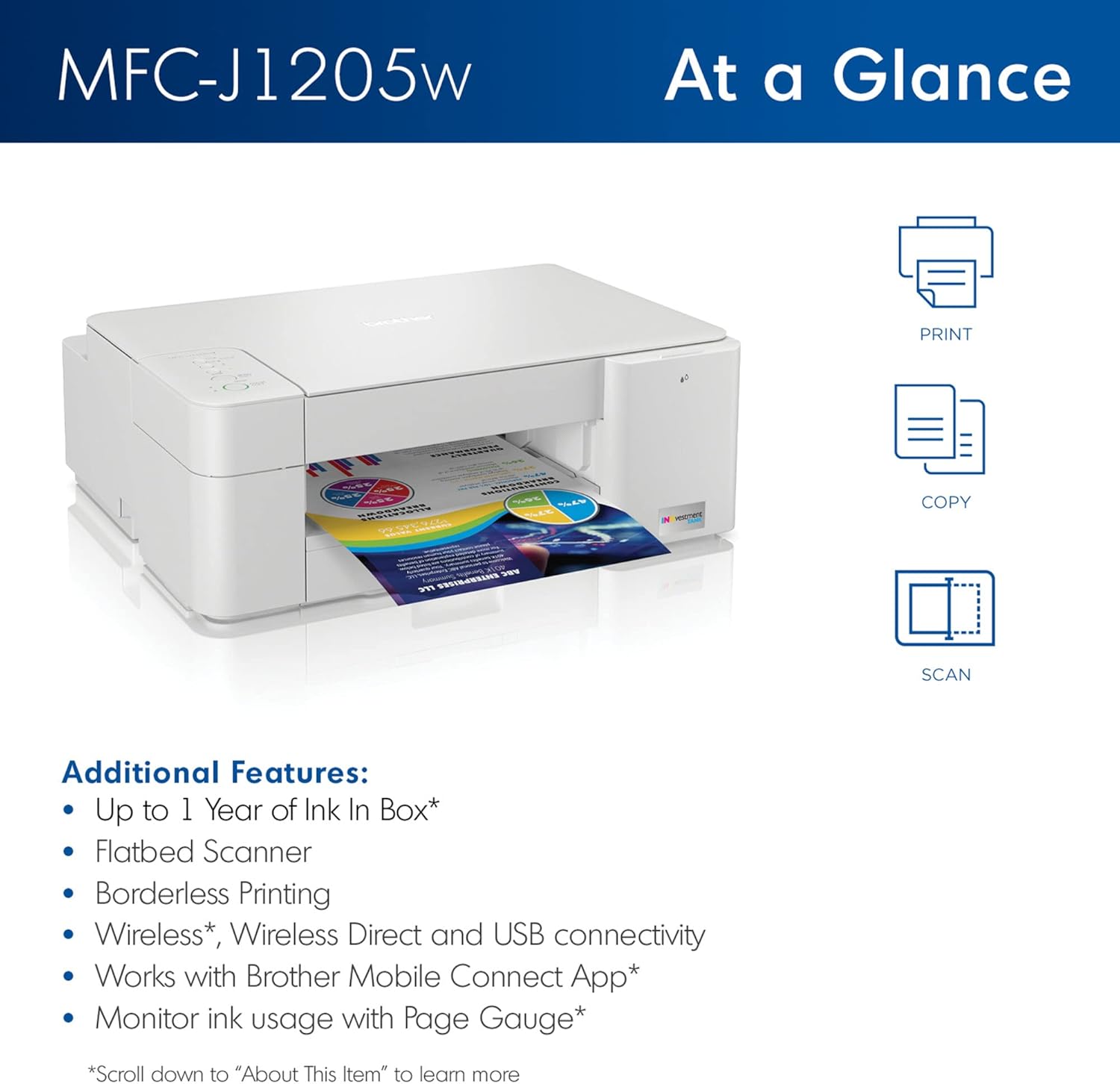
Get ready for a productive day with help from this Brother printer. The wireless printer offers easy mobile printing options, a Hi-Speed USB 2.0 interface and web-based printing for versatility. The color printer features a 150-sheet input tray to help your team print big jobs without having to constantly refill it. NO INK REPLACEMENT FOR UP TO 1-YEAR(1): Experience truly uninterrupted printing, exceptional savings and super convenience with up to 1-year of ink using only the four cartridges provided in-box.(1) PUT THE POWER OF PRINTING AT YOUR FINGERTIPS: The simple to use Brother Mobile Connect(2) App delivers easy onscreen menu navigation for printing, copying, scanning and printer management from your mobile device. BROTHER REVOLUTIONARY INKVESTMENT TANK SYSTEM: Brother INKvestment Tank printers feature reengineered ink cartridges that hold more ink than traditional cartridges and deliver a continuous ink supply for truly convenient, uninterrupted printing. ELIMINATE INK REPLACEMENT GUESSWORK: Print with confidence using the Brother Page Gauge,(3) a visual, numerical way to know the amount of ink used and the amount of ink remaining to help take the guesswork out of when to replace ink. USE BROTHER GENUINE INK: Engineered to work with INKvestment Tank inkjet printers, a full range of INKvestment Tank cartridges is available that deliver high quality prints and reliable page yields: LC404BK, LC404C, LC404M, LC404Y and LC404 3PK. BROTHER AT YOUR SIDE. Brother offers a 2-Year Limited Warranty and At Your Side support for the life of your printer. REFRESH: Buy Genuine Brother Ink Cartridges. When you do need to replace your ink supply, choose Brother Genuine LC404 inks. To avoid worrying about running out of ink again, get started with Refresh EZ Print Subscription service and save up to 50% on ink(5). DISCLAIMERS: (1)Based on average monthly print volumes of approx. 100 pages at 60% black/40% color pages in accordance with ISO/IEC 24711 using 4 cartridges
NO INK REPLACEMENT FOR UP TO 1-YEAR(1): Experience truly uninterrupted printing, exceptional savings and super convenience with up to 1-year of ink using only the four cartridges provided in-box. .Wireless, Wireless Direct, and USB connectivityMobile Compatibility : AirPrint, Wireless Direct, Brother Mobile Connect, Mopria
PUT THE POWER OF PRINTING AT YOUR FINGERTIPS: The simple to use Brother Mobile Connect App delivers easy onscreen menu navigation for printing, copying, scanning and printer management from your mobile device.
USE BROTHER GENUINE INK: Engineered to work with INKvestment Tank inkjet printers, a full range of INKvestment Tank cartridges is available that deliver high quality prints and reliable page yields: LC404BK, LC404C, LC404M, LC404Y and LC404 3PK.
BROTHER REVOLUTIONARY INKVESTMENT TANK SYSTEM: Brother INKvestment Tank printers feature reengineered ink cartridges that hold more ink than traditional cartridges and deliver a continuous ink supply for truly convenient, uninterrupted printing.
ELIMINATE INK REPLACEMENT GUESSWORK: Print with confidence using the Brother Page Gauge, a visual, numerical way to know the amount of ink used and the amount of ink remaining to help take the guesswork out of when to replace ink.
Wireless, Wireless Direct, and USB connectivity
Mobile Compatibility : AirPrint, Wireless Direct, Brother Mobile Connect, Mopria
Buy Genuine Brother Ink Cartridges. When you do need to replace your ink supply, choose Brother Genuine LC404 inks. To avoid worrying about running out of ink again, get started with Refresh EZ Print Subscription service and save up to 50% on ink
Customers say
Customers find the printer easy to set up and user-friendly. They are satisfied with the print speed. However, some customers have issues with WiFi connectivity and ink quality. There are mixed opinions on print quality, value for money, functionality, and color quality.
AI-generated from the text of customer reviews
9 reviews for Brother MFC-J1205W INKvestment -Tank Wireless Multi-Function Color Inkjet Printer with Up to 1-Year in Box, White
Add a review
Related Products


Original price was: $419.99.$129.99Current price is: $129.99.
Alan CS –
Positive First Impressions – Brother MFC-J1205W
After 4-years, our1st Brother Printer MFC-J995DW is still going strong, so I purchased another for a different location, a MFC-J1205W, both with extended supply of ink. First impressions, the MFC-J1205W will get the job done as a low cost, no-frills reliable printer. It only has base features, print, copy, and scan in color and B&W. It came with all 4 color & black ink cartridges, and 120 V power cord. The printer does not have an auto-sheet feeder for scan & copy (one page at a time lay flat on glass with manual cover), only WiFi network compatibility, no Ethernet port, no menu screen, no Fax, and a needed USB cable is not included.Other reviewers commented on difficulty with initial setup. After using the downloaded setup program “setup.brother.com” from USB connected Win11 PC (see step 5 of Quick Setup Guide) first time setup was a breeze. The setup program will find the printer IP & MAC address and allow all the initial setup functions. A printer password is needed for setup which is a separate label on the back of the printer next to the nameplate. At the network setup tab of setup software, select wireless, where your WiFi name (SSID) should already be listed. Enter & save your WiFi password, and select that this is a network shared device. I don’t think it’s possible to setup this printer without the downloaded “setup.brother.com” program. For other PC’s in the house, this printer was found and added without any difficulty, at menu “Control Panel > Printers > Add Printer”. taking only a few minutes. A 2nd Brother program is needed for scanning “iPrint&Scan”.
Scott J Gillis –
Fits the need
After years of not having a printer at the house since my last died, finally had to bite the bullet to get another. While not a whole lot of printing happens at the house, it became clear that going to the local library to print things off when needed was annoying.The price of the device was fair. I found it pretty easy to set up and be able to print to, modify default settings, etc.The print quality is not the best, but I also wasn’t looking for something with premium print quality. Not to say that I have found the quality to be poor, because it is not, it does a fine job.
Tree Dude –
Only 2.4G, no 5G WiFi – WiFi setup is Clunky and SLOW
Just set the printer up on WiFi. I would have preferred an ethernet connected printer but didn’t want to pay the $$. The “wizard” took a very long time finding the printer, which is just across the room from me. Once it eventually recognized the printer, everything went fairly smoothly. WiFi is only 2.4G, not 5G, which is a drag but it doesn’t make printing impossible.The physical part of setting up the printer was really easy. I was disappointed to see styrofoam packing blocks for a printer that supposedly conserves ink and therefore appeals to more environmentally conscious people who don’t want to spend the $$ for cartridge-less printers.I’ve only printed a few test pages so far. Quality is good but not outstanding. The Android app is pretty cool, though again it took a LONG time to find the printer. But really quick to print once it’s set up. I was able to print a file from my Google drive in a matter of seconds (granted, I choose a small text file ‘cuz it was just a test).The ink cartridges do seem on the small side, but on the other hand the replacements are reasonably priced. Unlike other reviewers, I will withhold judgement on how long the ink will last, but remember page count is based on some type of standard page with a fairly small percent coverage. If you’re printing photos, maps, charts, etc., you won’t get that page count. If you’re printing monospace text from a text editor, you’ll probably exceed the page count significantly.Low rating on tech support is based on website, I have not needed to actually contact tech support but the website is less than sterling for finding information.
Matthew Patella –
Dubious
I was worried about the software not being designed for the printer.The software that is downloaded to pc says to press the wireless button, but there isn’t any wireless button. I searched on google for the wireless button for that model and google suggests there isn’t one. The cell app similarly says I must press the wireless button, but there isn’t any button that says wireless on the printer.Youtube says to download the app, and press the ‘stop’ button so the printer shows on the cell app. But the cell app finds out what my printer model is, and won’t let me proceed unless I press the wireless button. The app forces me to lie about pressing the wireless button to proceed.I was later able to find the wireless button. The wireless icon on the button was the same color as the button, and was quite difficult to see. The software then worked.Under a month after purchase, my wireless router randomly switched the passwords, disconnecting all my gadgets, and costing my many hours on tech support resetting everything, likely for the 3rd instance of my AT&T router resetting all the passwords and costing me many hours on tech support with other organizations whos gadgets no longer worked.My Brother printer stopped working because the AT&T router was entitled to switch the passwords about to mysterious passwords. I could not reset the wireless information on the brother printer using any guides on google or in other searches.When I tried to contact Brother, the brother-usa.com website didn’t actually have any way to reach anyone. The contact us button confirmed that there was chat and phone, but no buttons were obvious that were the actual chat or phone.Google listed a mysterious phone number.Position in Que: 25Estimated Wait Time: 19 minutes————On 2-5-23 I located a file associated with a Brother printer I bought on Amazon, and was able to erase part of the file, and this allowed my wireless internet to work decently for the first time since a 7pm 2-3-23 crash of my internet that I reported to IC3.But, the Brother files keep re-appearing, and are associated with wireless traffic that I cannot control.I had returned the Brother printer quickly, a few days ago, after I noted that their customer service was not available, and after the printer could not sync with my wireless in numerous days of attempts.”Software update notification” was impossible to uninstall despite returning the printer. It was associated with a cantonese or japanese script error message during a force deletion of some of the files in the folder.My google maps suddenly started working, slightly, at more locations, with the Brother file partially removed.But on 2-5-23 a 4:15 pm, I was again not ‘allowed’ to use internet, a common effect for me as a disabled person, where in I am targeted first in cyber crimes for being disabled. I was able to force close Steam, and the wireless was working again.But at 7:00 pm on the 5th, the wireless was again not working, with no access to websites, or IC3, and I was able to get it working by erasing another Brother file, in programfiles(x86)/Browny02. Again, I was not allowed to erase the file completely. But, deleting the componants that I was allowed to delete did then mean I was allowed to use the internet despite being disabled.
Gordon Paley –
Very easy to set up and prints very well.
La conectaron , hicieron pruebas y funcionó. Yo como propietaria aún no he podido usarla por falta de tiempo –
Si me gustó, está bien cuidada. Aún no la uso aunque ya me la instalaron.Gracias
Colin G –
More of a complaint for Amazon sending US goods to the UAE without the compatible specifications than the Brother Printer itself;Beware; 2-pin plug requires adapter. The adapter has excess voltage and blew/smoked the printer mother board on first useage- rendering it useless !
Li LUO –
The printer can be connected to the mobile app, so I can easily scan any documents or certifications with the flatbed, no longer have to go to the library to pay for scanning materials. The printer is nice looking with white colour and has a inside container for papers making this type more easily located compared to my out-put old type. And I received the printer with a set of ink inside the package like they advertised, so it’s good for immediate using and cost-effective. The last point is about the printing quality, I should say it’s not fancy since there is some slight flaws in big colourful area, neither is this printer fast. But total ok for daily life and study. Totally recommended!
Pumpkin –
This is a great printer. Unfortunately I had to return it because it does not do auto 2 sided pages. I have since replaced it with the Brother MFC-J4335DW that solves my needs. I enjoy all Brother products.