

Crucial T700 1TB Gen5 NVMe M.2 SSD – Up to 11,700 MB/s – DirectStorage Enabled – CT1000T700SSD3 – Gaming, Photography, Video Editing & Design – Internal Solid State Drive
Original price was: $139.99.$124.99Current price is: $124.99.


Price: $139.99 - $124.99
(as of Jan 17, 2025 11:13:18 UTC – Details)
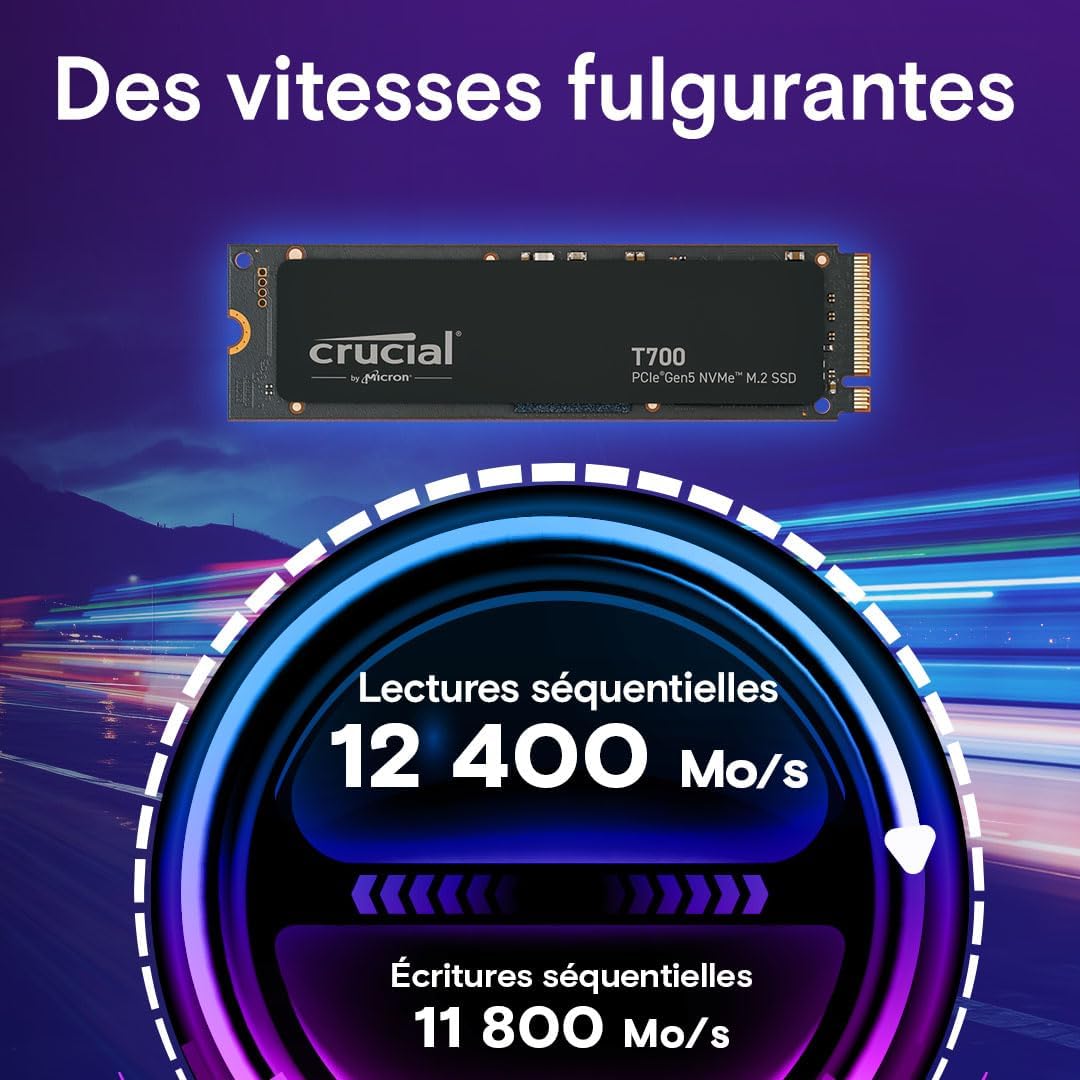
Are you ready to feel the rush of extreme performance? The Crucial T700 PCIe 5.0 NVMe SSD offers speeds of up to 11,700MB/s sequential reads and up to 9,500MB/s sequential writes** (up to 1,350K/1400K IOPS random reads/writes**) for faster gaming, video editing, 3D rendering and heavy workload applications. Built with Micron 232-layer TLC NAND3 and ready for use with your motherboard’s heatsink*, the Crucial T700 Gen5 SSD is optimized for performance, takes full advantage of Microsoft DirectStorage, and is backward compatible with Gen3 and Gen4 motherboards. With SSD speeds nearly 2x faster than Gen4**** in your PC, you’ll never look back from the Crucial T700! * Non-heatsink versions of the Crucial T700 must be installed with a motherboard or alternate heatsink to achieve optimal performance. ** Typical I/O performance as measured using CrystalDiskMark with a queue depth of 512 and write cache enabled. Windows 11 Core isolation disabled for performance measurement. Fresh out-of-box (FOB) state is assumed. For performance measurement purposes, the SSD may be restored to FOB state using the secure erase command. System variations will affect measured results. *** See Micron.com/products/nand-flash for more information. **** Compared to Crucial P5 Plus Gen4 NVMe SSD listed speed of 6,600MB/s. Actual speed may vary. ***** Some storage capacity is used for formatting and other purposes and is not available for data storage. 1GB equals 1 billion bytes. ****** Compared to Gen5 SSD performance without DirectStorage, based on internal test results with supported GPU that uses GPU decompression. ******* Compared to Crucial MX500 SATA SSD listed speed of 560MB/s. Actual speed may vary. ******** Warranty valid for 5 years from the original date of purchase or before writing the maximum total bytes written (TBW) as published in the product datasheet and as measured in the product’s SMART data, whichever comes first. ********* Under typical conditions for airflow and ambient temperature, our pre-installed premium heatsink allows the T700 Gen5 SSD to run at max workload without the need to thermal throttle. Please ensure your drive has proper airflow for maximum performance. ********** Based on internal gaming performance results measured with 3DMark Storage Benchmark SSD performance test for gamers. Actual results may vary. *********** Compared to SSD temperatures without a cooling apparatus, based on internal testing. The Crucial T700 SSD must be installed with a heatsink for optimal performance.
BLISTERING SPEEDS: Get sequential reads/writes of up to 11,700/9500MB/s and random read/writes of up to 1,500K IOPS** for blazing performance
ULTIMATE GAMING and CREATIVITY: With Microsoft DirectStorage, elevate gaming with up to 60% faster texture renders8 and reduced load times, render photos or UHD/8K plus videos and run heavy workloads with up to 99% less CPU utilization
COMPATIBLE: Ready for performance with your motherboard heatsink, the T700 installs easily in your M.2 slot. (T700 must be installed with a heatsink and access to appropriate airflow)
INNOVATION: Produced in house with the Micron 232-layer TLC NAND3 for Intel 13th Gen and AMD Ryzen 7000 CPUs
SPACIOUS: Store more games, UHD/8K plus media, apps, files and more with up to 4TB***** of capacity
Customers say
Customers are satisfied with the computer drive’s speed and performance. They find it easy to install and praise its build quality. However, some customers have issues with stability. There are mixed opinions on heat resistance, value for money, and drive quality.
AI-generated from the text of customer reviews
12 reviews for Crucial T700 1TB Gen5 NVMe M.2 SSD – Up to 11,700 MB/s – DirectStorage Enabled – CT1000T700SSD3 – Gaming, Photography, Video Editing & Design – Internal Solid State Drive
Add a review
Related Products


Original price was: $139.99.$124.99Current price is: $124.99.
Smack –
Excellent storage and speed.
I was able to add this drive into a spare slot buried under the motherboard of an HP ZBook 17 G5. It adds nearly 2TB media storage drive for fast 4k video editing with very little additional heat or weight. After a year, there are no issues. Great value.
Chris –
Works.
It’s quick, It’s reliable. That’s about it.
Gavin –
Blazing Fast Boot with a Gen5 Powerhouse
The Crucial T700 2TB Gen5 NVMe SSD is a beast for my 9950X Ryzen setup and MicroITX Asus board. The performance is stellarâWindows 11 loads in about 7 seconds, and everything feels instant. DirectStorage enabled, itâs basically future-proofed. If you want speed, this is your drive.Rating: âââââ (5/5)Lightning-fast, smooth, and perfect for high-end buildsâworth every penny.
Steve Snyder-Hill –
This thing is solid… and fast!
This is blazing fast if your motherboard supports PCI 5.0. A couple things to keep in mind, it has it’s own heatsink. I think you probably can remove it and use your own but from what I read it is a good one and does the job, so I just used the built in one. At first I had some issues getting it to sit properly on my motherboard and then realized there was a layer of compound on the back of it, which this has one built in, so once I removed that it was fine. The only negative issue I have had is that I can’t get the crucial software to set the over provisioning. It keeps telling me to do it manually in drive manager. I think it is worth the price, it is fast, but keep in mind on real world experience, if you already have an m.2 you are likely not to notice a ton of difference unless you are copying a large file, normal day to day use is similar, actually my Sabarent Rocket 4 had better random read write speeds. I posted that benchmark also. But if you want the latest cutting edge and fastest… this is your drive. I also used the EaseUS Partition Master to clone my windows 11 os with zero issues. Worked perfectly, entire system cloned in about 9 minutes. I can’t recommend that software enough…
James Johansen –
Great value for your money
I purchased a new computer and it only came with a single 1TB SSD.. Considering I’m a massive gamer I knew immediately it was going to be an issue.. I settled on an External drive with a fair bit of memory 8 TB’s and that filled my needs for a while, but I noticed that some games had stuttering and lag, which considering the specs on my system shouldn’t have been happening.. RTX4090, 64 GB of ram, etc etc etc etc.. So I narrowed down the likely causes to the External HDD, so I knew I needed to remedy that situation asap..After searching around I settled on the Crucial T700,, highly rated, and reviewed.. The price is hefty but gaming isn’t a cheap hobby, if you want to play like a pro, you gotta pay like a pro..The install was super easy, plug and play pretty much, the only issue arose from trying to format the drive for use.. after a half hour and numerous youtube videos I discovered that I had forgotten to name the drive, after feeling like an idiot, I had my harddrive installed and ready to roll..Download speeds have never been faster, I’ve always had issues with steam download times, normally stuff that my internet speeds should have done in minutes would take an hour or more, with the Crucial it’s down to taking minutes again..I honestly couldn’t be happier with this product.. If had another slot on my board I’d pick up another and never have to worry about uninstalling and installing games again.. Extremely happy with this purchase..
R Doupe –
FAST And Cool Running.
I get just right up to advertised speeds and it runs very cool on my Asus X670E Crosshair Extreme motherboard’s GenZ M.2 Heat sink that goes next to the dram.
Craigc –
Very fast and stable, but it does run hot. Installed in a PCIe4 m2 slot.
I have a Z790 motherboard with a 13700k. Specs say it is a PCIe4 m2 slot, but I also have a PCIe5 GPU slot.I reached out to the seller to see what speeds I could expect and they said full speed because I have a PCIe5 x16. They were wrong, so go off of your MB spec not what anyone else says. I am using the Heatsink on my MB for this and it works fine, however idle temps are around 45c and under/benchmark they went up to about 63c tops. Without the side panel on my case, Idle temps were at 50c. In comparison my old Fury renegade had idle temps around 32c and never went over 50c. Also for comparison, I included the last 2 images for the Kingston fury/renegade the Images with 7016 and 7041 speeds. The rated speed for that fury drive is 7300/6000MB/s read and write. The theoretical max speed on PCIe4 is 8000MB/s That being said, when bench marking the old drive I would get Passmark ratings between 48k and 53k. With this new drive, I always get over 56k as indicated in the red benchmarks. Also with this new drive having better performance than what my Motherboard is capable of, I am now getting a true indicator of my MB performance. Also if you notice second bench, this drive is rated at 1.5 million IOPS and I got 1.39 million. This is a very zippy drive even on PCIe4 m2. The performance difference isnt much on my specific system and this drive is over 100 dollars more. In short, lol. If you have a PCIe5 M2 slot, this is the drive to get. IMO, If you do NOT have an existing PCIe4 NVME drive with good specs then you might want to consider this drive for max speed on your system. Further, depending on your system upgrade path, you should get this drive if you are doing a new build or upgrading within the next 6 months. No matter what heat sink you use, you will need good air flow in your case to help reduce temps. I have actually reversed the air flow in my system so the rear fan blows into the case across the VRM, NVMe and the GPU, and my exhaust is out the front with my dual fan AIO.
Amazon Customer –
Excellent product
MOB –
I bought this 4TB PCIe Gen 5 SSD for $600 CAD all in, so this review is based on that price. Seeing it now at $800CAD and I would say its not worth the current price at all. The max I would pay for this is $600 CAD.This is a very fast PCIe Gen 5 SSD, with 4TB of space. I have the ASUS ROG CrossHair Hero x670E motherboard with 4 onboard M.2 NVMe SSDs, all of which are 4TB capacity each. 3 of these SSDs are PCIe Gen 4, and my OS System and Games are on this Gen 5 SSD. There is a slight difference in speed over my Gen 4 SSDs for general usage and gaming, my Gen 4s top out at 7200 MB/s, whereas this Gen 5 hits 12200 MB/s – that’s 30% more throughput – from 7 GB to 12 GB per second ! People will say of course these speeds are artificial as they will never be seen in real life use cases, they will say it’s the random file access that’s more realistic. And for most cases I agree, that’s true. But, recently I have moved my llama 2 based, large language models (AI chat bots) to this Gen 5, where I am loading 7GB to 55GB files and this has shaved off a third of the time they load in. I run these LLMs locally as opposed to the cloud (for privacy), with my AMD 7950x, and 2 x 48GB DDR5 6000MT/s memory. I also have a 4090 with another 24GB, and this is more than enough to have a working AI LLM system. So, if you want to load/move/manipulate large files (> 15GB) , then get one of these, if not stick with decent Gen 4s instead, ie the AGAMMIXS70B or the WD_BLACK SN850X. Currently (and this depends on the slot used in the motherboard), my Gen 5 is at 48oC, and my 3 other Gen 4s are at 39, 44 and 51oC. So it runs at average temperature – I bought the non heat sink one – as my motherboard has heatsinks built in.
Fred –
Installé dans une carte mère x870 MSI et couplé avec un 9800x3d ça tourne très bien les vitesses annoncées sont les bonnes, il est fiable aucun soucis avec .Question chauffe avec le dissipateur de la carte mère, en charge il est à 65 degrésNiveau rapidité allumage du pc , des applications, des jeux vous voyez une différence, maintenant niveau tarif c’est comme tout quand vous voulez mieux c’est plus chère…Je le recommande à un tarif maxi de 250 euros pour un 2 to
Comprador –
Exactamente lo que dice la publicación, muy rapido. recomendado para windows y arranca el sistema volando
Fr –
Lo uso come disco di sistema per il mio nuovo PC.Un po’ caro, ma le prestazioni si pagano.