

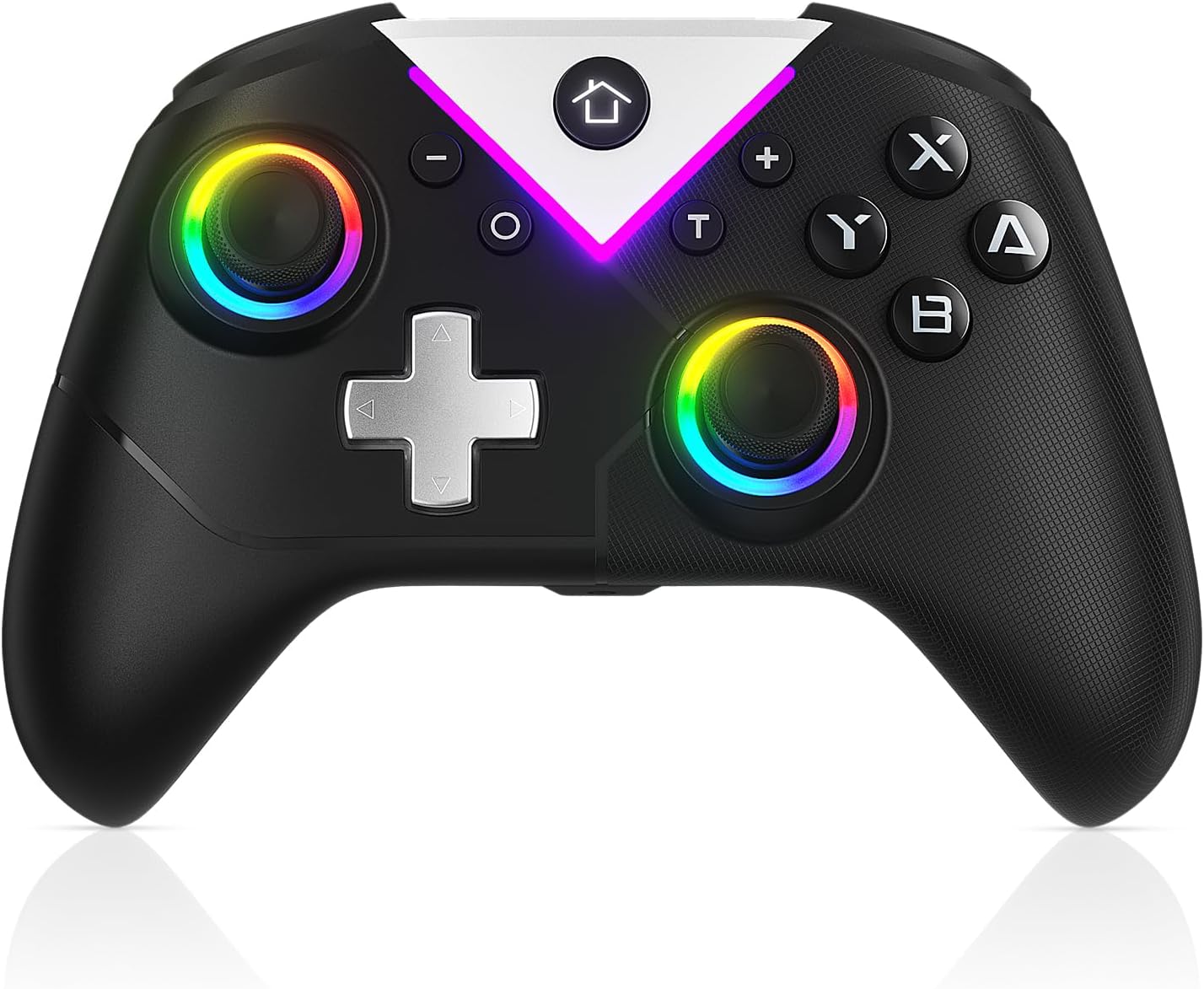
Gulikit KK3 Max Controller, Kingkong 3 Controller, Nintendo Switch Controller with Hall effect Joysticks and Triggers, 1000Hz Wireless Polling Rate, 4 Back Button, Compatible with Switch/Switch OLED
$79.99


Price: $36.99 - $79.99
(as of Jan 16, 2025 18:58:06 UTC – Details)
Gulikit king kong 3 max controller – the ultimate wireless switch controller for all your gaming needs!
Patented Maglev Vibration Motor
Gulikit kk3 has 3 Vibration modes: Maglev Super Haptic Mode, HD Rumble Mode and Rotor Vibration Mode, choose from 2 strength levels, light to strong. Six different vibration levels provide the most immersive gaming experience
Hall Effect Joysticks & Triggers
This controller is equipped with 2 Hall Effect Joysticks, 2 Hall Effect Analog Triggers For All Controller Versions, High Precision At Level 2200 AllowsFor More Delicate Joystick Micro-Control with adjustable sensitivity.
Patented “Hyperlink” Adapter
When this pro controller works with controller for Wireless 1000Hz Polling Rate and it helps you win competitive gaming with super fast response and super low delay
Second-Generation Mechanical Buttons
Enhanced Reliability, Hyper Responsive Actuation and Great Tactility
Patented “Smartrigger” Technology
Slide The Switches On The Back To Set For Digital Triggers Enabling An Ultra-Fast Rate Of Fire For Shooting Games Or Analog Triggers Enabling Pressure-Sensitive Action For Car Racing Games. Upgraded Triggers With New Structure And Less Dead Zones Feel More Natural And Responsive
Adjustable D-Pad
Supports Change From Default 8-Directions Mode To 4-Directions Mode To Avoid D-Pad Ghosting Issue In FPS Games
4 Metal Rear Paddles
Detachable,Swappable and Remappable. Equipped with four detachable long keys and a pair of replaceable semi-circular keys. Players can directly map them to any button through the gear button on the front, Simple and easy to use.
Upgraded Auto-Pilot Gaming
This switch remote controller can record all operating instructions in the game for up to 10 minutes. Optimized With Better Software & Hardware, Architecture And A Self-Correction M
【Maglev Vibration Motor】The KK3 Max Controller has 3 Vibration modes: Maglev motor, HD Vibration and rotor motor mode, with 2 strength levels available (light to strong).
【Multi-Platform Support】Compatible with Switch, Switch OLED, Switch Lite, Steam Deck, Android, iOS, macOS and Windows.The Bluetooth Version is Bluetooth 5.3. The KK3 Max come with a “Hyperlink” adapter for PC-Wins(only) that wireless or wired dual 1000Hz polling rates with low delay.
【4 Detachable Metal Rear Paddles】KK3 equipped with 4 detachable metal rear paddles mapping any face buttons, you can swap and change the rear paddles as you want(not programming/macro). Comes with 6 metal rear paddles (3 pairs).
【NO Drift Hall Joysticks & Triggers】The high-quality hall effect joysticks (Switches no-deadzone / deadzone mode by pressing ‘gear’ and ‘screen shot’ buttons ) with a high precision level of 2200 and adjustable sensitivity(50%, 100%, and 150%). The patented “Smarttrigger” technology for linear digital and analogue trigger modes.
【Auto-Pilot Gaming & RGB Light】Records your operations for up to 10 minutes with less than 0.01 seconds of difference within 30 seconds. The star ring RGB lights show different joystick sensitivities with 2 levels of brightness.
【6-Axis Gyroscope】GuliKit KingKong 3 controller supports 6-Axis gyro, NFC-Amiibo and Switch awake functions. The patented motion aim assist enhances and elevates your FPS gaming experience.
【2 D-pad Mode & Longer Battery Life】8-direction Mode and 4-direction mode. 950mAh rechargeable battery, without the lights it’s up to 28 hours playtime. With the lights, it’s up to 15 hours of playtime.
【Ergonomically Designed】Ergonomically designed with a skin-like surface and non-slip dotted texture for a comfortable grip. The 2nd-Gen buttons provide premium tactile feedback to solve stuck keys perfectly.
【Customer Service】 We are committed to providing you with the best customer service. If you have any questions or requirements regarding the product, please feel free to contact us.
Customers say
Customers find the video game controller functional and comfortable. They say it works well, is easy to connect, and is one of the best universal controllers they’ve ever owned. However, opinions differ on the build quality, control quality, buttons, stick drift, ease of use, and trigger strength.
AI-generated from the text of customer reviews
10 reviews for Gulikit KK3 Max Controller, Kingkong 3 Controller, Nintendo Switch Controller with Hall effect Joysticks and Triggers, 1000Hz Wireless Polling Rate, 4 Back Button, Compatible with Switch/Switch OLED
Add a review
Related Products


$79.99
Raine –
Needed for PC and Switch Gamers
as someone who games and uses controllers, this controller is by far the best one I have bought, i know its price point is high but it is high for a reason. it is comparable to an xbox elite controller which is a controller that is $150, this controller comes with MORE features that that one does. its build quality is amazing and i can not see it getting stick drift at all with use. i started up zelda and it connected INSTANTLY. its perfect for bluetooth and i will be picking up this controller more than my xbox elite controller.the material of the controller moves and feels so good, the vibration is perfect too, itâs not intense but it feels so good itâs hard to explain until you use it.i would recommend this controller for PC and switch users.
WetPig –
Probably one of the BEST controllers for basically anything!
My first impressions of this controller with rather limited since i hadnt got to work with it much. But as i continued to use it more and more, I instantly became attached to it! The ease of use when switch from my Nintendo Switch, to my PC, to my Android, is SO seamless! basically, you pair it to any one of those platforms, and can switch to them on the fly without having to re-pair it to the device! The included Hyper adapter is Another cool thing. It bypasses the CPU, that Bluetooth needs to compute the inputs, and has 1000hz poll rate, which means practically ZERO input lag!! Another thing is the customizability of this controller, the instructions are precise and simple to follow for each device, you can switch the button layout from Nintedo switch ABYX, to the XBOX BAXY with a simple button combo (it even comes with appropriate extra buttons to replace your most preferred button scheme!, from the Switch layout, to the XBOX layout!) The 4 back paddles is what sold me, being able to bind Keys to the back paddles for quick-use is so useful! sadly i will say, it doesnt allow you to make Multiple button presses into one paddle key, so thats a bummer! The battery life is SUPER long, even WITH the Ring lights around the joy sticks on (Yes it even lights up!) But the HANDS DOWN most useful thing about this controller.. The hall effect joysticks and triggers.. if you know anything about how conventional Joystick potentiometers work, then you will LOVE these hall effect joysticks! Stick drift is no longer a thing! Gulikit’s technical support is the coolest too. One of my shoulder button switches broke and I contacted them about it and they sent me out replacement switches to make the repair myself, and since I have the ability to do that, I found that sooo unbelievably cool! Do yourself and favor and GET THIS! IMHO, this controller has everything you could want at half the price of an XBOX Elite controller, or a NinSwitch Pro controller! Just the versatility and ease of repairs makes me give it 5 stars.
seanlam98 –
Better than my Switch Pro Controller(s)
Unpacking/Initial thoughts: (5/5)Looks cool. The controller was packed in a molded plastic case and all functions were working. After installing the firmware I tested out on my PC. The controller paired, functioned well and worked on Steam. I am very happy with my purchase and prefer this over the switch pro controller. I bought 2 SP contollers before and both have failed – they were my favorite controller for feel but I could not justify the expense in replacing them every ~2 years.Build: (4.5/5)Very High Quality. I have had to replace over 5 controllers to bad build quality. I feel like this will last me > 3 years.Build quality is much better than the switch pro controller.The DPAD has a slight click, rolls well and feels good to use. The L/R buttons are clickiest and yet, not loud. Face buttons are tactile but lower pitched than the L/R buttons. ZL/ZR are not clicky, but have a smooth travel. No noise in ZL/ZR until you hit the backstop. L3/R3 are shallow, quiet and clicky. The rumble is nice and strong, but can be lowered a bit. All buttons have minimal to zero play in them. Very slight flex in the controller when bending, but MUCH better than the switch pro.Fit/Finish: (4/5)I like the textured grip of the controller and it fits well in my hands. The finish oI can reach all buttons comfortably.Battery: (-/5)I was not able to test the battery life. Will not include the score in the finalSoftware: (2.5/5)I would love to see Gulikit expand on the software compatibility (or a standalone PC/mobile app with minimal bloat) as steam will NOT interact with the home button, unless you setup a workaround 🙁 . However, xbox game bar does function with the home button; disable it the feature in the game bar app if you don’t want that to happen to you! Let us assign keyboard shortcuts to the screenshot, home, and gear keys please <(ToT<)Overall: 16 points out of 20 total possible points total - 4.0/5 rating(I would have rated switch a 14/20, or a 3.5)
betty –
Useless out of the box
Received the controller, tried to connect to my pc via the dongle that came with it. It wouldn’t connect and the controller wouldn’t stay on for more than 10 seconds even fully charged. Tried to connect directly to my PC that has bluetooth, nothing. Read some forum posts about updating the firmware. Proceeded with the steps on the website. Can’t get the usb drive to show up so I can’t update the firmware and now the controller won’t turn on. It’s a great idea for a controller but just wait until a good company like Steel Series or Logitech make it.
Sfsetup –
ð® The joystick that everyone should try ð®
Iâve been using the KK3 Max controller for a while, and honestly, itâs pretty solid. The grip feels great, and the buttons are super responsive, which is perfect for intense gaming sessions.The connection with the dongle is fast and reliable, and if youâre someone whoâs picky about latency, using it with the cable gives you zero delay, which is awesome.The fact that it comes with a hard case is such a bonus!! itâs great for keeping the controller safe when youâre traveling or just storing it at home.For the price, I think itâs a fantastic option. It feels premium without costing a fortune, and itâs packed with features that make it a great pick for both casual and serious gamers.
S –
Worked well, no drift, but stopped working before even 1 year.
Amazon Customer –
Great Product and service
marine selzer –
Je ne sais pas s’il s’agit de la fameuse technologie “HAL effect”, ou un effort supplémentaire fournit par le constructeur, mais la différence de confort ressentie entre l’utilisation des Joysticks de mes Joycon, ou de ma manette GC, aux joystick de cette manette est sans équivoques.Elle me laisse bien volontier croire à la promesse d’une manette sans risque de drift.Aucune chance que je revienne à une autre manette pour jouer à la Switch, à part peut-être pour Smash Bros, car j’ai mes habitudes depuis Mêlée, et encore…Reste à voir si la manette survivrait à l’utilisation intensive qui accompagne les parties de Smash, mais peut-être que d’autres avis utilisateur vous éclaireront à cet égard.
Planewalker –
Da ich keine Lust mehr hatte, alle paar Monate trotz mäÃiger Nutzung neue Controller wegen des nervigen Stick-Drifts zu kaufen, habe ich mich für diesen Controller mit magnetischen Sensoren entschieden. Die Zeit wird zeigen, ob das richtig war. Der Controller fühlt sich zunächst haptisch gut an und die Kontrolle ist sehr präzise. Die Analogtrigger sind vielleicht etwas zu aggressiv und haben einen recht kurzen Weg. Je nach Spiel kann das vor- oder nachteilig sein.Für diejenigen, die den Controller auch auf Windows 7 drahtlos nutzen möchten, gebe ich ein paar Hinweise, wie das funktioniert. Im Ggs. zur kabelgebundenen Nutzung, die auf Anhieb funktioniert, muss man nämlich ein paar Einstellungen vornehmen:1. Passenden Bluetooth-Adapter installieren (praktisch geht jeder Adapter mit W7-Unterstützung)2. Controller pairen (Bluetooth -> Gerät hinzufügen; Controllermodus auf Windows setzen und Pairing-Taste 2+ Sek. drücken; der Controller wird angezeigt und kann ausgewählt werden)3. Microsoft XINPUT-Treiber für W7 herunterladen (muss man googeln)4. Gerätemanager öffnen und bei den Eingabegeräten “HID-konformer Gamecontroller” finden5. Rechte Maustaste -> “Treibersoftware aktualisieren…” -> “Auf dem Computer…” -> “Aus Liste wählen” -> “Datenträger” -> heruntergeladenen Treiber auswählen -> “XINPUT compatible HID device” wählen (Ist der Treiber bereits installiert, findet man den, indem man “Kompatible Hardware” ausschaltet und ihn unter “Microsoft” auswählt6. Fertig.Ist ein wenig fummelig, aber wenn es einmal eingerichtet ist, funktioniert es. Bei erneuter Nutzung schaltet man den Controller einfach ein, der rummelt kurz und ist dann einsatzbereit. Viel Erfolg!
Miguel –
Lo compré porque estaba harto de tirar el dinero comprando mandos que a los pocos meses me quedaban inservibles por el drift, independientemente de lo mucho que los cuidara para que no les entrara polvo. Tampoco los uso tanto y es absurdo que se estropeen tan rápido. Este ha funcionado perfectamente hasta ahora. Lo de tener su propia caja para guardarlo es maravilloso, el bluetooth funciona perfecto y los controles para encender/apagar el mando son muy sencillos e intuitivos. Cuando me dejo el mando encendido en modo bluetooth y no lo uso, se apaga solo para ahorrar baterÃa y vida útil del mando.