

HP Envy 6555e Wireless All-in-One Color Inkjet Printer, Print, scan, Copy, Duplex Printing Best-for-Home, 3 Months of Instant Ink Included (714N5A)
Original price was: $159.99.$119.99Current price is: $119.99.






Price: $159.99 - $119.99
(as of Jan 08, 2025 10:45:17 UTC – Details)
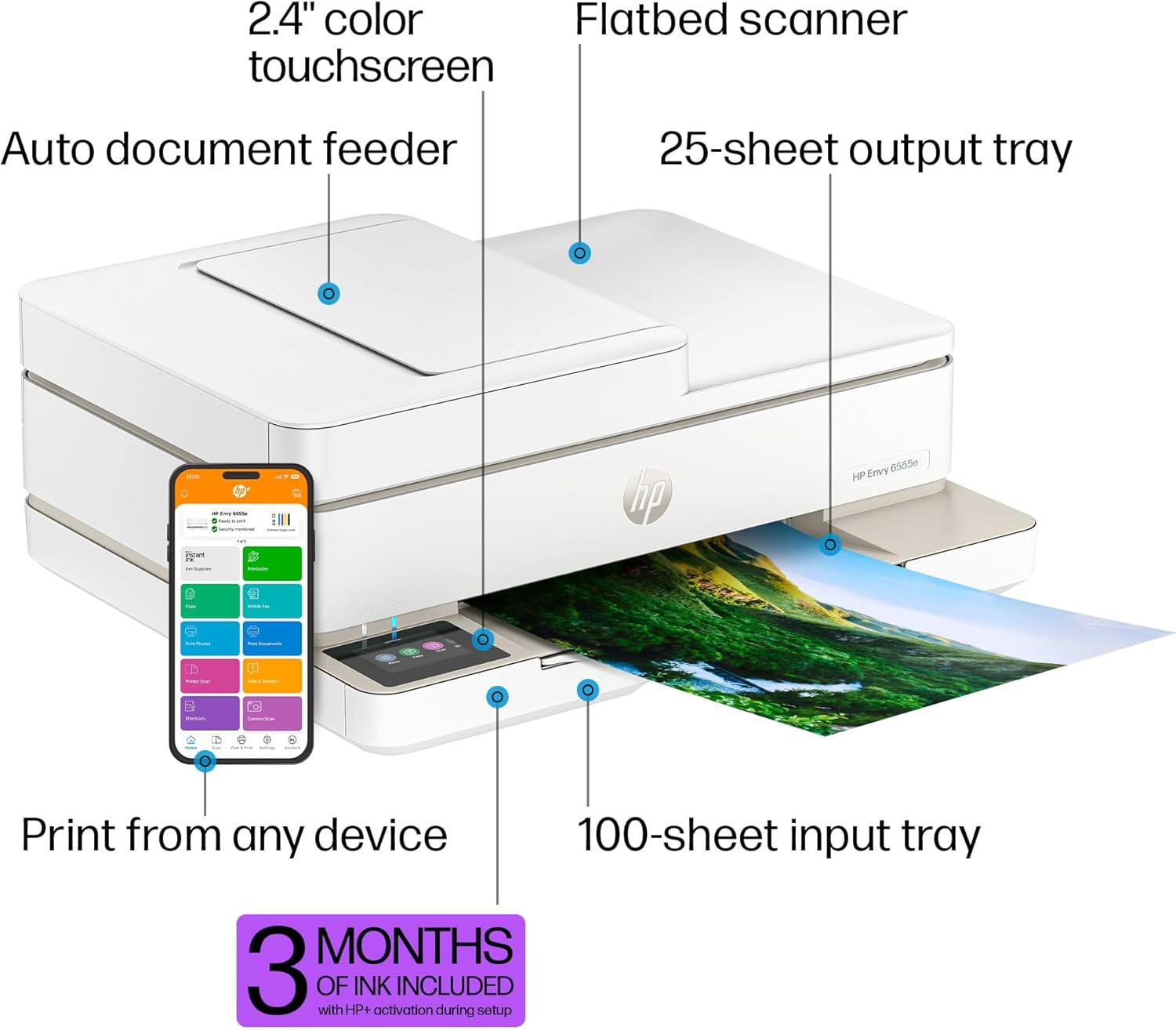
The HP Envy 6555e All-in-One delivers color printing, scanning and copying, plus a 35-sheet auto document feeder and 100-sheet paper capacity. It includes wireless and mobile printing capabilities to keep your multifunction printer connected, and prints highquality documents and photos every time with true-to-screen tech. This inkjet printer also lets you easily navigate print jobs with its intuitive color touchscreen.
FROM AMERICA’S MOST TRUSTED PRINTER BRAND – The Envy 6555e is perfect for homes printing everyday color documents like homework and borderless photos. Print speeds up to 7 ppm color, 10 ppm black.
KEY FEATURES – Color print, copy and scan, plus auto 2-sided printing, a 35-sheet auto document feeder and a 100-sheet input tray.
HP’S MOST INTUITIVE COLOR TOUCHSCREEN – Smoothly navigate your printer with the easy-to-use 2.4″ touchscreen.
WIRELESS PRINTING – Stay connected with our most reliable dual-band Wi-Fi, which automatically detects and resolves connection issues.
TRUE-TO-SCREEN TECH – Print documents and photos that look as vibrant as they do on your screen with HP’s P3 technology.
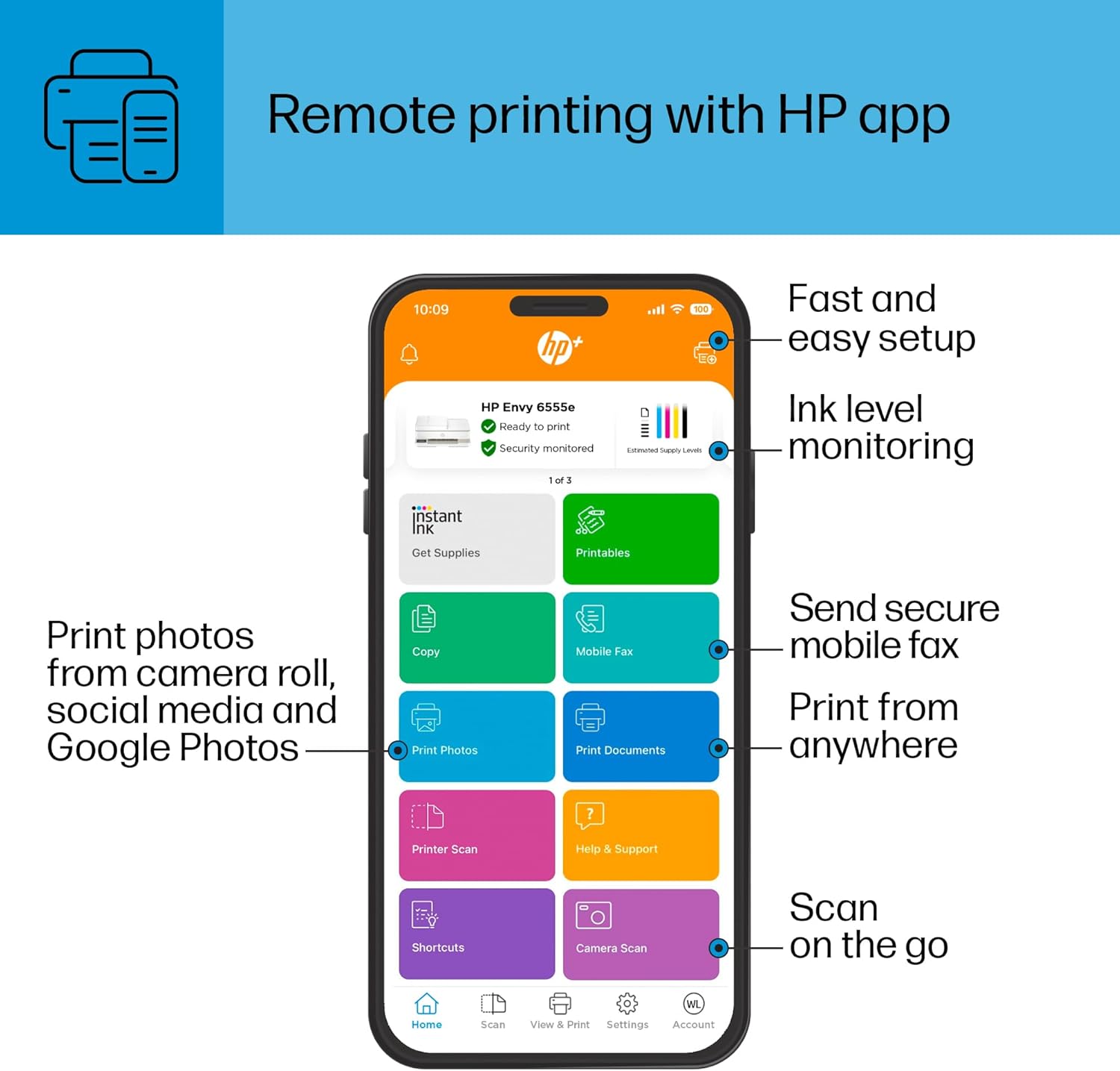
HP APP – Print, scan, copy, or fax right from your smartphone with the easiest-to-use print app.
3 MONTHS OF INK WITH HP+ ACTIVATION – Subscribe to Instant Ink delivery service to get ink delivered directly to your door before you run out. After 3 months, monthly fee applies unless cancelled, and you save up to 50%.
SUSTAINABLE DESIGN – Made with at least 60% recycled plastic. Choose HP to help forests thrive—for every page you print, HP protects, restores and manages forests.
This printer is intended to work only with cartridges with original HP chips or circuitry and will block cartridges using non-HP chips or circuitry. Periodic firmware updates will maintain the effectiveness of these measures.
Customers say
Customers find the printer easy to set up and use. They appreciate its good value for money and size. However, some customers have issues with print quality. There are mixed opinions on print speed, wireless connectivity, and ink quality.
AI-generated from the text of customer reviews
10 reviews for HP Envy 6555e Wireless All-in-One Color Inkjet Printer, Print, scan, Copy, Duplex Printing Best-for-Home, 3 Months of Instant Ink Included (714N5A)
Add a review
Related Products
![Phomemo Portable Thermal Printer – [Upgrade] Portable Printer Wireless for Travel Compatible with iOS and Android & Laptop,Bluetooth Printer supports 8.5″ X 11″ Letter Thermal Paper, Printer with Case](https://m.media-amazon.com/images/I/81DHkvIWPbL._AC_SL1500_.jpg)

![Canon PIXMA TS6420a All-in-One Wireless Inkjet Printer [Print,Copy,Scan], Black, Works with Alexa](https://m.media-amazon.com/images/I/61x6KTFR8yL._AC_SL1500_.jpg)


Original price was: $159.99.$119.99Current price is: $119.99.
brian –
Easy set up
Only had it a couple days so havenât used it much. Just want to state the set up was very easy. The set up instructions are the first thing you see when box is opened. Installing the ink cartridges is also easy. Only thing was little difficult is the small display makes hard to easily touch the keypad that you use to enter your wifi password to connect. But not a big deal. Only printed one thing from a mobile device so far and works fine.
noname –
Easy to connect wirelessly
This printer is small and mighty. I tried three other brands that were higher priced, and I absolutely could not get them to connect wirelessly. I will never purchase an Epson again. This envy was so simple to connect with easy directions to follow. I had it set up in a very short time. The print quality is excellent. I like the touch screen. The only thing that I don’t like is the instant ink program. Not sure I will stick with that.
Farrie –
Neat printer
I purchased this printer because I needed a replacement for my hp deskjet 3050 which has served me faithfully for almost a decade.
This Hp Envy 6555e looks pretty neat, got it for $100 which I think is a good price.
Upon setup the touchscreen display had a slight delay (havenât noticed it since), the sensitivity to touch is good.
The HP application is easy to use, and I have no problems connecting the printer to WiFi and using HP print or AirPrint.
It seems quite sturdy and well-made.
It works with HP 68 ink. I have no interest in the Instant Ink Subscription programme and I havenât had any nagging prompts to join the programme as others have mentioned. The Print quality is good.
My only negative observation so far is that in comparison to my old printer, the print speed is a bit slow. Otherwise, Iâm quite satisfied with my purchase.
Malagu –
Great Printer and Scanner
I love this printer! It was so easy to set up. The printer can still be used without having to install the HP software but it will need to be installed to use the scanning functionality. Printing to this printer from a PC or mobile device is easy, just select the printer when you want to print. The pages come out clear and fairly quickly. Scanning from this printer is easy as well. Just open the HP Scan app, click “Scan,” and the image will appear on your screen in a few seconds.
Truthsayer –
While your buying this printer also buy a bottle of Tylenol
Because this printer is a headache.
As you can below I wrote a positive review but things have changed drastically since my purchase in October 2024.
This printer is just not good. It constantly goes offline. HP suggests downloading HP Scan Doctor and other support apps but they help and not help. Sometimes the support apps help and well today is just one of the days it doesn’t.
I used the printer to scan and print one document. Well that one act caused the printer to completely go offline and I’m now on the second hour of troubleshooting and nothing helps. But this is how sensitive this thing is. Doing an everyday task it might decide to suddenly stop working.
Of course HP like so many others blame the customer or at the least put us to work to go through all the troubleshooting, unplug it, replug start your computer restart your computer. Adjust your network make sure the plug is in a wall outlet not an extension cord. And on and on and on. After all that, well 50/50 chance that works. So to reach someone in support, guess what? They make you do all that again. And download this download that, adjust this but not that. If you’re lucky to get it working, have the tylenol ready because most likely it will randomly do it again. That’s the issue it just stops it just goes offline you’ve changed nothing its been working great all day then BAM it goes offline or stops. I had an HP Envy for 8 years they don’t make it anymore and I never had one issues, not one. I can’t function with a product that’s unreliable and moody.
I mean they all have complaints about this or that to the point where I stopped searching and took a break for a few days. Then deciding between the varying but yet identical models 6555 vs 6444 vs 6332 etc. And common feedback was connection issues set up problems and frustration of having to allow HP to take over your printer by sending you ink but then also not allowing you to do things without paying.
I wanted of course a reliable good print of documents I rarely print photos or graphics. A descent printing speed I would suggest at least 10ppm. A multipage scanner and copier. I like the screen as it allows me to handle issues at the printer and not on an app or a couple of buttons without a screen.
Small enough to fit easily in places and of course a good price ideally under $100.
So I decided this one was the best choice. I’ve been using it about 3 weeks. While it’s tempting to accept the free ink for 3 months or 6 months or whatever it is, I didn’t do it because in doing so you pretty much give up your privacy and HP now has control over your printer. Meaning, they can access it and they do to determine if you need ink, monitor how many pages you print and god knows what else youre agreeing to.
So to keep your printer, yours when you’re setting up do not scan any QR codes decline the free ink, decline any other offers of support or diagnostic help by scanning any bar codes QR codes. Set up the printer without scanning or agreeing to anything during set up, Yes, you can easily set it up like you did before all of this ink technology stuff.
Once you’ve made it to the final setup there may be some connection issues that can be resolved.
I used my wifi and I had connection problems. The printer would constantly go Offline and would go to sleep and I would be unable to wake it up with the power button, or lifting the top. I had to unplug the printer to get it awake and back online.
After a few hours the fix is this. If you’re having these issues you need to download the HP Smart app on your PC or Apple. I have PC. This app is helpful in a few ways because it does help fix the issue of the printer going offline and not be able to awaken. There are areas in this app where it discusses these issues. Also make sure your wifi name you use on your PC is the same as the printer. You may have to reset the wifi on your printer again which helped in my case.
Of the HP printers I’ve owned this was more oddly a problem but be calm and not regretting the purchase it just requires a few more steps to connect. Hopefully you won’t have these issues. I don’t know what determines who gets the problems or not. But it is fixable with patience,
Once this was fixed it has not been an issue again and the print speed and qualify is really good. It is a bit loud when it starts printing but I suppose most are. I paid $99 plus tax and it’s worth it.
One thing very important. When you’re shopping for printers write down the model numbers and Ink number for each printer you’re considering, then go search the ink number on amazon. Some printers ink is very expensive and some printer models are discontinued (which they don’t tell you i figured out from searching) and for some of those the ink is hard to find. I have always bought the secondary market ink on amazon which is okay to use on the printer just make sure they are refilled original cartridges. Many of the printers I considered had maybe 1 or even no secondary ink sellers which means the only ink purchase option is HP.
Michael E. Miller –
new and easy to use and set up HP does it again go ENVY!
There is nothing I dislike about this ease of use Printer from HP. I have and love the HP ENVY laptops and this ENVY printer replaces an HP that I had for too long. Im not crazy about the monthly ink bill payment tho it’s less than $5, but I could always cancel it if I choose, and the power button in the back of the unit is a slight pain but all in all I love this product, and it got here early; thanks Amazon and the SELLER as well
Sajay –
So Far So Good
Needed a new printer for work @ home, just one fits the bill. It’s a little sensitive about paper drawer being closed correctly before it starts to print, otherwise working great so far. Luckily my son who is tech savvy set it up for me, working well so far.
G. S. –
ease of assembly looks
Jean M. –
Bon produit
Amazon Customer –
I am very disappointed with the Envy. It takes 4 minutes to make a 4×6 photo. My old 6970 would do that in about 20 seconds. The entry for numbers is so small that you need baby fingers to operate them. Instead of being facing you the pad is for standing up with a flashlight. I guess I will have to be careful when spending money for another one.