

IRIScan Visualizer Webcam Document Camera v7:4K UltraHD-13MP,4in1,visualizer,Scanner A3,Portable Scanner,Web Conferencing,Distance Learning,Remote Teaching,AI Micro,Led,USB,WinMac (4K-13MP)
Original price was: $109.00.$89.00Current price is: $89.00.





Price: $109.00 - $89.00
(as of Jan 19, 2025 02:30:12 UTC – Details)
From the brand


Less paper, more content is our motto. As every motto is supposed to do, it summarizes what our solutions aim to offer you. To make the long story short, we were among pioneers in the field of text recognition. We master it.
We are today’s pioneer in solutions, bringing to you the real value your money’s worth: The content of documents.

IRIScan Book 5 Wifi

IRIScan Book 5

IRIScan Executive 4

IRIScan Express 4

IRIScan Pro 5

IRIScan Desk 5


IRIScan Desk 6

IRIScan Desk 6 Pro

IRIScan Desk 6 Business
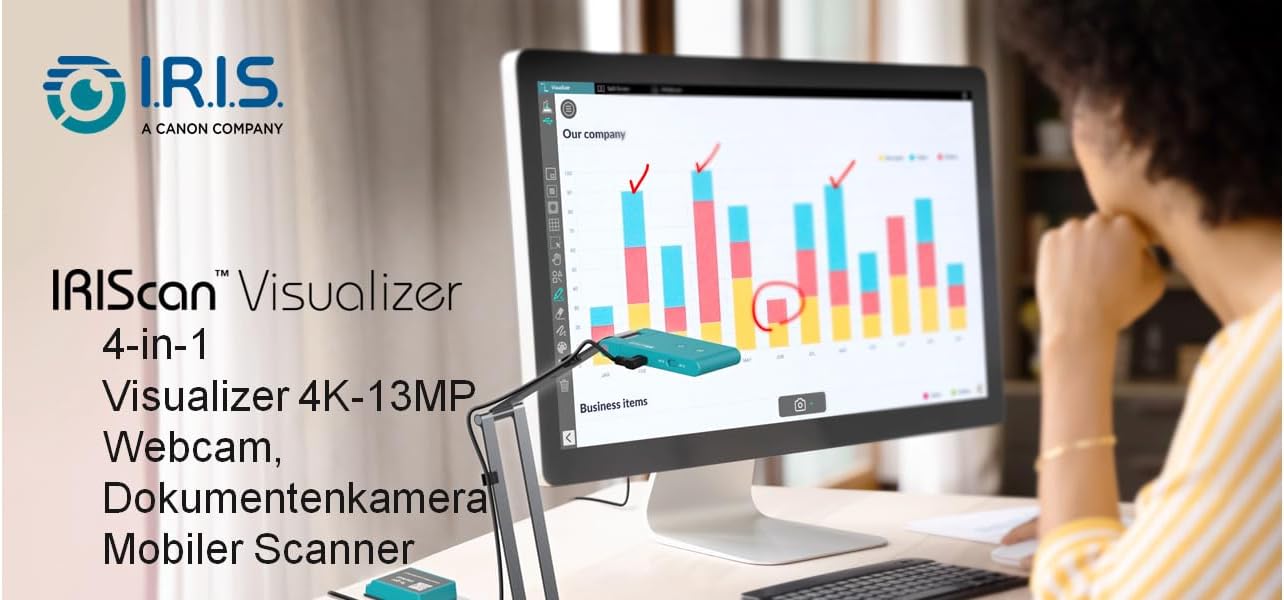
IRIScan Webcam : 4 in 1 : Webcam, Visualizer, Document Camera & portable scanner, The ALL-IN-ONE Solution For The Today’s Classroom Or Remote Presentation. 4K – 13MP USB powered amazing distance learning technology. In today’s modern classroom, it is vital for teachers to have the right tools to interact effectively with students. This includes choosing the right visualizer to use in conjunction with a classroom projector or interactive whiteboard. IRIS offers a brand-new high quality 4K visualizer that is easy to use, as well as a powerful scanning, demonstration and whiteboard software to enhance your classroom presentation application.
IRIScan visualizer : The IRIScan Visualizer has not only be developed for the classrooms. It can also be your ideal partner for all your professional or private remote or physical presentations. IRIScan Visualizer is fully UVC compatible no need to install any software PLUG & PLAY, IRIScan Visualizer is fully UVC compatible, this mean The USB video device class (UVC) is a device capable of streaming video like webcams, digital camcorders, transcoders, analog video converters and still-image cameras.
IRIScan the document camera : Students or colleagues can see clear images whether they are in-class, in meeting room or remote, the foldable mechanical arm can be firmly folded into a neat body and stored in the bag (ultra-portable design), it is very convenient to carry the device anywhere for teaching, recording, live streaming or planning. of the course
Besides, the IRIScan Visualizer has an easily operable control panel to improve teaching or presentation efficiency. A powerful Readiris OCR & Visualizer Software is included. This software provides many useful functions, including split-screen comparison, picture-in-picture recording, stop motion, and an interactive whiteboard. These features provide an enhanced user experience and enable you to achieve your goals more effectively
IRIScan Webcam & visualizer major benefits for your daily tasks : Teach, Co-Work and shares with others in Ultra HD quality video 4K Stream documents, textbooks , and images Plug & play compatible with all conferencing software Shared experience across classroom students Enable scanning powerful technology powered by IRIS
IRIScan 1/3.06” powered by Sony CMOS camera 4K-13MP, 4160 x 3120 pixels A3 document camera V4K Pro Ultra HD Document camera Software digital zoom up to 10x
IRIScan micro embedded AI noise reduction technology Built-in G-sensor, automatically rotates the video Dual-mode autofocus (AF-C / AF-S) Foldable, compact design to easily move or store Plug-and-play, UVC/UAC compliant with USB TYPE-C Come with an interactive Readiris Visual software compatible with Windows & macOS
IRIScan best of breed technology for your daily needs Image Sensor 1/3.06” Sony CMOS camera 13MP, 4160 x 3120 pixels Mode Scan Color, Color (Enhanced), Grayscale, B/W(Document) Camera V4K Pro camera – A3 format 440 x 330mm / 17.32 x 12.99 inches IRIScan portable scanner Document Scanning Format JPG/PDF/PDF searchable powered by OCR 138 languages supported (No export to Word or office)
G-Sensor Built-in & AI Noise Cancellation Technology Noise reduction and voice enhancement technology Resolution Interpolated (SW) 4160 x 3120 pixels (13MP) Digital Zoom 10X by Software
Companion Software Readiris Visual – lifetime Powered by Readiris visual powerfull software get our Software here : irislink.com/start. Free Readiris PDF Companion software full OCR : open any office & PDF Files, annotate, comment, merge and extract document, send document to office or PDF
11 reviews for IRIScan Visualizer Webcam Document Camera v7:4K UltraHD-13MP,4in1,visualizer,Scanner A3,Portable Scanner,Web Conferencing,Distance Learning,Remote Teaching,AI Micro,Led,USB,WinMac (4K-13MP)
Add a review
Related Products


Original price was: $109.00.$89.00Current price is: $89.00.
ð¹ –
With its autofocus everyone in a video chat can read the text of documents I share
I can fold it to a compact size of 7 ½ inches long, 2 inches wide, and only ¾ inches thick. Unfolded and fully extended, I measure a height of about 18 inches. Itâs under 14 ½ inches if I have the green camera part in a right-angled position. It connects via USB, and I didnât have to install any drivers to use it as a webcam.I scanned the QR code on the bottom to install the software for itâReadiris Visual and a TWAIN driver. Document scanning works, and the font looks sharp. I scanned a few documents, and the software saved them as PDFs. But I noticed that it is nearly impossible to use the touchscreen to select the area to be scanned. I have to plug in a mouse to select the field. Under Linux, there is no software that would make it work as a scanner. Still, on Linux, I can use it as a webcam with a built-in mic, and autofocus works as well.As a webcam, I can use its built-in light so people see me better, and I can get up to 4K resolution, but I mostly use 1080P to avoid network lag. I can change the orientation manually or automatically. The built-in microphone records my voice clearly. I havenât encountered any issues using it as a webcam in any video chat software or on the web. And I can share documents with friends live, and they can clearly read whatâs written as autofocus works and the camera stands completely still with its adjustable stand so text stays focused. With my phone, I would have to hold it with my hands, and text often gets blurry.
MDJ –
Works
Picture quality looks good with a lot of detail. I don’t think I would use it as a scanner, it was okay but a flatbed or MFP works way better. The hardware is quite good for a web/doc cam. The software was okay and it works but if you are looking for extreme customization and adjustment, you need to look elsewhere. For its pricepoint and its purpose, it works well.
Tyler –
Versatile Webcam for Teachers and More
This IRIScan document camera is a really cool tool. It’s basically a webcam on a flexible arm that can also be used as a document scanner. It’s great for teachers, especially for remote teaching or hybrid classrooms. You can use it to show documents, textbooks, or objects to your students. It has a 4K camera, so the image quality is really clear. It also has a built-in microphone with noise reduction. It comes with software that lets you do things like split-screen comparisons and picture-in-picture recording. It’s easy to set up and use. You just plug it into your computer’s USB port. It’s also portable, so you can take it with you wherever you go. Whether you’re a teacher, a student, or just need a versatile webcam, this one is worth checking out.
Bruce Richardson –
Frustrating, and ultimately more trouble than it’s worth–for me. YMMV
I was glad to see UVC/UAC support. That’s the reason I ordered this.I don’t want to rehash the many reviews that cover the basic operations. I just interpret UVC/UAC as “mobile device support,” and that’s clearly not what IRIScan means. I was excited to see in IRIScan app in the Google Play store, but it did not extend to any real control of the device.I had to experiment with different software apps, and finally found one that would let me snapshot **some** of the frame. When I allowed my screen to flip, the phone and device didn’t communicate well enough to keep the image proportional, so it became stretched and unusuable in both display and captured results.Even on the PC, the app doesn’t obey Windows conventions, and is not very detailed.Worse, the camera blows-out quite easily when light is added, whether it’s from the spotty on-board illumination or from my nicer and more even lights. You cannot adjust the color temperature so far as I can tell, and the images had a blue-green-ish cast to them.I see how the manufacturer probably intends for it to be used–as a presentation tool. But the stand–as compact as it is–makes it very difficult to pop paper documents into the camera’s field of vision and work with them.My gut feeling is that this is a solution looking for a problem. My hope was that I could throw it in a bag and have a compact way to scan documents. But in truth, it’s no better than a smartphone. In fact, it’s less capable of rendering a clean “scan” of a document than my built-in Samsung S22 Ultra phone, and requires unbearably more fiddling around…Ultimately, without an app it’s of very little use on a mobile device, and even with the app, it’s not much use on a PC. The form factor would be intriguing if it were a more capable device with a more comprehensively supported and better designed software app. In comparison, I have a little Obsbot camera that is amazingly capable on both PC and Android–precisely because it is well supported by software.I think in 2024, there’s a built in expectation that portable devices should work well with portable device ecosystems, and the lack of control over the hardware when I am using UVC mode is just not what I see other companies doing.I’ll give three stars. But this was probably a waste for me. I spent 2 hours dinking around with the PC implementation, and another 2 hours trying to find a mobile app that supported its full resolution via UVC/UAC, and by the time I was done with that I was exhausted and frustrated.I’m overlooking the frustration right now, actually, to support the three-star rating. Someone who really wants to make it work will probably rearrange their in-house and road setups to accommodate it and they’ll be fine. But for me, I was looking for a pop-up solution for a subset of uses, and this wasn’t it.
Viktor –
Versatile document camera — fun gadget for tech enthusiasts
This document camera is a truly unique and versatile gadget that tech enthusiasts like myself will appreciate. It doubles as both a document scanner and a portable camera, perfect for sharing documents during virtual meetings or presentations. The 4K resolution ensures solid clarity, making it ideal for professionals or educators. I love the sleek design and the flexibility to manipulate it into various positions â itâs both functional and fun to use. While not an absolute necessity for me, the impressive build quality and multipurpose functionality make it a standout purpose thatâs great for exploring creative uses.
marisa ortega –
Compact and Essential for Online Presentations
This document camera has been a fantastic addition to my travel kit for online meetings and lectures. The setup is incredibly easy, allowing me to focus on my presentation rather than fumbling with equipment. Its ability to provide clear visual aids and demos has elevated the quality of my sessions.Whatâs even better is how compactly it folds down, making it perfect for storing and traveling without any hassle. A must-have for professionals on the go!
Hasan –
L’IRIScan Visualizer Webcam Document Camera v7 est un appareil très pratique, que ce soit pour les enseignants, les professionnels ou une utilisation personnelle. Il combine une caméra 4K, un scanner portable, un visualiseur et une webcam, le tout dans un design compact et facile à transporter. La qualité de l’image est excellente grâce à son capteur Sony de 13 MP, et il peut capturer des documents jusquâau format A3, ce qui est très utile pour des présentations en classe ou en réunion.L’installation est très facile grâce à son système Plug & Play, et des fonctionnalités comme lâautofocus, le zoom numérique et la suppression du bruit assurent une utilisation fluide. En plus, son design léger permet de lâemporter partout, ce qui est un gros avantage.Cependant, un gros point faible est lâapplication gratuite, Readiris, qui est censée faciliter la conversion en PDF ou la numérisation. Malheureusement, cette application ne fonctionne pas bien. La conversion prend beaucoup de temps et souvent, cela ne donne aucun résultat. Beaucoup de fonctionnalités semblent inutiles, et même si l’application a plusieurs outils, la plupart ne fonctionnent pas comme prévu. C’est frustrant et, dans ce cas, il est plus rapide d’utiliser son smartphone avec une autre application.
Samuel –
Amazon me ha ofrecido esta webcam a cambio de mi experiencia honesta e imparcial. Tributo un porcentaje significativo por los productos que recibo gratis, por lo que soy tan exigente como cualquier cliente.LAS CÃMARAS COMO ESCANER.ð Hace unos años escaneé un par de libritos de cuando era niño para preservarlos. Usé la cámara del móvil y una app de Android que tenÃa realidad aumentada, lo que permitÃa escanear cada página con sólo pasar un dedo bajo un punto concreto de la imagen.La ventaja de escanear con cámara es que es más barato y pequeño que una fotocopiadora y no se presiona el libro.El inconveniente es también que no se presiona el libro (siendo peor la calidad de escaneado), y la ingente cantidad de tiempo que lleva cuadrar, enfocar y cuidar que la luz sea uniforme sobre las páginas.En mi caso además no tenÃa un soporte adecuado. Usaba un palo selfie apoyado detro de un jarrón y pasaba bastante tiempo cuadrando la imagen antes de escanear todo. En aquella época tenÃa mucho tiempo libre.ð Me ha hecho ilusión adquirir esta webcam por su soporte que es lo que eché de menos en aquél momento. El IRIScan viene con su propia cámara. Me ha sorprendido el enfoque automático, pero sin las condiciones perfectas de luz y distancia de escaneado no hace milagros. Tampoco tiene realidad aumentada para automatizar el escaneo. Como habrás deducido, la elegà para intentar preservar en digital mis libros favoritos de cuando era joven. Pero sigo prefiriendo la fotocopiadora de la oficina en su función de escaner.En general la calidad de digitalización de un libro con fotocopiadora de oficina es mucho mejor que con este sistema porque la página queda uniforme y el escaner hace la foto pegado al libro, pero el precio y tamaño de éstas y el mal rato que se pasa usando medios de la empresa para fines particulares no nos deja otro remedio que usar este sistema.EL IRISCAN V7ð· Lo que tengo entre manos sin embargo, no está tan orientado a ser un escaner, sino más bien una cámara para facilitar la enseñanza ya sea por videoconferencia o con pizarra electrónica.ð Para escanear libros el fabricante recomienda otros productos de su catálogo, como el IRIScan Desk 6, que tiene la funcionalidad de configurar un intervalo de segundos tras los cuales escanea automáticamente para no tener que dar al botón.No recomiendo el IRIScan V7 para escanear. Si lo vas a usar para otros propósitos, sigue leyendo.FISICAMENTE, VENTAJAS E INCONVENIENTESâ Plegable, compacto y más bien ligero.â Aluminio y plástico de calidad acorde al precio de 129⬠al que se estaba vendiendo en el momento en que lo pedÃ.â Un pequeño peso en un extremo y una ligera cámara en el otro estabilizan perfectamente el conjunto en cualquier posición.â La rotación de la cámara y la movilidad de las articulaciones hacen posible acercar o alejar significativamente la cámara. Por supuesto la puedes dirigir hacia abajo para mostrar un documento o hacia ti para que te vean en una videoconferencia. Las posibilidades son múltiples.â Envase de cartón marrón con el dibujo y texto del producto. Yo suelo guardar los productos en sus cajas, y al ser de cartón común no es tan visible en el armario de gadgets.CARACTERISTICAS Y REQUISITOS TÃCNICOSð Requiere el controlador y el software Readiris Visual, los cuales se proveen sin código de activación y totalmente gratuitos dado que son obligatorios para que el escaner funcione.ð» Es importante tener en cuenta que necesitarás un ordenador que como mÃnimo tenga Windows 10, procesador Intel i5 y GPU Intel Iris Plus. O bien macOS 13 con chipset Apple M1 y compatible con Metal. En ambos casos mÃnimo 8GB de RAM (16GB recomendados) y 1GB libre en el disco duro (20GB recomendado).ð» Yo estoy usando un HP Elitebook 840 G3 con Intel i5-6300U y 8GB de RAM y GPU Intel HD. Con este ordenador de hace 6 años, la aplicación Readiris Visual va fluida y durante la prueba no ha dado ningún lag.ð El enlace a descarga incluye un link a la versión de prueba gratuita de Readiris PDF 23, un software opcional para editar PDFs.ð El manual que incluye es básico. Da indicaciones sobre registro de usuario y sobre dónde bajar el manual completo. Ãste se baja en pdf, no incluyendose en papel con el producto. Esto para mà no supone un inconveniente, porque casi todos los manuales que incluyen los productos tienen la letra muy pequeña y con la presbicia me cuesta mucho leerlos.â Una vez instalado el controlador y Readiris Visual, el IRIScan se conecta al ordenador mediante el cable USB provisto. Mi ordenador lo ha reconocido de inmediato sin ninguna otra acción por mi parte.SOFTWAREâ La opción por defecto es escanear en un pdf diferente cada página, pero se puede “Habilitar escaneo de varias páginas”, el cual una vez finalizado da la posibilidad de grabar en pdf como imagen o con reconocimiento de texto (OCR).â Buen autoenfoque pero que tampoco hace maravillas si no hay suficiente luz o tienes que alejar mucho fÃsicamente la cámara.â Varias resoluciones estandar disponibles en Readiris Visual, pero si el libro se sale de la imagen con las resoluciones disponibles (como la revistas tamaño DINA4 que he usado para la prueba), la única opción es alejar fÃsicamente la cámara, lo cual empeora la nitidez de texto e imágenes.â Autoencuadre de documentos con corrección de inclinación al crear el pdf.â Lamentablemente el autoencuadre no funciona bien con libros.â Funcion slowmotion por la cual se puede fusionar una imagen estática con el video actual, generando de esta manera un video con elementos ficticios. Esta función la he probado y salen las imágenes sobrepuestas con transparencia como si fueran fantasmas.â PodrÃan haberle puesto realidad aumentada (AR). En Android usé SkanApp, con la que se usa la cámara del móvil para escanear, y podÃa pasar la mano por una zona determinada bajo el móvil en vez de pulsar un botón para escanear cada página.ð¡ Tip: Se puede usar con tu móvil, poniendo mucho peso sobre el contrapeso del soporte, y la articulación más bien vertical. De esta forma podrÃas usar el IRIScan combinado con tu app favorita de Android, si tienes un móvil con muy buena cámara.ð¡ Tip: Para que no haya reflejos, usar una luz potente al lado, que no apunte directamente al documento.EN RESUMENMi tiempo es escaso, por lo que doy mucha importancia no sólo a la calidad del escaneo, sino a perder el menos tiempo posible encuadrando. No obstante, la valoración es en relación al fin al que el fabricante orienta el IRIScan, que es la enseñanza y las videoconferencias. Por la buena calidad de sus materiales, su estabilidad y la versatilidad de sus articulaciones, le concedo 5 estrellas para el uso para el que se ha diseñado. Por su precio sólo lo habrÃa comprado para un uso profesional (si fuera profesor por ejemplo). Para escanear libros seguiré buscando otras opciones.
Amazon Kunde –
Die Freischaltung der mitgeliferten Software Readiris PDF war etwas umständlich. Nach Eingewöhnung in der Handhabung seht ordentliche Leistung als Scanner wie Kamera.
Marco –
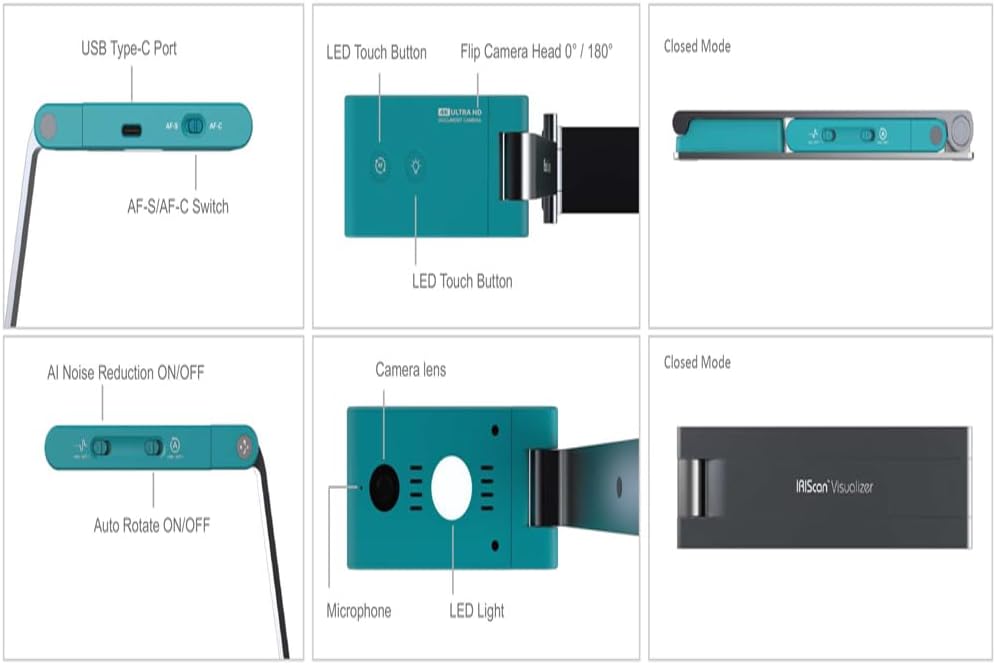
CONFEZIONEIn una piccola confezione in cartone con immagine stilizzata del prodotto troviamo un piccolo scanner mobile completo di accessori marchiato âIRISâ azienda del gruppo Canon ulteriormente protetto con spessori in schiuma espansa. Guida rapida illustrata e con traduzione anche in italiano inclusa.CARATTERISTICHE E USONella confezione abbiamo, in particolare un cavo USB tipo A/USB tipo C da collegare al PC per alimentazione e acquisizione dati, un adattatore USB tipo A/USB tipo C; due fermacavi per miglior ordine e mantenimento del cavo in dotazione, oltre ad un sacchetto con cordino a strozzo per la conservazione e il trasporto.Questa è una webcam/scanner, visualizzatore e scanner portatile, per libri e documenti, estensibile e richiudibile, inclinabile e orientabile per acquisizioni rapide di documenti in formato A3/A4, delle dimensioni massime di 44x33cm, da unâaltezza minima di 10cm e di qualità massima acquisibile video/immagini 4K ultra HD/13MP.Composta da una base di appoggio, due braccetti e una testa orientabili, questâultima oltre che in verticale può anche essere ruotata sullâasse orizzontale di 180° per miglior inquadramento, la facile e rapida visualizzazione e scansione con ottica sony luminosa, microfono, faretto LED per uniforme illuminazione di documenti compatibili per dimensione, due pulsanti touch LED (AF/autofocus e accensione/spegnimento faretto di illuminazione), una porta usbC per lâalimentazione e quattro interruttori: di cui:- due AFs e AFc, per la messa a fuoco automatica singola e continua;- due on/off per la riduzione intelligente del rumore (in Ai) e per la rotazione automatica o continua delle immagini.Di versatile uso, questo robusto dispositivo, realizzato in leggera lega di alluminio, è utilizzabile oltre che per la scansione di documenti vari, opuscoli, schede, eccâ¦, anche come funzionale e orientabile webcam compatibile con molteplici software per videochiamate, videoconferenze, didattica e-learning, ecc⦠in ambito famigliare, ma anche per liberi professionisti, piccoli e grandi aziende, avvocati, studi medici, eccâ¦Compatibile con PC Mac OS10.15 e Windows 7 o superiori (con processori intel core i5, 8GB RAM e 20GB di spazio libero o superiori), ma non supporta la conversione OCR, prevista invece con il modello superiore.Per avere libero accesso a ulteriori informazioni e download bisognerà però leggere attentamente e seguire le brevi indicazioni fornite con la guida rapida cartacea in dotazione e accedere alle varie pagine del sito web del produttore per accedere a utili tutorial, scaricare e istallare sul PC sia il dettagliato manuale utente nella lingua dâinteresse, sia il driver âIriscan visualizer7â che il software dedicato multilingue âReadiris Visualâ necessari per il corretto uso, funzionamento dello scanner e per le opportune impostazioni, adeguate ai documenti da acquisire in formato immagine JPG e documenti in PDF, tra le quali: luminosità , contrasto, rapporto, autofocus, zoom digitale +/- 10x, rotazione e ritaglio automatico, risoluzione (da 640×360 a 13MP massimi), eccâ¦.Devo dire che dopo aver attentamente visto i video tutorial e letto i vari documenti disponibili e forniti sul sito del produttore tutto risulta più semplice da comprendere sul dispositivo scanner/visualizzatore che appare così efficace, semplice e rapido da usare in tutte le sue interessanti funzioni e modalità .CONCLUSIONIValido piccolo e robusto scanner/webcam portatile, di versatile e rapido uso, utilizzabile in maniera proficua in ambito famigliare, scolastico, ufficio, eccâ¦.Spero che questa mia esperienza possa esservi utile nella scelta.
Client –
En fait, il s’agit ni plus ni moins d’une webcam 4K sur pied.Mais ce n’est pas vraiment négligeable, en effet le pied a l’avantage d’être orientable, avec plusieurs sections.S’agissant d’une caméra UVC, c’est à dire le standard qui est reconnu sur windows, mac ou linux comme une webcam, on peut s’en servir avec n’importe quel logiciel. Cela peut très bien servir de webcam pour faire une visio sur teams, zoom, ou autres.Mais il y a aussi la possibilité de l’orienter vers le bureau pour montrer des documents en direct.Je ne pense pas que cela remplacera vraiment un scanner, qui avec sa vitre écrase bien le document pour avoir un éclairage parfait, mais pour de la visualisation live c’est parfait. Cependant il n’y a pas la contrainte de dimension, ici on pourra scanner un document A3, ce qui est rare sur les scanners.L’usage est donc idéal pour des enseignants, mais également pour des créateurs de contenus, par exemple des illustrateurs qui veulent montrer leur processus, des bricoleurs qui veulent montrer leur champ de vision, etc.Un autre bon point : la dimension une fois repliée, vraiment peu encombrant et facile à glisser dans un tiroir.