

Memoking Mini Thermal Printer – T02 Mini Printer Sticker Maker Thermarote Mini Printer Bluetooth Wireless Phone Printer Small Portable Instant Pocket Printer for Anatomy Study, Photo, Children, Pink
Original price was: $39.49.$37.49Current price is: $37.49.




Price: $39.49 - $37.49
(as of Jan 16, 2025 11:15:46 UTC – Details)
From the brand

T02 Mini Printer (3 Sets)
T02 Printer with Color Papers
T02 Mini Printer (1 Set)
T02 White & Clear Paper
T02 Color Paper
Thermal Label for 4×6 Printer
M08F / M832 Paper
D30 Label Maker Tape
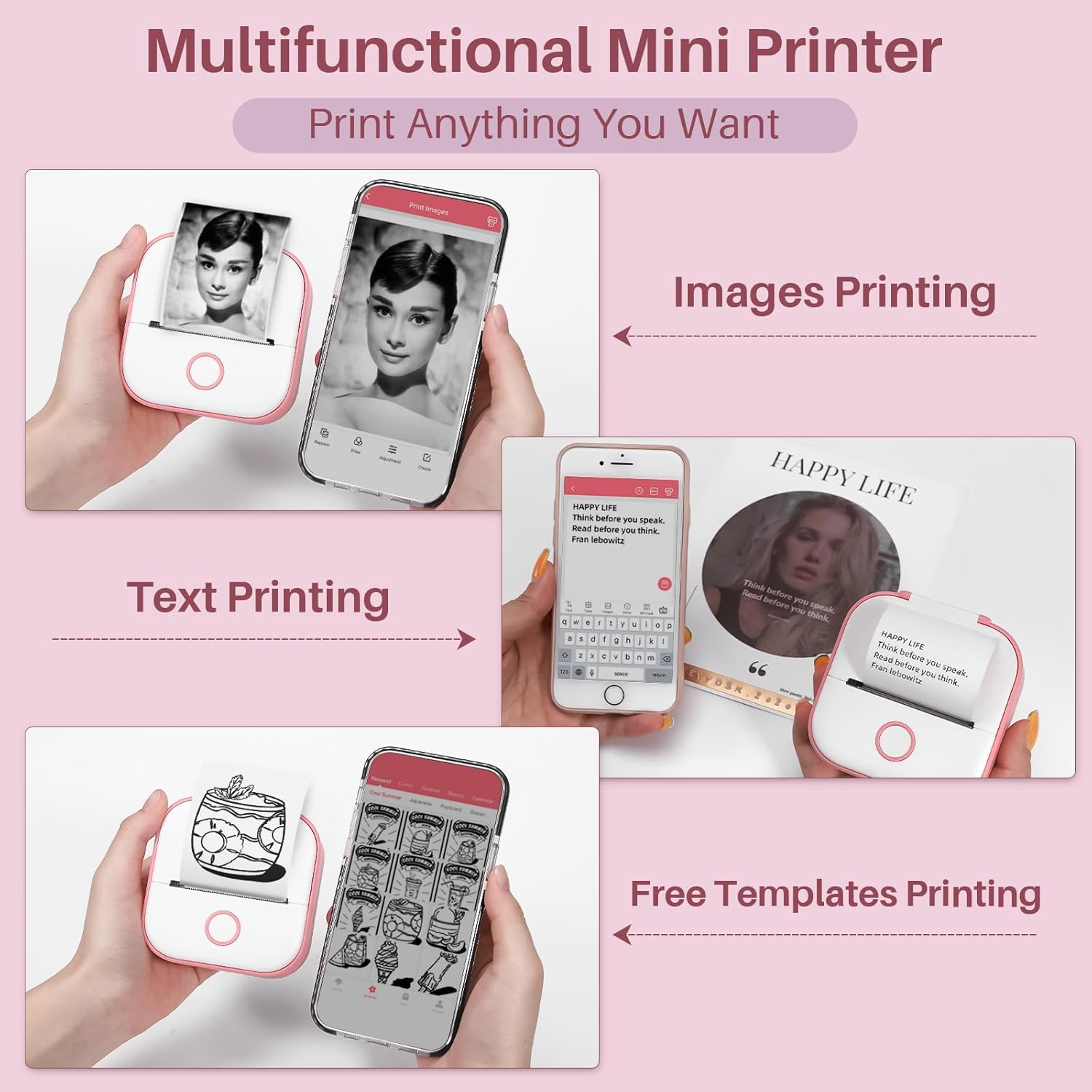
How to Use: Only print in monochrome. Connect Memoking T02 rechargeable pocket printer to your iOS or Android devices via Bluetooth in APP by clicking “unconnected” in the right up corner of the APP page after selecting T02 model in left up corner, then choose any functions to start your pictures wireless printing journey
What Functions Provided in APP (Certain features of the APP require a subscription for access): 9 powerful functions for super easy unique customization. Combining text, pictures, tables, emojis and QR code to make unique sticker pictures. Hundreds of templates and graphics provided in APP. “OCR” and “Scan” make it possible to transfer an objects or words in daily life into digital editable version. Moreover, micro letters, banners, online web printing are achievable in APP
Use Occasions: Memoking T02 203dpi wireless small printer is suitable for printing memos, records, plenty of APP themes, school for students, children, teachers, handwork teaching, work plans, shopping lists, “TO DO” lists and so on
Types of Thermal Papers Supported: Memoking T02 pocket printer receipt printers work with sticky and non-sticky thermal papers with monochrome printouts on white, pure color, patterns paper and blue printouts on special white paper
Important Precaution: 1. Please connect Bluetooth from APP. 2. No paper alert: although there are papers in the machine, it still shows “not paper”. Solution: take the paper roll out, then long press the power button for 10 seconds until you see green light flashes 2 times. After that, put that paper into the machine again to print normally. 3. The printed content is easy to shift without the paper holder
Customers say
Customers find the printer useful and easy to use. They appreciate its portability and Bluetooth connectivity. Many find it useful for projects and the classroom. The app is simple to navigate, making studying easier. While some are happy with note-taking and print speed, others have mixed opinions on print quality, picture quality, and value for money.
AI-generated from the text of customer reviews
10 reviews for Memoking Mini Thermal Printer – T02 Mini Printer Sticker Maker Thermarote Mini Printer Bluetooth Wireless Phone Printer Small Portable Instant Pocket Printer for Anatomy Study, Photo, Children, Pink
Add a review
Related Products



![Canon PIXMA TS6420a All-in-One Wireless Inkjet Printer [Print,Copy,Scan], Black, Works with Alexa](https://m.media-amazon.com/images/I/61x6KTFR8yL._AC_SL1500_.jpg)
Original price was: $39.49.$37.49Current price is: $37.49.
Jen Eldabbas –
What a great gadget
Bought this for my 14 year old. We set it up in a matter of minutes and started to print after picking a design. It was really easy and quality is good too! I recommend this. I was really surprised at how well this does. I thought it may be a junky thing I’d end up tossing but I was proved wrong!I liked:Picture qualityEasy set upSmall sizeEasy to read instructionsNothing to dislike, from my experience.
Megu Kirishima –
Worth it, perfect for scrapbooking & easy to use
(Please disregard my ‘decor’ on my printer, I have a s/o that will print out stupid things)In regards to usage, I had a mishap upon receiving the item. There was an error that stated the cover was open, when it was in fact- not. The red light would not signal to green no matter what method was used & I went to customer support for help. Fortunately, there is one within the app & through email, and because of live chat, I was able to get it addressed rather quickly. It was not a procedural error, and after numerous suggestions on how to restart/identify the paper/hold for 10secs, I just had to keep opening and closing until the light turns green.Annoying to experience upon just recently getting the item, but I appreciate the patient and fast response through customer support. I assume you guys will be luckier than I, but be reassured that if you have any problems, they will help & its easy to reach them.Now to the actual product: I love it. The usage of the app is so fool-proof. Connectivity is relatively easy, I had no problems with bluetooth. It connected while I was still reading instructions, and even if that failed- there’s a QR connection. It sucks that it uses your paper, but hey; at least there’s a plan B if bluetooth fails.Pictures are so easy to print, you can either print one by itself or create a collage to print multiple smaller images. I was worried about the pictures not coming out clear or patchy, but the quality is so good for the price I paid. Additionally, its completely customizable. In the app, you can adjust brightness, contrast or apply filters to your image to your liking. The preview is pretty accurate to the print. I have currently printed about 8 images & 2 texts, but not yet run out of paper.In terms of size, it is rather small but I love it. It is handheld sized and perfect for accessibility and travel. I do want a polaroid camera one day, but until then this is such a cheap & worth substitute. The product is so good for scrapbooking! It not only prints images, but text as well. The font options are pretty good in the app, but should you look for something specific, there’s images so you can print out a text as an image. Keep in mind it is thermal, so there is only black and white. However, there is a filter for outlines so I assume you can just print an image using the filter & color it in.Stickiness could be better, but for the price it’s great. Not a sticker connoisseur, but it sticks on paper perfectly fine. I printed out different cat memes and stuck them on the foreheads of myself & a few friends. It lasted over 6 hours and only reason it came off was because we took them off. Did it stick on something afterwards? Not really, but that’s warranted bc oily skin.
Blue.shrimp –
Great Mini Printer
The Memoking Print Pods Mini Printer is a compact and portable device excellent for on-the-go printing, primarily aimed for printing notes, stickers, name tags, product prices and product labels. Hereâs a review covering its key features: Pros:1. Portability: Compact and lightweight, making it easy to carry anywhere.2. User-Friendly: Simple controls and an intuitive companion app enhance the user experience. The app has various templates and designs to choose.3. Decent Print Quality: Excellent for photos small notes and small designs. For photos or designs the print quality varies depending on the details and size of said picture.4. Bluetooth Connectivity: Seamless pairing with smartphones and tablets for easy printing.5. Good Battery Life: Long-lasting battery allows for multiple prints on a single charge.6. Does not use ink.Cons:1. Limited Print Size: Can only print small images and documents, which may not meet all users’ needs.2. Cost of Supplies: Paper cost can add up over time as it uses a specific type of paper for printing.3. Not for High-Resolution Prints: Quality may not satisfy professional printing requirements or detailed documents. Does not print in color.4. Limited Functionality: May lack advanced features found in larger printers.ConclusionOverall, the Memoking Print Pods Mini Printer is a fun and practical option for those wanting quick, portable printing. It’s ideal for creating scrapbooks, sharing memories, or adding a personal touch to notes, though it may not be the best choice for professional or high-quality printing needs.
HavenGuard –
Cute Versatile Sticker Printer
This is a very fun, easy to use little sticker maker that prints in black only on thermal printer paper -BONUS: it never runs out ink. Download the easy to use Phomemo mini ink free printer app and insert editable text, pictures, or use one of the many available templates to quickly print clear images and notes that you can stick in notebooks or journals for a fun experience. If you want color you can color on them or get colored printer paper. I used Mildliner and Tombow with no problems. You can add handwritten notes with ballpoint pens, permanent fine tip pens/markers, and Mr. Pen fine liner pastel pens -I tried others and they smudged. Overall, a very fun addition to my planning and journaling stash!
Diane Newsham –
East to use
Was worried on purchase that it wouldnât meet expectations however I was pleasantly surprised east to use paired with my phone quickly and printed fast had amazing quality on a picture I printed .. all in all a perfect little label printer
Aya –
Itâs great if you want to print labels and simple pictures, been using it a lot.. I just wouldnât recommend printing very detailed or small texts or pictures.
Tanya –
Great little gift for kids and you can take anywhere. Also good for name tags
Joanne Synnott –
I love my mini printer. It is small enough to fit in my purse. I am always using it for labels around the house. It is easy to use, fast printing and it prints beautifully. It inspired me to buy the larger model which I also use a lot.
G1 –
Amazing but I do wish it could print colored images. I was very confused on what app to use but I finally found it. Great product though
Amazon Customer –
ÙضÙØ Ø§ÙصÙرة ردÙØ¡