

ORICO 1TB Magnetic Portable SSD, Aluminum Alloy, 4K 120 fps ProRes HDR Record and Store, Up to 2000MB/s, External Solid State Drive, Compatible with iPhone 16 Pro Max, Tablet, Computer – K20
$129.99




Price: $89.99 - $129.99
(as of Jan 13, 2025 00:46:45 UTC – Details)
Product Description


1 Strong Magnetic
2 Up to 20Gbps
3 Widely Compatible
4 Packing List


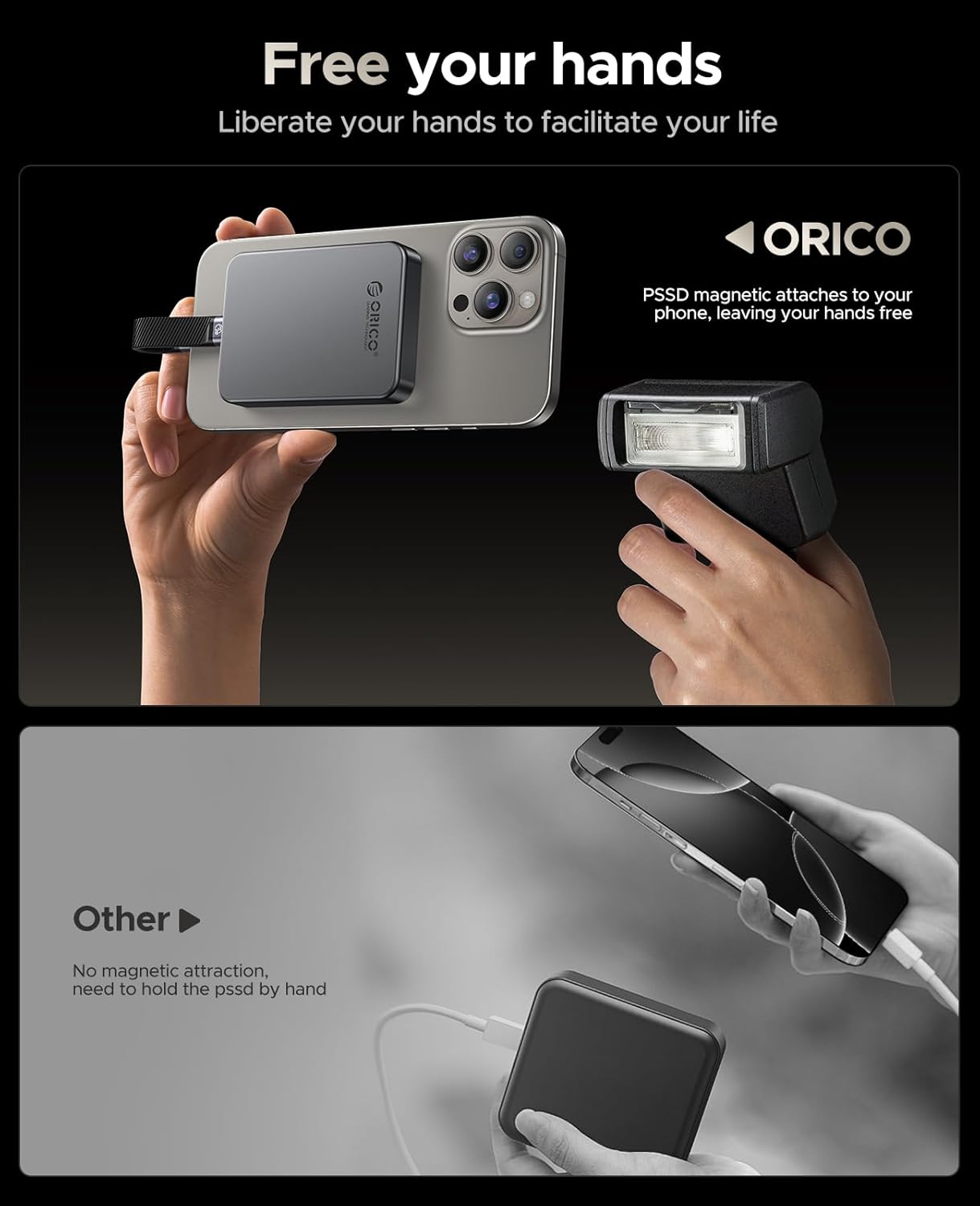
Strong Magnetic: Attach your cell phone with magnetic attraction, don’t worry about falling off. The package includes a magnetic attraction ring, which can easily attach any devices you want(Note: Not available for Apple phones with Lightning connector)
Expand Capacity: This external solid state drive could plug and play for devices, it can solve your insufficient memory problem in a moment, ORICO portable SSD is the ideal choice for photography enthusiast
Share Idea in A Flash: Ultra speed transfer speed of 2000MB/s helps you record all kinds of details in your life. Instant editing without delay, record your inspiration at any time
4K 120 fps ProRes: ORICO K20 external solid state drives supports 4K 120 fps ProRes HDR video recording of iPhone 16 Pro/Pro Max. Save as you record, edit on disk, no need for a second transfer
Firm and Reliable: The aluminum alloy body helps with quick heat dissipation, ensuring stable transmission speed for the portable SSD and safeguarding your data. Size(2.36*3.15*0.47 inches)
Note: In order to reach 2000MB/s, your device interface must be USB 3.2 Gen2*2, some Apple computer interfaces may not be able to perform the full function, even if they are Thunderbolt ports
9 reviews for ORICO 1TB Magnetic Portable SSD, Aluminum Alloy, 4K 120 fps ProRes HDR Record and Store, Up to 2000MB/s, External Solid State Drive, Compatible with iPhone 16 Pro Max, Tablet, Computer – K20
Add a review
Related Products



$129.99
Xtian –
Fast external SSD where the speed strongly depends on the connection characteristics.
This is a small external USB C drive that claims to be very fast if connected via USB 3.2. The primary target audience is for cell phone users where it can be attached magnetically (either directly, or via the included metal ring stuck to the phone first).The drive comes preformatted in exFAT. While the case is stylish, there is no obvious way to open it and we cannot inspect what’s really in it or e.g. re-use the case if the drive goes bad in the far future. Without cable, it weights 55 grams. The bottom contains six regulatory marks, Some are well known (e.g. FCC, CE) but the meaning of some others is not entirely clear to me (e.g. the “10” surrounded by arrows or the triangle with a checkmark).This drive can be connected to any USB C port or, using a suitable USB A to USB C cable, it also works when plugged into a USB A port. The actual write speed strongly depends on how it is connected and the specifics of the computer hardware.I transferred a single 12GB video file from an NVME SSD on the computer to this external drive and here are the times it took (fastest to slowest):- connected vis USB C to new laptop: 20 seconds- connected via USB C to recent desktop; 80 seconds- connected to a red USB A port on desktop PC: 314 secondsAs we can see, the speeds dramatically depend on the hardware and the bottleneck is typically not the external drive. This makes it somewhat future-proof. I might actually connected to my 4th generation Tablo DVR as storage drive for now where the speed (limited by the interface) is still plenty.The illustrated manual has sections in Chinese, English, and Japanese. It states that there is a detailed e-manual available for download from their site, but I searched the site and there is no such manual. I assume this is a new product and the manual will hopefully be available soon.Overall, a well made and functional small external drive. I wish there was a way to look inside.
AHa –
Great SSD for your iPhone but only if you have iPhone 15 Pro or 16 Pro.
This portable SSD is compact, lightweight, and magnetically attaches to your iPhone or any MagSafe device.The package includes a portable SSD, a data cable, a metal ring, and a user manual. The cable is short and rigid, featuring a USB-C connector on both ends, allowing for connection between the phone and the SSD device. The device itself is crafted from a mix of plastic and aluminum, making it lightweight yet durable. The side magnets are exceptionally strong and require considerable effort to detach them from the phone.The SSD drives come preformatted with exFAT (FAT64), making them compatible with all Apple and Windows devices. There is 953 GB of free storage available, and the advertised transfer speed of 20 Gbps is more than sufficient for recording video directly onto the drive.However, I recently discovered an important limitation: you can only record directly to this SSD if your iPhone has a ProRes mode in its camera settings. Unfortunately, this feature is only available on the iPhone 15 Pro and iPhone 16 Pro (and Pro Max). Since my iPhone 16 does not have this feature, I am unable to test it.While I can’t record videos directly to this portable SSD, I can still use it to transfer documents and photos between my iPhone and iPad. After recording, I can manually transfer videos to the drive. There’s plenty of storage space for large files, and the transfer speed is quite fast. Overall, if you’re looking for a small, compact SSD with MagSafe capability and high-speed transfers that works seamlessly with your iPhone 15 Pro or 16 Pro, this is a great option. However, it is a bit pricey if you’re only looking for a standalone SSD and do not have ProRes HDR capability on your phone.
kluj –
So fast I thought the file transfer failed
Able to write to this well in excess of 1GB/s, way faster than I was anticipating in real-world conditions. I transferred a 2GB file over for testing and was confused by it instantly appearing on the drive (no file transfer window displayed). You should have no problems recording video (or burst photos) directly to the SSD from a USB 3.1+ connection; fantastic for off-network video editing/demos.The magnet is very strong, easily able to hold the SSD in place without being able to knock it off easily; while most modern phones will be shielded to prevent ill effects from this, 10+ year-old laptops may not have expected users to attach things via rare earth magnets and not have RAM or storage shielded from magnetic interference, and so if you are in that kind of scenario, you may want to leave it off to the side rather than attaching it to the case.The SSD comes with a (rather short, given it’s intended for you to attach directly to a phone or laptop) USBC-USBC cable only, though it is possible to connect (at lower speeds) with your own USBA->USBC cable as needed, which should still get you 35MB/s+.
Steven M. Silverman –
Perfect for Backups and Mobile Storage
I’ve been using SSD drives as external storage for years by purchasing the bare SSD and a case that converts the M.2 port to a USB-C. I use them instead of external hard drives because of their speed and reliability. Initially using the 2280 they had a small size advantage over external hard drives and now using the 2230 drives they have a huge size advantage over the external hard drives. Plus now that they have the magnetic ring on them they’re even more functional.I have a few uses for these drives. I used them for back-up drives, making nightly incremental backups on these drives and a 2nd incremental backup each night to the cloud. I do this not only for my computers, but also my clients servers. Since they have the magnet on them, I can stick them to the side or back of the computer, out of the way. I use them as mobile storage for my laptops and now for video recording on my Samsung Galaxy S23 Ultra (with a MagSafe case).I have used ORICO cases and drive arrays for a long time and they’re one of the best price/performance equipment manufacturers. Their equipment has always performed well, they do what they’re supposed to and at a very fair price.
Stefano Quarneti –
Ottimo prodotto. Velocità di lettura e scrittura ottime, appare solido e ben costruito. Arriva con un anello magnetico in omaggio da installare su qualsiasi cover già in possesso. La tenuta magnetica è perfetta.
Matteo –
Die Magsafe Funktion ist sehr gut, der Magnet hält gut.
M. P –
SSD externe recommandé sans réserveConditions du test : ordinateur sous Windows 10©, sur un port USB 3 5Gbps, copie d’un fichier de 16Go sur un SSD NVMe (lecture et écriture)Remarque éventuelle : un coup de cÅur ð¤â¬ï¸Â très bonne qualité de fabrication du boitier, en aluminiumâ¬ï¸Â très légerâ¬ï¸Â compactâ¬ï¸Â température maitriséeâ¬ï¸Â débit de 315Mo/s en écriture et de 380Mo/s en lectureâ¬ï¸Â câble fourniâ¬ï¸ â¦
Grignani –
Manca solo il cavo per il collegamento con i-Phone (Lightning)
A.Schmidt –
Ich habe diese SSD für mein IPhone 16 Pro Max gekauft. Die Befestigung per Magsafe funktioniert wunderbar, auch wird die SSD erkannt und ich konnte direkt meine Daten darauf speichern. Ich nutzt die SSD für groÃe Fotos. Alle 50 Fotos stürzt mein Handy allerdings komplett ab. Dieser Fehler tritt nur mit dieser einen SSD auf. Ich habe den Kundensupport kontaktiert und trotz mehrmaliger Nachfrage KEINE ANTWORT erhalten. Zum Glück sind bisher keine Daten verloren gegangen – ich würde diese SSD als unzuverlässig einstufen und keine ungesicherten Daten darauf ablegen. Durch Zufall fand ich einige Zeit später heraus, dass nur das USB-Kabel kaputt ist. Wann immer man es berührt kommt es zum Absturz. Ersatz gab es trotzdem keinen, keine Antwort, keine Entschuldigung⦠daher mein Tipp: Finger weg von diesem Produkt und lieber eine andere, namhaftere SSD kaufen. Ich bin enttäuscht!NACHTRAG: Der Kundenservice hat sich gemeldet und eine sehr groÃzügige Lösung für mein Problem angeboten. Ich gebe nun also 4 Sterne für ein ansonsten wirklich gutes Produkt. In meinem Fall war also nur das Kabel defekt und nachdem ich mir ein neues passendes Kabel bestellt hatte funktioniert nun alles wie es soll. 1 Stern Abzug für den ganzen Trouble den ich hatte….