

ORICO 40Gbps NVMe SSD Enclosure, M.2 to USB-C Adapter for NVMe M-Key 4TB SSD 2280, Aluminum M2 External SSD Case, Compatible with Thunderbolt 3/4 USB3.2/3.1/3.0/Type-M234-Silver
Original price was: $89.99.$79.99Current price is: $79.99.




Price: $89.99 - $79.99
(as of Jan 17, 2025 18:19:40 UTC – Details)
From the brand

ORICO 40Gbps SSD Enclosure
ORICO 40Gbps PSSD
ORICO 40Gbps Thunderbolt Dock
ORICO 40Gbps Docking Station

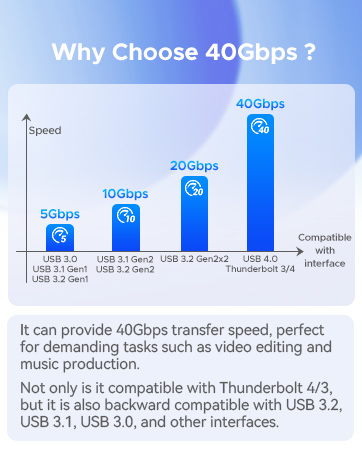
【40Gbps Breakneck Speed】The transfer speed of this NVMe Enclosure is up to 40Gbps. After installing NVMe SSD, the read and write speed can reach 3100MB/s. Transfer large 3G files within 1 second, faster than most internal drives. It is also compatible with Thunderbolt3/4, USB3.2/3.1/3.0 interfaces (Please be sure to use USB4.0 interface or Thunderbolt3 interface to achieve 40Gbps. Backward compatibility will limit the speed.)
【Compatible SSD】ORICO M.2 SSD Enclosure is compatible with M.2 PCIe NVMe M-Key SSD or NVMe M+B Key SSD, SSD size is 2280. The nvme usb adapter supports Windows, Mac OS and Linux systems. Plug and play, no additional drivers, software or power supply required
【2-in-1 Cable】The included USB cable has 2 output ports, USB C to A (10Gbps) and USB C to C (40Gbps), free to connect computers, mobile phones, game consoles, tablets and other devices . The wire is 30cm long, has an aluminum alloy interface, and supports PD100W fast charging
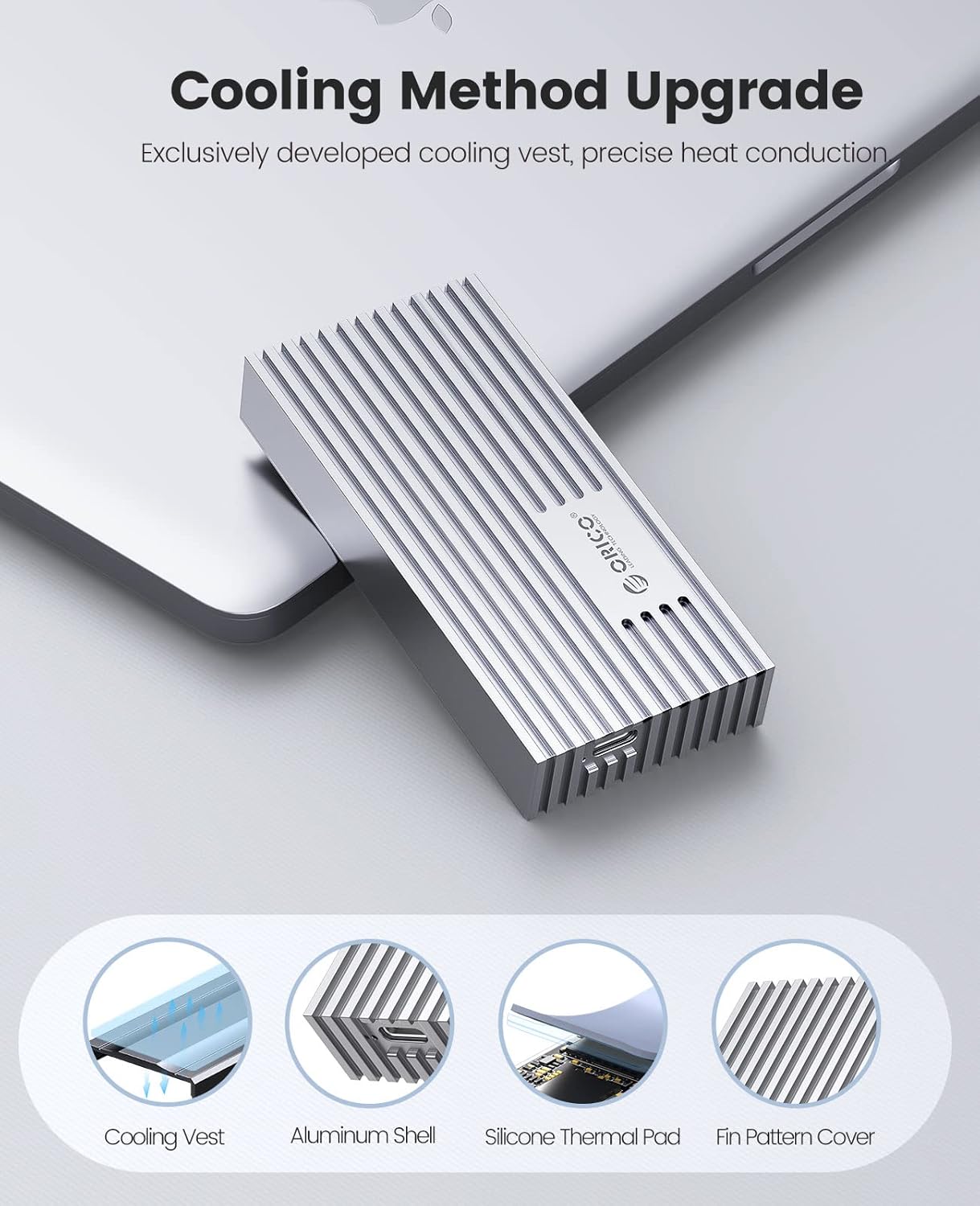
【Cooling Vest】 The NVMe case is professionally designed by ORICO, adding aluminum alloy cooling vest, with silicone thermal pad and striped aluminum alloy shell (striped shape can increase the heat dissipation area), to quickly release the high temperature generated by the NVMe SSD during the working process. And high-strength shock-resistant drop
【High Quality + Smart】 ORICO M.2 NVMe to usb has built-in smart microchips and multiple protection systems, supports UASP acceleration protocol and Trim, SMART functions, 10-minute smart sleep, effectively improves SSD speed, protects data operation, and prolongs SSD life. LED lights at any time Monitor work status
【Note】For compatible issue, we do not recommend using WD Black SN750, Samsung 970 EVO Plus SSD, SN850 and iPad. Not recommended ADATA, CRUCIAL and other non-mainstream SSDs
Customers say
Customers appreciate the computer drive’s build quality and stability. They find it well-made, stable, and easy to install. However, some customers dislike its compatibility and disconnectability. There are differing opinions on functionality, speed, heat generation, and design.
AI-generated from the text of customer reviews
13 reviews for ORICO 40Gbps NVMe SSD Enclosure, M.2 to USB-C Adapter for NVMe M-Key 4TB SSD 2280, Aluminum M2 External SSD Case, Compatible with Thunderbolt 3/4 USB3.2/3.1/3.0/Type-M234-Silver
Add a review
Related Products


Original price was: $89.99.$79.99Current price is: $79.99.
Jakup Martini –
Fantastically fast as external storage
I edit video using premier pro directly onto SK hynix Platinum P41 2TB PCIe NVMe Gen4 M.2 2280 Internal Gaming SSD drives in this case with absolutely no issues. These cases are fantastic and convenient and FAST! Highly recommend. I have three and for two years I’ve had ZERO issues, can’t compliment them enough.
XXTwnz –
Great looking (and working) enclosure
I have a Sabrent Rocket 4 2TB NVMe drive mounted inside this enclosure with the included Thunderbolt 4 certified cable to a Thunderbolt 4/USB 4 port on a MacBook Pro. It achieves 2.5-3.0 GB/ps in benchmarks. I have never seen throttling or heat issues, even when I filled it about 3/4 full initially. It is so much faster than SATA, HDD, and older SSDs that I’ve had that I question if I would ever want something faster. I hope they are still making and selling this the next time I need an external NVMe enclosure.
Amazon Customer –
Major overheating issues, unstable with macOS Ventura with Sabrent 2TB Gen4 SSD
Drive initially recognised and formatted fine, then macOS rebooted because of an error and the drive would no longer appear. Trying again later, the drive appears for a minute or so then spontaneously disconnects.This appears to be linked to overheating which happens rapidly with the Sabrent 2TB Gen4 NVMe I’m trying to use. Letting it fully cool down, the drive stays connected a bit longer but disconnects as soon as you use it a bit more.Despite claims of good thermal performance, the design of the enclosure is actually very bad for heat dissipation – It comes with one thermal pad and a metal cover to place on the M.2 stick, but this doesn’t make contact with the outer metal casing at all, so if your SSD runs hot very little heat will be conducted to the outside.Thanks for wasting my time on Christmas eve with such a poorly designed and tested product, will be returning this
M. C. Maxwell –
Great Over Thunderbolt, Issue With USB
I purchased a orico m234c3-u4 and installed a Western Digital 4 TB SN850X NVMe drive. I connected it using Thunderbolt 4 port, initialized it, created a single simple GPT partition and formatted it exFat. It works great and is blazing fast when connected via Thunderbolt, but when I connect via USB-C, it acts like the disk isn’t partitioned. If I try to initialize/partition/format via USB connection, I get an error and the operation fails. I’ve tried via Disk Manager, AOMEI Partition Assistant, and via command line. I sent a message to Orico Tech Support, but never heard back from them. After researching the chips used in the device, I believe that the issue is that the Thunderbolt to NVMe controller that they use will work with 4 TB drives, but the USB to NVMe controller has a maximum drive limit of 2 TB. Since I installed and partitioned a 4TB drive, I’m only able to access / utilize it over Thunderbolt.I’m willing to live with this because I really want the 4TB size and the incredible speed offered by this enclosure, but the inability to use the drive via USB for computers without Thunderbolt is really disappointing. If I could purchase a different enclosure without that problem, I definitely would.On a side note, the top of the included NVMe heat transfer cover doesn’t touch the aluminum enclosure cover when installed. In order to improve heat dissipation, I purchased thermal pads that I placed between the heat transfer cover and the enclosure cover. ( https://www.amazon.com/gp/aw/d/B0BQJGY7H4 )
PhilG –
The perfect SSD enclosure!
I really like and appreciate the included heat sink and heat-conductive padding. In heavy use of the drive, the case now gets fairly warm (about 50 degrees C on a MacBook), but the SSD (not included) works fine at these temps. Well made and nicely sized.
cyberpunk325 –
Faxt! But generates a lot of heat and randomly unmounts on my Mac
I really wanted to like this drive. I used it with a Samsung Pro 990 with heatsink SSD drive and a Mac mini M2 base model with Thunderbolt 4. This SSD drive was too large for the cover plate to fit over the drive, so I used it vertically so that there was a little air circulation. No matter, this drive was incredibly hot to the touch almost all the time. And when I mean hot, I mean fry an egg on top of it hot.Despite the awesome heat generated, this combination was incredibly fast. I don’t have screenshots, but the BlackMagic Disk Speed Test regularly showed read speeds at 3200 MB/s. This was more than I could have hoped for. But it was too good to be true. This drive randomly disconnected multiple times per hour, and each time it would, some application on my computer would hang, and I would have to restart.I switched to a slightly older, slower, smaller capacity WD Blue SSD drive and I thought the speeds would be significantly slower, but lo and behold, the speeds were about 3100 MB/s. Still more than fast enough for my modest needs. I thought that this would be the silver bullet for my random unmounting, and yes, the unmounting has gone down significantly. Maybe be 90%. But it still unmounts, and wrecks havoc on my workflow when it does.I tried another Thunderbolt 4 cable, and the issues remained. At this point, it’s the enclosure for me, and I will be returning it sadly.
Wahid –
Update: Macbook M1 doesn’t have usb 3.2 gen2 20gbps speed
Update: I was wrong. MacBook Air M1 support thunderbolt 3 and usb 3.1 10gbps. So the low speed is due to MacBook usb 3.1 gen 10gbps usb c port.
Chuck B –
Nice looking enclosure with problems
I purchased the Orico M.2 20Gbps enclosure for use with a new Asus laptop with Thunderbolt 4 ports. First problem I had was that the included heatsink did not fit my WD SN770 SSD, causing the SSD to overheat. I cut a 3 mm thick silicon thermal pad to fit between the ssd and the enclosure cover. Overheating problem solved. Next problem was that my laptop would only recognize the Orico enclosure about 50% of the time. Sometimes I get an error message saying that the USB audio device is not recognized. Unplugging and replugging from the Thunderbolt port usually solves this problem after 2 or 3 tries. The best read/write speed I was able to obtain is about 1080 MB/s using the Thunderbolt 4 ports. I tried on another machines having USB 3.2 ports and got around 460 MB/s. Finally, the enclosure sometimes randomly drops offline when used with Thunderbolt ports. USB 3 ports seem to work reliability, but never achieve full speed.
Pier –
La carcasa es bonita pero no alcanza los 20Gbps en una Mac con puerto TB4 y un SSD NVME que puede llegar hasta 3.5GB/s.Otro problemita es que el SSD no termina de ajustar bien del todo con la pieza de plástico que trae y se mueve un poco.Tengo la versión de 10Gbps y alcanza la misma velocidad por menos precio y menos tamaño.
Man –
Se calienta muchisimo, no lo recomiendo, seguramente no funciona bien el chip interno
mathi –
Seems good. It gives about 3.2 and 2.4GB/s read and write thunderbolt speeds on a Samsung 990 Pro 1TB SSD. See the US Amazon.com page for compatible and recommended NVMe SSD drives. Not all SSD drives work correctly, apparently. Gets a bit warm for more than 10 minutes of operations, but not too hot.
zohaib khan –
I tried 4 system to get it connected via C TYPE or USB IT it is not showing anything on MacBook pro , Desktop PC and windows laptop and it is not working very bad experienceâ¦
H3 –
اÙترÙÙب Ùا٠سÙÙØ ÙÙا تØتاج Ø¥ÙÙheatsinkÙØ£ÙÙ Ùأت٠٠ع ÙاØدة (تتطÙب اÙترÙÙب اÙÙدÙ٠بØد ذاتÙا ÙÙ٠اÙ٠سأÙØ© بسÙطة)باستخدا٠برÙا٠ج اختبار Ø§ØªØ¶Ø Ø¨Ø£Ù Ø§ÙÙراءة ÙاÙت تص٠إÙ٠اÙ٠ستÙ٠اÙ٠عÙ٠عÙÙØ ÙÙ٠اÙÙتابة ÙصÙت Ø¥Ù٠أÙÙ Ù Ù 1000 Ù Ùجا (اÙ٠عÙÙ 2100)Ø ÙÙبد٠أ٠اÙسبب Ø£ÙÙÙ ÙÙست Ù٠أÙÙاع اÙØ£Ùراص تع٠٠بشÙ٠جÙد (Øت٠ÙØ¥Ù ÙاÙت ٠طابÙØ© ÙÙÙ ÙاصÙات). ÙتبÙÙ ÙاØÙا ÙجÙد Ùائ٠ة Ù٠صÙØØ© اÙÙ Ùتج عÙ٠ا٠ازÙ٠اÙأ٠رÙÙ٠تÙØ¶Ø Ø§ÙØ£Ùراص اÙÙ Ùص٠بÙا تØدÙدا.Ù٠اÙÙÙ٠اÙØÙ ÙÙÙ ÙÙات Ù Ù ÙØ¥Ù٠أجÙزة ÙابتÙØ¨Ø ÙصÙت اÙسرعة Ø¥ÙÙ ÙÙ٠اÙ200 Ù Ùجا باستخدا٠اÙÙ٠اس ب٠سÙØ ÙØÙاÙ٠اÙ100 Ù Ùجا باستخدا٠اÙÙ٠أس ب٠اÙÙدÙ٠اÙ٠سرع.