

UGREEN Revodok 206 Docking Station 6 in 1 USB C Dock Dual HDMI 4K@60Hz Single 8K@30Hz 100W PD 5Gbps USB C and USB A Data Ports USB C Hub Compatible for HP, ASUS, ThinkPad and More
$39.99





Price: $39.99
(as of Jan 17, 2025 05:25:17 UTC – Details)
Product Description
The video showcases the product in use.The video guides you through product setup.The video compares multiple products.The video shows the product being unpacked.


UGREEN Revodok USB C Dock
Add to Cart
Add to Cart
Add to Cart
Add to Cart
Add to Cart
Add to Cart
Add to Cart
Customer Reviews
4.2 out of 5 stars
1,464
4.3 out of 5 stars
299
4.0 out of 5 stars
320
4.2 out of 5 stars
202
4.4 out of 5 stars
227
4.4 out of 5 stars
1,209
4.0 out of 5 stars
295
Price
$39.99$39.99
$36.99$36.99
$39.99$39.99
$39.99$39.99
$49.99$49.99
$59.99$59.99
$58.99$58.99
Extended Monitor(s)
2 Monitors
2 Monitors
3 Monitors
3 Monitors
2 Monitors
2 Monitors
2 Monitors
Display Ports
2*HDMI
2*HDMI
2*HDMI+VGA
2*HDMI+DP
2*HDMI
2*HDMI
2*HDMI
Max Display Resolution
8K@30Hz
4K@60Hz
4K@60Hz
4K@60Hz
4K@60Hz
8K@30Hz
8K@30Hz
Charging Port
100W
100W
100W
100W
100W
100W
100W
Max Transfer Speed
5Gbps
10Gbps
10Gbps
10Gbps
10Gbps
5Gbps
10Gbps
USB Data Ports
2*USB A +USB C
2*USB A + 2*USB C
2*USB A + 2*USB C
2*USB A + 2*USB C
2*USB A +2*USB C
3*USB A+USB C
3*USB A+USB C
SD/TF Card Reader
✘
✘
✘
✘
✔
✔
✔
Gigabit Ethernet
×
×
×
×
1000Mbps
1000Mbps
1000Mbps
SD/TF Card Reader
×
×
×
×
104MB/S
104MB/S
104MB/S
1. Why can’t dual HDMI display at the same time?
a) Check the graphics card performance of the laptop or ask the computer manufacturer whether it supports extending two displays at the same time; b) Check the power management settings. In the power options, you can adjust the power plan and select “High performance” or similar settings; c) Check the display settings. In Windows, you need to go to “Display Settings” to configure the display. Make sure you have set the display mode to “Extend these displays” instead of “Show desktop only on 1” or “Show desktop only on 2”; d) Macbook only supports SST mode. If the color gamut of the two HDMI screens is different, it may cause single-screen output. It is recommended to swap the devices connected to HDMI1 and HDMI2; e) Mobile phones and iPads can only support single-screen display but not dual-screen display; It is recommended to connect to HDMI2 first when using mobile phones and iPads.
2. Why can’t the laptop be charged through the PD interface or is charging slowly?
a. Please confirm whether the USB-C interface of the laptop supports the charging function. If your computer uses a DC interface, please connect the original adapter. b. When your computer is charging slowly, please use the original adapter of the computer or a charger above 65W.
3. How can I troubleshoot if my monitor cannot display?
a.Make sure your laptop’s USB-C port supports video output; b. Lower your monitor’s resolution or refresh rate; c. Replace another high standard HDMI cable.
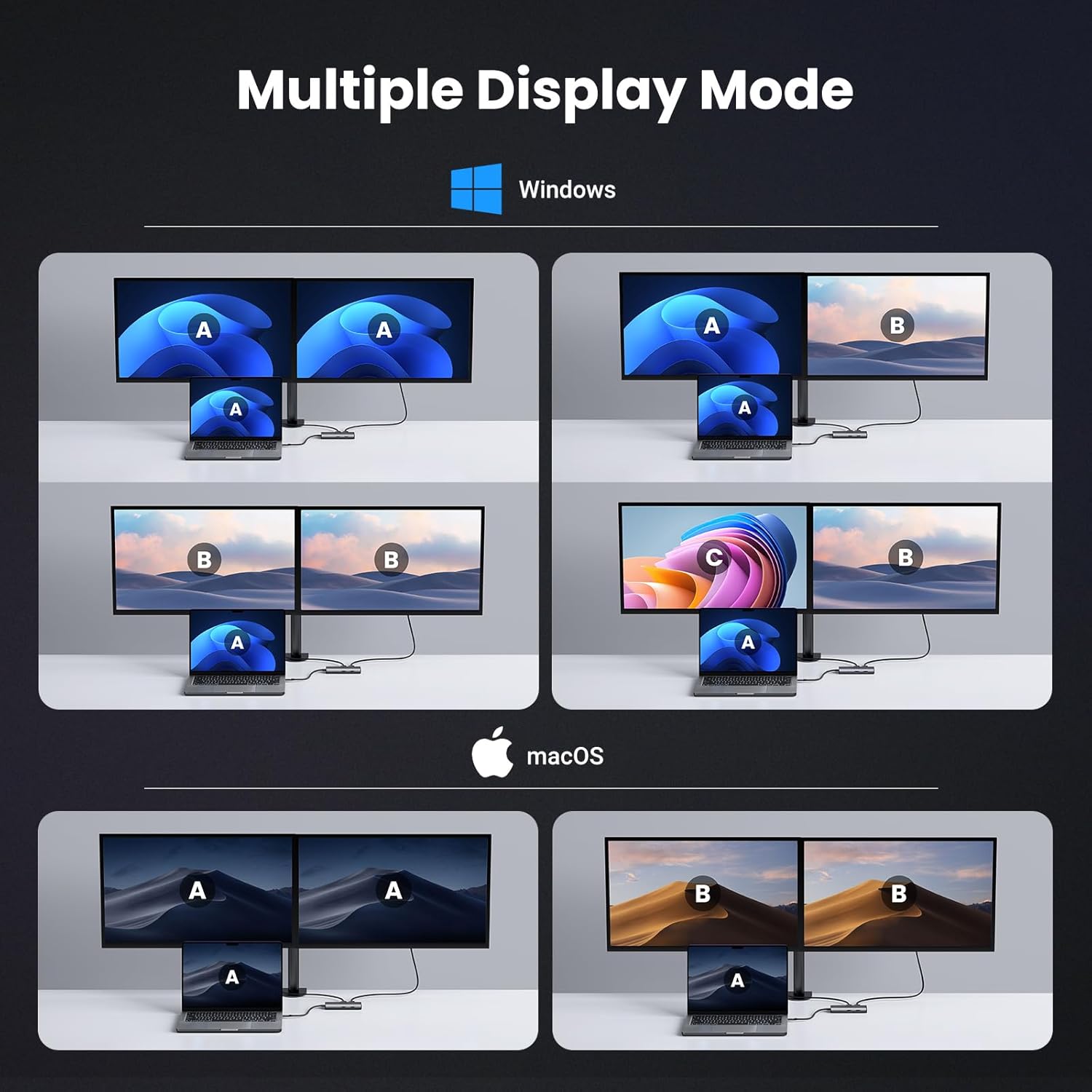
4. When I connect to 2 monitors with Mac, why do both monitors show the same image?
Macbooks only support SST mode. In extended mode, two monitors display the same image; Windows supports MST mode. In extended mode, two monitors can display different images (computer processors must be 4th generation or higher, and graphics cards, systems, and external monitors must support DP1.2 and above)
5. Why does the USB-C/A external device disconnect?
a. It is recommended that the power of the external device does not exceed 10W. If more than two high-power devices are connected at the same time, it is recommended to plug in the PD charger for power supply first; b. When the product is connected to a wireless mouse and other USB 3.0 devices at the same time, the wireless mouse can be used at a distance of about 0.4 meters; c. If your computer system is Windows 11, please check the laptop power management settings and make sure they are set not to limit performance in battery mode.
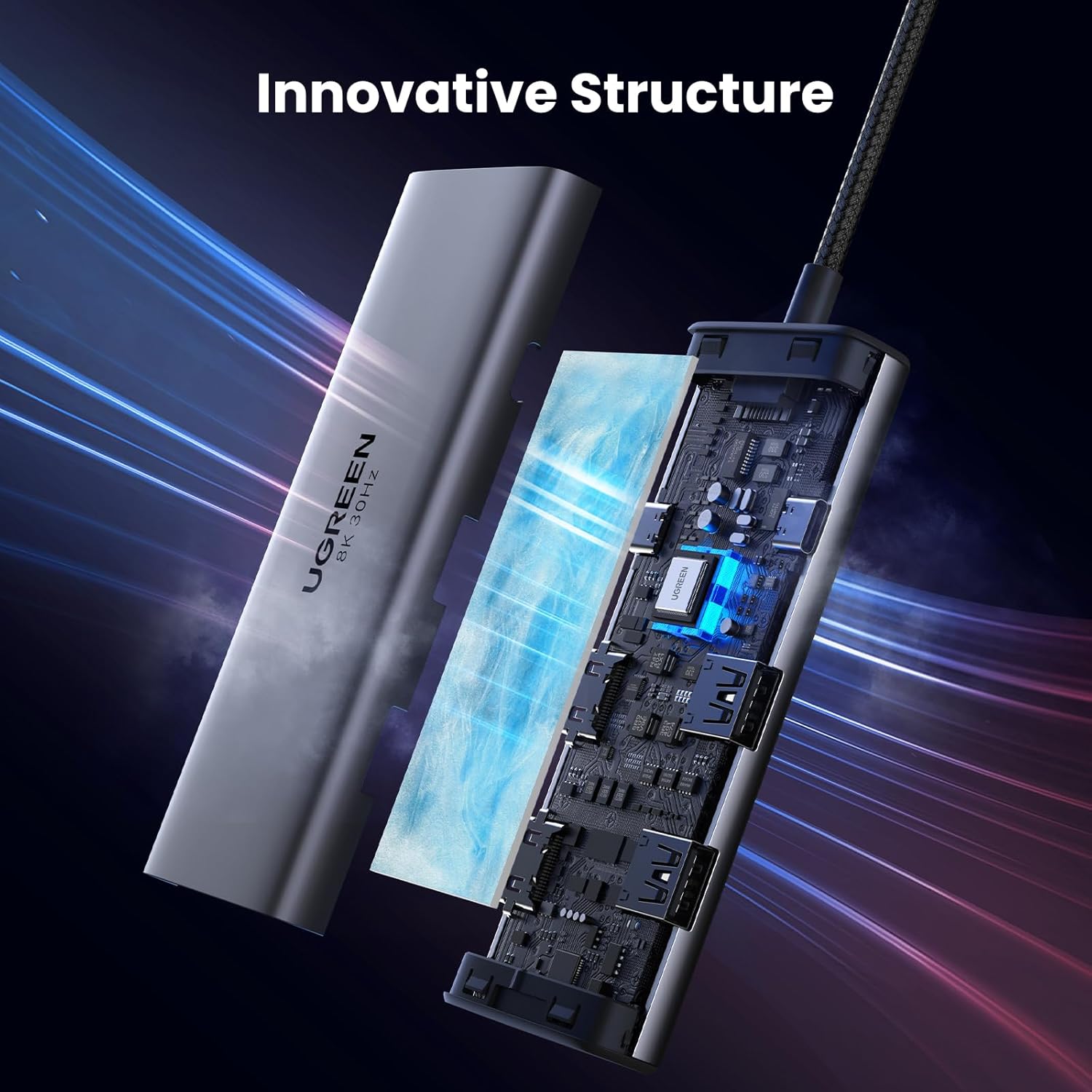
6-in-1 USB C Docking Station: Inspire more potential of your laptop’s USB-C port with two HDMI ports, a 100W USB-C PD port, a 5Gbps USB-C data port, and two USB-A data ports.
Dual HDMI Display: The Docking Station will hook up two displays to both HDMI ports in 4K@60Hz max, which makes cross-screen multitasking and creative workflows even more efficient. Please note that extended mode is only supported on Windows systems.Due to MacOS limitations, all extended monitors will display the same content when connecting a MacBook.
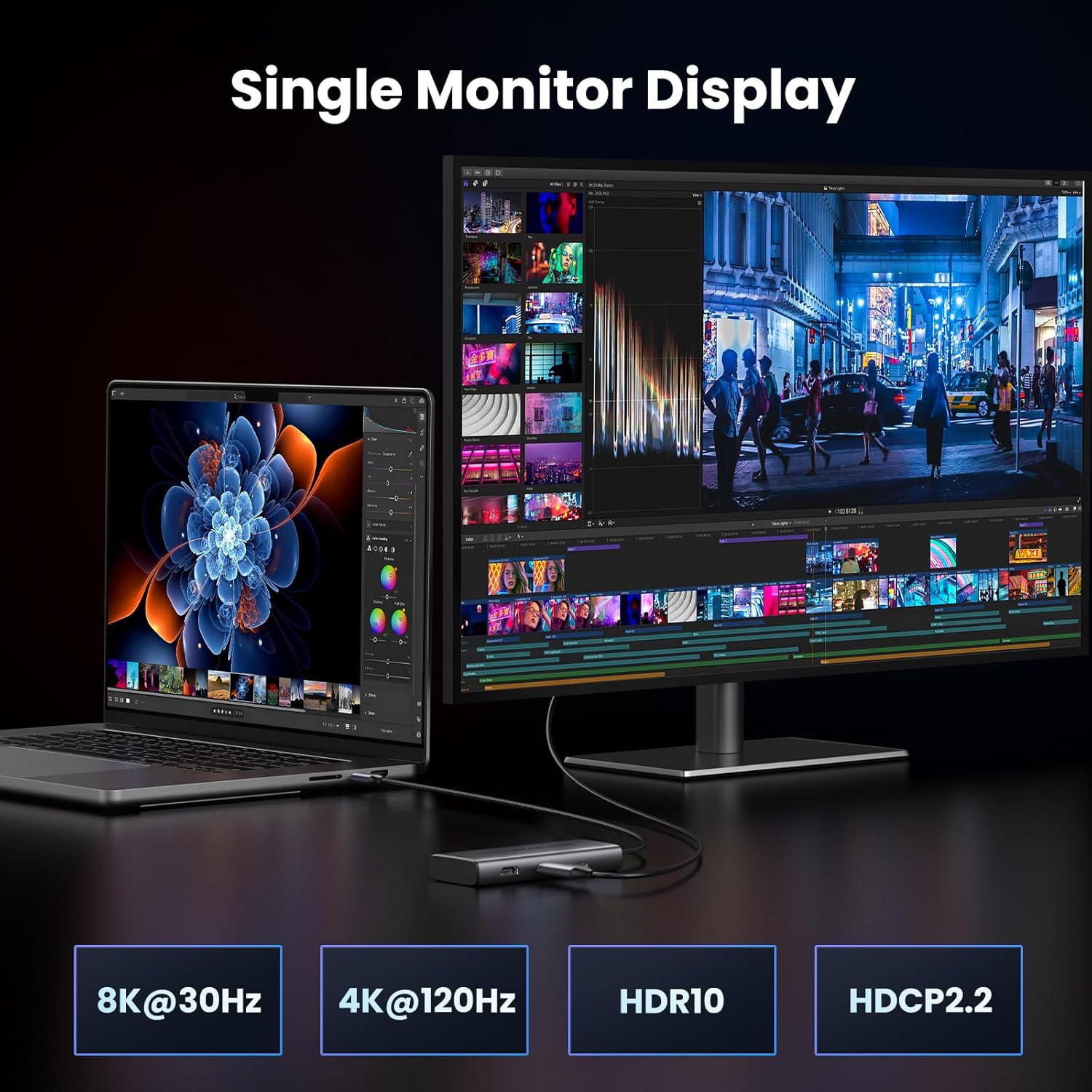
8K UHD Display: The HDMI 2 port on USB C Dual HDMI Adapter delivers a maximum 8K@30Hz, backward compatible with 4K@120Hz, 4K@60Hz, which produces jaw-dropping detail and ultra-vivid colors. Not compatible with the LG38WN95C monitor.
100W Power Delivery: The USB C Dock support for max 85W USB C pass-through charging over the USB-C PD port, so you can charge your MacBook Pro 13 from a low battery to 73% in an hour.
Transfer Files in Seconds: Transfer files, movies and photos at speeds up to 5 Gbps via the USB-C data port and dual USB-A ports.
Customers say
Customers find the multiport hub offers good value for money. They are satisfied with its docking station and refresh rate. However, some have reported issues with durability, charging capacity, and USB ports. There are differing opinions on its functionality.
AI-generated from the text of customer reviews
13 reviews for UGREEN Revodok 206 Docking Station 6 in 1 USB C Dock Dual HDMI 4K@60Hz Single 8K@30Hz 100W PD 5Gbps USB C and USB A Data Ports USB C Hub Compatible for HP, ASUS, ThinkPad and More
Add a review
Related Products


![Anker 4-Port USB 3.0 Hub with 5Gbps Data Transfer, Ultra-Slim Data USB C Hub [Charging Not Supported], for MacBook, iMac, Surface, Mobile HDD, and More(USB-C, 2 ft)](https://m.media-amazon.com/images/I/71zeY5pqXzL._AC_SL1500_.jpg)
$39.99
Tech Buyer –
Works greate and lots of options
Great for on the go with multiple connectors
Juniorverse –
Was able to properly get 4K@60Hz on two monitors at once from my LG Gram laptop
I needed a USB-C hub that allowed me to get 4K @ 60Hz+ on two monitors connected to it at once. Since the options for that seem to be few and far between (most ran at 30Hz on at least one port), I was happy to see this hub offer 4K @ 60Hz on two monitors for compatible devices. Well, my LG Gram works fine with this scenario, and can confirm that this hub did indeed give me a stable 4K @ 60Hz signal on two monitors at once for entire days without any issues. And the price wasn’t too bad either. I also like the other ports and connectivity options. Nice value.
Brian Martini –
4k 120hz single monitor, 4k 60hz dual monitor. Love it, great for my ROG Ally.
Great dock, better than most docking stations that cost way more. The I/O is okay, sufficient but not a ton. You could get separate dongles that should work with this dock if you need more I/O.Mainly, if youâre looking for 120hz and/or 60hz 4k output for your computer and/or handheld, this is a great option.
Tracy Gil –
!!DO NOT BUY!! The unit failed after a couple of months.
I needed a USB and HDMI hub for my office. The hub worked ok but then stopped working. Flaky unit and look for one that can last at least a year or two.
Virginia –
intermittent flicker
I use this to connect my two monitor. I will have intermittent flicker . not very often stilll ok to use but I’m pretty sure it’s the issue of the adaptor. Because I directly connect my monitor with my laptop it never happened.
Oz –
Good
Product is good. Gets the job done for the money. Charging capacity isnât great when you use it to charge a 65W laptop. Laptop will display a low wattage charger being used even though the charger connected into the adapter is 65W. Still charges the laptop just fine, just dont like Low Wattage the message.
Amazon Customer –
Excellent
I’ve tried three other docking stations (most costing twice as much) and this is the only one that actually works as it’s supposed to. It’s an incredible value at only $29. Other devices would only push 4k at 60hz on one display and 30hz on the other even though claiming the ability to provide dual 4k 60hz hdmi. One device was laggy to initiate signal, would show 60hz on the display settings but created noticeable mouse lag like 30hz, and eventually just stopped working altogether. This one so far has none of those issues. Very pleased with this docking station from UGreen.
Jesus Ivan –
Hermoso dockstation
El material de primera, el cable muy resistente y todos los puertos con excelente repuesta.
Michel –
Excelente dispositivo, funciona de maravilla para múltiples pantallas y mantiene la calidad de imagen.Lo único negativo verÃa el tema de que su cable es demasiado corto, impidiendo algo de modalidad en el HUB
Aaron –
It works in my use case which is for connecting my work laptop to two of my HDMI ports on my ultrawide monitor.I have a 240hz ultrawide monitor but obviously I wouldn’t really need all of that for my work laptop which can only go up to 60hz, so this dock works perfectly for just connecting my laptop to my ultrawide and turning it into a pseudo-dual monitor setup.The material is solid and very premium feeling, my only gripe with the docking station is that the USB-C cable that you use to connect to the device you want to dock is pretty short. I ended up having to buy a USB-C extension cable just so I can reach my laptop (I have the docking station hidden underneath my table). The pass through charging works good, I just plugged in my laptop charger where the manual told me to and it charges my laptop just fine.Very happy with my purchase!
Eric Nyarko –
Solid, well built, does the job. Never failed me.
Rishi –
Dieser kleine USB-C Hub ist ein wahrer Meister! Winzig und leistungsstark. Die Verarbeitungsqualität ist top-notch. Funktioniert absolut perfekt und ist sehr fair im Preis. 5 von 5 Sternen. Kaufempfehlenswert!
Yoxe –
Reçu en moins de 24h .Fonctionne parfaitement avec Mac Book M1 pro!! Attention lorsque on branche les 2 HDMI sur le boîtier on a bien les 2 écran en miroir car limitation d’apple oblige. Par contre j’ai trouvé une solution en utilisant le port HDMI natif du mac en 1er écran et le second écran géré par le boîtier. Je partage ce commentaire car j’ai passé un bon moment à trouver une solution de dual screen sans dépenser une fortune. Ce boîtier payé 32⬠fait très bien le travail.Mon 2e produit chez ugreen, pour l’instant RAS.