

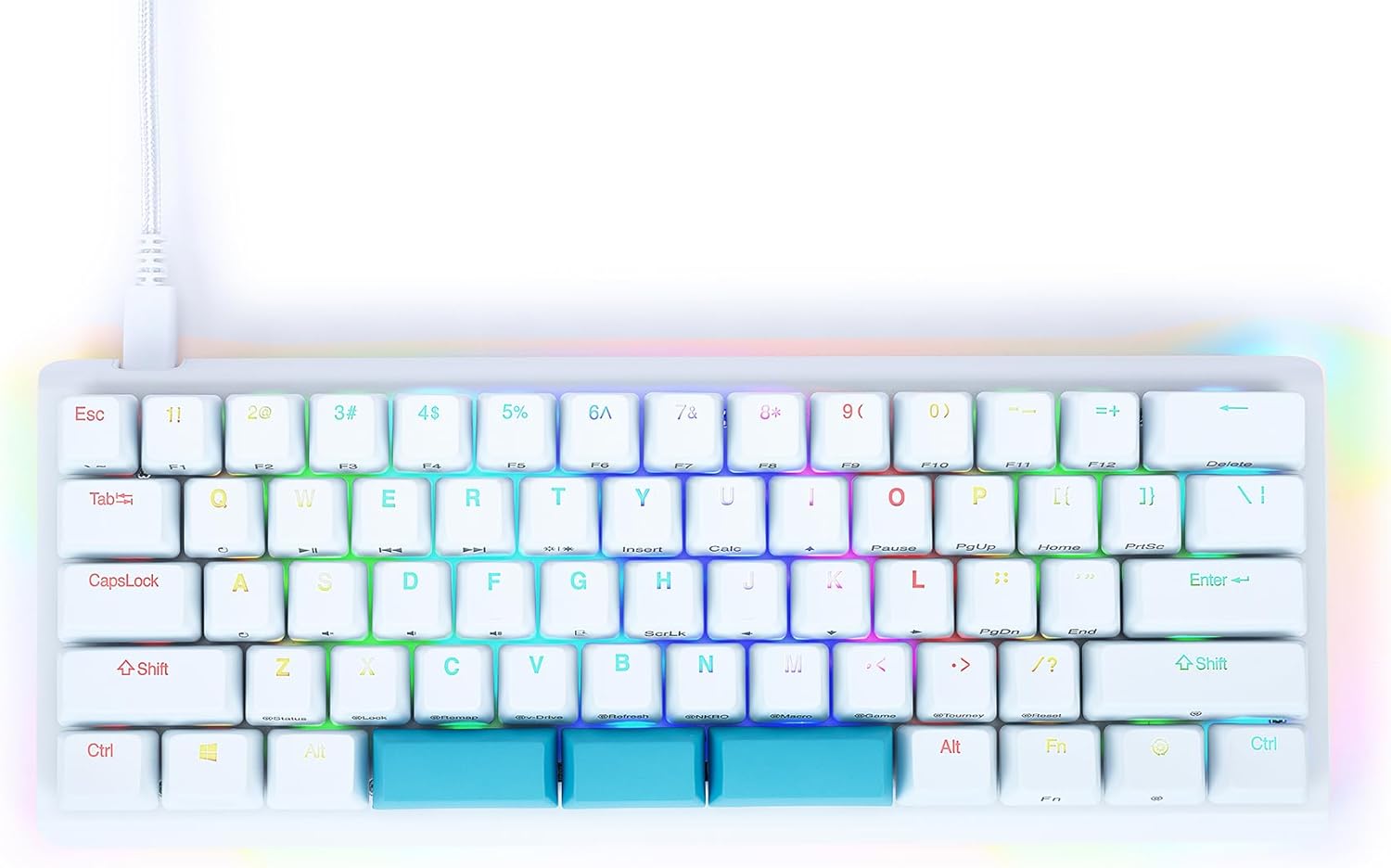
Wireless 61% Mechanical Keyboard, Modes BT5.0/2.4G/Wired, Backlit Ultra-Compact 68Keys Gaming Keyboard with Stand-Alone Arrow/Control Keys (Red Switch)
$19.99


Price: $19.99
(as of Jan 09, 2025 13:19:56 UTC – Details)
Product Description

2.4G wireless mode
Switch the power to 2.4G/Bluetooth logo. Press fn+v at the same time. Then insert the receiver into the PC port, and now you can use the product as a wireless keyboard.
Wired mode
Switch the power to the wired mode, connect the Type-C cable to your PC, and then press the FN+B long press and connect to the connection. It will work.
BT1 wireless mode
Switch the power to 2.4G/Bluetooth logo, then press it at the fn+z at the same time, and the “Z key” flashes. Then appear “BT3.0KB” and “BT5.0KB” on your computer and then connect to any of them. Open the Bluetooth of the laptop. If your computer system is win7 or earlier, please select “Connection, BT3.0KB “”.


Detachable Type-C Cable
1.5m Type-C cable widely compatible with PC devices, more general and convenient charging method, more solid data transmission. You can charge it in a few hours with the attached Type-C cable.

Stronger Battery Life
With a built-in 2000mAh rechargeable battery, this 61% mechanical keyboard with 480h standby time can hold a charge for longer than 15hours of continuous use. It also comes with a power switch and 10 min sleep mode for power saving. You can charge it in a few hours with the attached Type-C cable. (Note: lowering the small keyboard’s brightness improves battery life.)

That is THREE MODES
With 2.4G wireless and Bluetooth 5.0 to seamlessly connect up to 4 devices, if you want to pursue higher stability, you can connect by wired (Type C data cable included in the package).
【Mini Portable 60% Layout Keyboard】MK530 is a 68-key mechanical keyboard, compact size, adding separate arrow keys and “Del” keys, saving space while providing you with all the functions of a normal keyboard .
【Multi-Device Connection】wireless mechanical keyboard provides three connection methods, including Bluetooth 5.0, 2.4GHz wireless mode, and USB wired mode. It can be connected to up to five devices at the same time, and switch between them easily by FN+ combination keys. No limits about your keyboard connection to meet the needs of work, gaming, and study.
【Hot-swappable Custom Keyboard】The switches and keycaps can be freely replaced(keycap/switch puller are included in the package).This customizable keyboard with hot-swap PCB allows users to replace 3 pins/5 pins switches easily without soldering issue.
【Ergonomic Design】 This 60% mechanical gaming keyboard has two feet stands which can adjust the placement angle, so you can use it for a long time without feeling tired.
Efficient & Comfortable Operation: The OKB120 60 percent keyboard based on ergonomics, scientific stepped keycap design provides maximum comfort. Support full key anti-ghosting.Keep you away from lag and enjoy efficient and smooth gaming typing.
Customers say
Customers find the keyboard has a good feel and ergonomic design. It offers great value for the price, with no flimsy keys or gaps. They appreciate its functionality, sound quality, and color scheme. However, some customers have differing opinions on Bluetooth connectivity.
AI-generated from the text of customer reviews
5 reviews for Wireless 61% Mechanical Keyboard, Modes BT5.0/2.4G/Wired, Backlit Ultra-Compact 68Keys Gaming Keyboard with Stand-Alone Arrow/Control Keys (Red Switch)
Add a review
Related Products



$19.99
Joshua J. Horton –
Get a wireless mouse along with this and never use your media/HTPC keyboard again
This keyboard is a premium typing experience for a pittance. I think makes a really great “media” PC keyboard, and I use it from my couch in conjunction with a wireless mouse. In this use-case, I’d say it EASILY outclasses anything officially sold as a “media” keyboard, for a seemingly impossible price.The reliability of both wireless modes of connecting is AMAZING. I go into this below.Folks doing a lot of word processing might not like the fact that this reduced-format keyboard has the Home and End keys being accessible by the use of the “Fn” key.If you are unfamiliar with reduced-format keyboards, a great example is likely sitting in front of you. If you’ve got a function key (often shown as “Fn” or “FN”), you’ve got a reduced format keyboard. This one has its Home, End, and Insert keys accessed by pressing the Fn key in concert with the PgUp and bracket keys. Keys F1-F12 are also accessed via the Fn key, however this arrangement many are likely to find convenient, as they correspond to the number keys.The performance for this keyboard on Bluetooth is excellent, which is as expected, having a rock solid connection in any scenario I could give it. What blew my mind, though, is that the 2.4ghz connection mode (using the included dongle that magnetically attaches to the underside of the keyboard) is also excellent, being able to accurately transmit through my bedroom wall. This level of performance in 2.4ghz mode is absolutely in stark contrast to a vast array of similar devices. I’ve had even brand-name 2.4ghz keyboards fail to connect over the 6′ gap from the dongle to the keyboard, let alone broadcast through a freakin’ wall. I actually shouted with surprise when I saw how well it worked.And the good thing about a reliable 2.4ghz mode is that (on PCs, at least, not sure about Macs), this keyboard will operate reliably well in that mode from the moment of powering on. In bluetooth mode, the keyboard will not connect until Windows has started. This means that you can access your BIOS settings and startup options just like a wired keyboard, from the moment of powering on your PC.That said, I primarily use this keyboard in Bluetooth mode, as it reduces the potential for interference with my other bluetooth devices. I also suspect that bluetooth mode makes the batteries last longer.If you are not used to linear key switches, or don’t know the difference between the feel of linear key switches (reds), tactile (browns), and clicky (blues), look it up. This is the first linear key I’ve used and it’s a little bit of an adjustment. That said, these keys perform AMAZINGLY for the price. Like this was so inexpensive I thought it had to feel flimsy, but this thing feels solid. It’s got good weight to it and the sound is solid, not hollow at all.The videos on here don’t really capture the sound well — it actually sounds fairly muted, not nearly as much treble or echo. If you’re really hammering the keys you can hear a bit of ping, but I cannot emphasize enough how solid this keyboard is for the price. It’s overall very quiet for what it is, and very well made. It really is a premium typing experience in it’s price class, especially for anyone used to “media/HTPC” keyboards.CON: I have the version with mostly blue keys, and when the backlight is off, it is very hard to see the key’s markings. I notice that the white keys on my keyboard are MUCH easier to read with the backlight off.***If you are not a touch-typist, you should get the version with more white keys.***
NoodleMan –
Surprisingly great touch and quality
So far this $20ish keyboard has exceeded my expectations. Iâve been using it for over a week now. Easy to set up. The battery right out of box still runs well without a single charge. The keys feel great. The only thing I could hope for is the backlight to be more bright. Anyways, the price outweighs the shortcomings.
Ian –
Solid 4 stars.
I bought this keyboard about a week ago and itâs been quite an experience for me using it.Iâll try to be concise, so let me bring up all the pros of this product first.1. Value for the money. I got it on sale for ~$20 and I guess itâs the cheapest wireless mechanical keyboard with 3 different connection types you can get on Amazon.2. Build quality: well, Iâm not gonna embellish it, it feels quite cheap, but the good point that is pretty decent. No flimsy keys, no gaps, no peeling plastic stripes, etc.3. Wireless feature/delays: I was using Bluetooth and usb-c connection options and since there is nothing much to say about the plug-in mode, Iâll focus on Bluetooth. It remembers the device and connects to it right away, no noticeable delays during typing, however I had a ~1-second input lags a couple times, which I donât consider being an issue keeping in mind the keyboardâs price.4. Appearance: well, itâs different for every person, but the keyboard looks very modern and neat for me and I like it, all keycaps are painted thoroughly and the letters are hard-printed inside the plastic, so they wonât wear off.5. Swappability: youâre getting a switch-remover in the box, so you can always customize it, which is great.That being said, it would be a 5-star review, except one âbutââ¦There is no backtick /tilde(`~) key! While other manufacturers came up with adding it to the âEscâ key, this product just doesnât have it at allâ¦I wouldnât say that I use these symbols every day, but the feeling that I donât have the full layout makes me really sad. For anyone who is struggling with the same issue – I personally reassigned my PgDn key to `~ using Microsoft PowerToys key manager.To sum up, it is really a great product for its price. If youâre comfortable spending some time to reassign the key in order to use `~ – just go ahead and buy it, itâs a nobrainer.I hope this review was helpful for someone)
Tattedmama –
Great cheap keyboard
For the price, you can’t beat it. Works well. It’s a very basic plastic outer case and thin key caps. The red switches work well and are fully hot swappable. I added a picture of the board after I swapped the switches for another brand. It’s the perfect size for taking everywhere. Comfortable to use. You may want a little stand to go with it as there are no built in feet. The rgb is nice, not overly bright but very visible. Charges well and connects with no problem.I got this keyboard with the intent of modifying it. Was able to take it apart, add sound dampening features, swap all switches and install moa keycaps with no issues. Works great! If you need to use it as is, you’ll have no problem there.
Lucas Dominguez –
Sou do Brasil e decidi comprar um teclado mecânico para trabalhar com programação e também jogar alguns jogos, ele precisa ser compacto, mas com algumas teclas importantes que uso bastante, como as setas independentes. Muito confortável, conveniente por conseguir utilizar em 3 modos. Todos os modos, com exceção de um, estão funcionando. O produto não veio acompanhado com o USB 2.4 na sua parte de baixo, como mostra a foto [EDIT: Depois de um longo tempo, encontrei o perdido rsrs].