
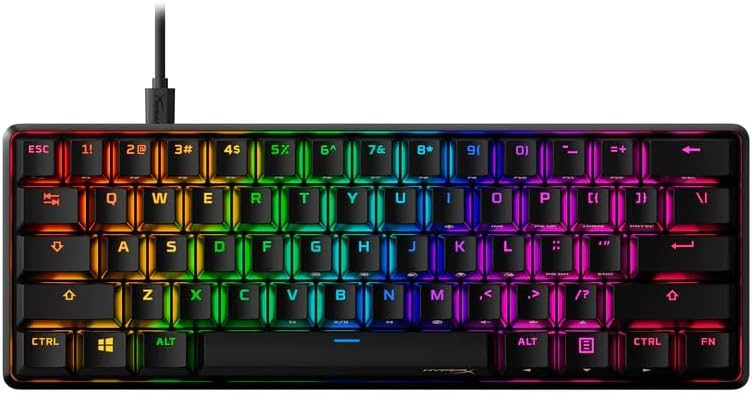
HyperX Alloy Origins 60 – Mechanical Gaming Keyboard – Ultra Compact 60% Form Factor – Tactile Aqua Switch – Double Shot PBT Keycaps – RGB LED Backlit – NGENUITY Software Compatible,Black
$64.97


Price: $64.97
(as of Jan 11, 2025 09:16:55 UTC – Details)
The HyperX Alloy Origins 60 is a durable, supremely portable 60% form factor keyboard that provides more room for sweeping mouse movements. It features a durable, full aluminum body, and reliable HyperX switches balanced for speed and performance. The pre-installed double shot PBT keycaps have secondary functions printed on them so you can quickly locate any additional functionality you need. Further customize your keyboard with macros, lighting effects, and more with HyperX NGENUITY software.
Petite 60% form factor: Free up more room for your mouse with this supremely compact keyboard. Side-printed functions on the keycaps allow you to quickly locate secondary keypress functionality.
Full aircraft-grade aluminum body: The aluminum casing keeps the keyboard structurally sound and stable when the action gets intense and the game hangs in the balance; battle after battle, night after night
Double shot PBT keycaps with side printing: The pre-installed PBT keycaps have text on the sides to help you quickly locate additional key functions.
HyperX Mechanical switches: Reliable HyperX key switches are balanced for speed and accuracy to help provide faster keypresses with fewer mistakes. Their exposed LED design delivers stunning RGB lighting that stands out.
RGB backlit keys with radiant lighting effects: Get brighter, more luminous RGB lighting, thanks to the exposed LED design of the HyperX mechanical switches.
Advanced customization with HyperX NGENUITY: Customize Game Mode, build macros, and set up per-key lighting and effects.
Three adjustable keyboard angles and detachable USB-C cable: Two-step keyboard feet allow you to set your keyboard up at 3 different tilt angles. A detachable USB-C cable makes this ultra-compact keyboard super portable.
Included keycap puller and additional keycaps: A keycap puller, an additional Esc key, and the special alternate spacebar design for the Alloy Origins 60 are included for additional customization.
Customers say
Customers find the keyboard has a great feel and firm keys. They appreciate the solid build quality and premium look. The keycaps have a slight grippy texture that feels pleasant. The RGB backlighting looks good and the pudding key caps really make the colors shine. Overall, the brightness of the backlighting is satisfactory.
AI-generated from the text of customer reviews
8 reviews for HyperX Alloy Origins 60 – Mechanical Gaming Keyboard – Ultra Compact 60% Form Factor – Tactile Aqua Switch – Double Shot PBT Keycaps – RGB LED Backlit – NGENUITY Software Compatible,Black
Add a review
Related Products


$64.97
Tim M. –
The RGB keyboard for everyone
I picked this up to use across two systems as I recently started using a docked laptop as my daily driver. The usb-c connection makes swapping between systems as simple as swapping a single cable, meanwhile I can tuck the other cable away when not in use. This is replacing the alloy elite and this is my experience so far …Been using this board since late Feb 2021 and I love it. It has a much smaller footprint than the alloy elite while boasting pretty much all of the same features. At first the removal of the dedicated media keys, volume roller, and dedicated RGB keys was bothering me, but all of these functions are mapped to the function keys on this board. Not having those keys is actually the big thing I love about this board. It offers the same hyper x clicky switches that I love in a much more compact form factor.The build quality is great. The deck is all metal and super slim compared to the alloy elite as well as every other board I’ve used in the past. It’s close to logitech’s offerings as far as thinness goes, but without the extreme flex and terrible keycaps. The hyper x keycaps use standard mx stems so using pretty much any keycap set should fit these, though check the questions if you’re looking for specific compatibility.I removed the pudding keycaps from my alloy elite and swapped them over to these which … is a mixed bag. Overall I love the floating keycap design and the backlighting on this thing is both very bright and software accurate. I do miss the the legends printed on the FN keys that tell me which keys do what since I no longer have the dedicated media keys, but it took approximately a day to remember everything. Compared to the alloy elite this board seems much brighter overall. The lowest setting on these switches seems to be brighter than the highest setting on the elite, which could be a placebo effect but I don’t know. I can’t turn these up to max without it being painful to keep in my periphery. So RGB?? Fantastic on this board, especially with the pudding keycaps.I also really like the adjustable feet that offers you 3 different height adjustments. It’s pretty standard these days but I still love to see it.Another thing I love is the numlock/caps lock display. It’s positioned perfectly so that you can easily see at a glance which functions you have activated. This was not the case on the alloy elite. The display was placed too closely to the numpad meaning that unless you were sitting up very straight, are super tall, or leaned forward to look at it you could NOT tell what was on/off. This is a big improvement. It seems minor but it really bugged me on the elite.Not much else to say. Keycaps feel great, very stable and it has that satisfying bump I’m looking for in an mx-blue style switch. i love it.So everything about this keyboard is amazing, but it right now!! … oh wait … the softwareWell the software is pretty barebones, isn’t very streamlined, and still appears to be in beta from the MS store? I’m not sure as I didn’t install this on the computer I’m using right now. I used my old pc (desktop) to set this up since it already had the hyperx software (ngenuity i believe) installed, and it works well enough. While the colors of the keycaps are very accurate in terms of how close they are to what you see in the software you would not notice this with the stock keycaps. The black seems to shift the colors just a little bit so that they appear darker. With the pudding keycaps though they’re amazing. Can’t complain here. So yeah use the software once to customize your board, then uninstall it. There are plenty of effects to choose from whether you prefer static colors or moving effects … it all looks great.And with that yeah I think we’re done. This is a fantastic keyboard for anyone looking for a better overall typing experience. Do some research about switches, maybe order a sample pack of switches or something, to find the one that’s right from you, then go nuts. Great product, will definitely be buying hyper x again if they can maintain this level of quality and value. Good stuff
Aaron –
Excellent Quality, Excellent Customer Service
This is my first mechanical keyboard and I now understand why they are preferred over membrane variants. I went with the aqua keys and they are wonderful for both typing and gaming. I’ve had the keyboard for about two weeks now and it’s really great.I’ve heard a lot of complaints about the software, but I’ve had no problems whatsoever with using it. It’s intuitive and functional enough that I set up my keyboard in just a few minutes and haven’t had to use the program again. The backlighting works well and is quite vibrant.The keys feel wonderful and responsive. I was initially worried about tactile keys being annoying for gaming, but after using them I couldn’t recommend them more. Some people mentioned the cheap keycaps, but I haven’t had any issues personally with them. My only complaint is that if you’re a heavy handed typist like myself, there is a faint metallic ring when hitting the keys. It isn’t loud and doesn’t bother me much, but I’d be happier if it wasn’t there at all. It’s a minor gripe overall and isn’t worth deducting a star for. Most of the time I’m typing with headphones on and can’t hear it at all, so it hasn’t bothered me much. If you like to type in a quiet environment though, it might annoy you.Edit: 8 Month update:Unfortunately, the W key on my keyboard stopped working yesterday. Fortunately, the customer service is so excellent that they shipped me a replacement and I’m typing on it today. It’s hard to complain about a one day turnaround. Fantastic.
Matthew Miller –
Fantastic mechanical TKL
I bought this with the HyperX blue switches to replace a Das Keyboard Pro 4 with Cherry MX Blue switches for work (I am a programmer). I loved the Das, it’s a solid workhorse and the clicky cherry blue switches are so satisfying, but it’s huge and I wanted something smaller so that I could position my keyboard directly in front of me without pushing my mouse way off to the right.Feel – When I got this keyboard, I put it next to the Das to compare the HyperX blue switches to the Cherry MX blues. There is a slight, noticeable difference. I would say that the cherry blues are _slightly_ crisper, but the difference is negligible. The HyperX blues are still plenty clicky and satisfying. I got used to this keyboard very quickly. I probably wouldn’t have noticed any difference if I didn’t have them side-by-side. No complaints here, it’s a joy to type on this keyboard.Noise – Yes it’s loud, that comes with the territory. The volume is comparable to the Das… however… I read other reviews that complained about “pinging” and didn’t know what they were talking about. This wasn’t a problem with the Das even after years of use. However, in the past few days (after a month of using this keyboard) I noticed that some keys, particularly the Tab and Ctrl keys, make a “pinging” noise after being pressed. It’s not as loud as the normal clicking noise of the keys and it depends how snappy and hard you tap the keys, but it’s there. It doesn’t really bother me but I could see how it might grate on some people’s nerves. You could always just turn on some music. :)Design – I love the compact form. There is no wasted space around the keys to needlessly take desk space. The key layout is the same as what I’m used to minus the number pad, no funky layout to make it more compact or cram in extra keys. The spacing feels slightly different compared to the Das; I guess the keys are slightly closer together? Not a big deal, I got used to it in maybe a week or two. It lacks USB ports to plug in other devices, but this wasn’t a big issue for me. Like any other mechanical keyboard it is a bit tall and I highly recommend getting a wrist rest like the Glorious Gaming wrist rest (don’t forget to get a TKL size).Lighting and software – This was low on my priorities, but I have to say the RGB lighting is cool. This keyboard is VERY BRIGHT. It has 4 brightness levels other than off (25%, 50%, 75%, 100%) but even on the lowest setting at 25% it is quite bright. However you can dim the brightness to whatever level you want with the software. The software, despite all the complaints in other reviews, seems fine to me. It gives you a lot of flexibility for layered colors and effects that are very cool. I have no problems with it other than I wish it allowed you to load the settings from your keyboard to tweak them after you save them to the keyboard, but it does look like it has profiles that you can save and load in the software.Summary – This is a fantastic TKL layout mechanical keyboard that I would recommend for work or games. The blue switches are comparable to Cherry MX blues. However, if you can’t stand the “pinging” noise on some keys then you may want something higher quality.
Ãtima Qualidade –
O teclado é incrÃvel, construção muito bem feita, é meio pesado, para quem precisa ficar se locomovendo com ele, talvez possa incomodar um pouco pelo seu peso, mas em compensação a sua resistência é indiscutÃvel, seu led é bom, mas acredito que pelo valor poderia ser um pouco ainda melhor, teclas excelentes e ótima resposta auditiva e tátil do switch red, além das suas teclas extras que deixam o teclado com um aspecto visual ainda mais bonito, da minha opinião, teclado recomendado!
Hachi –
Materiales se sienten de calidad,ya veremos con el tiempo
Leandro Antonio –
Boa disposição de teclas (mais que suficiente pra mim que não faço questão de ter os numéricos à direita), switches silenciosos e bem responsivos, keycaps doubleshot de qualidade, software intuitivo e muito versátil para customizar o visual RGB
Brayan –
Muy buen producto, super recomendado.
ya –
good