

Unitek M.2 NVMe SSD Enclosure Adapter – 10 Gbps Hard Drive Reader Tool Free Pcie NVMe Adapter External USB 3.2 M2 SATA Case Converter Supports M Key Any Sizes M.2 2.5″ /3.5″ SATA Solid State Drive
$42.99



Price: $39.99 - $42.99
(as of Jan 18, 2025 03:48:20 UTC – Details)
Product Description

Unitek M.2 NVMe SSD Enclosure Adapter
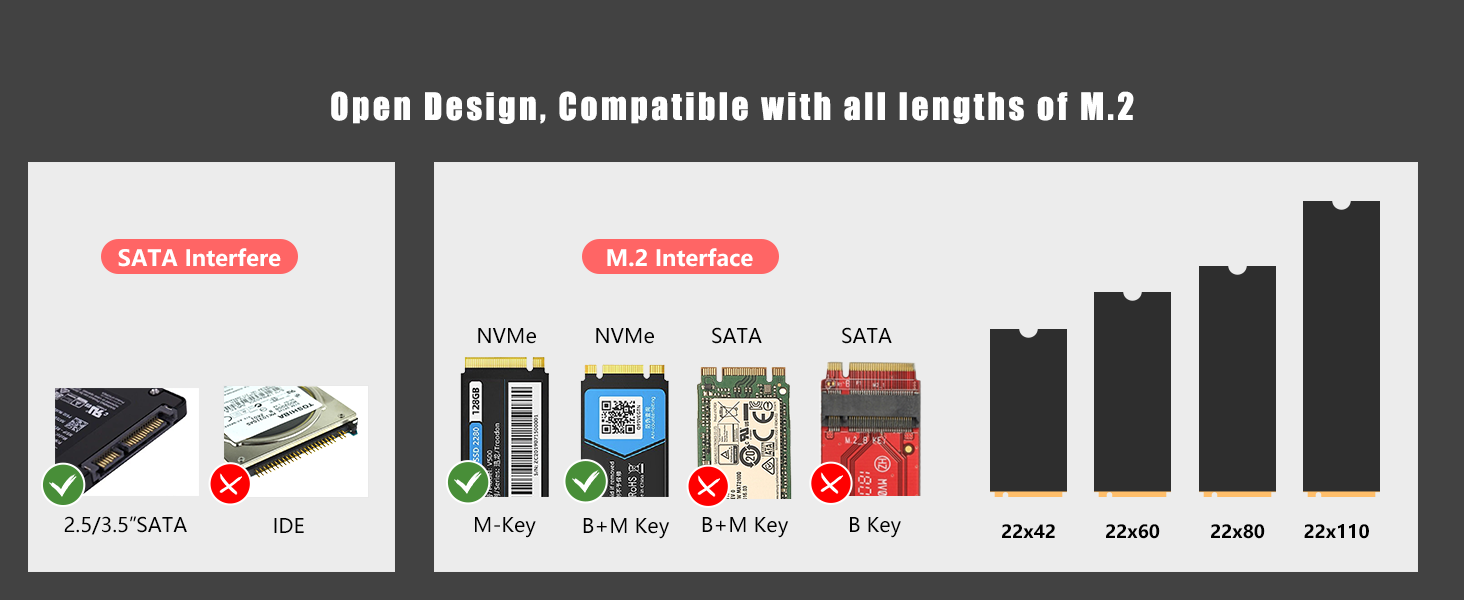
Support M.2 NVMe PCIe M key, PCIe B&Mkey SSD, and AHCI/SATA 2.5″/3.5″ SSD&HDD.Compatible with Windows 7/10/11 and Mac10.5 or Later, Linux.Support connection with a smartphone, read or transfer data. (the phone needs to support OTG function).

Powerful Functions
You can use it to transfer files, store data, watch movies, play games, etc.Plug and play, tool-free installation, no driver required.
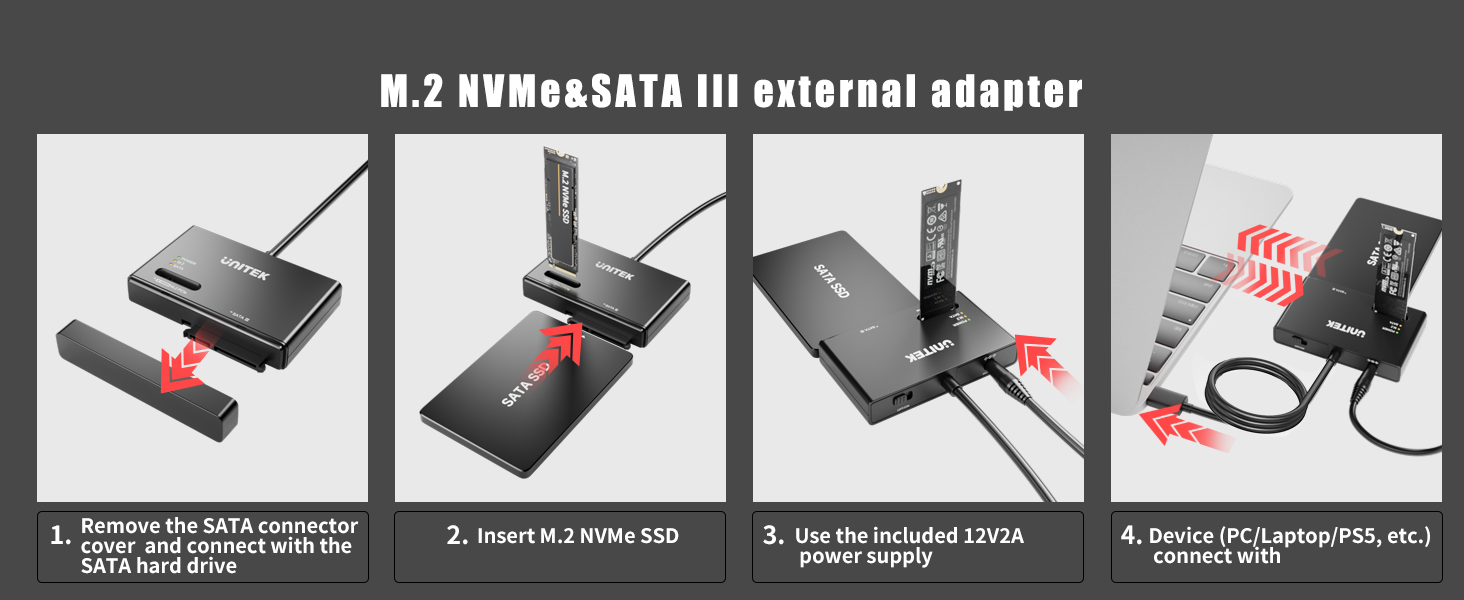
1 How to Use
2 Compatible Hard Drive
 Open Design
The open design is compatible with all lengths of M.2 (only the M key and B+M key are supported)
 30 Mins Automatic Sleep
The SSD reader will automatically enter the hibernation state after 30 minutes of no reading or writing (the disk position light is off)
 Portable Size
The compact size allows you to take it anywhere, an essential tool for office work.
 Dust-proof Interface Cover
Humanized design for SATA interface, an equipped cover ensures better protecting from dust.
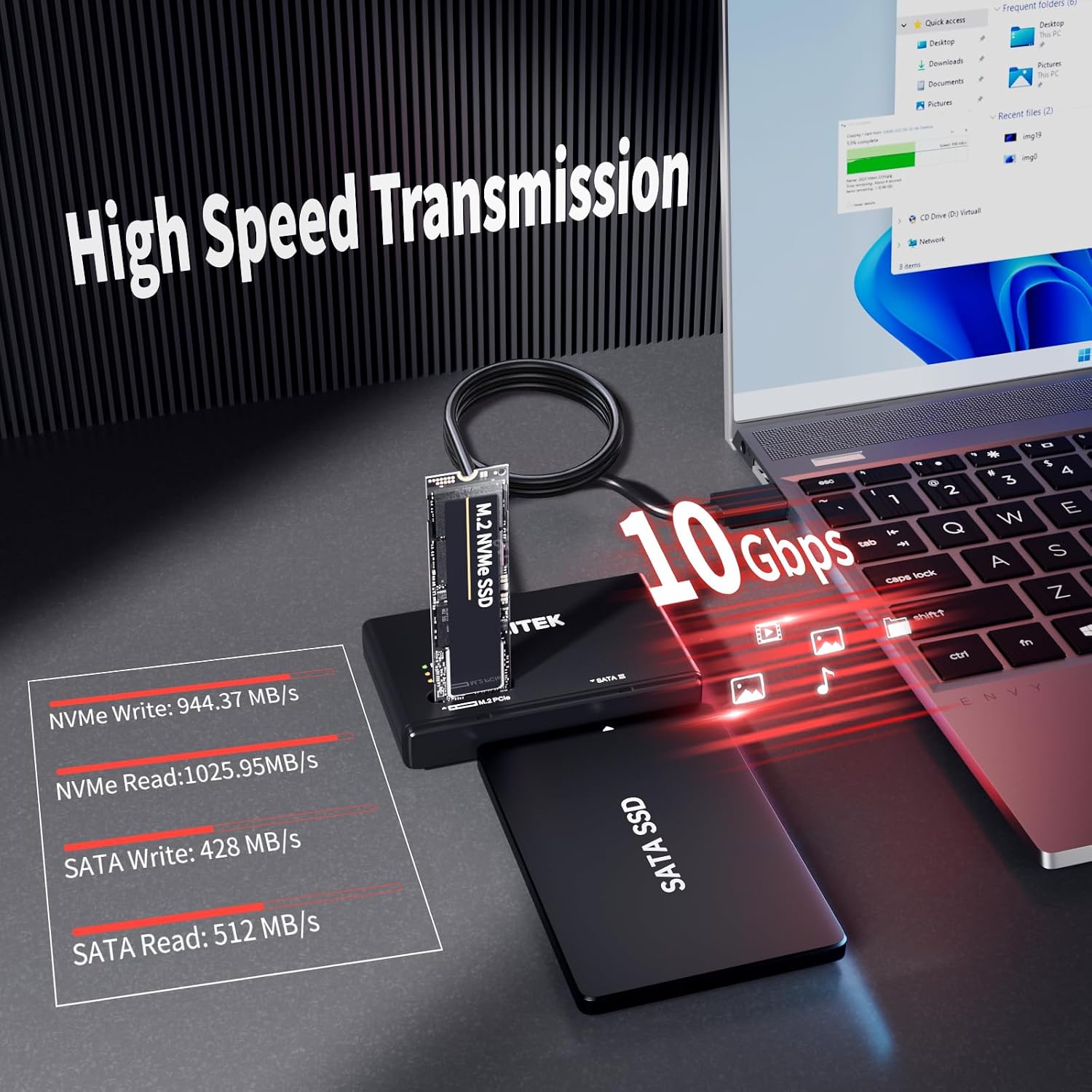
【10Gbps M.2 SSD Enclosure】This SDD External Enclosure supports UASP 10Gbps ultra-fast transfer speed, which can transfer a 4K HD movie or several G files in seconds, Backward compatible with USB 3.1 and USB 3.0.
【Tool-Free NVMe SSD USB Adapter】The M.2 enclosure reader is so easy to use without any tools and no driver required, Simply open the dust cover of the USB Drive Case to insert a SATA SSD, M2 SSD can be inserted directly into the external NVMe enclosure, and the open design is compatible with any size of M.2.
【Support M.2 NVME and SATA SSDs to USB】This M.2 hard disk enclosure will meet your needs whether you are using M.2 or SATA hard drives. Plug-and-play, no driver required, supports hot-swapping, 30 minutes without reading or writing automatically into hibernation. Great for office workers/gaming movie lovers and users with multiple different hard drives.
【Safe and stable】The M.2 USB Adapter uses JMS581DC chip with anti-breakage and over-current protection to protect your precious data, and supports SSD TRIM commands, and UASP acceleration for more powerful read and write rates.
【Package Content】Includes a USB-C to M.2/SATA adapter, a 12V2A power cable, easy to connect, no need to distinguish between the front and back, compact and portable, a good helper for travel work.
【Note】If the M.2 with a thick heat sink cannot be inserted, you can remove the heat sink and use it again. If your M.2 SSD comes with an encrypted transmission protocol, please turn it off before use. This adapter does NOT support the cloning between SATA and M.2 hard disk.
Customers say
Customers find the electronic device docking station functional and easy to use. It works well for them to duplicate their hard drives and retrieve information. They find it simple to set up and operate without supervision. The speed is fast and saves time, making it practical for swapping out other drives. Customers are satisfied with the value for money, fit, and design. However, some customers have differing opinions on its cloning capability.
AI-generated from the text of customer reviews
13 reviews for Unitek M.2 NVMe SSD Enclosure Adapter – 10 Gbps Hard Drive Reader Tool Free Pcie NVMe Adapter External USB 3.2 M2 SATA Case Converter Supports M Key Any Sizes M.2 2.5″ /3.5″ SATA Solid State Drive
Add a review
Related Products


$42.99
R. Fondrick –
Works perfectly
Seperate power supply and works with any NVMe
Marcia Sweet –
Excellent product
Easy to use. Versatile. Great deal.
D.Ayotte –
Worked Like a champ
I was able to reformat 5 M.2 drives and 2 SSD’s that I had accumulated over recent years. I did need to use the windows disk management tool to remove old partitions and create a new volume, format, and assign a letter to them. This may be due to me having them in Linux systems before.Bottom line, it worked. Plug your drive into the device, turn the device on, plug it into your computer. If it shows up as drive Y or something odd, and “looks” okay, but you can’t get to it, try using the disk tool.
Basic Unboxing 101 –
Look out for this product. The seller changed some information on their product page.
I bought this in hopes of hooking up multiple drives. I have too much data lying around that I needed to back up after having issues with my main desktop running Windows 10. After long deliberations of going back and forth of thinking about this, I finally pulled the trigger on buying this enclosure for my drives. When it got here I was ecstatic. I hooked it up, along with it’s supplied 12v supplied adapter that plugs into the back. I inserted my Crucial NVME M.2 1TB on top of it (My main drive from my desktop), and my internal HDD 2TB seagate infront of the enclosure.Now, here’s where thinks get weird, as a computer nerd I need work arounds with my software since I’m running MacOS. Now, yesterday 9/23/2024 (Last I checked) The seller listed 4 bullet points on their webpage. One of those bullet points was line 4 “The M.2 and SATA switch key allows you to switch back and forth between the two drives at will.”. If you look at the screenshots, photos, and the video that I provided. You’ll see where things get a little shady. Not only did the seller removed their listings with the 4 bullet points on their product page, if you go to their main website or type it into google, and scroll under all the way under till you’ll see product and specifications, it isn’t listed their as well the M.2 SATA switch on the enclosure.Now, as for the enclosure itself, I have provided my own software since apple products do not natively support NTFS formats. You have to either A format a drive to exfat so that both Windows and Mac will recognize it, and B insure that this enclosure it “Plug and Play” ready. As stated in their listing, where it says “ãSupport M.2 NVME and SATA SSDs to USBãThis M.2 hard disk enclosure will meet your needs whether you are using M.2 or SATA hard drives. Plug-and-play, no driver required, supports hot-swapping, 30 minutes without reading or writing automatically into hibernation. Great for office workers/gaming movie lovers and users with multiple different hard drives.”.I also provided the screenshots that showcases this as well. The software that I use to recognize NTFS format for HDD or SDD drives allows me utilize file swapping and exploring between different drives. So, the whole point of buying this enclosure was to take all of my important files off of my main drive, the NVME one, and swap them over to any of my internal/external HDDs. However, this wasn’t the case, as when I plugged the enclosure into my satechi usb u adapter, along with the 12v cord plugged into the back of the enclosure, my NVME was recognized by my macbook as an SSD.I wasn’t able to mount it to my Macbook using the software that I provided for myself because of an unknown error, that popped up which I showed in one of the screenshots. Now, this isn’t necessarily the software’s fault, it’s more along the lines of switch and bait and in-compatibility with certain platforms like Macbook for instance. Now, I might be wrong with that last one, but even still the seller did remove the 4 bullet points about having a physical switch on the enclosure itself.I also written 2 emails, one yesterday which I still haven’t heard anything back from, and one today. On their product support page where you type in your name, email, phone number, and other information there’s nothing listed about “Help” or “Technical Support” at all on their official website. This happens when you click on your orders, and go to product support, it takes you straight to their contact us page. Now, as for talking about product support for mac, I can’t really say much because I can’t get any of my drives to mount on my macbook (I have the M1 macbook air, running the latest version of MacOS). I don’t know if this is due to a faulty hardware problem, or if something entirely different.Anyways, I hope Amazon sees this and other people sees this because I think people should be wary of what they are buying on here, if Amazon is allowing sellers to freely change their product information on their webpage. Especially after purchasing it.
Paul –
Good unit but needs a longer cable
Good transfer speed with one or both drives in use over USB 3.The off-line clone function worked well and took no more time than expected based on average sustained read/write performance of the drives. (To start a clone: hold the button for three seconds until the indicator lights, then release and quick-press again.)HDDs operate at about 40 degrees Celsius (20 over ambient) without additional cooling.The included USB-C to USB-C cable is too short to reach the ports on my desktop PC with the dock sitting on the same desk, forcing me to put something under to the dock to raise it up which seemed a bit precarious in combination with the vertical orientation of the drives. I purchased a longer cable at a significant fraction of the dock price to address this.
SCusack –
Great Product for the Price….It Just Works!
Glad I went with this product, I have done a dozen or so data transfers from legacy hardware, CrowdStrike didn’t do us any favors for sure! I had no issues connecting drives and pulling the data dow, basically all I could ask for. Would recommend purchasing the product.
Dan –
Works Great
My HP Omen laptop died and left me with an SSD and a Seagate SATA drive. The Unitek read them both without a problem so now can get apps and purchases I made a bit easier than going back to all of the vendors and downloading again, not to mention thousands of astrophotography images taken on that laptop. No complaints on price or function!
Brandon T. –
Works but beware of design limitations
It works as intended, and does read M.2 drives but, They either should have had the m.2 connector closer to the top of the enclosure or widen the hole around it. Having to take the heatsink off the M.2 drive means removing the warranty sticker from the drive and is just inconvenient, when they could have just tweaked the design to accommodate heat sinks.
Johnny –
I already have the IDE & SATA HD Adapter from Unitek which has worked flawlessly. I purchased this model for whenever I require using a NVMe drive. It works great with SATA HDD and SSD. Suppose I really do not need the IDE anymore but might come in handy.Very easy to use, plug & play.
Cliente de Amazon –
Ha funcionado perfecto, la compatibilidades señaladas son correctas, lo único es que el cable es muy corto pero con un extensor de soluciona y sin afectar el rendimiento. Lo recomiendo.
Amazon Customer –
work as describedgood for cloning drives
ROBERT J SABADOS –
Clones drives error free. Very happy with the product. Easy instructions.
z.one –
Très utile pour le clonage des disque, et super qualité. utilisation plus que deux ans.