

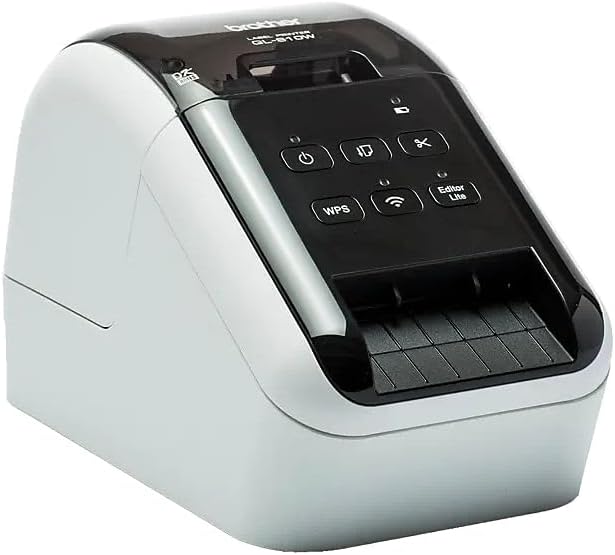
Brother QL-810WC Ultra-Fast Label Printer with Wireless Networking,Black
$148.00

Price: $148.00
(as of Jan 12, 2025 03:54:01 UTC – Details)
The Brother QL-810WC is a professional, high-speed label printer with unique technology that allows you to print in high visibility in black and red on the entire label. Rapidly prints black and white labels for envelopes, packages, file folders, barcodes, and assorted business uses. The Wireless interface offers easy connectivity – print from virtually anywhere or share on a network.
Easy connectivity – print from virtually anywhere or share on a network
Print amazing Black/Red labels using DK-2251
Create cost-effective paper labels for packages, envelopes, file folders, name badges, postage and more
Ultra-fast, up to 110 standard address labels per minute with black text at 300 dpi
Create and print labels from your mobile device when connected to a wireless network
Customers say
Customers find that the printer prints quickly and efficiently. However, they have mixed opinions on its functionality, setup process, connectivity, labeling capabilities, build quality, value for money, and size.
AI-generated from the text of customer reviews
13 reviews for Brother QL-810WC Ultra-Fast Label Printer with Wireless Networking,Black
Add a review
Related Products


$148.00
gradstudent –
LOVE this machine!
Since I bought this machine this machine has performed perfectly helping me to make lables for my cards. I have used it to make addresses for packages I am sending just amazing. It is so simple to use.
MC Fix It –
Great printer for PCO’s Check-in App
We bought three of these printers to go with PCO’s Check-In system. We’ve been using them for almost 6 months. The only problem we had is where one of the printers is located with spotty wifi connections. There is no ability to hardwire the printer, so make sure you have good access points near the printer.Pros:- Easy set up on MacBook with Brother’s driver- Connects easily with Planning Center Online’s Check-In application- Quality design- Prints quickly- Cuts automatically- Large power brick with long cords- Includes printer to USB jack for a printer cable for easier setupCons:- If you have spotty internet, you will need to make sure you set the printers up as Static IP Address- No hardwired ethernet cable option (only WiFI)- It would be nice if it has a display screen when you have an error and for set upI highly recommend this Brother printer for anyone who is looking to do digital sign-in and print sticker labels with PCO’s Check-In system!
Claudia S. –
Brother makes great stuff
Love this new Lable printer. I have had other Brother products, mainly label makers, and this one is just as nice to use as the others in the past. I have only had experience with Zebra printers before this new one, but they both work great and get the job done.
Steve Gardner –
Endless Network Connection Issues
I bought two of these printers for our church to use with Planning Center Check Ins to print labels for children in our programs. We had previously used two Brother QL-720NW printers which performed very well on Wifi with the check ins app. These printers have put us through 3 months of agony as they randomly disappear from connection in the Check Ins app, particularly when there is a long line of people trying to check their children in. I am no amateur when it comes to network troubleshooting. We have hired firewall experts and followed all recommendations for making this work, including port settings, firewall settings, network settings(separate VLAN), and troubleshooted all potential issues with access point radio 2.4 GHZ. Tested exhaustively. They show up in the planning center app and invariably disappear. I know about the sleep setting and it is turned off. Two times when I had the printers connected to my PC to check the settings they stopped communicating through the USB cable. I contacted Brother Support and after explaining all of this to two separate agents the result was giving me a support number to call. I will call the number soon when I have time but I don’t to be honest have high hopes of getting any kind of satisfaction from this transaction because what I need is our church’s money back since I have already ordered the bluetooth model, which allows me to avoid the network nightmare altogether, which is what I should have purchased in the first place, but I had no idea this would occur since the previous models were very stable on our network. I am sure this review makes me sound probably a bit crazy but this has been the worst experience with tech equipment I have ever had as far as troubleshooting and repeated failure to perform and I have been buying equipment for tech use for many years.
SloRdr –
Great little printer, website not so much
So far this printer as worked very well for me. The wireless feature is essential, since the printer is on the other side of the room from the computer. I have several different label sizes for it, and it’s very easy to switch between them.I did have some difficulty getting it set up initially, but maybe that was just me. Once past the setup issues, it has worked great.My one complaint, and the reason I’m docking it one star, is not about the printer itself but the Brother website. Trying to find labels for this thing is rather frustrating. When I try to find compatible media I get a page of pictures of printers, kits, and both compatible and incompatible labels, even after specifying my model number. Then I have to keep clicking “Load More” to get more pictures. Why can’t I just type in my model number and get a simple list on one page of all the media compatible with this printer? I don’t need pictures, just dimensions and a link to get more details. Very inefficient!
Lori H. –
Can’t imagine not having this now
I use this daily for business and it is amazing!
Tajadin –
excelente producto. Entrega rapida
Era lo q esperaba no tenia dudas.. excelente
Madison Schmidtlein –
3 out of 5
Works great when it’s working. This is the 3rd one I have purchased because they easily get clogged up and they are very difficult to fix once that happens.
TBK Pagamentos Ltda –
Eficiente, bom custo beneficio.
Jay –
FINAL EDIT: MAC users, you need to manually edit settings for BEST quality. See my text and final comparison photo.EDIT: MAC users! READ THE END BEFORE PRINTING!Can print wirelessly from your PC/Mac or Android/iOS device. The app is a little rudimentary but works just fine.Wish your saved files could somehow sync or be exported between devices (Dropbox? OneDrive?) but thatâs ok. There seems to be an issue with graphics, however. Printing detailed graphics to the QL-810W comes out muddied compared to our 5+ year old QL-550. See my photo for comparison. Unknown why this is happening, but have reached out to Brother for comment. The test photo was print from the desktop app at the same time.Overall, the wireless function IS worth it if your workflow includes printing directly from mobile device. If itâs going to be tethered to your desktop/laptop, then the QL-800 is a better buy.EDIT: Iâve managed to figure out more about the quality discrepancy. For some reason, the Mac software installed the AirPrint version of the QL-810W driver which caused graphics to be very unclean with random dots and blotchiness (see photo). After forcibly changing the driver using Mac CUPS (sorry, need to Google that canât link), it prints BETTER but still not on par with the very old QL-550. Note this has nothing to do with wired vs wireless or paper types. Tested all those scenarios and the result is the same. What you CAN see is that the printed scale of the print is different for some reason between the QL-550 and QL-810W. I canât find any setting discrepancies so still investigating…FINAL EDIT: Brother was no help, so I dug into CUPS (the print manager in Mac). By setting to âError Diffusionâ and âHigh Resolutionâ, I finally got output that is worthy of the upgrade. Note that these options are NOT exposed in the Print dialog box. The quality drop down offers âPriority Speedâ, âPriority Qualityâ, âHigh Qualityâ. When you actually print, there is only a simple slider for draft/normal/best. Note that even setting to âbestâ doesnât give the result in my photo. For comparison, the QL-550 only has âPriority Speedâ and âPriority Qualityâ but also has error diffusion which was used in the print samples.
L Wahl –
This QL810W works well, much like the QL-710W I have. Wireless setup in Windows was easy.I found the comments / instructions about removing labels when not in use and using a protective strip rather strange and not at all practical – I don’t recall any such instructions with the QL-710W. Will not be doing either of those and if it affects the printer negatively, out it will go and I will go to another brand.Overall another very good product.Update: Installation has been a pain – again. I just moved it to another printer. The auto setup for wireless hung, then completed, but would not print. Uninstalling and reinstalling has not fixed it. Way too much time for what it is worth – Out it goes to recycle.. I will look for a used 710 or some other model.Sad.
angel0405 –
I ordered this for use with a Mac. The installation instructions featured the wrong model, but looking the printer up on the brother support site was easy. If you are on a Mac, you will need to download the Brother P-Touch Editor from the App Store. If you are using wifi, make sure to connect the printer using the CUPS driver and not AirPrint, otherwise the software will fail to connect.
OA –
Tried printing a QR code, worked but the print featuring alternating bands of darker and lighter ink, like a pinstripe