
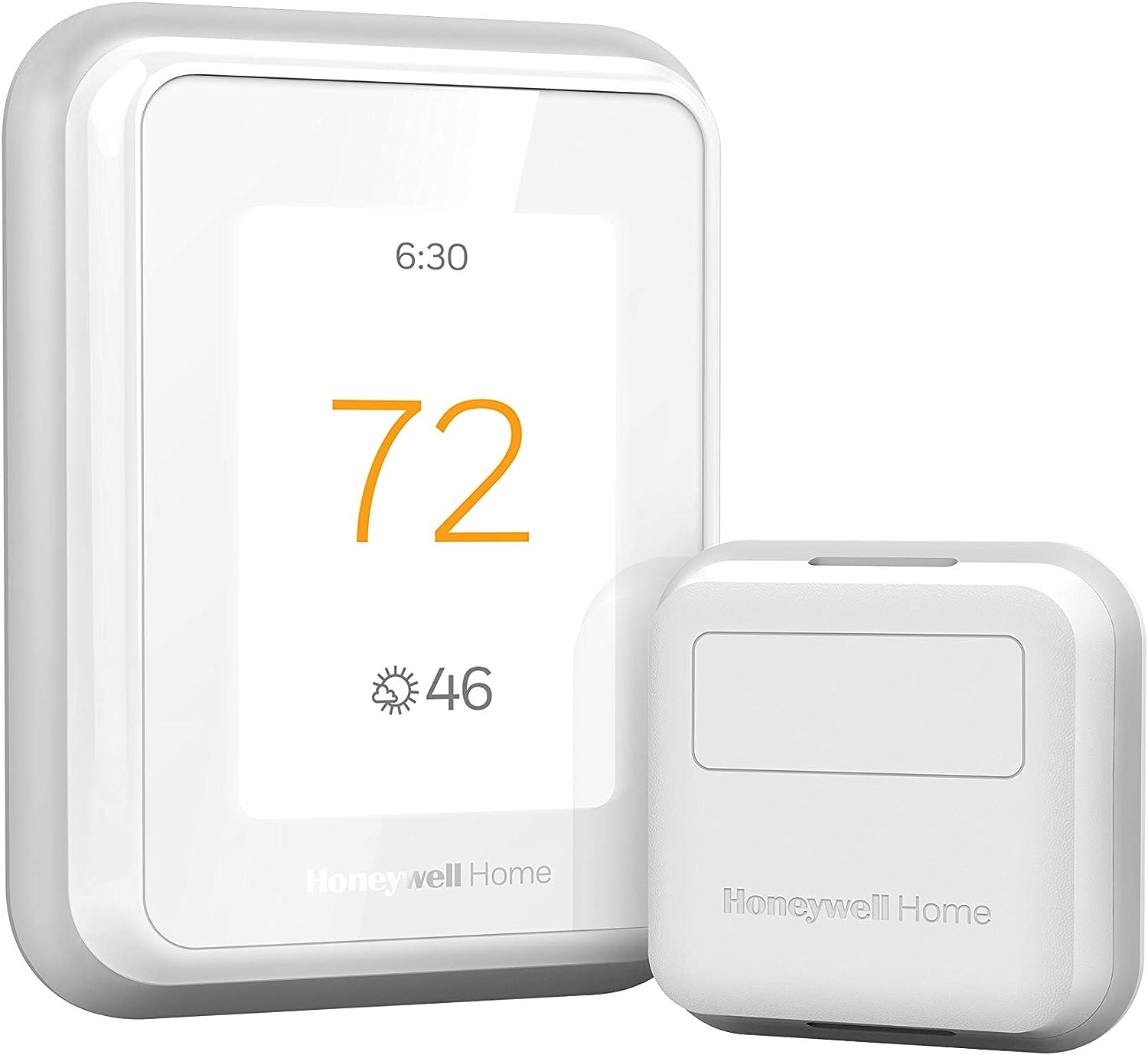
Honeywell Home T9 WiFi Smart Thermostat with 1 Smart Room Sensor, Touchscreen Display
Original price was: $209.99.$199.99Current price is: $199.99.


Price: $209.99 - $199.99
(as of Jan 08, 2025 17:49:39 UTC – Details)
The T9 Smart Thermostat works with Smart Room Sensors to help you adjust the temperature from anywhere and stay cozy in the rooms that matter. Place sensors where you want to see each room’s temperature and humidity. Use the multi-room display on the thermostat’s touchscreen — or in the Honeywell Home app — to focus on rooms based on occupancy or a specific schedule you choose. When focusing on multiple rooms, the T9 works toward creating an average temperature, balancing the needs across the whole home.
SAVE MONEY AND ENERGY. Adjust your ENERGY STAR certified thermostat from anywhere with your mobile device, or let your home automatically react to your schedule with Auto Home/Away Scheduling. Save even more by checking with your energy provider about available energy savings rebates to save on your purchase (rebate finder link above). Plus, eligible customers can enroll in their local Utility’s “DEMAND RESPONSE PROGRAM” which can reward you for allowing the utility to slightly adjust your AC or furnace temperature settings when there is high energy demand.
LIVE AND SLEEP SMARTER. Choose the temperature in a specific room, like the bedroom, to be exactly what you want it to be, to help get a better night’s sleep. Or let the Smart Room Sensors automatically detect which rooms people are in and focus comfort where it matters automatically.
AMAZING SENSOR RANGE. The battery powered Smart Room Sensors utilize unique Honeywell Home technology to deliver an efficient signal up to 200 ft range. (Could be further depending on home construction.)
MULTI-ROOM FOCUS. Don’t be forced to choose one room over another, the T9 Smart Thermostat can handle multiple rooms to focus on (requires sensors).
CONTROL IT YOUR WAY. Control the T9 using the Resideo app or through Amazon Alexa, Apple HomeKit, Google Assistant, and more.
COMPATIBLE WITH: Forced air (gas, oil or electric), hot water and steam, and heat pumps with electric backup. Does NOT work with electric baseboard heat (120-240V). C-Wire required.
DO IT YOURSELF SIMPLE INSTALL. With guided installation setup couldn’t be simpler. The included power adapter is an easy-to-install, low-voltage alternative to a C-wire, so the thermostat is compatible with most homes.
Before purchasing, check to see if this thermostat is compatible with your home and to determine if your home needs a C-wire power adapter.
Works with most heat/cool oil furnace systems. Will not work with heating only oil furnace systems unless a C-Wire is present.
Customers say
Customers find the product functional and easy to set up. They appreciate the thermostat control and remote sensor functionality. However, some customers have issues with the app quality and thermostat functionality. There are mixed opinions on internet connectivity and value for money.
AI-generated from the text of customer reviews
7 reviews for Honeywell Home T9 WiFi Smart Thermostat with 1 Smart Room Sensor, Touchscreen Display
Add a review
Related Products


Original price was: $209.99.$199.99Current price is: $199.99.
Amazon Customer –
Great Thermostat, Easy Install especially with the Wall Plate Adapter
First the install is very easy if you are replacing an existing thermostat that has a C wire, a C wire adapter is included but I did not need that in my case. Secondly if you are replacing an existing thermostat, especially the traditional rectangular form factor, I HIGHLY RECOMMEND purchasing the THP2400A1080 wall plate adapter or the generic version which is much cheaper. It makes install of the T9 even easier. This thermostat has 3 holes you need to drill which are probably not in the location of the ones for your old thermostat. The wall adapter allows you to use the existing holes from your old thermostat then the UWP/mounting plate from the T9 (or any honeywell thermostat that uses the UWP) just clicks onto the adapter without new holes to drill. The cover plate from the wall adapter is then large enough to cover the area of your old thermostat.Now for a review of thermostat itself. My setup is a 2 story home with single stage forced air AC with a single stage gas furnace on a 2 zone system (upstairs and downstairs) so I bought 2 T9’s that replaced 2 old smart thermostat (old honeywell with basic wifi and online scheduling capability). The old thermostats worked fine but I upgraded to the T9 to hopefully mitigate unbalanced temps between rooms on the same floor as well as between the 2 floors. It absolutely worked as I had hoped. It has only been a few days but I can immediately tell the difference in temperature balance between the rooms and the floors in over 100 degree weather.How are these thermostats helping balance the air temp? First the room sensors allow you to prioritize which rooms are being used for temp readings at different times of day or based on activity. This can be done by either specifying a single room (or group of rooms to average the temperature) or by activity (also individual room or averaging multiple rooms). During the day I can prioritize the living spaces and at night the bedrooms for temp readings. This combined with the auto recirculation mode of the fan allows the fan to recirc air about 20 minutes every hour even when the heating or cooling isn’t actually running. Over the course of a day this really has helped balance the air between rooms and between the floors on my 2 zone system. Using the energy monitoring from my solar panel system I can already see a drop in energy usage as my AC has not had to run as much overall to make the occupied rooms comfortable.Also my thermostats are in stupid locations so the room sensors help with that. The UWP on the T9 is great as one of my thermostats is on the wall between the house and the garage which has a large hole for the thermostat wiring. The UWP for the T9 has a door that closes off that hole and the wiring before you attach the thermostat, so it is not reading any of that hot air coming from the wall. I confirmed this as my old thermostat use to read 2 degrees hotter than the rest of the hallway, verified with a separate thermometer, on a 100 degree day. The T9 now reads the same as the thermometerIn terms of why I chose the T9 over a Ecobee or a Nest, basically the T9 generally is cheaper. The T9 thermostat with a room sensor can be had for as little as $143. The other popular options cost more. While the additional features of the others may be worth it to some I simply would not use those features. For example, I am not going to talk to my thermostat. I am just gonna set the schedules and let the thermostat do its think and it still has integration to those systems if I choose to have that functionality later.Overall, great value smart thermostat that does what it needs to do. If I had one complaint is that this thermostat, and Honeywell thermostats in general don’t allow you to adjust the differential (the plus or minus above or below the setpoint the thermostat kicks on or off the air/heat) This seems to be set at a +/- of 1 degree and no way to change it. Some may prefer a differential of 1.5 to 2 degrees instead. This is somewhat mitigated by using multiple sensors to average the temperature but a differential setting adjustment would of made this thermostat almost perfect.
Dan P. –
Seems like an excellent thermostat. Less excited about the app. degrees between sensors, turn on the fan,” or allow the system to run based on humidity/heat index.
UPDATE- after using the app more, I’ve decided to upgrade my rating on the app to a B+. The connection issues haven’t been a problem, and it is quite capable and easy to use regardless of how it felt during installation. I THINK that when I’m on the same wifi connection as the thermostat that the app doesn’t have to “phone home” to get info and update settings, which is a bonus.Hardware still running like a champ, love it.————–The instructions seem pretty thorough. They cover multiple scenarios to make sure that you understand how to get it working. In my case, I had a four wire connection to the HVAC with no C-wire. The system includes an “adapter” that you connect to the HVAC panel, then re-connect your thermostat wire to it, and then finally connect the thermostat. This process gives you a C-wire at the thermostat so the unit has power. Better and prettier but more complicated than a dedicated wall-wart transformer. I’ve not tried the heater yet (it’s August!) but the A/C side is working flawlessly. Installation took about 45 minutes to do everything but the wire pre-labeling, and it worked the first time. Controlling the unit from the panel is easy. Connected to the remote sensor fine. Can set the time and schedule, use motion detection to determine active room, everything it’s supposed to do. Scheduling options are great. BTW, the main unit and the remote sensor report humidity too! All good.And then, I turned on the wifi. First thing it did was reset the time, I think to UTC. Then you have to download/install the app (ok), register a new account with Honeywell (ok), and create a location (e.g. “home.” Possible to use the app to control multiple thermostats at different locations.) NOTE: If you don’t let your phone or tablet use location data, you apparently can’t create a location and the app just spins, but the app doesn’t tell you that. Then connect the app to your thermostat. Honeywell emails your account an activation code that you then enter at the thermostat (somewhere around here it figured out my timezone and fixed the clock). Eventually it’s all set up and your problems are over, right? Nope. I’ll be poking through the app and at random times it’ll claim I have no internet, but I’m sitting right next to my wifi and using internet on other devices. Having said all that, the app does function, controls the HVAC fine, lets me do what I need to do. It’s not hard to understand or use, but the drops might be really annoying if they got in the way. I’ve not tried geofence and don’t plan to, but that might be a good app test. Also the app is designed to work with a lot of devices. Thermostats, security systems, and more. Great on one hand but possibly causing loss of focus. So, overall:Hardware: A+Instructions, ease of installation: A+Honeywell App: C+Most desired improvements: Fix the internet connection issue. Offer more options for programming, like “if there is a difference of
jturcot –
trés pratique
Hedilberto –
Funcionan super bien y su material es de muy buena calidad
Amazon Customer –
Ce thermostat est recommandé par HILO pour contrôler le système de chauffage central (avec thermopompe)
Paul Ridsdale –
The install went as directed phone program was a guessing job but ok
TravelNVal –
3 issues and returned as a result1. Temperature reading was not accurate, could range and be as much of 1c or 3f off. This was not consistent so could not use the advanced preferences which allows for an offset. But since not consistent would not work. This was confirmed with an independent reader and older Honeywell thermostat.2. Screen when active is way too bright and not adjustable. Idle and sleep screen can be adjusted but unless complete off it is too bright to have in a bedroom. Then the biggest issue is when you touch the screen to check the setting the screen goes to 100% brightness. This is not adjustable and essentially you can land a plane in your bedroom itâs so bright and wakes everyone up. Simple fix would be to allow for the active screen brightness to be adjustable. But it is not3. Alexa integration with app. If you have all setting to C no matter what when asking for the current temp of the room it returns in F. So when setting it causes C and F confusion. Lack of app support.